Arduino Due
⚡ The essentials in 60 seconds
- mcu — Microchip (ex-Atmel) AT91SAM3X8E (a.k.a. SAM3X8E), single-core ARM Cortex-M3, 84 MHz (official tech-specs; build.f_cpu=84000000L in boards.txt). Board main oscillator: 12 MHz (VARIANT_MAINOSC in variant.h). The chip datasheet is the Atmel 11057 SAM3X/SAM3A combined datasheet (PDF) (the link used by the store page).
- gpu_radios_storage — none — bare-metal MCU board. No WiFi/BT/Ethernet, no filesystem; network or graphics need external modules/shields (board page).
- memory — 512 KB flash, 96 KB SRAM, 0 KB EEPROM (official tech-specs, Wikipedia). Sketch space per the core: upload.maximum_size=524288 bytes (boards.txt).
- digital_i_o — 54 pins at 3.3 V logic. Official warning: "Unlike most Arduino boards, the Arduino Due board runs at 3.3V. The maximum voltage that the I/O pins can tolerate is 3.3V. Applying voltages higher than 3.3V to any I/O pin could damage the board." (store product JSON).
- per_pin_drive_current_much_lower_than_avr_boards — 9 mA (group 1) / 3 mA (group 2) per I/O pin, and 130 mA total across all I/O lines (official tech-specs).
- pwm — 12 pins (digital 2–13; PWM peripheral channels + TC channels per variant.cpp). Default analogWrite is 8-bit at 1 kHz (PWM_RESOLUTION 8, PWM_FREQUENCY 1000 in variant.h); resolution/frequency are software-configurable via analogWriteResolution (wiring_analog.c).
- On this board : 9 tutorials · 10 code
The Arduino Due, released in October 2012, marks a significant turning point in the history of maker electronics as the first board in the Arduino ecosystem to move beyond the familiar 8-bit architecture. By adopting a 32-bit ARM Cortex-M3 microcontroller, specifically the AT91SAM3X8E, the Due offered a dramatic leap in processing power and memory capacity compared to its predecessors. At the heart of this board is a single-core processor running at 84 MHz, a frequency that dictates how many instruction cycles the chip can execute per second. For context, this is roughly three times the speed of the classic Arduino Uno, but the real advantage lies in the architecture itself, which allows for more complex mathematical operations and faster data handling. This increased capability is supported by substantial memory resources: 512 KB of flash storage for your program code and 96 KB of SRAM for temporary data. To put this in perspective, the Due offers approximately thirty times the flash memory and twelve times the RAM of the standard Uno, making it suitable for projects that require large data buffers, complex algorithms, or extensive libraries that would simply not fit on smaller boards.
Despite its power, the Due is a bare-metal microcontroller board, meaning it does not include an operating system, Wi-Fi, Bluetooth, or Ethernet capabilities. It is designed to run code directly on the hardware, relying on external modules or shields if network connectivity or graphics processing is required. One of the most critical aspects for users to understand is the voltage logic. Unlike the majority of Arduino boards that operate at 5 volts, the Due runs at 3.3 volts. This is not merely a specification but a strict operational limit; applying 5 volts to any of the input/output pins can permanently damage the board. While the physical pin layout follows the standard Arduino shield compatibility, users must be cautious when connecting older 5-volt peripherals, often requiring level-shifting circuits to ensure safe communication. Furthermore, the current drive capability per pin is significantly lower than on AVR-based boards, providing only 3 to 9 milliamps per pin depending on the group, with a total limit of 130 milliamps across all lines. This means that driving LEDs, relays, or motors directly from the pins is often insufficient, and external driver circuits are frequently necessary.
The input and output capabilities of the Due are extensive, featuring 54 digital I/O pins and 12 analog inputs. A standout feature is the analog-to-digital converter (ADC), which offers 12-bit resolution. In simpler terms, this means the board can distinguish between 4,096 different voltage levels, whereas the standard Uno can only distinguish between 1,024 levels. This higher precision is invaluable for sensors requiring fine detail, though it is important to note that the default software settings often mimic the 10-bit resolution of older boards for compatibility, requiring a specific command to unlock the full 12-bit potential. Complementing the high-resolution inputs are two true 12-bit digital-to-analog converter (DAC) outputs. This is a unique feature in the classic Arduino lineup, allowing the board to generate smooth, continuous analog voltages rather than just the rapid on-off pulses used by PWM on other models. This makes the Due particularly well-suited for audio synthesis, precise control signals, or generating custom waveforms without the need for external filtering components.
Communication options are equally robust, with four hardware serial ports (UARTs) available, allowing the board to communicate with multiple devices like GPS modules, Bluetooth radios, or other microcontrollers simultaneously without relying on software emulation. Additionally, the Due features two CAN controllers. CAN, or Controller Area Network, is a robust vehicle bus standard designed to allow microcontrollers and devices to communicate with each other in applications without a host computer. While the silicon supports this, the board itself does not include the physical transceivers needed to connect to a CAN bus, so users must add an external transceiver module to interface with automotive or industrial networks. The board also includes two I2C interfaces and one SPI interface, providing ample options for connecting sensors, displays, and other peripherals.
The Due’s connectivity is further enhanced by its dual-USB architecture. It features a micro-USB connector for programming, which uses an ATmega16U2 chip to bridge the serial connection, and a second native USB port driven directly by the main processor. This native port supports USB On-The-Go (OTG) functionality, meaning the Due can act as a USB host. This allows it to read data from devices like keyboards, mice, or USB flash drives, a capability that opens up new possibilities for interactive installations and data logging. The board also includes a JTAG header for advanced debugging and an erase button, which is necessary because the flash memory must be erased before reprogramming if the bootloader state is lost.
Physically, the Due maintains the larger form factor of the Arduino Mega, measuring 101.5 by 53.3 millimeters, but it is notably lighter at 36 grams. It is powered via USB or a barrel jack accepting 7 to 12 volts. While the official launch price is not definitively recorded in current accessible sources, the board remains available for purchase, reflecting its enduring relevance. However, users should be aware of some ecosystem considerations. The SAM3X platform is in maintenance mode, and modern alternative runtimes like MicroPython or CircuitPython do not support it. Additionally, the board has no EEPROM for persistent storage, requiring users to write to flash memory or use external chips to save data when power is removed. Despite these limitations, the Arduino Due remains a powerful tool for advanced projects requiring high-speed processing, precise analog control, and complex communication protocols, serving as a bridge between simple hobbyist electronics and more professional embedded systems.
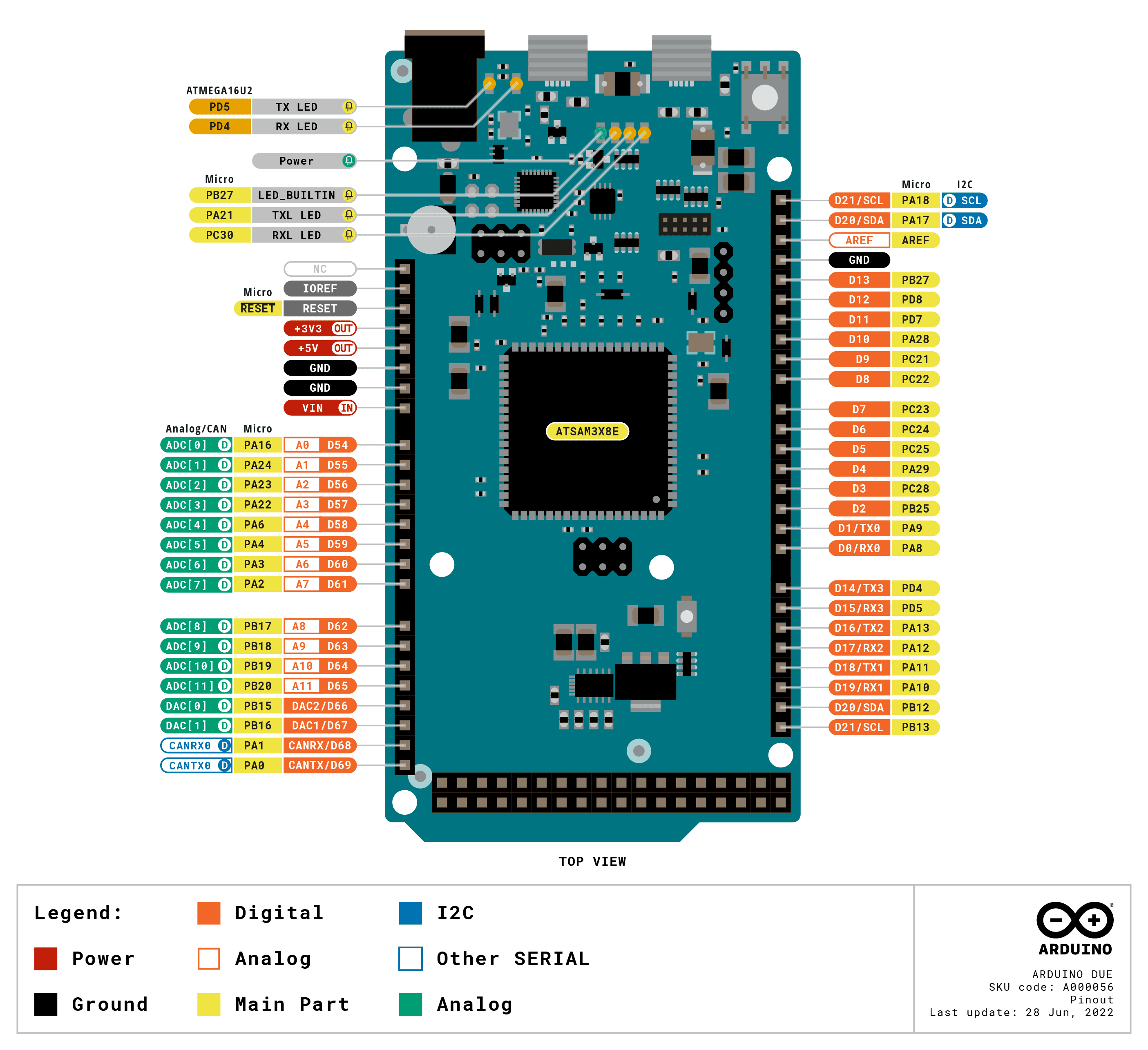
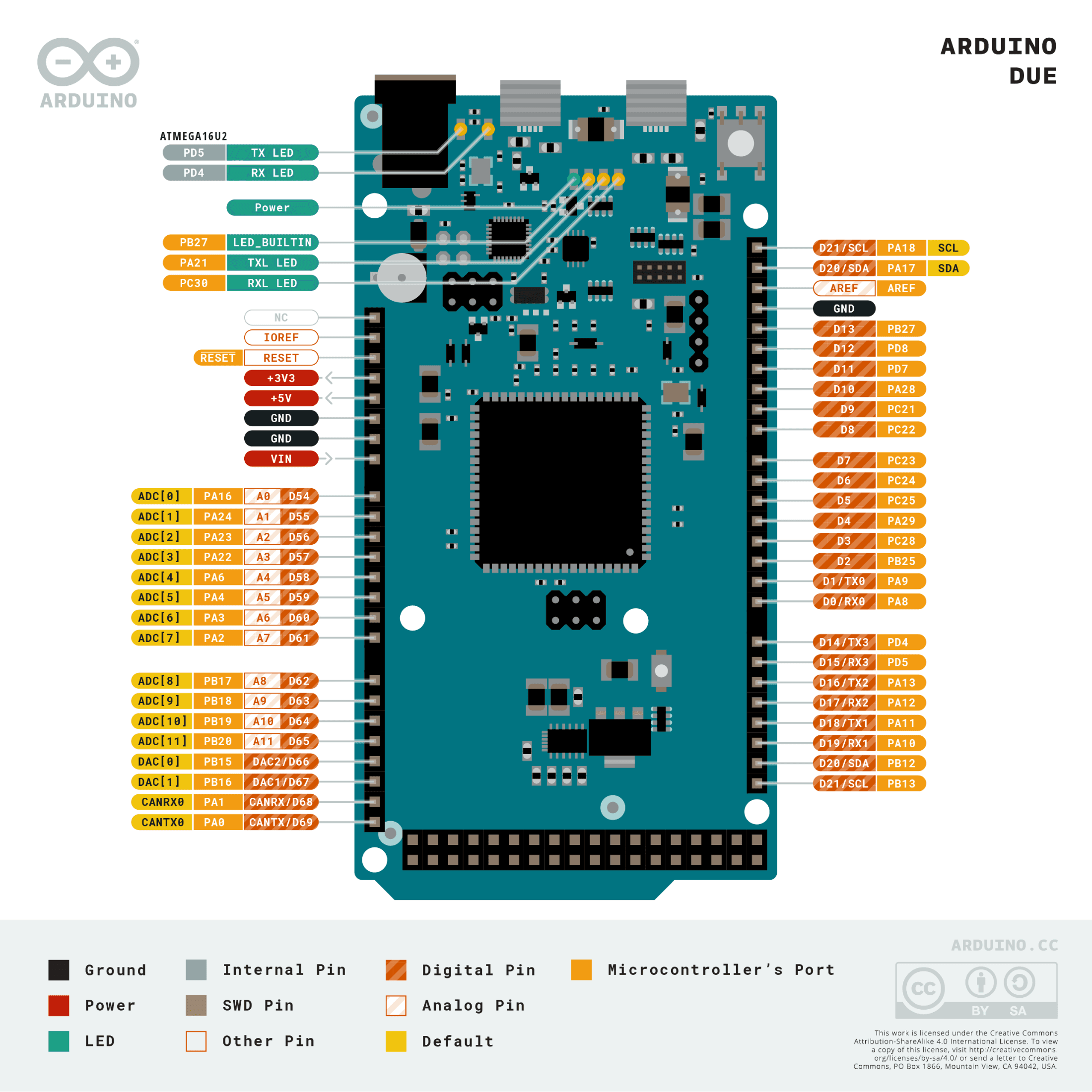
Pinout diagram
| Attr | Specs | verified |
|---|---|---|
mcu | Microchip (ex-Atmel) AT91SAM3X8E (a.k.a. SAM3X8E), single-core ARM Cortex-M3, 84 MHz (official tech-specs; build.f_cpu=84000000L in boards.txt). Board main oscillator: 12 MHz (VARIANT_MAINOSC in variant.h). The chip datasheet is the Atmel 11057 SAM3X/SAM3A combined datasheet (PDF) (the link used by the store page). | ✔ |
gpu_radios_storage | none — bare-metal MCU board. No WiFi/BT/Ethernet, no filesystem; network or graphics need external modules/shields (board page). | ✔ |
memory | 512 KB flash, 96 KB SRAM, 0 KB EEPROM (official tech-specs, Wikipedia). Sketch space per the core: upload.maximum_size=524288 bytes (boards.txt). | ✔ |
digital_i_o | 54 pins at 3.3 V logic. Official warning: "Unlike most Arduino boards, the Arduino Due board runs at 3.3V. The maximum voltage that the I/O pins can tolerate is 3.3V. Applying voltages higher than 3.3V to any I/O pin could damage the board." (store product JSON). | ✔ |
per_pin_drive_current_much_lower_than_avr_boards | 9 mA (group 1) / 3 mA (group 2) per I/O pin, and 130 mA total across all I/O lines (official tech-specs). | ✔ |
pwm | 12 pins (digital 2–13; PWM peripheral channels + TC channels per variant.cpp). Default analogWrite is 8-bit at 1 kHz (PWM_RESOLUTION 8, PWM_FREQUENCY 1000 in variant.h); resolution/frequency are software-configurable via analogWriteResolution (wiring_analog.c). | ✔ |
analog_in | 12 inputs, hardware 12-bit ADC (ADC_RESOLUTION 12 in variant.h) — but analogRead defaults to 10-bit output for AVR compatibility (static int _readResolution = 10; in wiring_analog.c); use analogReadResolution(12) to get full resolution. | ✔ |
analog_out | 2 true DAC outputs (12-bit DACC, DACC_RESOLUTION 12 in variant.h) on pins DAC0 = digital pin 66 (PB15) and DAC1 = 67 (PB16) (variant.cpp pin table); driven through analogWrite (wiring_analog.c). | ✔ |
serial | 4 hardware UART/USARTs — Serial = SAM3X UART on pins 0/1 (PA8/PA9), wired to the Programming Port (ATmega16U2 bridge); Serial1 = USART0 on 18/19; Serial2 = USART1 on 16/17; Serial3 = USART3 on 14/15 (variant.cpp, variant.h). Plus SerialUSB, the CDC-ACM virtual port on the native USB (variant.h SERIAL_PORT_USBVIRTUAL). | ✔ |
i_c | 2 TWI controllers. Wire = TWI1 on pins 20 (SDA) / 21 (SCL) (near AREF, R3-style header); Wire1 = TWI0 on pins 70/71 (PA17/PA18), the 4-pin header near RESET (variant.h Wire Interfaces block). Note the inverted numbering: Wire→TWI1, Wire1→TWI0. | ✔ |
spi | SPI0 — MISO=74 (PA25), MOSI=75 (PA26), SCK=76 (PA27), hardware NPCS0/1/2 on pins 10/4/52 (NPCS3 pin 78 is unconnected) (variant.h, variant.cpp). | ✔ |
can | 2 CAN controllers in the silicon; official spec: "CAN: Yes (ext. transceiver needed)" — the board has no CAN transceivers (official tech-specs, board page "CAN support"). CAN0 signals are defined in the core as pins 68/69 (CANRX0/CANTX0 = PA1/PA0) and CAN1 as 88/89 (variant.h). | ✔ |
usb | Micro-USB connector for the Programming Port (16U2 serial bridge) plus a second native USB OTG port driven by the SAM3X itself (official tech-specs, board page). USB IDs: Programming Port 0x2341/0x2A03 : 0x003D, Native 0x2341/0x2A03 : 0x003E (boards.txt). Wikipedia's board table summarizes the host interface as "16U2 + native" (Wikipedia). | ✔ |
debug | JTAG header on board; reset and erase buttons (features.md). | ✔ |
power | USB or barrel-plug jack (the official feature list even suggests a 9 V battery on the barrel plug); input voltage (nominal) 7–12 V, I/O voltage 3.3 V (official tech-specs, features.md). | ✔ |
size_weight | 101.5 × 53.3 mm (Mega form factor footprint), 36 g (official tech-specs; Wikipedia lists 101.6 × 53.3 mm). | ✔ |
- Manufacturer: Arduino (arduino.cc / Arduino AG). Board page and store listing are official Arduino properties (board page, store product JSON).
- Year: Released October 22, 2012 (Wikipedia — List of Arduino boards and compatible systems). It was the first Arduino board based on a 32-bit ARM core microcontroller (board page).
- Status: Active — still listed on the official store at €52.50 (SKU A000062, product JSON fetched live; the rendered page's price block does not expose the price to scrapers) (store product JSON), and Microchip lists the ATSAM3X8E MCU as "Status: In Production" (Microchip product page).
- Launch price:
- Variants: - SKU A000062 (current, headers soldered) and legacy SKU A000056 — both listed in the official product metadata (docs-content product.md). - Arduino Due without headers — same board sold with unsoldered pin headers (store link referenced in the product description). - Sold as "Genuino Due" outside the US during the 2015–2016 trademark split; the Genuino brand was later dropped (Wikipedia — Arduino). The core still carries the Genuino USB VID 0x2A03 alongside Arduino's 0x2341 (boards.txt). - A large market of third-party clones exists; the official core and firmware work on them, but component quality varies (see Problems).
+ Strengths
- First 32-bit Arduino: Cortex-M3 at 84 MHz with 512 KB flash / 96 KB SRAM — roughly 30× the flash and 12× the SRAM of the Uno's ATmega328P (board page, official tech-specs).
- Two true 12-bit DAC outputs (DAC0/DAC1) — still unique in the classic Arduino line-up; the Uno/Mega have none (board page, variant.h).
- 12-bit ADC (vs 10-bit on AVR boards), usable end-to-end with analogReadResolution(12) (variant.h, wiring_analog.c).
- Two CAN controllers on-chip (external transceiver required) — the classic way to put an Arduino on a car/industrial CAN bus (official tech-specs, due_can library).
- USB host capability: the native port is OTG-capable; the official feature list advertises "Use the Due as USB host for peripherals such as mice", with an official keyboard-host tutorial and the USBHost library (features.md, USBHost library).
- Dual-USB architecture: a "safe" Programming Port (16U2 bridge, always recoverable) plus a Native port that can present any USB device class via the core/USBHost stack (boards.txt).
- Mega-class I/O count in a slimmer footprint: 54 digital + 12 analog + 2 DAC + 4 UART + 2 TWI + SPI + CAN, following the Arduino 1.0 shield pinout with IOREF for 3.3 V shield adaptation (store product JSON).
- JTAG header + erase button for low-level recovery and debugging (features.md).
- Rich timer/PWM silicon: PWM peripheral channels plus 9 TC (timer counter) channels mapped across pins 2–13, enabling higher-rate or phase-accurate PWM beyond the AVR presets (variant.cpp).
− Weaknesses
- 3.3 V only — not 5 V tolerant. The official product page carries an explicit bold warning that applying >3.3 V to any I/O pin could damage the board; 5 V shields/signals need level shifting even though the shield footprint fits (store product JSON).
- Weak per-pin drive current. 9 mA / 3 mA per pin group and 130 mA total across all I/O lines — far below the AVR boards' 20–40 mA — so LEDs/relays/solenoids frequently need drivers (official tech-specs).
- analogRead silently returns 10-bit values even though the ADC is 12-bit (_readResolution = 10 default); many tutorials assume 0–4095 and get 0–1023 until they call analogReadResolution(12) (wiring_analog.c).
- Native-port CDC quirks. SerialUSB only exists once the USB host has enumerated the CDC class; sketches that block on it with no host attached, or that re-enumerate on reset, are a recurring forum topic (forum topic 1183292 — CDC on native-USB Arduinos).
- Board invisible on both ports. A classic failure mode: neither the Programming nor the Native port enumerates (bad cable/clone chip/bricked bootloader); recovery goes through the erase button + SAM-BA (forum topic 1161811).
- Flash must be erased before re-programming. The SAM3X boot code requires a full flash erase when a sketch is already running; the automatic 1200-baud touch handles this, but when the bootloader state is lost you must hold the erase button and re-upload manually (forum topic 1278587).
- Confusing I²C controller numbering. Wire maps to TWI1 (pins 20/21) while Wire1 maps to TWI0 (the 4-pin header, pins 70/71) — datasheet-level TWI0/TWI1 references do not line up with the Arduino names (variant.h).
- CAN advertised, transceiver not fitted. The marketing page says "two CAN buses", but the official spec table adds "ext. transceiver needed" — you must add a 3.3 V CAN transceiver (and confirm the signals are reachable on your clone/revision) before anything appears on the wire (official tech-specs vs board page).
- No EEPROM. 0 KB EEPROM vs 1 KB on the Uno — persisting calibration data needs flash-write tricks or external I²C SPI EEPROM (Wikipedia board table).
- Aging platform / ecosystem drift. The SAM core is in maintenance mode while Arduino pushes mbed/renesas platforms; MicroPython/CircuitPython never got a SAM3X port, and Mbed (which did support the Due) was sunset in July 2026 (MicroPython ports list, Mbed sunset notice).
- Retour d'expérience expert expert — expert-arduino
- Petit retour d'experience sur la Due après plusieurs mois d'utilisation. Les specs sont solides : premier 32-bit avec ses 84 MHz et surtout les deux sorties DAC 12-bit reelles, un vrai plus pour la generation analogique propre. Par contre, attention aux pieges classiques. D'abord le 3.3V exclusif, … — expert-arduino
- Merci pour ce resumee très clair. Je debute avec la Due pour un projet audio et je confirme le souci du courant faible, j'ai du mettre des transistors pour mes amplis. Par contre, je bloque completement sur la partie USB. Quand je branche le cable en micro-usb, ni le port Programming ni le Native n… — maker-debutant
- Salut maker-debutant, ne panique pas, c'est un classique. Si les deux ports sont invisibles, c'est souvent un bootloader bloque ou un mauvais cable (certains cables chargeurs ne font pas de data). Essaie deja de maintenir le bouton Erase enfonce pendant que tu branches l'USB, puis relache-le pour v… — bricoleur-75
Community feedback and projects
- Sharing a fully working DUE based scope + AWG project, with fully automated self test/measurement suite and cross-platform GUI forum.arduino.cc
- Arduino Due bad Analog/digital conversion results forum.arduino.cc
- Building your own Custom ARDUINO DUE and Programming Firmware onto it forum.arduino.cc
- Arduino Due / SAM3X8E: enabling ADC channel 15 (internal temp sensor) conflicts with digital output pin 13 forum.arduino.cc
- Official board page
- Official store page / product JSON
- Official tech specs (source of docs.arduino.cc spec table)
- MCU datasheet
- Microchip product page (status)
- boards.txt
- variant.h
- variant.cpp
- wiring_analog.c
- Core / bootloader / variant sources
- features.md
- USBHost library
- Official USB-host tutorial
- Community CAN library
- product.md
- Forum category
- Wikipedia board comparison table
- 3.3 V only — not 5 V tolerant. The official product page carries an explicit bold warning that applying >3.3 V to any I/O pin could damage the board; 5 V shields/signals need level shifting even though the shield footprint fits (store product JSON).
- Weak per-pin drive current. 9 mA / 3 mA per pin group and 130 mA total across all I/O lines — far below the AVR boards' 20–40 mA — so LEDs/relays/solenoids frequently need drivers (official tech-specs).
- analogRead silently returns 10-bit values even though the ADC is 12-bit (_readResolution = 10 default); many tutorials assume 0–4095 and get 0–1023 until they call analogReadResolution(12) (wiring_analog.c).
- Native-port CDC quirks. SerialUSB only exists once the USB host has enumerated the CDC class; sketches that block on it with no host attached, or that re-enumerate on reset, are a recurring forum topic (forum topic 1183292 — CDC on native-USB Arduinos).
- Board invisible on both ports. A classic failure mode: neither the Programming nor the Native port enumerates (bad cable/clone chip/bricked bootloader); recovery goes through the erase button + SAM-BA (forum topic 1161811).
- Flash must be erased before re-programming. The SAM3X boot code requires a full flash erase when a sketch is already running; the automatic 1200-baud touch handles this, but when the bootloader state is lost you must hold the erase button and re-upload manually (forum topic 1278587).
- Confusing I²C controller numbering. Wire maps to TWI1 (pins 20/21) while Wire1 maps to TWI0 (the 4-pin header, pins 70/71) — datasheet-level TWI0/TWI1 references do not line up with the Arduino names (variant.h).
- CAN advertised, transceiver not fitted. The marketing page says "two CAN buses", but the official spec table adds "ext. transceiver needed" — you must add a 3.3 V CAN transceiver (and confirm the signals are reachable on your clone/revision) before anything appears on the wire (official tech-specs vs board page).
- No EEPROM. 0 KB EEPROM vs 1 KB on the Uno — persisting calibration data needs flash-write tricks or external I²C SPI EEPROM (Wikipedia board table).
- Aging platform / ecosystem drift. The SAM core is in maintenance mode while Arduino pushes mbed/renesas platforms; MicroPython/CircuitPython never got a SAM3X port, and Mbed (which did support the Due) was sunset in July 2026 (MicroPython ports list, Mbed sunset notice).
- Faire clignoter la LED de l'Arduino Due et apprivoiser ses deux ports USB debutant Schéma : IMG-due-debutant-1-clignoter-led-due.svg — Arduino Due vue de dessus, LED L (broche 13) surlignée près du connecteur JTAG, les deux connecteurs micro-USB « Programming » (16U2) et « Native » (SAM3X) annotés, badge d'avertissement 3,3 V.
- Lire un potentiomètre avec le vrai ADC 12 bits de la Due debutant Schéma : IMG-due-debutant-2-potentiometre-adc-12-bits.svg — Arduino Due avec un potentiomètre 10 kΩ câblé sur A0 (3,3 V / A0 / GND), moniteur série affichant des valeurs 0–4095 après analogReadResolution(12), puce ADC 12 bits annotée.
- Allumer une LED externe en respectant les broches 3,3 V et 9 mA de la Due debutant Schéma : IMG-due-debutant-3-led-externe-resistance-3v3.svg — Arduino Due, broche 9 reliée via une résistance 100 Ω à une LED rouge dont la cathode va à GND, encart de calcul (3,3 V − 2 V)/10 mA ≈ 130 Ω et rappel des groupes 9 mA / 3 mA.
- Générer une vraie tension analogique avec les DAC 12 bits (broches 66 et 67) intermediaire Schéma : IMG-due-intermediaire-1-dac-veritable-sortie-analogique.svg — Arduino Due, broche DAC0 (66) sortant vers l'entrée d'un oscilloscope affichant une rampe en dents de scie, puce DACC 12 bits annotée, broche DAC1 (67) disponible à côté.
- Dialoguer avec un GPS (ou tout module TTL) sur Serial1 sans bloquer la boucle intermediaire Schéma : IMG-due-intermediaire-2-gps-non-bloquant-serial1.svg — module GPS connecté à l'Arduino Due sur Serial1 (RX=18, TX=19, GND, 3,3 V), encart « logique 3,3 V : niveau-baisseur requis pour un module 5 V », trame NMEA affichée.
- Scanner les deux bus I2C de la Due (Wire sur 20/21, Wire1 sur 70/71) intermediaire Schéma : IMG-due-intermediaire-2-scanner-deux-bus-i2c.svg — Arduino Due avec deux bus I2C distincts : Wire/TWI1 sur les broches 20 (SDA) et 21 (SCL) près de AREF, Wire1/TWI0 sur le connecteur 4 broches 70/71 près du RESET, résistances de pull-up 4,7 kΩ annotées.
- Monter la Due sur un bus CAN 500 kbit/s avec un transceiver externe avance Schéma : IMG-due-avance-1-can-bus-500k-due-can.svg — signaux CAN0 (broches 68 RX / 69 TX) de l'Arduino Due reliés à un module transceiver CAN 3,3 V (TJA1050/SN65HVD230) connecté au bus CAN_H/CAN_L avec résistance de terminaison 120 Ω, mention « transceiver externe requis ».
- Utiliser la Due en hôte USB : lire un clavier sur le port Native avance Schéma : IMG-due-avance-2-usb-host-clavier-usbhost.svg — clavier USB branché via un hub alimenté sur le connecteur micro-USB Native de l'Arduino Due, bibliothèque USBHost annotée, moniteur série affichant les touches reçues.
- Sauver une Due invisible : bouton Erase, SAM-BA et bossac en secours avance Schéma : IMG-due-avance-3-reparer-due-bouton-erase-sam-ba.svg — Arduino Due vue de dessus avec les boutons RESET et ERASE surlignés près du connecteur ICSP/JTAG, port Programming relié au PC, étapes numérotées maintenir ERASE puis téléverser, et outil SAM-BA en secours.
Code library — examples written for this board
clignotante.inoArduinobouton-led.inoArduinodac-onde.inoArduinoadc-12-bits.inoArduinopwm-12-bits.inoArduinogps-serial1.inoArduinopont-usb-serial1.inoArduinoservo-balayage.inoArduinotest-can.inoArduinousb-native.inoArduino
Examples and repos found online
- arduino/ArduinoCore-sam github.com
- sdroege/arduino-due-rust github.com
- openenergymonitor/ArduinoDue_3phase github.com
- Gadgetoid/Arduino-DueVGA-Tools github.com
- christation/Arduino-Due-ADC-DMA github.com