Arduino Leonardo — Board Fiche
⚡ The essentials in 60 seconds
- mcu — Atmel/Microchip ATmega32U4 (AVR, 8-bit RISC, modified Harvard architecture — see AVR family article); datasheet via Microchip product page.
- cpu — single-core AVR RISC, 16 MHz crystal oscillator (build.f_cpu=16000000L).
- gpu — none.
- memory — Flash 32 KB (4 KB used by the bootloader → 28,672 bytes available for sketches, upload.maximum_size=28672 in boards.txt); SRAM 2.5 KB (2560 B); EEPROM 1 KB.
- usb — native full-speed USB 2.0 device on the ATmega32U4 (no USB-serial chip). Enumerates as CDC serial by default (VID 0x2341, PID 0x8036; bootloader PID 0x0036; legacy VID 0x2A03 also present) and can present HID keyboard/mouse/joystick (boards.txt, store FAQ). Connector: micro-USB.
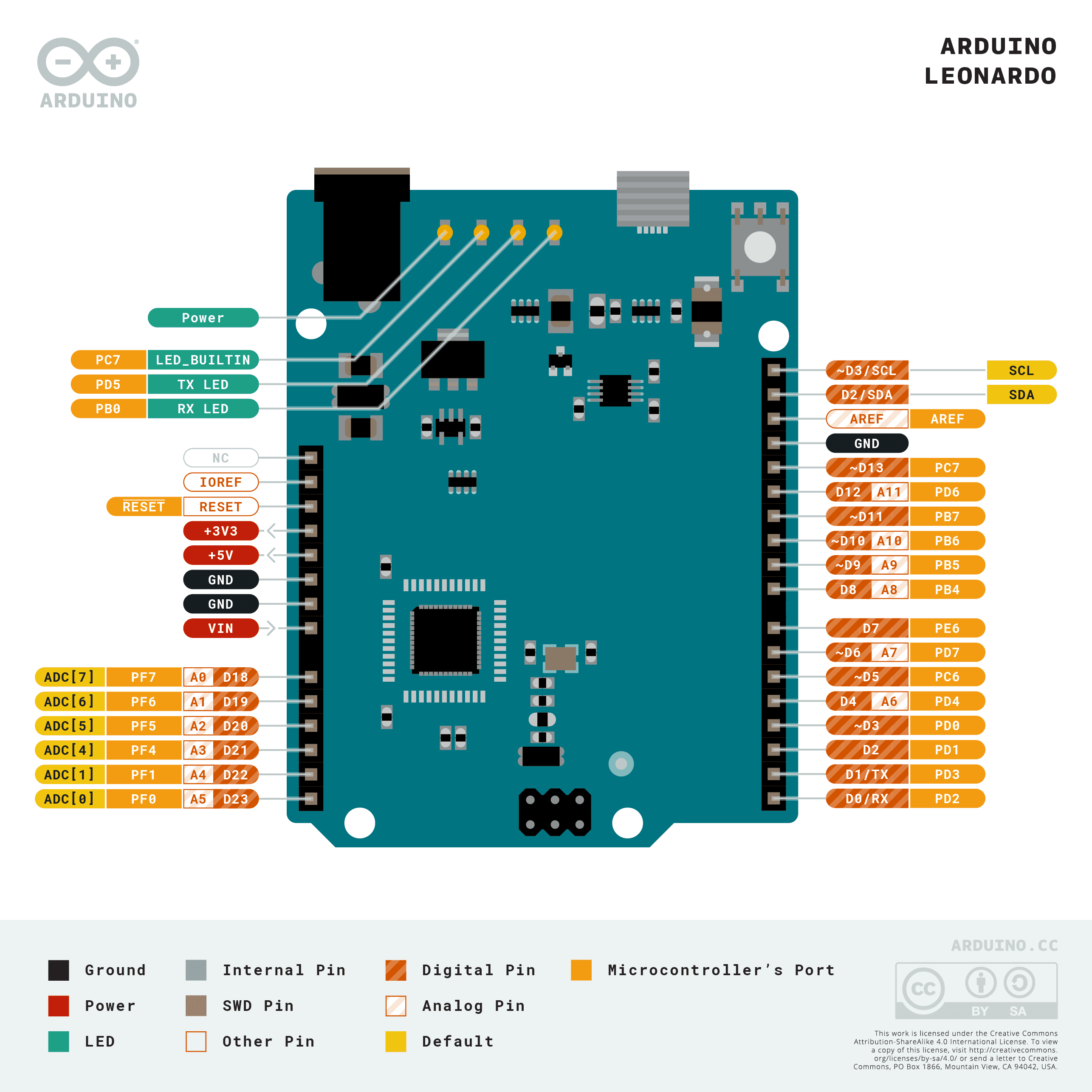
- gpio — 20 digital I/O pins @ 5 V, of which 7 PWM (pins 3, 5, 6, 9, 10, 11, 13 — 8-bit PWM via analogWrite) and 12 analog inputs A0–A11 (10-bit ADC; A6–A11 are multiplexed on digital pins 4, 6, 8, 9, 10, 12). Internal pull-ups 20–50 kΩ. Built-in LED on pin 13. - UART: TTL serial on pins 0 (RX) / 1 (TX) via the Serial1 class — the Serial class on Leonardo means USB (CDC), unlike the Uno (store FAQ). - I2C/TWI: pins 2 (SDA), 3 (SCL), Wire library. - SPI: only on the 6-pin ICSP header — not routed to the digital header; shields using SPI without the ICSP connector will not work (store FAQ). - External interrupts: pins 3 (int0), 2 (int1), 0 (int2), 1 (int3), 7 (int4). - No DAC. Pin↔port mapping: ATmega32u4 pin mapping.
- On this board : 9 tutorials · 10 code
In terms of physical layout and electrical characteristics, the Leonardo maintains the familiar Uno-size form factor, measuring 68.6 by 53.3 millimeters and weighing approximately 20 grams. This compact footprint allows it to fit into many existing enclosures and shield stacks, although users should be aware of a specific mechanical nuance: the spacing between digital pins 7 and 8 is 160 mils rather than the standard 100 mils, which may cause alignment issues with certain shields. The board provides 20 digital input/output pins operating at 5 volts, seven of which support Pulse Width Modulation (PWM) for simulating analog outputs, and twelve analog inputs (A0 through A11) with a 10-bit resolution. It is important to note that analog pins A6 through A11 are multiplexed with certain digital pins, a detail that can lead to confusion when writing code if not carefully managed. The memory architecture consists of 32 KB of Flash storage, of which 4 KB is reserved for the bootloader, leaving 28,672 bytes available for user sketches. Additionally, the board includes 2.5 KB of SRAM for dynamic variables and 1 KB of EEPROM for non-volatile data storage.
Power management on the Leonardo is flexible, supporting operation via the micro-USB connector or an external power source through a barrel jack or the Vin header. The recommended input voltage range is 7 to 12 volts, with absolute limits between 6 and 20 volts. The board features automatic power source selection, prioritizing external power when available. A resettable polyfuse protects the USB port from overcurrent events, typically tripping around 500 mA, safeguarding the host computer. While the store documentation lists a per-pin DC current limit of 40 mA, there is a noted discrepancy with technical specification files that cite 10 mA; designers should consult the ATmega32u4 datasheet for precise electrical ratings to ensure reliability. The 3.3V regulator is limited to 50 mA, which is sufficient for low-power sensors but insufficient for driving high-current peripherals directly.
Software development for the Leonardo relies on the Arduino core for AVR, supporting the widely used Arduino IDE, arduino-cli, and web-based editors. The bootloader, known as Caterina, communicates over USB using the AVR109 protocol. A distinctive aspect of the Leonardo’s programming workflow is the "reset dance" required to enter bootloader mode. Unlike boards with a dedicated reset button that immediately halts execution, the Leonardo continues running the current sketch upon power-up. To upload new code, the user must trigger a software reset by opening the COM port at 1200 baud, which causes the board to reset and enter the bootloader for approximately eight seconds. If a sketch crashes immediately upon boot, it can prevent this reset sequence, requiring the user to manually hold the reset button while connecting the board to regain access. This behavior is a common point of confusion for beginners migrating from the Uno, where the hardware reset button provides a more immediate and predictable entry into programming mode.
A critical software distinction for developers is the mapping of serial communication classes. On the Arduino Uno, the Serial class refers to the hardware UART connected to pins 0 and 1. On the Leonardo, Serial refers to the USB CDC (Communications Device Class) interface, while the hardware UART on pins 0 and 1 is accessed via the Serial1 class. This change is essential for compatibility when porting code from Uno-based projects. Furthermore, the SPI (Serial Peripheral Interface) bus is not routed to the standard digital header but is available only on the 6-pin ICSP header. This means that shields relying on SPI connections via the standard pin layout will not function without modification or the use of the ICSP connector. The board also supports I2C communication on pins 2 and 3, and external interrupts on pins 0, 1, 2, 3, and 7.
The native USB HID (Human Interface Device) capability is the defining feature of the Leonardo, enabling it to act as a keyboard or mouse. This functionality is supported by the official Keyboard and Mouse libraries, allowing users to send keystrokes or move the cursor on the host computer. However, this power comes with a significant caveat: if a sketch continuously sends HID reports without proper gating, it can flood the host system with inputs, potentially locking the user out of their own computer and making it difficult to reprogram the board. Arduino explicitly warns against calling HID functions in tight loops and recommends testing with Serial.print statements first. The board can operate as a composite device, simultaneously providing CDC serial communication and HID keyboard/mouse/joystick functions, which is useful for debugging while maintaining input control.
Despite its versatility, the Leonardo has some documented quirks. The analog pin numbering scheme, where A6-A11 share physical pins with digital I/O, can lead to conflicts if not handled correctly in code. Additionally, there are known issues in the core library related to USB CDC stability, such as stalls with small buffered reads or the serialEvent function not firing as expected. These issues are largely mitigated by using robust communication practices and keeping the Arduino core updated. The board is open hardware, with full schematics and EAGLE reference designs available, encouraging community modification and learning. While the original launch date is widely reported as January 2014, the current official product record reflects a 2021 update to the product page, and the board remains active and in production as of late 2026. The ATmega32u4 chip itself is also listed as "In Production" by Microchip, ensuring long-term availability for projects requiring this specific combination of native USB and AVR architecture.
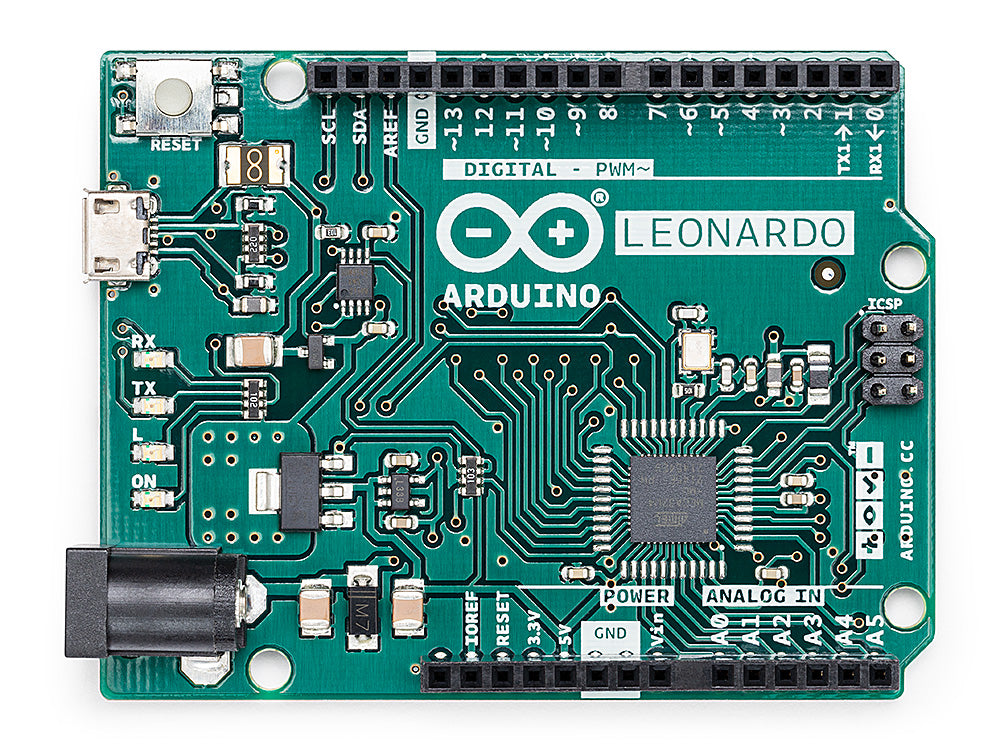
Pinout diagram
| Attr | Specs | verified |
|---|---|---|
mcu | Atmel/Microchip ATmega32U4 (AVR, 8-bit RISC, modified Harvard architecture — see AVR family article); datasheet via Microchip product page. | ✔ |
cpu | single-core AVR RISC, 16 MHz crystal oscillator (build.f_cpu=16000000L). | ? unverified |
gpu | none. | ? unverified |
memory | Flash 32 KB (4 KB used by the bootloader → 28,672 bytes available for sketches, upload.maximum_size=28672 in boards.txt); SRAM 2.5 KB (2560 B); EEPROM 1 KB. | ✔ |
usb | native full-speed USB 2.0 device on the ATmega32U4 (no USB-serial chip). Enumerates as CDC serial by default (VID 0x2341, PID 0x8036; bootloader PID 0x0036; legacy VID 0x2A03 also present) and can present HID keyboard/mouse/joystick (boards.txt, store FAQ). Connector: micro-USB. | ✔ |
gpio | 20 digital I/O pins @ 5 V, of which 7 PWM (pins 3, 5, 6, 9, 10, 11, 13 — 8-bit PWM via analogWrite) and 12 analog inputs A0–A11 (10-bit ADC; A6–A11 are multiplexed on digital pins 4, 6, 8, 9, 10, 12). Internal pull-ups 20–50 kΩ. Built-in LED on pin 13. - UART: TTL serial on pins 0 (RX) / 1 (TX) via the Serial1 class — the Serial class on Leonardo means USB (CDC), unlike the Uno (store FAQ). - I2C/TWI: pins 2 (SDA), 3 (SCL), Wire library. - SPI: only on the 6-pin ICSP header — not routed to the digital header; shields using SPI without the ICSP connector will not work (store FAQ). - External interrupts: pins 3 (int0), 2 (int1), 0 (int2), 1 (int3), 7 (int4). - No DAC. Pin↔port mapping: ATmega32u4 pin mapping. | ✔ |
power | USB or external via barrel jack (2.1 mm, center-positive) or Vin/GND header; auto source selection. Input voltage recommended 7–12 V, limits 6–20 V; 5 V rail from onboard regulator; 3V3 pin max 50 mA; USB protected by a resettable polyfuse (~500 mA trip). A barrel-plug 9 V battery solution is explicitly advertised (docs features). | ✔ |
per_pin_dc_current | store says 40 mA per I/O pin; the docs-content tech-specs.yml says 10 mA. | ? unverified |
mechanicals | 68.6 × 53.3 mm, 20 g; USB connector and power jack extend beyond the PCB; note the non-standard 160 mil spacing between digital pins 7 and 8 (store FAQ). | ✔ |
- Manufacturer: Arduino S.r.l. (Italy) — store product page, docs page
- Product: Arduino Leonardo, a microcontroller board based on the ATmega32u4, in the classic Uno-size form factor. It was the first mainstream Arduino to use a microcontroller with built-in USB communication, eliminating the secondary USB-serial processor used by the Uno/Due generations (docs page, store overview).
- Year: The current official product record (releaseDate: 2021-01-04) in Arduino's docs-content repository refers to the current product-page/SKU listing (product.md). The Leonardo was originally launched in January 2014.
- Launch price:
- Status: Active / in sale. Listed on the Arduino Store and docs as of 2026-10-13; the ATmega32U4 itself is "In Production" at Microchip (Microchip product page).
- SKUs / variants: - A000052 and A000057 (with/without headers) — SKUs listed in product.md; store sells with headers and without headers. - Close relatives on the same ATmega32u4: Arduino Micro; the Leonardo ETH appears in Arduino's retired boards archive (content/retired/01.boards/arduino-leonardo-eth-2-with-poe in the docs-content repo). - Many clones exist (e.g. "Pro Micro"-class boards use the same chip but a different board definition — select the correct board entry in the IDE).
+ Strengths
- Native USB HID — the defining feature: the Leonardo "can act as a mouse or keyboard" on the connected host, in addition to a virtual CDC serial port, because the ATmega32u4 has an integrated USB transceiver (store, docs). Programming is done with the Keyboard and Mouse libraries (Keyboard repo, Mouse repo, USB function reference).
- Composite device: keyboard/mouse/joystick + CDC serial simultaneously; an open HID class (HID.cpp in ArduinoCore-avr libraries/HID) allows custom HID reports (e.g. the Arduino Joystick library).
- Uno-compatible shield footprint (with the SPI-on-ICSP caveat) plus a barrel jack convenient for a 9 V battery (docs).
- Software reset / bootloader entry by opening the COM port at 1200 baud — no button press needed for uploads (store FAQ).
- USB overcurrent protection via resettable polyfuse protecting the host port (store FAQ).
- Open hardware: full EAGLE reference design and schematics published (store OSH links, docs-content downloads).
− Weaknesses
- Runaway HID: if Mouse/Keyboard code runs continuously it moves the host cursor / floods keystrokes and can make the board hard to reprogram; Arduino explicitly warns to gate HID calls behind a switch and test with Serial.print first (tech-specs.md).
- Reset/upload dance: the sketch keeps running on re-plug (bootloader is skipped at power-up); a sketch that hangs or crashes immediately can grab the USB bus on every boot. Recovery: press the reset button (bootloader active ~8 s) and upload in that window, or hold the board in reset while connecting (store FAQ).
- Serial ≠ pins 0/1: Serial is USB CDC; TTL UART on pins 0/1 is Serial1 — a classic Uno-migration bug (store FAQ).
- SPI only on ICSP: SPI shields without the 6-pin ICSP connector don't work (store FAQ).
- Analog pin numbering: A6–A11 map onto digital pins 4/6/8/9/10/12 with confusing/duplicate Arduino pin numbers in the core (ArduinoCore-avr issue #187).
- USB CDC core bugs: Serial.available stall with small buffered reads (issue #516); serialEvent not fired for USB CDC (issue #206); Serial Monitor activity disturbing parallel LCD output (issue #434).
- HWB (hardware boot) pin not exposed as a digital pin in the standard variant (issue #273).
- Mechanical gotcha: 160 mil (not 100 mil) gap between digital pins 7 and 8 — some shields' pin rows won't line up (store FAQ).
- Official spec discrepancy: 10 mA vs 40 mA per I/O pin between tech-specs.yml and the store page (see SoC & specs note).
- Retour d'expérience expert expert — expert-arduino
- Petit retour d'experience sur la Leonardo. Le point fort reste le contrôleur ATmega32u4 avec son USB natif, ce qui permet de creer des peripheriques HID (clavier, souris) sans puce supplementaire. C'est très pratique pour les macros ou l'automatisation. En revanche, attention au piege classique lor… — expert-arduino
- Merci pour ce rappel sur le SPI, je me suis fait avoir avec un shield capteur qui ne repondait pas. J'ai cru a un defaut matériel. Par contre, j'ai une question sur le courant par broche. La fiche technique du store indique 40mA par pin I/O, mais je vois souvent la mention 10mA ailleurs (ou dans le… — maker-debutant-05
- Pour le courant, la discrepance existe bel et bien entre les differentes sources officielles. Tant que tu restes en dessous de 20mA par broche, tu es generalement dans le sur avec l'ATmega32u4, mais evite de tirer sur les limites sans vérifier la datasheet du Microchip. Sur un autre point, si tu ut… — bricoleur-avere
Community feedback and projects
- Arduino leonardo and USB Host Shield 2.0 forum.arduino.cc
- Help with video game controller using rotary encoder on the Arduino Leonardo forum.arduino.cc
- Arduino Leonardo / TastaturInput MausInput erkennen und ausführen forum.arduino.cc
- How wiring: Load Cell ---> AD620 ---> ADS1115 ---> Arduino Leonardo forum.arduino.cc
- Official docs page
- Store page (full tech specs & FAQs)
- Getting-started guide (retired archive)
- ATmega32u4 datasheet / product
- Schematics (PDF)
- Schematics (PDF)
- docs-content downloads
- Pinout diagram (PDF)
- Arduino ↔ ATmega32u4 pin mapping
- Core & bootloader
- HID libraries
- HID libraries
- HID libraries
- Project Hub Leonardo list
- Community
- Family background
- Family background
- Runaway HID: if Mouse/Keyboard code runs continuously it moves the host cursor / floods keystrokes and can make the board hard to reprogram; Arduino explicitly warns to gate HID calls behind a switch and test with Serial.print first (tech-specs.md).
- Reset/upload dance: the sketch keeps running on re-plug (bootloader is skipped at power-up); a sketch that hangs or crashes immediately can grab the USB bus on every boot. Recovery: press the reset button (bootloader active ~8 s) and upload in that window, or hold the board in reset while connecting (store FAQ).
- Serial ≠ pins 0/1: Serial is USB CDC; TTL UART on pins 0/1 is Serial1 — a classic Uno-migration bug (store FAQ).
- SPI only on ICSP: SPI shields without the 6-pin ICSP connector don't work (store FAQ).
- Analog pin numbering: A6–A11 map onto digital pins 4/6/8/9/10/12 with confusing/duplicate Arduino pin numbers in the core (ArduinoCore-avr issue #187).
- USB CDC core bugs: Serial.available stall with small buffered reads (issue #516); serialEvent not fired for USB CDC (issue #206); Serial Monitor activity disturbing parallel LCD output (issue #434).
- HWB (hardware boot) pin not exposed as a digital pin in the standard variant (issue #273).
- Mechanical gotcha: 160 mil (not 100 mil) gap between digital pins 7 and 8 — some shields' pin rows won't line up (store FAQ).
- Official spec discrepancy: 10 mA vs 40 mA per I/O pin between tech-specs.yml and the store page (see SoC & specs note).
- Faire clignoter la LED intégrée (broche 13) debutant Schéma : IMG-leonardo-debutant-1-leonardo-clignotement-led.svg — Carte Arduino Leonardo alimentée par micro-USB, LED intégrée de la broche 13 (PB7) mise en évidence
- Bouton et console série : Serial (USB) vs Serial1 (broches 0/1) debutant Schéma : IMG-leonardo-debutant-2-leonardo-bouton-console-serie.svg — Bouton câblé entre la broche 2 et GND sur une Leonardo, moniteur série affiché à l'écran
- Lire un capteur analogique : potentiomètre et ADC 10 bits debutant Schéma : IMG-leonardo-debutant-3-leonardo-capteur-analogique.svg — Potentiomètre alimenté en 5V/GND, curseur relié à A0 sur une Leonardo, courbe de valeur à l'écran
- Clavier USB : taper du texte avec la bibliothèque Keyboard intermediaire Schéma : IMG-leonardo-intermediaire-4-leonardo-hid-clavier.svg — Leonardo branchée en USB émettant des frappes vers un ordinateur, bouton sur la broche 2, fenêtre de garde de 3 s
- Souris USB : déplacer le curseur avec la bibliothèque Mouse intermediaire Schéma : IMG-leonardo-intermediaire-5-leonardo-hid-souris.svg — Leonardo émulant une souris USB : potentiomètre sur A0 pour l'axe X, bouton de clic sur la broche 4, curseur bougeant à l'écran
- Asservir un servo moteur avec un potentiomètre (PWM) intermediaire Schéma : IMG-leonardo-intermediaire-6-leonardo-pwm-servo.svg — Leonardo commandant un servo moteur sur la broche PWM 9, potentiomètre sur A0, alimentation externe 5V avec masse commune
- Programmer aux registres : interruption Timer/Counter1 avance Schéma : IMG-leonardo-avance-7-leonardo-registres-avr-interruption-timer.svg — Broche PB7 (D13) de l'ATmega32u4 basculée par l'ISR du Timer1 en mode CTC, registre TCCR1B/OCR1A et signal créneau à 1 Hz
- Périphérique composite CDC + HID et bootloader Caterina avance Schéma : IMG-leonardo-avance-8-leonardo-cdc-hid-simultanes.svg — Câble USB de la Leonardo se dédoublant en deux flux étiquetés « Clavier HID » et « Port série CDC » entrant dans un ordinateur, avec la timeline du bootloader Caterina (fenêtre 8 s)
- Mode power-down et réveil par watchdog (AVR C nu) avance Schéma : IMG-leonardo-avance-9-leonardo-low-power-powerdown-watchdog.svg — Leonardo sur batterie en sommeil profond, puce ATmega32u4 endormie et chiot-chien de garde (watchdog) la réveillant toutes les ~2,1 s
Code library — examples written for this board
clignotante.inoArduinobouton-led.inoArduinoclavier-auto-tape.inoArduinosouris-cercle.inoArduinotelecommande-media.inoArduinobouton-clic-souris.inoArduinopotentiometre-souris.inoArduinotelecommande-presentation.inoArduinosaisie-serie-vers-clavier.inoArduinobuzzer-melodie.inoArduino
Examples and repos found online
- arduino/ArduinoCore-avr github.com
- NicoHood/HID github.com
- MHeironimus/ArduinoJoystickLibrary github.com
- feilipu/Arduino_FreeRTOS_Library github.com
- AlanChatham/UnoJoy github.com