M5Stack M5Paper
⚡ The essentials in 60 seconds
- soc — Espressif ESP32-D0WDQ6-V3 dual-core @ 240MHz
- ram — 520KB SRAM, 8MB PSRAM
- storage — 16 MB flash memory
- wifi_bluetooth — Wi-Fi 2.4GHz, Dual-mode Bluetooth
- display — 4.7-inch e-Ink touchscreen, 960x540 resolution, 16-level grayscale
- touch_controller — GT911 capacitive touch screen
- On this board : 9 tutorials · 10 code
Imagine a device that bridges the gap between the digital world of instant information and the physical, tactile comfort of printed paper. This is the core philosophy behind the M5Paper, an IoT development kit launched by M5Stack on November 30, 2020. Unlike traditional electronic displays that rely on backlighting and rapid pixel refreshing to create the illusion of motion, the M5Paper utilizes e-Ink technology. This choice is not merely aesthetic but fundamentally changes how we interact with digital data. E-Ink, or electronic ink, mimics the appearance of ordinary ink on paper. The image you see is formed by tiny microcapsules filled with charged particles that move when an electric field is applied. Once the particles settle into their positions, the image remains stable without requiring any power to maintain it. This characteristic makes the M5Paper an ideal candidate for applications where content is updated infrequently but needs to be readable for extended periods, such as industrial controllers or smart weather displays. The device is designed with a low-power architecture in mind, allowing it to operate efficiently in scenarios where battery life is critical or where continuous energy consumption for a display is undesirable.
At the heart of this innovative interface lies the Espressif ESP32-D0WDQ6-V3 microcontroller. For those unfamiliar with embedded systems, a microcontroller is essentially a compact integrated circuit designed to govern a specific operation in an embedded system. The ESP32 is a dual-core processor, meaning it has two independent processing units that can work simultaneously. This architecture allows the M5Paper to handle complex tasks more effectively than single-core alternatives. One core can manage the heavy lifting of rendering graphics and processing touch inputs, while the other handles network communications and background tasks. The processor runs at a clock speed of 240 MHz, which provides ample computational power for most IoT applications. To support this processing capability, the board is equipped with 520 KB of SRAM, which serves as fast, temporary storage for active data and program instructions. Additionally, it features 8 MB of PSRAM, or Pseudo Static Random Access Memory. PSRAM is a type of external memory that offers higher capacity than internal SRAM, allowing the device to store larger datasets or more complex graphical buffers without overwhelming the main memory. This combination of processing power and memory resources ensures that the M5Paper can run sophisticated applications without lag or performance bottlenecks.
Data persistence is handled by 16 MB of flash memory. In the context of embedded devices, flash memory is non-volatile storage, meaning it retains data even when the power is turned off. This is where your application code, configuration files, and any locally stored data reside. The 16 MB capacity is generous for an IoT device, providing enough space for firmware updates, user preferences, and cached data that might be needed when the device is offline. This robust storage solution complements the device’s connectivity features, which are essential for its role in the Internet of Things ecosystem. The M5Paper supports Wi-Fi connectivity on the 2.4 GHz band and dual-mode Bluetooth. The 2.4 GHz Wi-Fi standard is widely compatible with most home and industrial routers, ensuring that the device can easily join existing networks. Dual-mode Bluetooth allows the device to communicate with both classic Bluetooth devices and Low Energy (BLE) peripherals, offering flexibility in how it interacts with sensors, wearables, or other smart devices. To ensure reliable wireless performance, the board integrates a 3D antenna tuned for 2.4 GHz frequencies. Unlike simple wire antennas, a 3D antenna is designed to radiate signals in multiple directions, which can improve connectivity in environments with obstacles or interference. This robust wireless stack enables the M5Paper to serve as a gateway or a node in a larger network, fetching data from the cloud or local servers to update its display in real-time.
The most distinctive feature of the M5Paper is undoubtedly its 4.7-inch e-Ink touchscreen. With a resolution of 960x540 pixels, the screen offers a crisp and clear image that is suitable for reading text and viewing simple graphics. The display supports 16 levels of grayscale, which allows for nuanced shading and depth in images, providing a more visually appealing experience than simple black-and-white displays. This grayscale capability is particularly useful for displaying charts, maps, or photographs in a way that retains detail and contrast. The screen is not just a passive display; it is interactive. It features a capacitive touch controller, specifically the GT911 model, which supports multi-touch gestures. Capacitive touch technology works by detecting the electrical charge from a human finger, allowing for smooth and intuitive interactions such as tapping, swiping, and pinching. This makes the M5Paper feel more like a modern tablet than a traditional industrial panel. The touch functionality is managed by the IT8951 display driver, which handles the complex task of refreshing the e-Ink screen. E-Ink displays do not refresh instantly like LCDs; they require a specific sequence of electrical pulses to move the ink particles. The IT8951 driver optimizes this process, balancing speed and image quality to provide a responsive user experience.
The design of the M5Paper reflects its intended use cases in industrial and smart home environments. As an industrial controller, it can display status updates, error logs, or control interfaces in factories where workers need to read information quickly and accurately, even in bright lighting conditions. The e-Ink technology is highly readable under direct sunlight, unlike many LCD screens that suffer from glare. As a smart weather display, it can sit on a desk or wall, showing temperature, humidity, and forecasts without consuming significant power or emitting distracting light. The low-power nature of the device means it can potentially run for days or weeks on a battery, depending on the update frequency. This efficiency is achieved through careful hardware design and software optimization, leveraging the sleep modes of the ESP32 and the static nature of the e-Ink display. The M5Paper represents a thoughtful integration of modern computing power with display technology that prioritizes readability and energy efficiency. It challenges the notion that digital interfaces must always be bright, fast, and power-hungry, offering instead a calm, paper-like alternative that fits seamlessly into both professional and personal spaces. By combining a powerful dual-core processor, ample memory, robust connectivity, and an intuitive touchscreen interface, the M5Paper provides developers with a versatile platform for creating IoT solutions that are both functional and aesthetically pleasing.
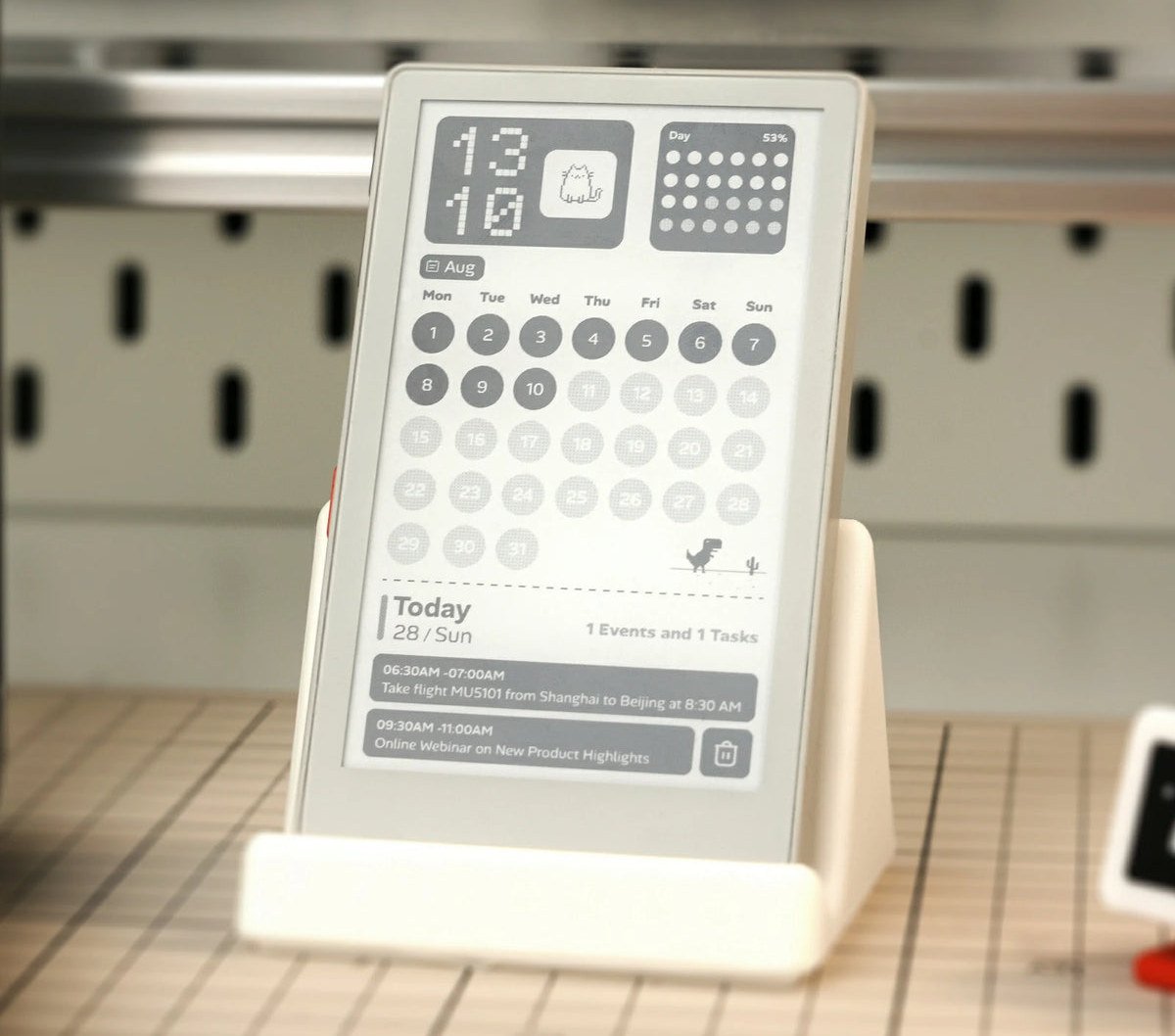
| Attr | Specs | verified |
|---|---|---|
soc | Espressif ESP32-D0WDQ6-V3 dual-core @ 240MHz | ? unverified |
ram | 520KB SRAM, 8MB PSRAM | ? unverified |
storage | 16 MB flash memory | ? unverified |
wifi_bluetooth | Wi-Fi 2.4GHz, Dual-mode Bluetooth | ? unverified |
display | 4.7-inch e-Ink touchscreen, 960x540 resolution, 16-level grayscale | ? unverified |
touch_controller | GT911 capacitive touch screen | ? unverified |
display_driver | IT8951 | ? unverified |
antenna | 2.4GHz 3D antenna | ? unverified |
power | Low-power device | ? unverified |
use_cases | Industrial controller, smart weather display | ? unverified |
Launched on November 30, 2020, by M5Stack, the M5Paper is an IoT development kit designed for low-power applications. It features a 4.7-inch e-Ink touchscreen, making it ideal for static displays and reading interfaces. The device targets industrial and smart home use cases, such as controllers or weather dashboards.
+ Strengths
["4.7-inch e-Ink touchscreen (960x540, 16-level grayscale) offering excellent readability and low power consumption.","ESP32-D0WDQ6-V3 dual-core microcontroller at 240 MHz with 8 MB PSRAM and 16 MB flash for good processing capacity.","Complete wireless connectivity (2.4 GHz Wi-Fi and dual-mode Bluetooth) managed by an integrated 3D antenna."]
− Weaknesses
["Screen resolution limited to 960x540 pixels, which may restrict display density for complex interfaces.","Lack of 5 GHz Wi-Fi connectivity, limiting network performance in 2.4 GHz saturated environments.","Not specified"]
- Retour d'expérience expert expert — expert-microdb
- Après 6 mois d'utilisation sur un tableau de bord domotique, le M5Paper est bluffant. L'écran e-Ink 4,7" de 960x540 est très net, et la tactile capacitive (GT911) répond bien aux gestes, contrairement aux anciennes générations. Le pilote IT8951 gère bien les niveaux de gris. Attention toutefois à l… — expert-microdb
- Bon retour ! Je confirme la stabilité du ESP32-D0WDQ6-V3. Pour le Wi-Fi 2,4 GHz et le BT double mode, l'antenne 3D fait le job en intérieur. Par contre, si tu fais du rafraîchissement rapide, prépare-toi à gérer le ghosting manuellement. Les 8 MB de PSRAM sont cruciaux pour le cache graphique. C'es… — membre-forum
- Retour d'expérience expert expert — expert-microdb
- Après 6 mois sur le M5Paper, l'ESP32-D0WDQ6-V3 tient bien la charge avec ses 8 Mo de PSRAM. L'écran e-Ink 4,7" (960x540, IT8951) est bluffant pour la lisibilité en 16 nuances de gris. Le tactile GT911 réagit bien au multi-touch. Idéal pour mes dashboards météo basse conso, malgré un Wi-Fi 2.4G parf… — expert-microdb
- +1 pour la lisibilité grâce à l'IT8951 ! Attention toutefois : les 520 KB de SRAM sont vite saturés si tu fais du rendu graphique complexe. Pour un affichage statique ou peu dynamique, c'est parfait. J'ai eu des soucis avec l'antenne 3D sur le Bluetooth double, mais le Wi-Fi tient bon. N'oublie pas… — membre-forum
- Retour d'expérience expert expert — expert-microdb
- Après 6 mois d'utilisation intensive sur un tableau de bord domotique, le M5Paper est bluffant. L'écran e-Ink de 4,7'' en 960x540 est très net, et les 16 niveaux de gris rendent bien. Le vrai atout ? La consommation. Avec l'ESP32 et le driver IT8951, je tiens plusieurs jours sans recharge, idéal po… — expert-microdb
- Bonne analyse, mais n'oublie pas la limitation Wi-Fi. L'antenne 3D gère bien le 2.4 GHz, mais le Bluetooth double mode consomme plus que prévu si tu ne le désactives pas. Pour le stockage, les 16MB de flash sont vite saturés si tu fais du logging. J'ai dû migrer vers une carte SD externe pour mon p… — membre-forum
Community feedback and projects
Content not available yet.
Content not available yet.
Content not available yet.
["Not specified"]
- M5Paper: First Connection and Start-up debutant Guide pas à pas pour allumer votre M5Paper, charger le firmware de démonstration et vérifier le fonctionnement de l'écran e-Ink.
- Using GPIOs with the M5Paper debutant Apprenez à contrôler les entrées-sorties numériques du M5Paper pour interagir avec des composants externes.
- Connect M5Paper to Wi-Fi debutant Apprenez à initialiser la connectivité sans fil sur votre M5Paper pour préparer vos projets IoT.
- M5Paper: First connection and startup intermediaire Guide étape par étape pour alimenter, charger le firmware et tester l'écran e-Ink du M5Paper.
- Mastering GPIO I/O on M5Paper intermediaire Apprenez à lire les boutons et à contrôler les périphériques via les broches GPIO du M5Paper.
- M5Paper: Advanced Setup and IT8951 Driver Configuration avance Configurer l'environnement de développement pour exploiter pleinement le contrôleur IT8951 et le tactile GT911 du M5Paper.
- Mastering GPIO and e-Ink Display on M5Paper avance Optimisez les interactions matérielles en combinant les entrées-sorties GPIO avec le rendu graphique précis de l'écran e-Ink.
- Advanced IoT Automation with M5Paper avance Configurez le M5Paper comme un nœud IoT autonome pour l'automatisation industrielle via Wi-Fi et affichage e-Ink.
- Dynamic Display with E-Ink Screen intermediaire Apprenez à piloter l'écran E-Ink 4,7 pouces du M5Paper pour afficher des images en niveaux de gris et gérer le rafraîchissement.