Raspberry Pi 5 (model-5)
⚡ The essentials in 60 seconds
- soc — Broadcom BCM2712, 16 nm application processor (derived from BCM2711): quad-core 64-bit Arm Cortex-A76 @ 2.4 GHz, 512 KB L2 per core, 2 MB shared L3 —
- gpu — VideoCore VII (developed in Cambridge, open-source Mesa drivers): OpenGL ES 3.1, Vulkan 1.2, dual 4Kp60 HDMI output (2× micro-HDMI), 4Kp60 HEVC decoder, new Image Sensor Pipeline —
- i_o_hub — RP1 chiplet (Raspberry Pi's own design, TSMC 40LP process, third silicon step "C0"), attached over a 4-lane PCIe 2.0 link (16 Gb/s). Provides 2× USB 3.0 + 2× USB 2.0, Gigabit Ethernet MAC, 2× 4-lane MIPI CSI/DSI transceivers (bi-directional CAM/DISP connectors), analogue video, and all 3.3 V GPIO + UART/SPI/I2C/I2S/PWM —
- pmic — Renesas DA9091 "Gilmour" with eight switch-mode supplies (quad-phase 20 A-capable core rail), integrated RTC and power-button logic —
- ram — 32-bit LPDDR4X @ 4267 MT/s; 1/2/4/8/16 GB options — ,
- storage — microSD (SDR104 high-speed mode); boot/storage over PCIe via the FPC connector (NVMe) and USB — ,
- On this board : 9 tutorials · 10 code
The Raspberry Pi 5 stands as the current flagship of the single-board computer line, representing a significant architectural shift for the platform. Announced on September 28, 2023, with the first units shipping at the end of October that year, this board was designed in Cambridge, UK, and manufactured at the Sony UK Technology Centre in Pencoed, South Wales. It marks the first time a Raspberry Pi flagship has utilized in-house silicon, specifically the RP1 I/O controller, alongside a co-developed power management integrated circuit. This move signifies a departure from relying solely on third-party components for peripheral management, allowing Raspberry Pi Ltd. to tailor the input/output experience more closely to user needs. The board is available in multiple memory configurations, including 1, 2, 4, 8, and 16 GB variants. While the 4 GB and 8 GB models launched at $60 and $80 respectively, the 16 GB version arrived later in January 2025 at a price of $120. It is important to note that the exact launch prices for the 1 GB and 2 GB variants were not specified in the available sources, so potential buyers should verify current pricing for those specific models.
At the heart of the Raspberry Pi 5 is the Broadcom BCM2712 system-on-chip, a 16 nm application processor derived from the previous BCM2711. This chip features a quad-core 64-bit Arm Cortex-A76 architecture running at 2.4 GHz. To put this in perspective, the Cortex-A76 cores are significantly more powerful than the Cortex-A72 cores found in the Raspberry Pi 4, offering roughly two to three times the CPU and GPU performance. The processor includes 512 KB of L2 cache per core and a shared 2 MB L3 cache, which helps reduce latency when accessing memory. Graphics are handled by the VideoCore VII GPU, developed in Cambridge, which supports modern graphics APIs like OpenGL ES 3.1 and Vulkan 1.2. This GPU enables dual 4Kp60 HDMI output through two micro-HDMI ports, a substantial upgrade over the Pi 4, which could only support one 4Kp60 or two 4Kp30 displays. The GPU also includes a new Image Sensor Pipeline and a 4Kp60 HEVC decoder, making it suitable for high-definition video playback and camera-based projects.
A defining feature of the Raspberry Pi 5 is its disaggregated chiplet architecture. Unlike traditional single-board computers where the main processor handles all tasks, the BCM2712 handles critical high-speed tasks like SDRAM, HDMI, PCIe, and SD card operations. All other peripherals are managed by the RP1 chiplet, a custom-designed I/O controller manufactured on TSMC’s 40LP process. The RP1 connects to the main processor via a 4-lane PCIe 2.0 link, providing a bandwidth of 16 Gb/s. This design allows the RP1 to manage a wide array of interfaces, including two USB 3.0 and two USB 2.0 ports, a Gigabit Ethernet MAC, and two bi-directional 4-lane MIPI CSI/DSI transceivers. These MIPI connectors are versatile, allowing each port to function as either a camera input (CSI) or a display output (DSI). The RP1 also drives the standard 40-pin GPIO header, providing 3.3 V logic levels. It is crucial to understand that the GPIO pins do not have onboard analog-to-digital converters (ADC) or digital-to-analog converters (DAC), so external components are required for analog sensing. The board also introduces a real-time clock (RTC) with wake-alarm capabilities, allowing the device to power on at a scheduled time, a feature absent in previous models.
Power management is handled by the Renesas DA9091 "Gilmour" PMIC, which includes eight switch-mode supplies and integrated RTC and power-button logic. The board uses a USB-C connector for power, with an official recommendation of a 27 W (5 V/5 A) supply. This high-current supply is necessary to unlock the full 1.6 A budget for the USB ports; with any other compliant supply, the USB current is limited to 600 mA. Users should be aware that USB-PPS (Programmable Power Supply) is not supported on any Raspberry Pi model. The board’s power consumption is notable: it draws approximately 800 mA during typical active use and can peak at 12 W under heavy load. Even when turned off, the board consumes 1–1.4 W unless the POWER_OFF_ON_HALT=1 setting is enabled in the EEPROM configuration, which reduces standby power to about 0.01 W. Idle power consumption has been widely reported by reviewers to be around 2.6 W, though this figure is not officially confirmed in the primary documentation.
Thermal management is a critical consideration for the Raspberry Pi 5. The processor has a hard throttle limit of 85 °C, with progressive throttling beginning between 80 and 85 °C. To maintain peak performance under sustained workloads, the official Active Cooler or a case with an integrated fan is effectively mandatory. The fan curve is designed to start at 30% speed at 50 °C and ramp up to 100% at 75 °C, with a 5 °C hysteresis to prevent rapid cycling. Without adequate cooling, the board will throttle its performance to prevent overheating. Storage options include the traditional microSD slot, which supports high-speed SDR104 mode, and a PCIe 2.0 x1 FPC connector that allows for NVMe SSD booting. This connector also supports HAT+ devices, a new accessory standard. While a Gen 3 PCIe mode is documented, it is explicitly uncertified and may be unstable. Additionally, the PoE (Power over Ethernet) header position has changed, meaning existing PoE HATs for the Pi 4 are not compatible; a new PoE+ HAT is required.
Software support for the Raspberry Pi 5 is robust, with Raspberry Pi OS 64-bit (Bookworm and later) being the recommended operating system. 32-bit images are not supported on BCM2712 boards. Other mainline-supported distributions include Ubuntu 23.10 and later, as well as Home Assistant OS. The bootloader resides in a dedicated EEPROM and can be updated using tools like rpi-eeprom or Raspberry Pi Imager. The boot order is configurable and now includes NVMe/PCIe devices, allowing users to boot from fast SSDs for improved I/O performance. Network booting via PXE/TFTP and HTTP is also documented. For developers, the GPIO interface is managed by the RP1, which means older libraries that directly accessed BCM2835 registers may require updates. The recommended approach is to use modern libraries like gpiozero, lgpio, or libgpiod, which handle the RP1’s GPIO abstraction transparently. The removal of the 3.5 mm analog audio jack is another notable change; audio must now be output via HDMI, USB audio devices, or the official Keyboard accessories. Composite video is still available but requires soldering to specific header pads.
The Raspberry Pi 5 ecosystem has expanded with accessories like the Active Cooler, M.2 HAT+, and AI HAT+ series. The AI HAT+ 2, featuring the Hailo-10H accelerator, provides up to 40 TOPS of AI performance, enabling generative AI tasks on the board. Despite its capabilities, users should be mindful of certain limitations. The PCIe connector is disabled by default unless a HAT+ is detected or the dtparam=pciex1 parameter is set in the configuration file. Enumeration of devices behind a PCIe switch can be problematic with certain chips. Furthermore, the RTC does not ship with a backup battery, and charging is disabled by default. Users must enable charging via device tree parameters and use appropriate non-rechargeable lithium cells, as Li-Ion cells are not supported. These nuances highlight the importance of consulting official documentation for specific configurations, especially when dealing with power, thermal, and peripheral compatibility issues. Overall, the Raspberry Pi 5 offers a substantial leap in performance and flexibility, making it a powerful tool for both hobbyists and professionals, provided its specific architectural requirements and limitations are understood.
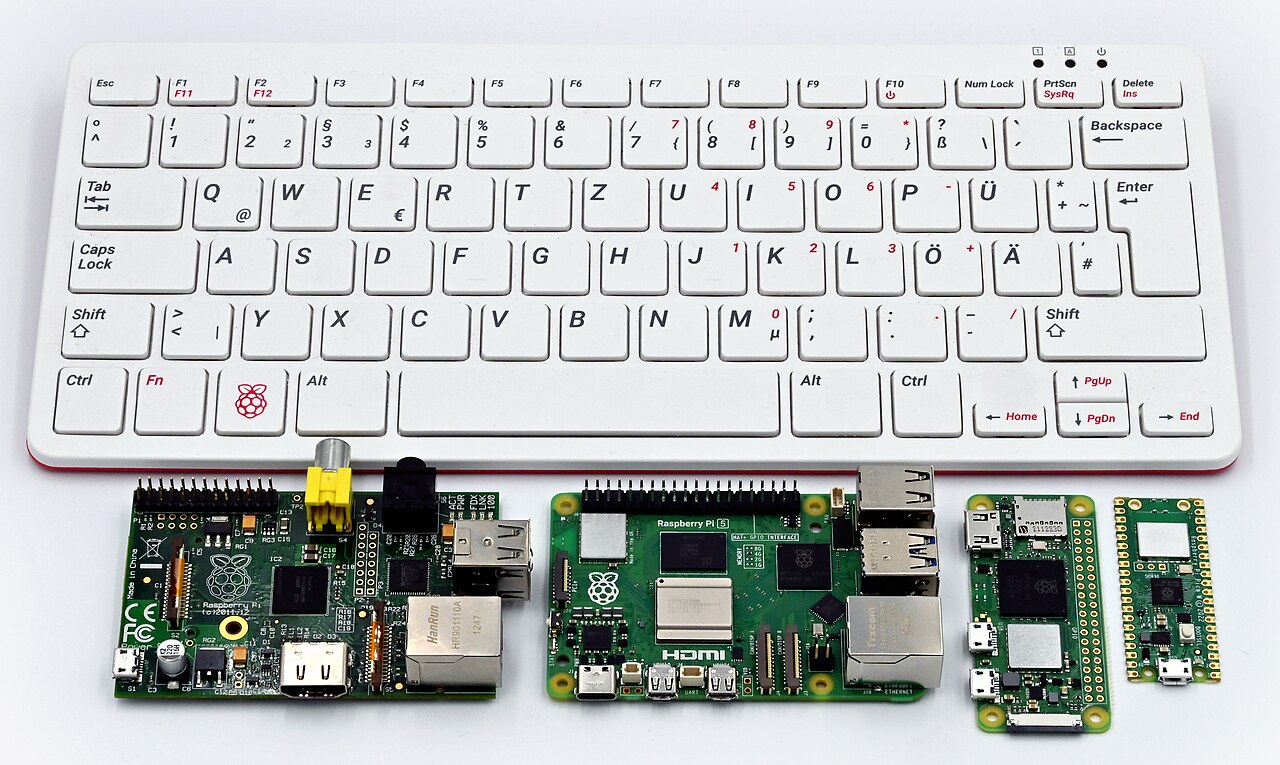
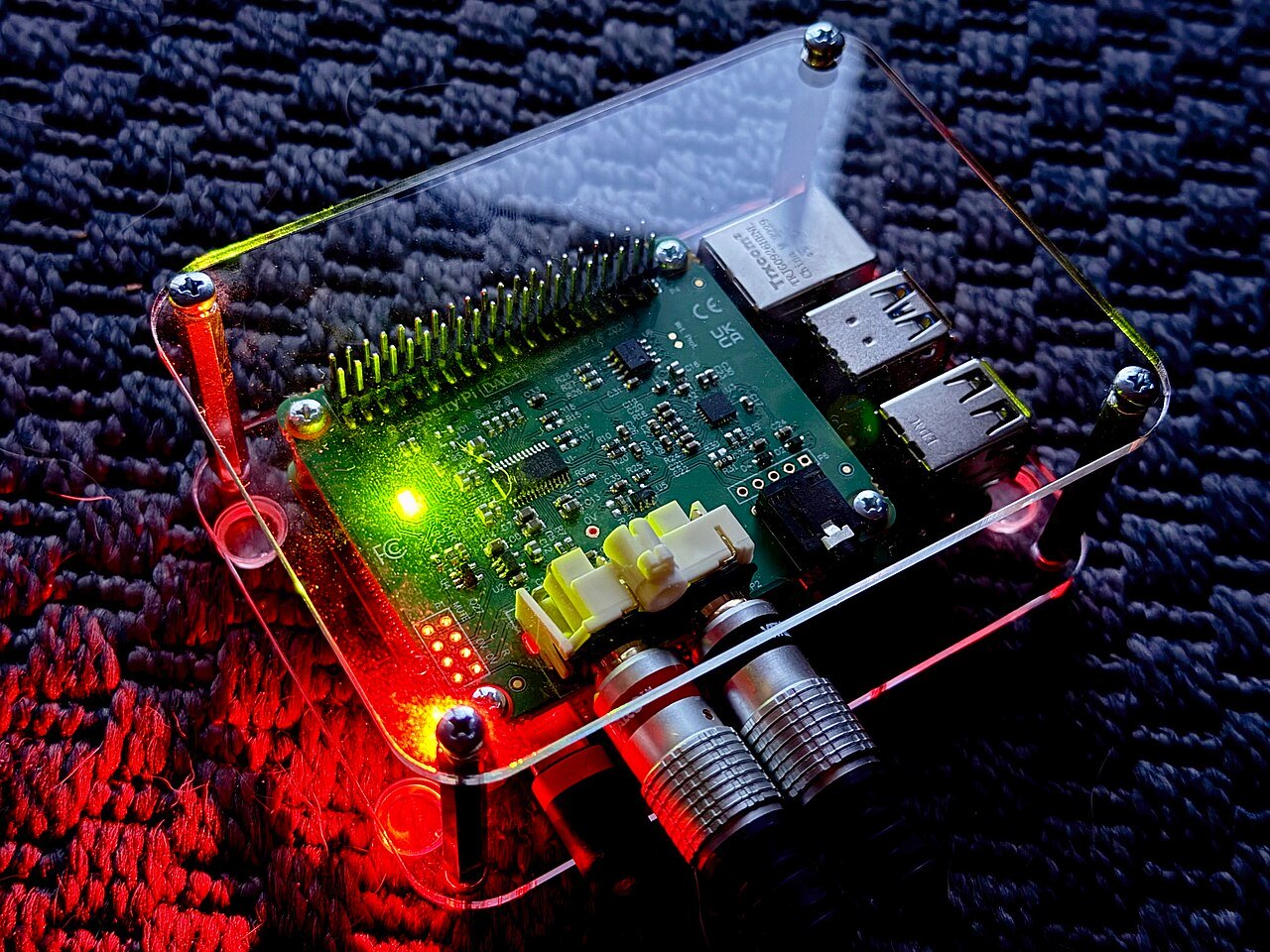
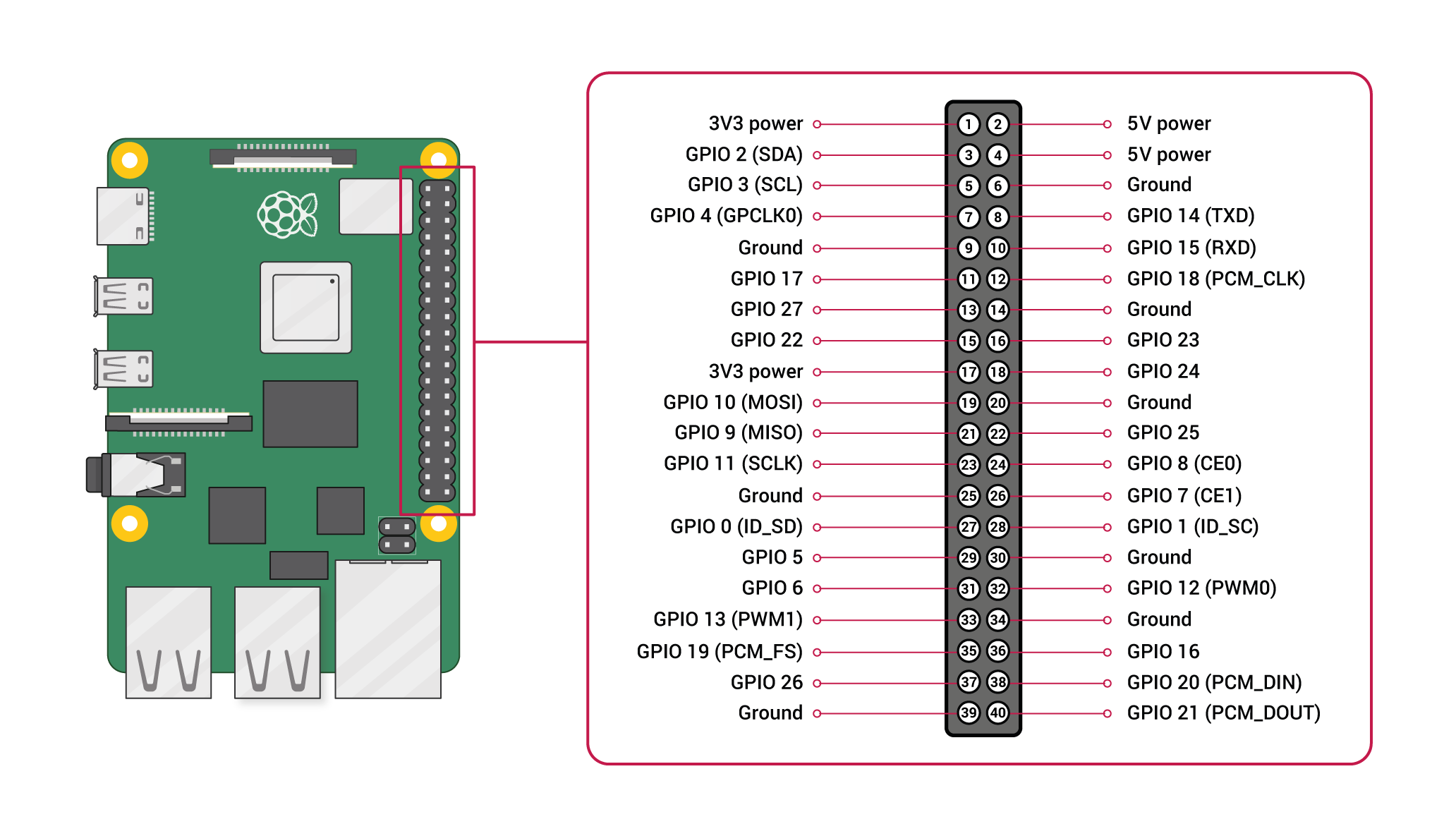
Pinout diagram
| Attr | Specs | verified |
|---|---|---|
soc | Broadcom BCM2712, 16 nm application processor (derived from BCM2711): quad-core 64-bit Arm Cortex-A76 @ 2.4 GHz, 512 KB L2 per core, 2 MB shared L3 — | ✔ |
gpu | VideoCore VII (developed in Cambridge, open-source Mesa drivers): OpenGL ES 3.1, Vulkan 1.2, dual 4Kp60 HDMI output (2× micro-HDMI), 4Kp60 HEVC decoder, new Image Sensor Pipeline — | ✔ |
i_o_hub | RP1 chiplet (Raspberry Pi's own design, TSMC 40LP process, third silicon step "C0"), attached over a 4-lane PCIe 2.0 link (16 Gb/s). Provides 2× USB 3.0 + 2× USB 2.0, Gigabit Ethernet MAC, 2× 4-lane MIPI CSI/DSI transceivers (bi-directional CAM/DISP connectors), analogue video, and all 3.3 V GPIO + UART/SPI/I2C/I2S/PWM — | ✔ |
pmic | Renesas DA9091 "Gilmour" with eight switch-mode supplies (quad-phase 20 A-capable core rail), integrated RTC and power-button logic — | ✔ |
ram | 32-bit LPDDR4X @ 4267 MT/s; 1/2/4/8/16 GB options — , | ✔ |
storage | microSD (SDR104 high-speed mode); boot/storage over PCIe via the FPC connector (NVMe) and USB — , | ✔ |
connectivity | dual-band 802.11ac Wi-Fi + Bluetooth 5.0/BLE (Infineon CYW43455, DDR50 SDIO); Gigabit Ethernet with PoE+ (IEEE 802.3at) support via separate HAT; 2× USB 3.0 (simultaneous 5 Gbps) + 2× USB 2.0; PCIe 2.0 ×1 FPC connector; 2× 4-lane MIPI (camera or display); composite video on 0.1″ pads; 4-pin JST fan connector (PWM + tach); 3-pin JST debug UART — , | ✔ |
gpio | standard 40-pin header, 2.54 mm pitch, 3.3 V logic (driven by RP1); 2× 5 V, 2× 3.3 V, ground pins; hardware PWM on GPIO 12/13/18/19; SPI0/SPI1, I2C (GPIO2/3), UART (GPIO14/15); no onboard ADC or DAC — , | ✔ |
power | USB-C, 5 V; official recommendation is the 27 W (5 V/5 A) USB-C supply. With a 5 A supply the USB ports deliver 1.6 A total; with any other compliant supply this is limited to 600 mA. Typical bare-board active draw ≈ 800 mA; peak ≈ 12 W under "power virus" workloads; turned off it still burns 1–1.4 W unless POWER_OFF_ON_HALT=1 is set in the EEPROM config (drops to ~0.01 W). USB-PPS is not supported on any Pi. — , | ✔ |
thermal | hard throttle limit 85 °C (Arm cores progressively throttled 80–85 °C, Arm+GPU at 85 °C); official Active Cooler or case fan keep it below throttle under worst-case load; fan curve 30 % @ 50 °C → 100 % @ 75 °C with 5 °C hysteresis — | ✔ |
- Manufacturer: Raspberry Pi Ltd. (designed in Cambridge, UK; manufactured at the Sony UK Technology Centre in Pencoed, South Wales) —
- Announced: 28 September 2023; first units shipped end of October 2023 (source: launch article "coming at the end of October"; Wikipedia lists release as October 2023) — ,
- Status: Active (current flagship of the Raspberry Pi line as of 2026; derivatives Pi 500/Pi 500+ and Compute Module 5 are based on it) —
- Launch price: $60 (4 GB) and $80 (8 GB) at announcement —
- Variants: RAM options of 1, 2, 4, 8 and 16 GB (the 16 GB model launched January 2025 at $120, per the cited Ars Technica coverage) —
- Firsts: first flagship Raspberry Pi with in-house silicon (the RP1 I/O controller) and first with a real-time clock and a PC-style power button —
+ Strengths
- First Raspberry Pi with in-house silicon on a flagship board: the RP1 I/O controller ($15 M, longest-running program at Raspberry Pi) plus the co-developed DA9091 PMIC —
- Disaggregated chiplet architecture: AP handles SDRAM/HDMI/PCIe/SD; everything else rides the PCIe link to RP1 — unusual for the SBC market —
- PCIe 2.0 ×1 FPC connector for NVMe SSDs and HAT+ devices (with documented opt-in Gen 3 mode, uncertified) —
- Real-time clock with wake-alarm (≈3 mA low-power state, powers the board back on at alarm time) and PC-style power button with hard/soft on/off — ,
- Dual bidirectional 4-lane MIPI transceivers — each CAM/DISP connector can be either a CSI-2 camera or a DSI display —
- AI accelerator path via HAT+: AI HAT+ (Hailo-8L 13 TOPS / Hailo-8 26 TOPS) and AI HAT+ 2 (Hailo-10H, 40 TOPS + 8 GB dedicated RAM) — ,
- 2–3× CPU/GPU performance vs Pi 4, ~2× memory/IO bandwidth; dual simultaneous 4Kp60 HDMI (Pi 4: one 4Kp60 or two 4Kp30) —
- Ecosystem accessories: Active Cooler ($5), case with integrated fan, RTC battery, M.2 HAT+, PoE+ HAT (new connector layout) —
− Weaknesses
- Higher idle/off power than Pi 4: the board consumes ~1–1.4 W even when "turned off" (mitigate with POWER_OFF_ON_HALT=1 → ~0.01 W) —
- Power-supply sensitivity: full 1.6 A USB budget requires a genuine 5 V/5 A (27 W) supply; anything else caps peripherals at 600 mA. USB-PPS is not supported. Multi-port PD adapters renegotiate when devices join — if the Pi is powered down, renegotiation can spuriously boot it —
- PoE HAT compatibility break: the Ethernet jack moved and the PoE+ header position changed, so existing Pi 4 PoE/PoE+ HATs do not fit; a new PoE+ HAT is required —
- PCIe caveats: Gen 3 mode is explicitly not certified and "might be unstable"; enumeration of devices behind a PCIe switch works only with certain chips (tracked in the connector is disabled unless a HAT+ is detected or dtparam=pciex1 is set —
- Thermal throttling under sustained load: uncased boards hit the 80–85 °C throttle band on continuous heavy workloads; the $5 Active Cooler or fan case is effectively mandatory for sustained peak performance —
- RTC quirks: no backup cell ships in the box; charging is disabled by default (dtparam=rtc_bbat_vchg=...); primary (non-rechargeable) lithium cells give a short service life and Li-Ion cells must not be used —
- Analogue audio jack removed: 3.5 mm composite/video+audio jack is gone (composite now on header pads); HDMI audio, USB audio or the official Keyboard accessories are the audio paths —
- Legacy GPIO library breakage: Pi 5's GPIO is behind RP1; older direct-BCM2835 code paths (e.g. classic RPi.GPIO versions) needed updates — use gpiozero, lgpio or libgpiod on Pi 5.
- Retour d'expérience expert expert — expert-raspberrypi
- Petit retour d'experience sur la Pi 5 après quelques mois d'utilisation. C'est indeniablement un saut de performance : on retrouve les 2 a 3x en CPU/GPU annonces par rapport a la Pi 4, et le dual 4Kp60 change tout pour le desktop. Le nouveau bouton power et l'RTC sont des vrais plus qualitatifs. Pa… — expert-raspberrypi
- Merci pour ce retour. Je confirmer le point sur l'alim, c'est le piege principal. J'avais branche ma Pi 5 sur un chargeur multiport 30W standard et j'avais des drops USB des que je branchais un SSD. Il faut absolument le 27W officiel (5V/5A) pour avoir les 1.6A sur les ports USB, sinon c'est limite… — maker-du-35
- Petite question pour les experts RP1 : je migre des scripts de Pi 3 et ca casse partout. Les vieilles bibliotheques directes sur BCM2835 ne passent plus car le GPIO est passe par le chiplet RP1. J'ai lu qu'il fallait migrer vers gpiozero ou libgpiod. Est-ce que les pins hardware PWM (12/13/18/19) s… — gpio_zero
Community feedback and projects
- Raspberry Pi 5とその他のモデルの比較 - 評価テスト forum.digikey.com
- Raspberry Pi 5のアクティブクーラー forum.digikey.com
- Use a raspberry pi 5" dsi touch with the rock 5b forum.radxa.com
- Penta SATA HAT power input causing unstable Raspberry Pi 5 USB 3.0 ports? My testing and findings forum.radxa.com
- 📣 Raspberry Pi 5 announced - ARM news - EndeavourOS forum.endeavouros.com
Content not available yet.
- Launch announcement (full chipset/platform detail)
- Official hardware documentation (mirror)
- Official hardware documentation (mirror)
- RP1 product page / datasheet
- RP1 product page / datasheet
- PCIe connector standard / HAT+ spec
- PCIe connector standard / HAT+ spec
- GPIO pinout reference
- Community
- Community
- Community
- Wikipedia overview (Pi 5 section & accessories)
- Higher idle/off power than Pi 4: the board consumes ~1–1.4 W even when "turned off" (mitigate with POWER_OFF_ON_HALT=1 → ~0.01 W) —
- Power-supply sensitivity: full 1.6 A USB budget requires a genuine 5 V/5 A (27 W) supply; anything else caps peripherals at 600 mA. USB-PPS is not supported. Multi-port PD adapters renegotiate when devices join — if the Pi is powered down, renegotiation can spuriously boot it —
- PoE HAT compatibility break: the Ethernet jack moved and the PoE+ header position changed, so existing Pi 4 PoE/PoE+ HATs do not fit; a new PoE+ HAT is required —
- PCIe caveats: Gen 3 mode is explicitly not certified and "might be unstable"; enumeration of devices behind a PCIe switch works only with certain chips (tracked in the connector is disabled unless a HAT+ is detected or dtparam=pciex1 is set —
- Thermal throttling under sustained load: uncased boards hit the 80–85 °C throttle band on continuous heavy workloads; the $5 Active Cooler or fan case is effectively mandatory for sustained peak performance —
- RTC quirks: no backup cell ships in the box; charging is disabled by default (dtparam=rtc_bbat_vchg=...); primary (non-rechargeable) lithium cells give a short service life and Li-Ion cells must not be used —
- Analogue audio jack removed: 3.5 mm composite/video+audio jack is gone (composite now on header pads); HDMI audio, USB audio or the official Keyboard accessories are the audio paths —
- Legacy GPIO library breakage: Pi 5's GPIO is behind RP1; older direct-BCM2835 code paths (e.g. classic RPi.GPIO versions) needed updates — use gpiozero, lgpio or libgpiod on Pi 5.
- Allumer une LED via le GPIO avec libgpiod debutant Schéma : IMG-model-5-debutant-1-model5-d1-led-gpio-libgpiod.svg — Raspberry Pi 5, broche physique 11 (GPIO17) vers résistance 470 Ω puis LED vers GND
- Lire un bouton et afficher dans la console debutant Schéma : IMG-model-5-debutant-2-model5-d2-bouton-console.svg — Bouton relié entre la broche physique 7 (GPIO4) et GND, pull-up interne activé, terminal console à l'écran
- Premier script Python avec gpiozero debutant Schéma : IMG-model-5-debutant-3-model5-d3-premier-script-python.svg — Raspberry Pi 5 avec LED sur GPIO17 et bouton sur GPIO4 pilotés par un script Python gpiozero dans un terminal
- Variation d'intensité d'une LED avec le PWM intermediaire Schéma : IMG-model-5-intermediaire-1-model5-i1-pwm-led.svg — LED sur GPIO18 (broche physique 12, PWM matériel) avec résistance 470 Ω, effet de respiration lumineuse
- Lire un capteur I2C (BME280 température/humidité) intermediaire Schéma : IMG-model-5-intermediaire-2-model5-i2-i2c-capteur.svg — Capteur BME280 sur le bus I2C0 : SDA sur GPIO2 (broche 3), SCL sur GPIO3 (broche 5), 3V3 et GND
- Configurer Ethernet et se connecter en SSH intermediaire Schéma : IMG-model-5-intermediaire-3-model5-i3-ethernet-ssh.svg — Raspberry Pi 5 headless relié par câble au routeur Gigabit, poste de développement connecté en SSH
- Démarrer sur un SSD NVMe et récupérer un bootloader cassé avance Schéma : IMG-model-5-avance-1-model5-a1-boot-nvme-recouvrement.svg — Raspberry Pi 5 avec HAT M.2 et SSD NVMe sur connecteur FPC PCIe, câble USB-C vers un PC pour le mode recouvrement rpiboot
- Accélérer l'inférence IA avec un HAT NPU (Hailo) avance Schéma : IMG-model-5-avance-2-model5-a2-npu-ia-hat.svg — Raspberry Pi 5 surmonté d'un AI HAT+ (puce NPU Hailo) exécutant une détection d'objets sur flux caméra, jauge de TOPS à l'écran
- Serveur multimédia et Domotique avec Docker avance Schéma : IMG-model-5-avance-3-model5-a3-docker-serveur-multimedia.svg — Raspberry Pi 5 sous Docker hébergeant Jellyfin (transcodage matériel VideoCore VII) et Home Assistant, diffusant vers TV et navigateurs
Code library — examples written for this board
led_blink.pyPythonbutton_led.pyPythonservo_sweep.pyPythondht_temp.pyPythonoled_i2c.pyPythonmcp3008_read.pyPythoncam_photo.pyPythonweb_led.pyPythongpiotools_blink.shBashblink_c.cC
Examples and repos found online
- raspberrypi/linux github.com
- raspberrypi/rpicam-apps github.com
- retropie/retropie-setup github.com
- gokrazy/gokrazy github.com
- goodtft/LCD-show github.com