Raspberry Pi Model A (2013) — Board Sheet
⚡ The essentials in 60 seconds
- soc — Broadcom BCM2835 — single-core 32-bit ARM1176JZF-S (ARMv6 + VFPv2 FPU) at 700 MHz, plus VideoCore IV GPU (~250 MHz, OpenGL ES 2.0, ~24 GFLOPS, 1080p30 H.264 encode/decode; MPEG-2/VC-1 by paid license). (Wikipedia)
- ram — 256 MB LP-DDR shared CPU/GPU (gpu_mem= split). No onboard storage; full-size SD card boot. (Wikipedia)
- connectivity — No Ethernet port, no WiFi/Bluetooth. Exactly 1× USB 2.0 port (direct from the BCM2835's DWC2 host — no LAN9512 hub chip on this model). HDMI (full-size) + 3.5 mm composite-video jack + 3.5 mm analog audio. (Wikipedia)
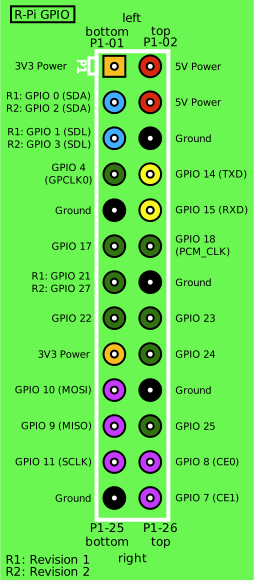
- gpio — 26-pin P1 header — 3.3 V/5 V rails, GND, I²C0 (GPIO0/1), SPI0, UART0, hardware PWM (GPIO18); 3.3 V logic only, no ADC/DAC. (pinout.xyz; official docs)
- power — micro-USB 5 V; single USB port limits peripheral budget; resettable polyfuse on the rail. Being the smallest Pi 1 config, it idles below the Model B's draw.
- temperature — firmware throttles above 85 °C or on undervoltage. (Wikipedia)
- On this board : 9 tutorials · 10 code
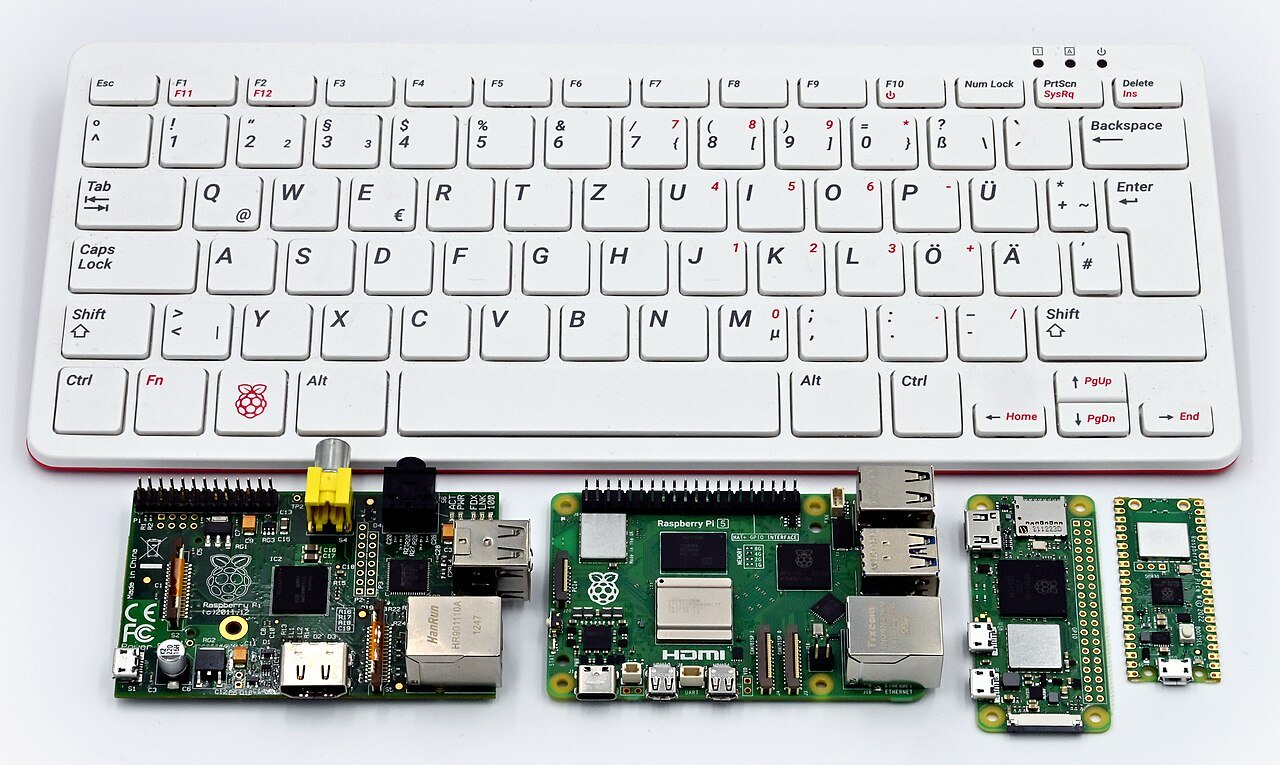
Launched on February 4, 2013, at a price point of twenty-five US dollars, the Raspberry Pi Model A was introduced as the lower-cost sibling to the original Model B. Designed by the Raspberry Pi Foundation in the United Kingdom in collaboration with Broadcom, this board was manufactured in Taiwan and China, with production for the family also occurring at the Sony Pencoed plant in Wales from September 2012 onward. While the Model A shares the same physical footprint as the Model B, measuring 85.6 by 56 millimeters, its design philosophy was distinct. It was intended as a high-volume embedded solution or a set-top box, stripping away components to reduce cost. Consequently, the Ethernet port and the USB hub section were removed, and part of the circuit board was cut away, though it retained the full-size SD card slot for storage and booting. Today, this board is considered end-of-life and legacy hardware, having been replaced by the Model A+ in November 2014.
At the heart of the Model A is the Broadcom BCM2835 system-on-a-chip. To understand what this means for a user, it is helpful to break down the terminology. A system-on-a-chip, or SoC, integrates the central processing unit, graphics processing, and other key components onto a single piece of silicon. The BCM2835 features a single-core 32-bit ARM1176JZF-S processor running at 700 MHz. The term "single-core" means it has one processing unit, which limits its ability to handle multiple complex tasks simultaneously compared to modern multi-core devices. The "32-bit" architecture refers to the width of the data it can process in one go, which restricts the amount of memory it can address directly. The "ARMv6" instruction set is an older standard, and the "VFPv2 FPU" indicates it has a floating-point unit for handling decimal numbers, though it is less efficient than modern equivalents. Alongside the CPU, the chip includes a VideoCore IV GPU running at approximately 250 MHz. This graphics processor supports OpenGL ES 2.0, a standard for 3D graphics, and can handle 1080p video encoding and decoding. However, certain video formats like MPEG-2 and VC-1 require a paid software license to enable.
The Model A is equipped with 256 MB of LP-DDR RAM. LP-DDR stands for Low-Power Double Data Rate, a type of memory designed to consume less energy. This memory is shared between the CPU and the GPU, meaning the total pool of 256 MB must be split between system operations and graphics rendering. This limited memory capacity is a significant constraint for modern usage, as heavy operating systems or web browsers may struggle to run smoothly. There is no onboard storage; instead, the board boots from a full-size SD card, which holds the operating system and user data. The board’s connectivity options are its most defining characteristic. It lacks an Ethernet port, Wi-Fi, and Bluetooth. It features exactly one USB 2.0 port. Unlike the Model B, which used a LAN9512 chip to combine Ethernet and USB functions, the Model A’s single USB port connects directly to the BCM2835 chip. This means the single port receives the full 480 Mbps bandwidth of USB 2.0, as it does not share it with a network connection. For video and audio, the board provides a full-size HDMI port, a 3.5 mm composite video jack, and a 3.5 mm analog audio jack.
The General Purpose Input/Output, or GPIO, is a header of pins that allows the board to interact with the physical world, such as reading sensors or controlling motors. The Model A uses a 26-pin P1 header. This header provides 3.3 V and 5 V power rails, ground connections, and various communication interfaces including I²C, SPI, UART, and hardware PWM. It is crucial to note that these pins operate at 3.3 V logic levels and do not include analog-to-digital converters, meaning they cannot directly read analog signals without external components. Power is supplied via a micro-USB connector delivering 5 V. Because the board has fewer components than the Model B, it consumes less power and generates less heat, making it suitable for sealed enclosures. However, the single USB port limits the number of peripherals that can be connected without an external powered hub. A resettable polyfuse protects the power rail from over-current conditions, but if it trips, the board may underpower until reset.
Software support for the Model A has evolved since its launch. Initially, it supported Raspbian, a Debian-based Linux distribution optimized for the hardware, as well as RISC OS and Fedora remixes. Today, official support for the ARMv6 architecture used by the BCM2835 has been dropped from current Raspberry Pi OS releases. Users must rely on legacy 32-bit images, such as those based on Debian Buster, or third-party distributions like Arch Linux ARM or LibreELEC. Setting up the board can be challenging because it lacks a network connection. To configure it headlessly, users often need to write an image to the SD card on a separate computer and enable SSH or a serial console via configuration files. Alternatively, the single USB port can be configured as a USB Ethernet gadget, allowing the Pi to appear as a network device when plugged into a laptop. This technique, known as g_ether, enables remote access without a traditional network cable or Wi-Fi dongle.
The Model A’s design makes it particularly well-suited for specific projects. Its low cost and low power consumption make it ideal for digital signage, kiosks, or simple media players using software like LibreELEC. It is also popular for retro computing enthusiasts who wish to run RISC OS, an operating system that offers a distinct user experience reminiscent of the classic Acorn Archimedes computers. Furthermore, its ability to act as a USB gadget allows it to function as a network drive or a keyboard emulator. However, users should be aware of certain limitations. The lack of a second USB port means that connecting a keyboard, mouse, and Wi-Fi adapter simultaneously requires a powered USB hub. Additionally, there have been reported issues with the USB gadget stack where the host computer may see a random MAC address each time the device is connected, requiring users to identify the device by hostname rather than network address. The 256 MB of RAM also restricts the use of modern, resource-heavy applications, making headless operation or lightweight desktop environments the recommended approach. Despite these constraints, the Raspberry Pi Model A remains a significant piece of hardware history, demonstrating how minimal design choices can create a versatile and affordable platform for learning and embedded applications.
Pinout diagram
| Attr | Specs | verified |
|---|---|---|
soc | Broadcom BCM2835 — single-core 32-bit ARM1176JZF-S (ARMv6 + VFPv2 FPU) at 700 MHz, plus VideoCore IV GPU (~250 MHz, OpenGL ES 2.0, ~24 GFLOPS, 1080p30 H.264 encode/decode; MPEG-2/VC-1 by paid license). (Wikipedia) | ✔ |
ram | 256 MB LP-DDR shared CPU/GPU (gpu_mem= split). No onboard storage; full-size SD card boot. (Wikipedia) | ✔ |
connectivity | No Ethernet port, no WiFi/Bluetooth. Exactly 1× USB 2.0 port (direct from the BCM2835's DWC2 host — no LAN9512 hub chip on this model). HDMI (full-size) + 3.5 mm composite-video jack + 3.5 mm analog audio. (Wikipedia) | ✔ |
gpio | 26-pin P1 header — 3.3 V/5 V rails, GND, I²C0 (GPIO0/1), SPI0, UART0, hardware PWM (GPIO18); 3.3 V logic only, no ADC/DAC. (pinout.xyz; official docs) | ✔ |
power | micro-USB 5 V; single USB port limits peripheral budget; resettable polyfuse on the rail. Being the smallest Pi 1 config, it idles below the Model B's draw. | ? unverified |
temperature | firmware throttles above 85 °C or on undervoltage. (Wikipedia) | ✔ |
- Manufacturer / developer: Raspberry Pi (Trading) Ltd. / Raspberry Pi Foundation, UK, with Broadcom; built in Taiwan/China and (from Sept 2012 onward for the family) at the Sony Pencoed plant, Wales. (Wikipedia, retrieved 2026-10-13)
- Launch: 4 February 2013 at US$25 — the lower-cost sibling of the Model B. (Wikipedia)
- Status: End-of-life / legacy. Replaced by Model A+ (Nov 2014, $20). (Wikipedia)
- Variants: Model A 256 MB (this board); later Model A+ (different board: 40-pin GPIO, microSD); "Model A" 512 MB production runs appeared alongside the Model B 512 MB transition (Oct 2012 policy applied to later stock).
- Form factor: same 85.6 × 56 mm outline as the Model B but with the Ethernet/USB section removed and part of the board cut away; full-size SD slot retained.
+ Strengths
- Cheapest full Linux PC of its era ($25) aimed at high-volume embedded/appliance use — the intended "set-top box" Pi. (Wikipedia)
- Single USB directly on the SoC — no USB hub/LAN combo chip in the path, so the one port gets the full 480 Mbps USB bandwidth (on the Model B, Ethernet + 2 ports shared it via the LAN9512). (Wikipedia — "Direct from the BCM2835 chip")
- Same multimedia capability as the Model B (1080p H.264 encode/decode) at $10 less. (Wikipedia)
- Popular as a USB gadget device: with g_ether/g_mass_storage over its single port it behaves as a network drive, Ethernet gadget, or HID keyboard.
- Reduced heat and power vs Model B — suited to sealed enclosures.
− Weaknesses
- One USB port, no network: the defining limitation — keyboard+mouse+WiFi needs a hub; many USB WiFi dongles exceed the port's current budget. Community workaround: powered hub, or serial console + later SSH over g_ether. (Raspberry Pi forums)
- USB gadget MAC quirks: the g_ether gadget stack on BCM2835 boards has long-standing issues applying configured MAC addresses (host sees a random MAC). (raspberrypi/firmware issue #843)
- Polyfuse trips on USB over-current, same F1 design as the Model B; after a hard trip the board underpowers. (eLinux R-Pi Troubleshooting)
- 256 MB RAM constrains modern browsers/heavy distros; headless use strongly recommended. (Wikipedia)
- Undervoltage throttling with weak micro-USB supplies; firmware throttles at 85 °C/brown-out. (Wikipedia)
- No composite audio via HDMI on early firmware? — audio over HDMI works, but the analog jack and HDMI audio must be switched (vcgencmd audio/config), a classic first-boot confusion.
- Retour d'expérience expert expert — expert-raspberrypi
- Retour sur la Model A après plusieurs mois d'utilisation en projet embarqué. Le concept est brillant pour le prix de 25 dollars, surtout pour les applications où l'on n'a pas besoin d'Ethernet. La bande passante USB complète est un vrai plus comparé à la Model B, mais attention à la gestion de l'al… — expert-raspberrypi
- Merci pour ce retour. Je confirme le souci du polyfuse, c'est frustrant quand on branche un petit hub non alimenté pour tester un clavier. Par contre, pour la gestion du son, je me suis perdu au début. Il faut bien comprendre que le jack analogique et le HDMI ne fonctionnent pas en même temps par d… — maker-bleu
- Pour l'adresse MAC sur g_ether, c'est malheureusement un vieux problème lié au BCM2835. Il n'y a pas de solution miracle côté soft, il faut parfois jouer avec les options du module au démarrage, mais ça reste capricieux. Pour le reste, si tu veux éviter les tracas du hub, le mode gadget en mode sto… — linux-pi-user
Community feedback and projects
- New raspberry pi model a+ trouble stackoverflow.com
- Raspberry Pi Model A+ Arrives – The Cheapest and Smallest Pi Yet techcrunch.com
- Raspberry Pi Model A+ Board cnx-software.com
- Does the Raspberry Pi 1 Model A support 128 GB SD cards? raspberrypi.stackexchange.com
- Raspberry Pi Model A ethernet raspberrypi.stackexchange.com
Content not available yet.
- One USB port, no network: the defining limitation — keyboard+mouse+WiFi needs a hub; many USB WiFi dongles exceed the port's current budget. Community workaround: powered hub, or serial console + later SSH over g_ether. (Raspberry Pi forums)
- USB gadget MAC quirks: the g_ether gadget stack on BCM2835 boards has long-standing issues applying configured MAC addresses (host sees a random MAC). (raspberrypi/firmware issue #843)
- Polyfuse trips on USB over-current, same F1 design as the Model B; after a hard trip the board underpowers. (eLinux R-Pi Troubleshooting)
- 256 MB RAM constrains modern browsers/heavy distros; headless use strongly recommended. (Wikipedia)
- Undervoltage throttling with weak micro-USB supplies; firmware throttles at 85 °C/brown-out. (Wikipedia)
- No composite audio via HDMI on early firmware? — audio over HDMI works, but the analog jack and HDMI audio must be switched (vcgencmd audio/config), a classic first-boot confusion.
- Allumer une LED depuis le GPIO 26 broches debutant Schéma : IMG-model-a-debutant-1-modela-led-gpio.svg — Raspberry Pi Model A vu de dessus avec le connecteur P1 26 broches, une LED et sa résistance 330 Ω câblées entre GPIO17 (broche 11) et la masse
- Bouton poussoir et retour sur la console debutant Schéma : IMG-model-a-debutant-2-modela-bouton-console.svg — Raspberry Pi Model A avec un bouton poussoir câblé entre GPIO4 (broche 7) et la masse, résistance interne de pull-up indiquée, sortie console série annotée
- Premier script Python sur la bête de 256 Mo debutant Schéma : IMG-model-a-debutant-3-modela-premier-python.svg — Raspberry Pi Model A relié à un écran HDMI affichant un terminal avec un script Python, carte SD grand format insérée dans le logement, blocs mémoire 256 Mo et ARM11 700 MHz annotés
- Variateur de lumière : PWM matériel sur GPIO18 intermediaire Schéma : IMG-model-a-intermediaire-4-modela-pwm-led.svg — Raspberry Pi Model A avec une LED sur GPIO18 (broche 12, sortie PWM matériel) et sa résistance, dégradé lumineux de faible à forte intensité illustrant le rapport cyclique
- Premier capteur I2C sur GPIO0/GPIO1 intermediaire Schéma : IMG-model-a-intermediaire-5-modela-i2c-capteur.svg — Raspberry Pi Model A relié en I2C à un petit module capteur : SDA sur GPIO0 (broche 3), SCL sur GPIO1 (broche 5), 3,3 V et masse, résistances de pull-up sur le bus
- WiFi sur la prise USB unique et SSH à distance intermediaire Schéma : IMG-model-a-intermediaire-6-modela-wifi-ssh.svg — Raspberry Pi Model A sans prise Ethernet avec un petit dongle WiFi USB inséré dans l'unique port USB, liaison sans fil vers un routeur et un ordinateur portable exécutant SSH
- Boot sur carte SD, chaîne de démarrage et recouvrement avance Schéma : IMG-model-a-avance-7-modela-boot-recouvrement.svg — Coupe du démarrage du Model A : ROM VideoCore chargeant bootcode.bin depuis la partition FAT d'une carte SD grand format, puis start.elf et kernel, avec une flèche de secours vers la réécriture de l'image
- Surveillance thermique et fréquence sous contrainte 256 Mo avance Schéma : IMG-model-a-avance-8-modela-surveillance-thermique.svg — Raspberry Pi Model A en boîtier fermé avec son dissipateur, sonde de température pointant vers le BCM2835, graphique de température et seuil de throttling à 85 °C avec jauge de fréquence 700 MHz
- Serveur web ultra-léger ou conteneurs sur 256 Mo avance Schéma : IMG-model-a-avance-9-modela-serveur-leger.svg — Raspberry Pi Model A servant de petit serveur web : page HTML servie par busybox httpd sur le port 8090, dongle WiFi en amont, jauge mémoire montrant l'espace disponible sur les 256 Mo
Code library — examples written for this board
led_blink.pyPythonbutton_led.pyPythonservo_sweep.pyPythondht_temp.pyPythonoled_i2c.pyPythonmcp3008_read.pyPythonwebcam_photo.shBashweb_led.pyPythongpiotools_blink.shBashblink_c.cC
Examples and repos found online
- raspberrypi/noobs github.com
- WiringPi/WiringPi github.com
- joan2937/pigpio github.com
- raspberrypi/userland github.com
- raspberrypi/linux github.com