Arduino Nano ESP32
⚡ The essentials in 60 seconds
- soc_module — u-blox NORA-W106-10B module embedding an Espressif ESP32-S3 — "the first Arduino board to be based fully on an ESP32" (user manual, p.1, docs page, ESP32-S3 SoC page).
- cpu — dual-core 32-bit Xtensa LX7 @ up to 240 MHz per core; 128-bit data bus, DMA controller (user manual, pp.2, 9).
- memory — 384 kB ROM, 512 kB SRAM, 16 kB SRAM in RTC (8 kB RTC FAST + RTC SLOW, SLOW accessible by the ULP coprocessor in deep sleep), 8 MB PSRAM (octal SPI, in the NORA-W106-10B) (user manual, pp.2, 9-10).
- external_flash — 128 Mbit (16 MB) GD25B128EWIGR on QSPI, 133 MHz, up to 664 Mbit/s (user manual, p.13).
- gpu — none (MCU board).
- connectivity — Wi-Fi 4 802.11 b/g/n 2.4 GHz, up to 150 Mbit/s (HT-40; 72 Mbit/s HT-20), rated EIRP up to 10 dBm, max range 500 m; Bluetooth LE v5.0, up to 2 Mbit/s, multi-connection central/peripheral; built-in antenna (typ. radiated 20 dBm EIRP Wi-Fi / 10 dBm EIRP BLE) (user manual, pp.2, 9-10). No Ethernet, no cellular.
- On this board : 9 tutorials · 10 code
The Arduino Nano ESP32 represents a significant milestone in the evolution of compact development boards, marking the first time an Arduino product is built entirely around the ESP32 architecture. Released in 2023, this board bridges the gap between the familiar simplicity of the Arduino ecosystem and the powerful, connectivity-focused capabilities of Espressif’s silicon. At its core lies the u-blox NORA-W106-10B module, which integrates the Espressif ESP32-S3 system-on-chip. This choice of processor is crucial for understanding the board’s potential, as the ESP32-S3 is a dual-core 32-bit Xtensa LX7 microcontroller capable of running at speeds up to 240 MHz per core. For beginners, this means the board can handle complex calculations and multitasking far more efficiently than traditional single-core microcontrollers, while still maintaining the low power consumption expected from battery-operated devices. The board retains the classic Nano footprint, measuring just 45 by 18 millimeters, making it ideal for space-constrained projects, yet it packs a punch with substantial memory resources including 512 kB of SRAM, 8 MB of PSRAM, and 16 MB of external flash storage. This generous memory allocation allows developers to store large datasets, complex web interfaces, or extensive code libraries directly on the board without needing additional storage modules.
Connectivity is the standout feature of the Nano ESP32, offering both Wi-Fi and Bluetooth Low Energy without the need for external modules. It supports Wi-Fi 4 (802.11 b/g/n) on the 2.4 GHz band with speeds up to 150 Mbit/s, and Bluetooth LE version 5.0 with speeds up to 2 Mbit/s. The board includes a built-in antenna, simplifying the hardware design for IoT projects. A unique protocol supported by this hardware is ESP-NOW, which allows boards to communicate directly with each other without requiring a Wi-Fi router or access point. This peer-to-peer capability is excellent for sensor networks or remote control applications where infrastructure might be unavailable. Furthermore, the board introduces the USB-C connector to the Nano form factor, replacing the older micro-USB standard. This not only provides a more durable and reversible connection for power and data but also enables native USB functionality. The ESP32-S3 chip includes a USB-JTAG interface, which allows for on-chip debugging directly through the Arduino IDE. This means developers can set breakpoints and inspect variables in real-time without needing expensive external debug probes, a feature that significantly lowers the barrier to entry for learning embedded systems development.
The input and output capabilities of the Nano ESP32 are designed to be versatile while adhering to modern logic levels. All pins operate at 3.3 V, a critical detail for users migrating from older 5 V Arduino boards. Connecting 5 V devices directly to the GPIO pins can damage the board, so level shifting is often required for legacy sensors. The header exposes 14 digital pins and 8 analog inputs, supporting standard protocols like I2C, SPI, and UART. Notably, the board includes a CAN/TWAI controller, allowing it to communicate over the automotive-style CAN bus, although it is important to note that this implementation supports the classic CAN 2.0B standard and not the newer CAN FD. For visual feedback, the board features a built-in RGB LED, allowing users to indicate status through color changes, alongside a standard blue user LED. The power management system is robust, accepting an input voltage between 6 and 21 V via the VIN pin, which is stepped down internally. However, users should be aware that there is no dedicated 5 V output pin; the 5 V rail is only available when the board is powered via USB, which is a limitation to consider when designing power supplies for external 5 V sensors.
Software support for the Nano ESP32 is extensive, offering two primary paths for developers. The first is the official "Arduino ESP32 Boards" package, which is a fork of the Espressif core maintained by Arduino. This package is based on the ESP-IDF version 5.1.4 and provides full compatibility with the Arduino API, including libraries for Wi-Fi, Bluetooth, and other peripherals. It is essential to use this specific package rather than the generic Espressif package to ensure proper driver installation and debugging functionality. The second option is MicroPython, which is officially supported via an upstream board port. MicroPython allows developers to write code in Python, a language known for its readability and ease of use, making it an attractive option for educators and rapid prototyping. Switching between these environments is straightforward, though it requires flashing the appropriate firmware. The board enters a special Device Firmware Upgrade (DFU) mode when the reset button is double-tapped, allowing users to flash new firmware or recover from a locked state. This recovery mechanism is vital, as improper flashing or full chip erasures can remove the bootloader, requiring a specific procedure to restore it.
Despite its strengths, the Nano ESP32 comes with certain nuances that users should understand to avoid common pitfalls. One frequent issue involves the USB port enumeration; the board can appear as both a standard USB device and a DFU device. When uploading sketches from the Arduino IDE, users must select the standard USB port, as selecting the DFU port will block the upload process. Additionally, Linux users may encounter permission errors when attempting to debug, requiring the installation of specific udev rules to grant access to the USB device. Another point of confusion arises from the PWM capabilities; while the store specifications list five PWM pins, the underlying hardware and core software actually support PWM on nearly all GPIO pins through the LEDC peripheral, offering more flexibility than the simplified specs suggest. Finally, developers should be cautious about core divergence. Since the Arduino package is a fork, some functions or features may behave differently compared to the upstream Espressif core, potentially causing compatibility issues with libraries written for the generic ESP32 platform. By keeping these details in mind, the Arduino Nano ESP32 serves as a powerful, compact, and highly capable platform for building connected devices, combining the ease of Arduino with the advanced features of the ESP32-S3.
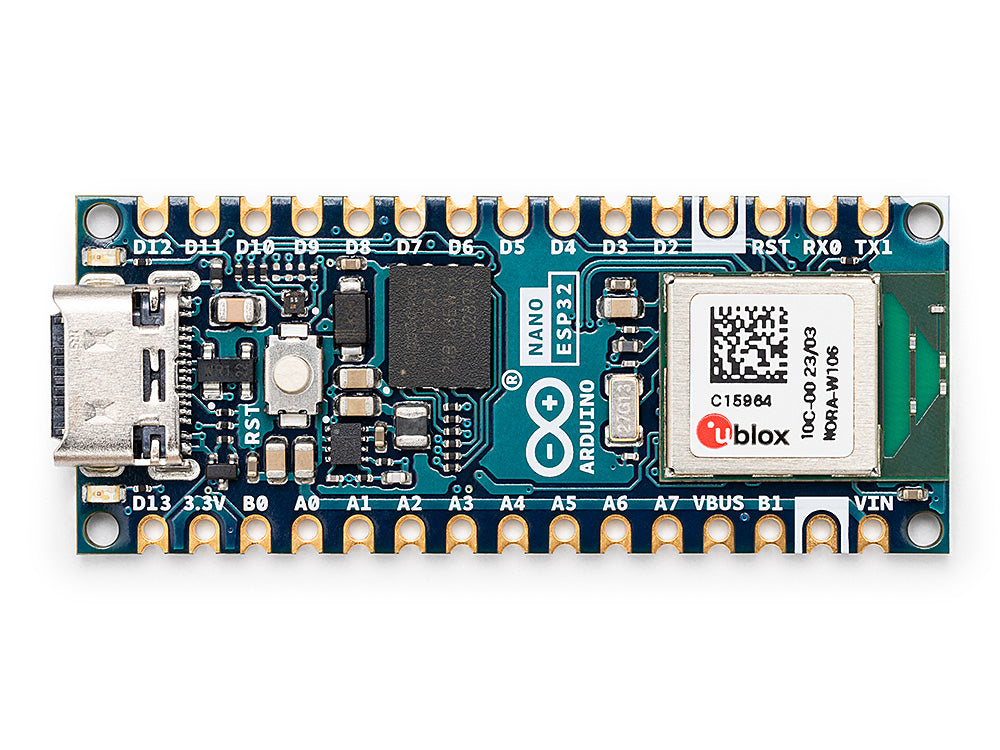
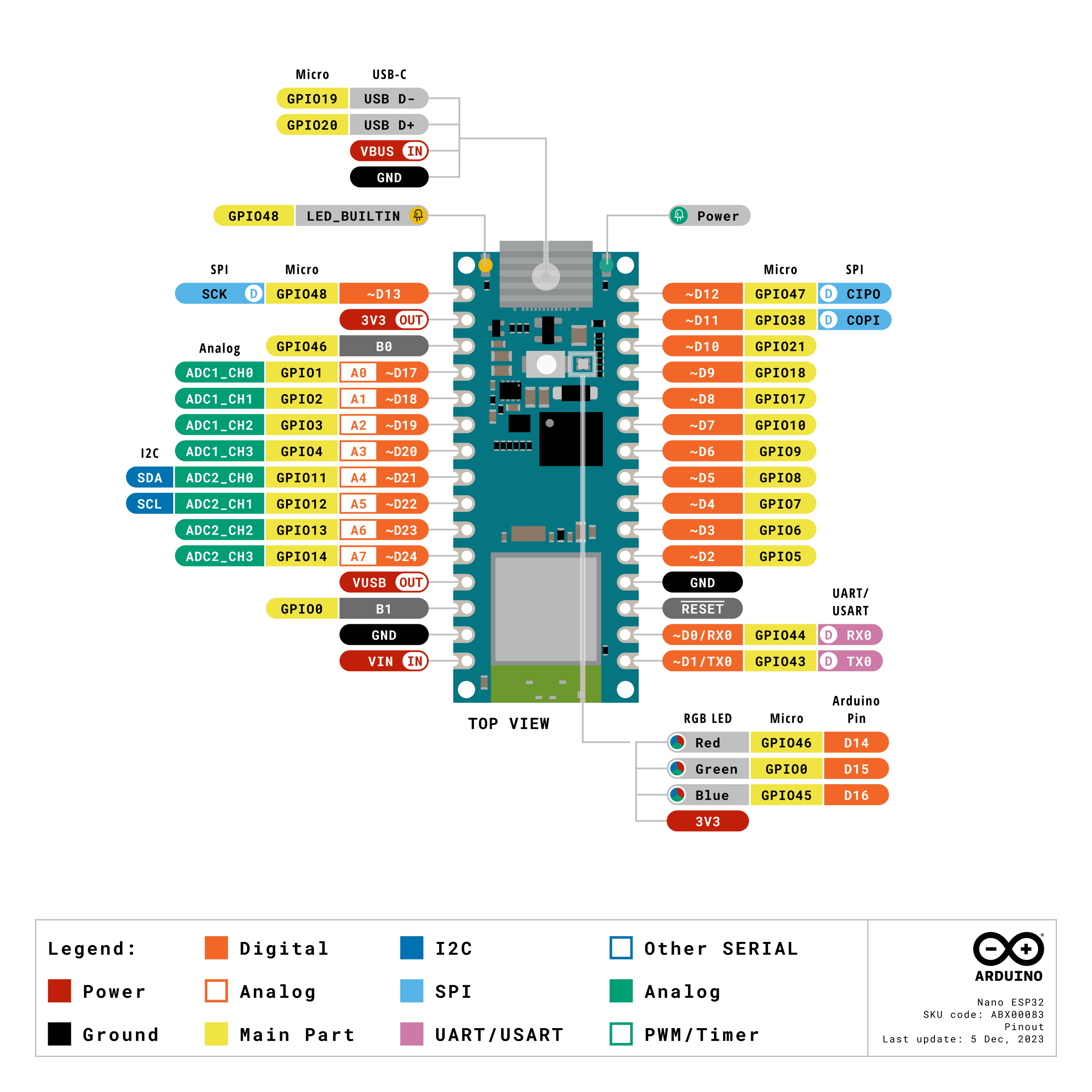
Pinout diagram
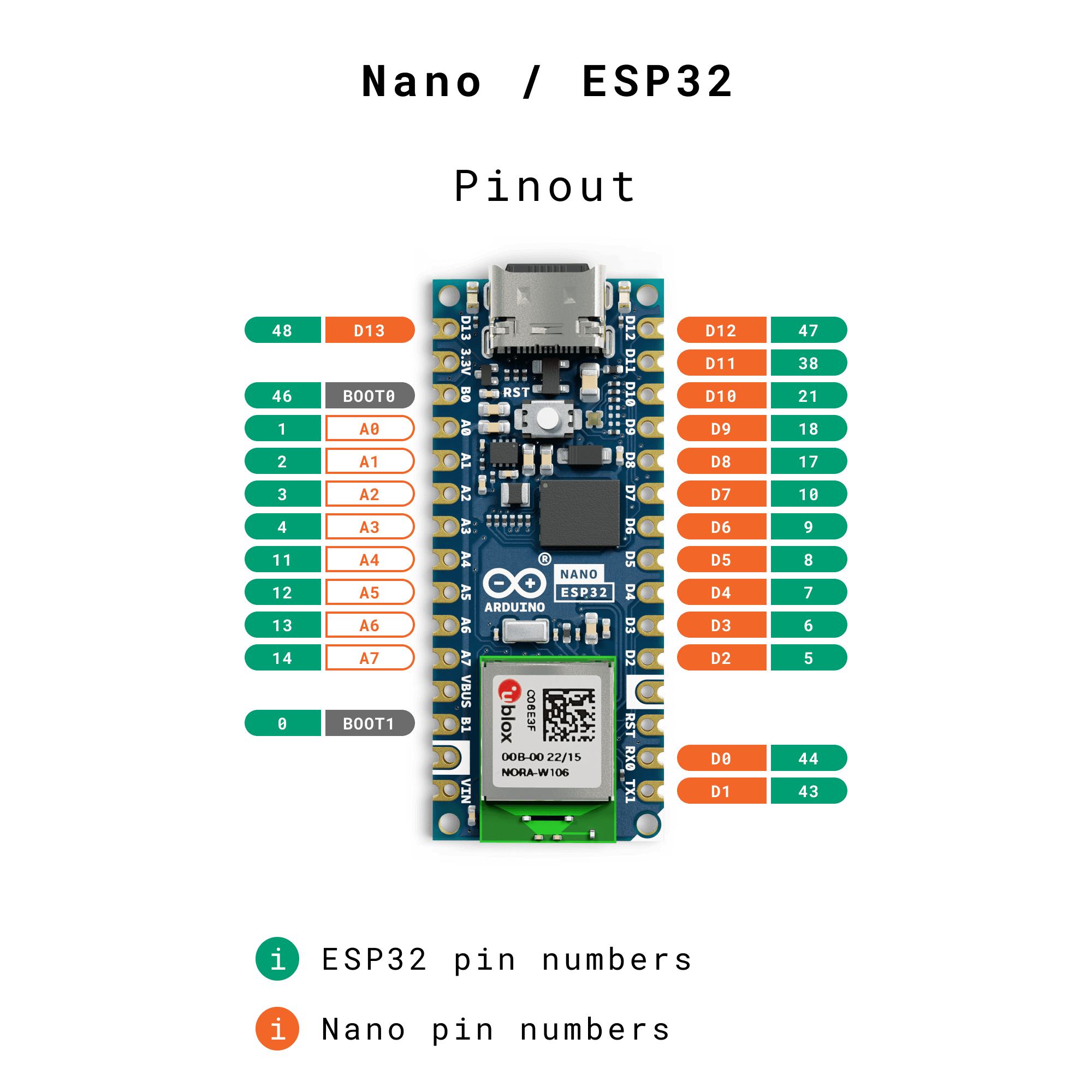
| Attr | Specs | verified |
|---|---|---|
soc_module | u-blox NORA-W106-10B module embedding an Espressif ESP32-S3 — "the first Arduino board to be based fully on an ESP32" (user manual, p.1, docs page, ESP32-S3 SoC page). | ✔ |
cpu | dual-core 32-bit Xtensa LX7 @ up to 240 MHz per core; 128-bit data bus, DMA controller (user manual, pp.2, 9). | ✔ |
memory | 384 kB ROM, 512 kB SRAM, 16 kB SRAM in RTC (8 kB RTC FAST + RTC SLOW, SLOW accessible by the ULP coprocessor in deep sleep), 8 MB PSRAM (octal SPI, in the NORA-W106-10B) (user manual, pp.2, 9-10). | ✔ |
external_flash | 128 Mbit (16 MB) GD25B128EWIGR on QSPI, 133 MHz, up to 664 Mbit/s (user manual, p.13). | ✔ |
gpu | none (MCU board). | ? unverified |
connectivity | Wi-Fi 4 802.11 b/g/n 2.4 GHz, up to 150 Mbit/s (HT-40; 72 Mbit/s HT-20), rated EIRP up to 10 dBm, max range 500 m; Bluetooth LE v5.0, up to 2 Mbit/s, multi-connection central/peripheral; built-in antenna (typ. radiated 20 dBm EIRP Wi-Fi / 10 dBm EIRP BLE) (user manual, pp.2, 9-10). No Ethernet, no cellular. | ✔ |
i_o_from_the_official_core_variant_arduino_nano_nora_pins_arduino_h_https_raw_githubusercontent_com_arduino_arduino_esp32_arduino_nano_esp32_variants_arduino_nano_nora_pins_arduino_h | - NUM_DIGITAL_PINS 25, NUM_ANALOG_INPUTS 8 — header exposes 14 digital (D0–D13) + 8 analog (A0–A7) (store spec table). - All pins are 3.3 V logic — "Do not connect any higher voltage devices to any of the pins" (user manual, p.14). - I²C default on A4 (SDA) / A5 (SCL) (SDA = A4, SCL = A5); GPIO-matrix assignable to most pins (pins_arduino.h, user manual, p.11). - SPI SCK D13 / CIPO(MISO) D12 / COPI(MOSI) D11 / CS D10; UART RX D0 / TX D1; I²S pins SCK D7, FS D8, SD D9 (bidir), SD_IN D10; 2× I²S controllers; CAN/TWAI (CAN 2.0B "classic", not CAN FD) on any free GPIO (pins_arduino.h, user manual, pp.12-13). - PWM: digitalPinHasPWM(p) covers every mapped GPIO < 46 in the core; the store spec table instead lists "PWM pins: 5". - LEDs: LED_BUILTIN = D13; RGB LED on LED_RED = 14, LED_GREEN = 15, LED_BLUE = 16 (store: "Built-in RGB LED pins 14-16") (pins_arduino.h, store spec table). - USB: native USB-C (ESP32-S3 USB, VID 0x2341 / PID 0x0070) (pins_arduino.h). | ✔ |
power | operating voltage 3.3 V; VIN 6–21 V (typ 7 V), USB VBUS 4.8–5.5 V; both rails stepped down by an MP2322GQH buck converter; no 5 V pin (VBUS only passes USB power through); 3.3 V pin output for externals; GPIO source 40 mA / sink 28 mA (user manual, pp.6, 13-15). | ✔ |
consumption | 7 µA deep sleep / 240 µA light sleep (ESP32-S3 SoC only — board LEDs etc. add more) (user manual, p.2). | ✔ |
temperature | ambient −40 to +105 °C (recommended operating conditions) (user manual, p.6). | ✔ |
size | 45 × 18 mm, classic Nano footprint (store spec table). | ✔ |
- Manufacturer: Arduino (arduino.cc / Arduino AG), using the u-blox NORA-W106-10B module (user manual, p.1, u-blox NORA-W10 series).
- Year: 2023. The official user manual's change log lists "08/06/2023 Release" (the manual uses DD/MM/YYYY — its header reads "Modified: 08/10/2026", i.e. 8 October 2026) (user manual, change log).
- Status: Active / current product — datasheet last modified 2026-10-08, store lists the board as available (user manual, store page).
- Price: €20.40 on the official store at retrieval time (EUR locale, "price":2040 in the product JSON) (store page).
- Variants: sold with and without pre-soldered headers ("The Arduino Nano ESP32 (with and without headers)…" — user manual, p.1). Two SKUs appear in official docs: ABX00083 (user manual) and ABX00092 (store spec table).
+ Strengths
- First fully-ESP32 Arduino board with Wi-Fi + BLE in the Nano form factor — "the first Arduino board to be based fully on an ESP32" (user manual, p.1).
- First Nano with USB-C (docs page).
- Out-of-the-box debugging, no extra hardware (ESP32-S3 USB-JTAG) (docs page, debugging tutorial).
- ESP-NOW peer-to-peer protocol support (up to 250-byte frames, no AP required) (ESP-NOW tutorial).
- Dual programmable worlds: Arduino core (2.x/ESP-IDF 5.1.4) and upstream MicroPython board support (docs page, MicroPython board).
- 8 MB PSRAM + 16 MB flash — unusually large memory for the Nano class (user manual, pp.10, 13).
- CAN/TWAI controller on any GPIO (automotive-style bus on a maker board) (user manual, p.13).
- ULP coprocessor + RTC memory, 7 µA deep-sleep SoC floor for battery designs (user manual, p.2).
- Arduino Cloud integration for IoT dashboards (docs page).
− Weaknesses
- Two ports, one right choice: the board can enumerate as both a "USB" and a "DFU" port; picking DFU in the IDE blocks uploads — official docs tell you to select the USB port (getting started).
- Wrong core = no drivers / no debugging: you must use the "Arduino ESP32 Boards" package by Arduino, not the "esp32" package by Espressif — "For Windows users this is paramount, otherwise no drivers will be ever installed and no debugging can be performed" (debugging tutorial).
- Linux permissions: debugging can fail with libusb_open failed with LIBUSB_ERROR_ACCESS / esp_usb_jtag: could not find or open device! until udev rules are installed (debugging tutorial).
- USB connect/disconnect loops: users report the board repeatedly enumerating and refusing new firmware; recovery requires entering the DFU bootloader (forum topic 1249799).
- "No DFU capable USB device available": after flashing with PlatformIO/other tools, uploads from the Arduino IDE fail until the board is put back into the right mode (forum topic 1251053, forum topic 1252665).
- Port disappears after debugging: restoring a normal sketch after an IDE debug session can drop the "cube" port (Ubuntu, IDE 2.2.1, core 2.0.12) (forum topic 1227968).
- Bricking worries / stuck boards: threads like "Nano ESP 32 bricked?" document boards that stop responding to normal uploads and need double-tap-reset or DFU recovery (forum topic 1266537, user manual, p.19).
- No 5 V rail: there is no 5V pin; VBUS only carries 5 V when powered via USB, and is dead when powering from VIN — 5 V shields/sensors need external supply (user manual, pp.13-15).
- TWAI ≠ CAN FD: the CAN controller is CAN 2.0B classic only (user manual, p.13).
- Core fork divergence: the Arduino package tracks the 2.x branch with ESP-IDF v5.1.4, and Arduino warns "functions and features may differ between versions" vs Espressif's core — sketches/libs targeting the upstream core may not compile unchanged (getting started, ESP-NOW tutorial).
- Full-chip erase kills the DFU bootloader: erasing entire flash (e.g. with esptool) removes the factory DFU bootloader; it must be re-installed via the Arduino support procedure (deploy.md).
- Retour d'expérience expert expert — expert-arduino
- Après quelques semaines d'utilisation de la Nano ESP32, je confirme que c'est une bête de course pour le format Nano : 8 Mo de PSRAM et 16 Mo de flash, c'est rare. Le debug USB-JTAG natif est un vrai plus comparé aux cartes classiques. Par contre, attention aux pièges de démarrage. Si vous voyez de… — expert-arduino
- Merci pour le rappel sur les ports ! J'ai eu exactement ce souci au début, ça m'a fait perdre une heure. Un truc qui m'a aussi piégé, c'est l'absence totale de pin 5V. Comme je viens des cartes Uno/Mega, je branchais mes capteurs 5V directement en me disant que le convertisseur allait gérer. Résult… — hobbyiste-tinkering
- Je confirme le coup du brick facile si on touche au bootloader. J'ai fait une erreur en flashant avec esptool pour effacer la flash entière et j'ai perdu le bootloader DFU d'usine. La carte ne répondait plus aux commandes normales et il a fallu suivre la procédure de support Arduino pour le réinsta… — maker-codeur
Community feedback and projects
- Debugging on the new Nano ESP32 forum.arduino.cc
- Arduino CLI and Nano ESP32 - Can't Upload forum.arduino.cc
- Arduino Nano ESP32 hangs, possibly HTTPClient related? forum.arduino.cc
- How do you made the double tap reset to dfu working on Arduino Nano ESP32? forum.arduino.cc
- ABX00083-datasheet.pdf datasheet
- ABX00083-full-pinout.pdf pdf
- Official board page (features, ESP32 platform notes)
- Official user manual / datasheet (SKU ABX00083, 41 pp.)
- Full pinout PDF
- Store page (price, spec table, SKU ABX00092)
- Getting started
- Debugging tutorial
- ESP-NOW tutorial
- Arduino ESP32 core fork (branch arduino_nano_esp32)
- Core variant pin map (authoritative)
- Upstream Espressif core
- MicroPython board port (config, pins, deploy)
- u-blox NORA-W10 series
- Espressif ESP32-S3 SoC
- Community forum
- Two ports, one right choice: the board can enumerate as both a "USB" and a "DFU" port; picking DFU in the IDE blocks uploads — official docs tell you to select the USB port (getting started).
- Wrong core = no drivers / no debugging: you must use the "Arduino ESP32 Boards" package by Arduino, not the "esp32" package by Espressif — "For Windows users this is paramount, otherwise no drivers will be ever installed and no debugging can be performed" (debugging tutorial).
- Linux permissions: debugging can fail with libusb_open failed with LIBUSB_ERROR_ACCESS / esp_usb_jtag: could not find or open device! until udev rules are installed (debugging tutorial).
- USB connect/disconnect loops: users report the board repeatedly enumerating and refusing new firmware; recovery requires entering the DFU bootloader (forum topic 1249799).
- "No DFU capable USB device available": after flashing with PlatformIO/other tools, uploads from the Arduino IDE fail until the board is put back into the right mode (forum topic 1251053, forum topic 1252665).
- Port disappears after debugging: restoring a normal sketch after an IDE debug session can drop the "cube" port (Ubuntu, IDE 2.2.1, core 2.0.12) (forum topic 1227968).
- Bricking worries / stuck boards: threads like "Nano ESP 32 bricked?" document boards that stop responding to normal uploads and need double-tap-reset or DFU recovery (forum topic 1266537, user manual, p.19).
- No 5 V rail: there is no 5V pin; VBUS only carries 5 V when powered via USB, and is dead when powering from VIN — 5 V shields/sensors need external supply (user manual, pp.13-15).
- TWAI ≠ CAN FD: the CAN controller is CAN 2.0B classic only (user manual, p.13).
- Core fork divergence: the Arduino package tracks the 2.x branch with ESP-IDF v5.1.4, and Arduino warns "functions and features may differ between versions" vs Espressif's core — sketches/libs targeting the upstream core may not compile unchanged (getting started, ESP-NOW tutorial).
- Full-chip erase kills the DFU bootloader: erasing entire flash (e.g. with esptool) removes the factory DFU bootloader; it must be re-installed via the Arduino support procedure (deploy.md).
- Faire clignoter la LED embarquée et la LED RGB debutant Schéma : IMG-nano-esp32-debutant-1-nanoesp32-clignotement-led.svg — La carte Nano ESP32 avec la LED D13 et la LED RGB embarquées en évidence.
- Bouton USER et console série USB-C debutant Schéma : IMG-nano-esp32-debutant-2-nanoesp32-bouton-user-console.svg — Doigt appuyant sur le bouton USER, câble USB-C vers un PC affichant la console série.
- Lire un capteur analogique sur A0 (ADC 12 bits) debutant Schéma : IMG-nano-esp32-debutant-3-nanoesp32-capteur-analogique.svg — Potentiomètre 10 kΩ câblé entre 3V3, A0 et GND avec échelle 0-3,3 V.
- Scanner les réseaux Wi-Fi 2,4 GHz intermediaire Schéma : IMG-nano-esp32-intermediaire-1-nanoesp32-scan-wifi.svg — La carte scanne les réseaux Wi-Fi 2,4 GHz environnants avec leur puissance RSSI.
- Être un périphérique Bluetooth LE avec ArduinoBLE intermediaire Schéma : IMG-nano-esp32-intermediaire-2-nanoesp32-ble-arduino-ble.svg — Diffusion Bluetooth LE de la carte vers un smartphone exécutant nRF Connect.
- Piloter un servo avec le PWM (LEDC) intermediaire Schéma : IMG-nano-esp32-intermediaire-3-nanoesp32-pwm-servo.svg — Servo SG90 alimenté par une source 5 V externe, signal sur D9, masse commune avec la carte.
- Exposer un stockage de masse USB (TinyUSB MSC) avance Schéma : IMG-nano-esp32-avance-1-nanoesp32-tinyusb-msd.svg — La carte énumérée comme clé USB dans l'explorateur, image disque stockée dans la flash de 16 Mo.
- Deep-sleep 7 µA et réveil externe (EXT0) avance Schéma : IMG-nano-esp32-avance-2-nanoesp32-deep-sleep-ext0.svg — Carte en deep-sleep (microampères), bouton de réveil sur une broche EXT0 et minuteur de secours.
- Communication inter-cartes avec ESP-NOW avance Schéma : IMG-nano-esp32-avance-3-nanoesp32-esp-now.svg — Deux Nano ESP32 échangeant des trames ESP-NOW en direct, sans routeur intermédiaire.
Code library — examples written for this board
connexion-wifi.inoArduinopoint-acces.inoArduinoble-capteur.inoArduinoneoled-rgb.inoArduinoadc-12bits.inoArduinopreferences.inoArduinodeepsleep-minute.inoArduinoscanner-i2c.inoArduinoble_listen.pyPythonserveur-capteur.inoArduino
Examples and repos found online
- espressif/arduino-esp32 github.com
- mirobotech/CEMC2025 github.com
- maxgerhardt/pio-nano-esp32-usb-cdc github.com
- cgoulart35/StormerESP32 github.com