Hardkernel ODROID-XU4 (Samsung Exynos5422)
⚡ The essentials in 60 seconds
- soc — Samsung Exynos5422 — quad Arm Cortex-A15 @ 2.0 GHz + quad Cortex-A7 @ 1.4 GHz, big.LITTLE (CNX spec tables). Mainline binds it as samsung,exynos5800 (DTS). The cores are ARMv7-A, 32-bit only — the XU4 is not AArch64; Arch Linux ARM packages it under armv7/samsung (ALARM). All eight CPUs appear as cpu0–cpu7 in the mainline thermal cooling maps (common dtsi), i.e. in-kernel HMP today.
- gpu — ARM Mali-T628 MP6 (Midgard) — OpenGL ES 3.0/2.0/1.1 and OpenCL full profile; CNX's spec table says "OpenCL 1.1", but the actual vendor driver reports OpenCL 1.2 in clinfo ("Device Name Mali-T628 … Device Version OpenCL 1.2") (CNX OpenCL tutorial, 2018-05-13, retrieved 2026-10-13). ⚠️ The GPU is an Arm Mali, not a PowerVR part — any "PowerVR M628" claim is wrong; every fetched source (CNX announcement, CNX OpenCL article title, spec tables) says Mali-T628 MP6.
- ram — 2 GB LPDDR3 PoP @ 750 MHz, 2×32-bit bus, ~12 GB/s bandwidth (CNX, 2015-07-14). No other RAM size exists.
- storage — microSD slot (CNX lists "up to 64 GB" tested cards) plus an eMMC 5.0 module socket (16/32/64 GB modules). Mainline drives the eMMC port at 8-bit, HS400, 200 MHz (mmc_0 node: mmc-hs400-1_8v, max-frequency = <200000000>, common dtsi).
- video_out — full-size HDMI 1.4a Type-A, up to 1080p — the XU3's DisplayPort output was dropped (CNX, 2015-07-14; CNX, 2017-02-23). CEC is enabled in mainline (&hdmicec status = "okay", common dtsi).
- audio — HDMI audio only — the XU3's ALC audio codec and 3.5 mm jack were removed (CNX, 2015-07-14); mainline sound card is samsung,odroid-xu3-audio, I2S0 → HDMI (XU4 dts sound node). Optional S/PDIF via a USB sound module (CNX spec table).
- On this board : 9 tutorials · 10 code
The Hardkernel ODROID-XU4 stands as a distinctive entry in the landscape of single-board computers, representing a strategic pivot by the South Korean manufacturer to deliver high-performance computing at an accessible price point. Introduced in July 2015, this board was explicitly designed as a smaller and more affordable alternative to its predecessor, the ODROID-XU3, while retaining significant computational power. At its launch, it carried a price tag of US$74, a figure that included essential components like a power supply and a cooling solution, which was unusually generous for the market at the time. By early 2017, the price had dropped to $59, further cementing its reputation as a value-driven powerhouse. Although the board is now considered legacy hardware, it remains remarkably well-maintained, with community support continuing into 2026 through distributions like Armbian, Arch Linux ARM, and DietPi, ensuring that these devices remain functional and relevant for modern applications.
At the heart of the ODROID-XU4 lies the Samsung Exynos5422 system-on-chip, a processor that employs a sophisticated architecture known as big.LITTLE. This design combines two different types of processor cores to balance performance and energy efficiency. Specifically, it features four high-performance Cortex-A15 cores running at 2.0 GHz, paired with four energy-efficient Cortex-A7 cores running at 1.4 GHz. This octa-core configuration allows the system to direct demanding tasks to the powerful A15 cluster while handling lighter background processes on the A7 cluster, thereby optimizing battery life and reducing heat generation. It is important to note that these cores are based on the ARMv7-A instruction set, meaning the XU4 is a 32-bit architecture and does not support the newer 64-bit AArch64 standard. This limitation means that while the board is highly capable for many tasks, it cannot run software exclusively compiled for 64-bit ARM systems, a factor users should consider when selecting operating systems or containerized applications.
Graphics processing on the XU4 is handled by the ARM Mali-T628 MP6 GPU, a component that distinguishes this board from many competitors that rely on less capable integrated graphics. The Mali-T628 supports OpenGL ES 3.0 and, notably, the full profile of OpenCL 1.2, enabling it to perform general-purpose computing on the GPU. This capability allows developers to offload complex calculations, such as those used in computer vision, ray tracing, or financial simulations, from the CPU to the GPU. However, users should be aware that the Mali-T628 MP6 often enumerates as two separate OpenCL devices—one with four cores and one with two—requiring specific coding considerations to utilize the full power of the chip. While vendor-provided drivers offer robust support for these features, the open-source community has also made strides, with the Mesa Panfrost driver providing support for Midgard-generation Mali GPUs, although specific testing on the XU4 under this driver may vary.
Memory and storage subsystems on the ODROID-XU4 are designed to prevent bottlenecks, a common issue in budget single-board computers. The board comes equipped with 2 GB of LPDDR3 RAM running at 750 MHz, providing a bandwidth of approximately 12 GB/s. While 2 GB may seem modest by today’s desktop standards, it is sufficient for most headless server applications, media centers, and lightweight desktop environments. For storage, the board offers a microSD slot for convenient, removable storage, but its true strength lies in the dedicated eMMC 5.0 module socket. eMMC is a type of flash storage that is soldered onto a module and plugged into the board, offering significantly higher speed and durability compared to standard SD cards. The mainline Linux kernel drives this eMMC port at HS400 speeds, allowing for rapid data transfer rates that make the system feel much more responsive during boot and application loading.
Connectivity is another area where the XU4 shines, particularly in its input/output bandwidth. It features a Gigabit Ethernet port that has been measured to achieve speeds of approximately 880 Mbps, nearly saturating the gigabit link. This is complemented by two USB 3.0 Type-A ports and one USB 2.0 port. However, the internal topology of these connections requires careful planning. The Gigabit Ethernet controller shares one of the SoC’s USB 3.0 hosts, while the two external USB 3.0 ports share the second host through an on-board hub. This means that if you connect two high-speed USB 3.0 devices, such as external SSDs, they will share the bandwidth of that single host controller. Additionally, the board lacks built-in Wi-Fi or Bluetooth, relying instead on USB dongles for wireless connectivity. This design choice prioritizes wired stability and speed, making the XU4 an ideal candidate for network-attached storage (NAS) builds or server clusters where wireless interference is undesirable.
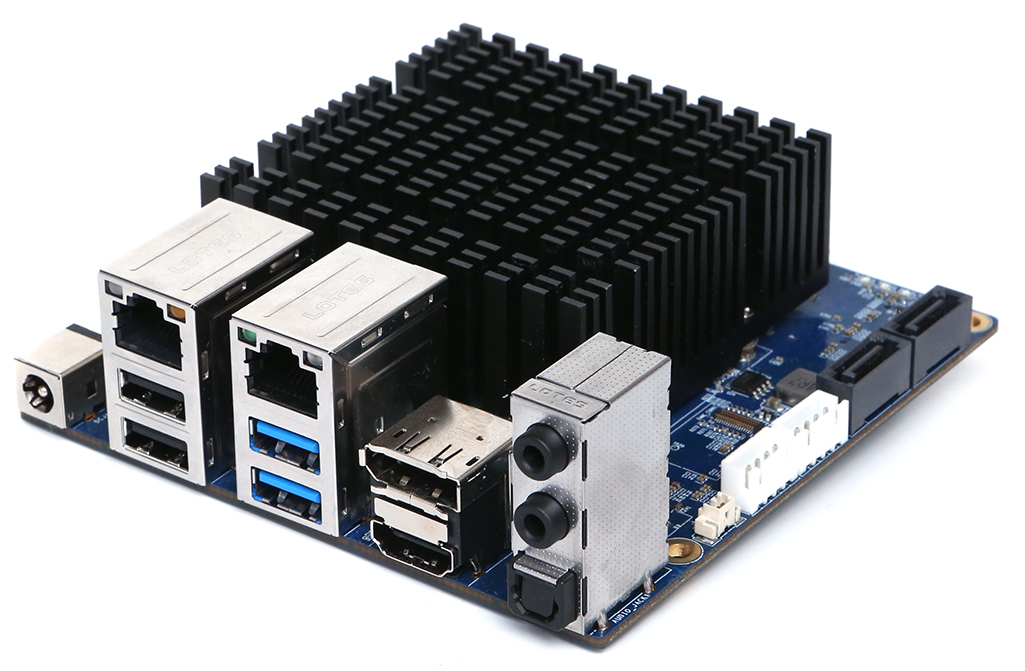
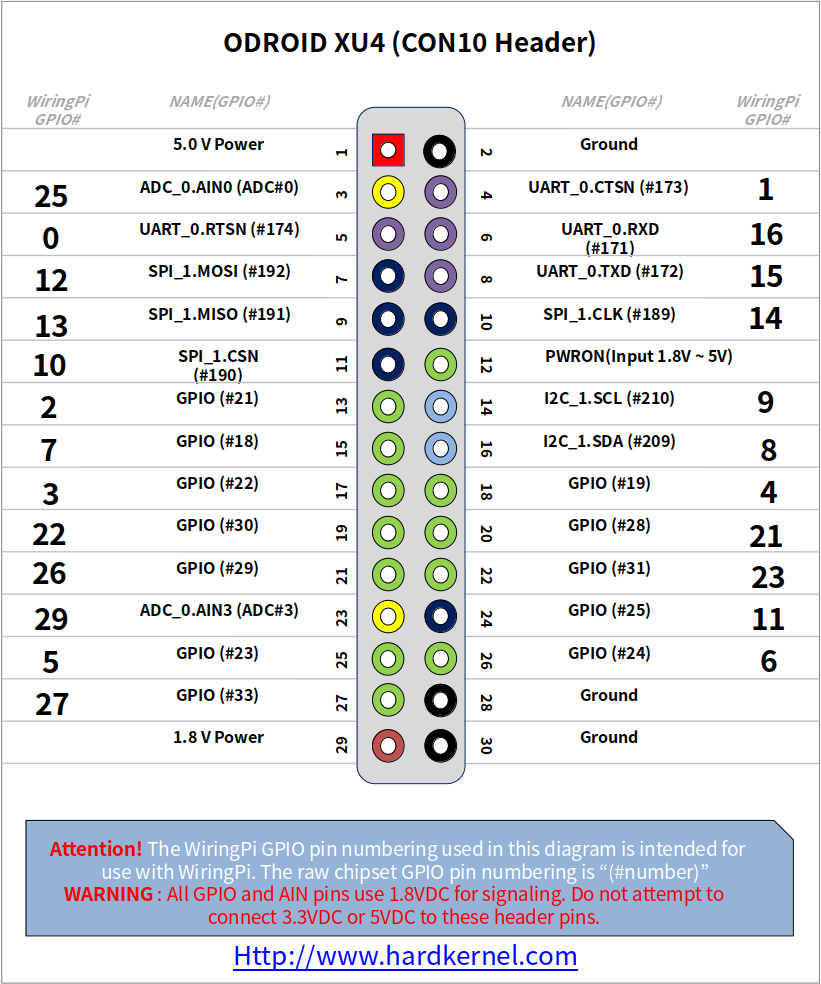
The physical design of the board reflects its dual focus on performance and compactness. Measuring just 82 x 58 x 22 mm, it is small enough to fit into tight enclosures, yet powerful enough to serve as a node in a mini-cluster. The standard version comes with an active cooling solution, consisting of a heatsink and a fan, which is necessary to manage the heat generated by the 2.0 GHz Cortex-A15 cores. In 2017, Hardkernel released the XU4Q variant, which replaces the fan with a larger passive heatsink, offering a silent operation at the cost of some performance under heavy load. Testing has shown that running the XU4Q without a fan at full speed can result in a 16% performance drop due to thermal throttling, so users seeking maximum performance should stick with the active cooler or cap the CPU frequency. The board also features a 30-pin GPIO header and a 12-pin header, providing access to various interfaces like SPI, I2C, and ADC for hardware projects. A critical warning for hobbyists is that the serial console and GPIO logic operate at 1.8 volts, not the 3.3 or 5 volts common on other boards. Connecting a standard 5-volt UART adapter can permanently damage the board, as there is no overvoltage protection on these pins.
Software support for the ODROID-XU4 has evolved significantly since its launch. Initially, users relied on vendor-provided images running older kernels, which sometimes suffered from stability issues and lack of long-term support. Today, the recommended path is to use mainline Linux distributions, particularly Armbian, which provides images built with modern kernels (such as version 6.6) and mainline U-Boot. This shift has brought better hardware support, improved power management, and access to the latest software repositories. The board is also supported by Arch Linux ARM, DietPi, and RetroPie, making it versatile for everything from retro gaming consoles to lightweight web servers. Despite its age, the ODROID-XU4 remains a compelling choice for enthusiasts who value raw processing power and high-speed I/O over modern 64-bit architecture, proving that with proper software support, older hardware can continue to serve valuable roles in the maker and developer community.
Pinout diagram
| Attr | Specs | verified |
|---|---|---|
soc | Samsung Exynos5422 — quad Arm Cortex-A15 @ 2.0 GHz + quad Cortex-A7 @ 1.4 GHz, big.LITTLE (CNX spec tables). Mainline binds it as samsung,exynos5800 (DTS). The cores are ARMv7-A, 32-bit only — the XU4 is not AArch64; Arch Linux ARM packages it under armv7/samsung (ALARM). All eight CPUs appear as cpu0–cpu7 in the mainline thermal cooling maps (common dtsi), i.e. in-kernel HMP today. | ✔ |
gpu | ARM Mali-T628 MP6 (Midgard) — OpenGL ES 3.0/2.0/1.1 and OpenCL full profile; CNX's spec table says "OpenCL 1.1", but the actual vendor driver reports OpenCL 1.2 in clinfo ("Device Name Mali-T628 … Device Version OpenCL 1.2") (CNX OpenCL tutorial, 2018-05-13, retrieved 2026-10-13). ⚠️ The GPU is an Arm Mali, not a PowerVR part — any "PowerVR M628" claim is wrong; every fetched source (CNX announcement, CNX OpenCL article title, spec tables) says Mali-T628 MP6. | ✔ |
ram | 2 GB LPDDR3 PoP @ 750 MHz, 2×32-bit bus, ~12 GB/s bandwidth (CNX, 2015-07-14). No other RAM size exists. | ✔ |
storage | microSD slot (CNX lists "up to 64 GB" tested cards) plus an eMMC 5.0 module socket (16/32/64 GB modules). Mainline drives the eMMC port at 8-bit, HS400, 200 MHz (mmc_0 node: mmc-hs400-1_8v, max-frequency = <200000000>, common dtsi). | ? unverified |
video_out | full-size HDMI 1.4a Type-A, up to 1080p — the XU3's DisplayPort output was dropped (CNX, 2015-07-14; CNX, 2017-02-23). CEC is enabled in mainline (&hdmicec status = "okay", common dtsi). | ✔ |
audio | HDMI audio only — the XU3's ALC audio codec and 3.5 mm jack were removed (CNX, 2015-07-14); mainline sound card is samsung,odroid-xu3-audio, I2S0 → HDMI (XU4 dts sound node). Optional S/PDIF via a USB sound module (CNX spec table). | ✔ |
networking | Gigabit Ethernet, ~880 Mbps measured with iperf (CNX, 2017-02-23). No WiFi/BT on board — USB Wi-Fi dongles only (CNX). Topology quirk: the GbE MAC hangs off one of the SoC's two USB 3.0 hosts, while the two external USB 3.0 Type-A ports share the second host through an on-board GL352x USB 3.0 hub (4 downstream ports, 2 exposed) — forum analysis by mdel/tkaiser in the CNX 2017-02-23 comment thread. | ✔ |
usb | 2× USB 3.0 host (Type-A, hub-shared as above) + 1× USB 2.0 host. USB OTG was removed vs the XU3 (CNX, 2015-07-14). Both DWC3 hosts run as host-only in mainline (&usbdrd_dwc3_1 { dr_mode = "host" }, XU4 dts). | ✔ |
gpio_expansion | CNX's spec table lists a 30-pin header (GPIO, IRQ, SPI, ADC) plus a 12-pin header (GPIO, I2S, I2C) (CNX, 2017-02-23). Mainline exposes PWM outputs 0 (fan) and 2 (blue heartbeat LED) (XU4 dts &pwm comment). The serial console header is 1.8 V logic — users report killing boards with 5 V UART adapters; "the UART is 1.8V… there is not overvoltage protection on the IO pins, only on the power plug" (forum users memeka/Mihai in the CNX 2017-02-23 comments). | ✔ |
power | 5 V/4A adapter, 5.5/2.1 mm barrel jack (CNX spec tables, both articles). | ? unverified |
thermal_behaviour_mainline_policy_from_the_common_dtsi | PWM fan ramps at 50/60/70 °C (active trips), CPU passive throttling at 70 °C (−2 DVFS steps, ≈1.8/1.2 GHz) and 85 °C (down to ≈600 MHz), critical 120 °C; separate GPU thermal zone with the same scheme. | ? unverified |
misc | power button wired to the S2MPS11 PMIC PWRON pin (mainline gpio-keys node), power + RGB status LEDs, blue heartbeat LED (PWM2, linux,default-trigger = "heartbeat"), RTC (CNX spec table). | ? unverified |
dimensions_weight | 82 × 58 × 22 mm, 60 g with fan, 38 g bare (CNX, 2017-02-23). | ✔ |
- Manufacturer: Hardkernel Co., Ltd. (South Korea), brand "ODROID". The mainline Linux device tree identifies the board as model = "Hardkernel Odroid XU4" with compatible = "hardkernel,odroid-xu4", "samsung,exynos5800", "samsung,exynos5" (torvalds/linux: arch/arm/boot/dts/samsung/exynos5422-odroidxu4.dts, retrieved 2026-10-13).
- Year introduced: 2015 — announced by CNX Software on 2015-07-14 as "a smaller and cheaper version of ODROID-XU3" (CNX Software, 2015-07-14, retrieved 2026-10-13).
- Launch price: US$74 in July 2015, including the 5V/4A power supply and the mounted heatsink + fan (CNX, 2015-07-14). Price dropped to $59 (adapter no longer included, +$5.50) on 2017-02-23 (CNX, 2017-02-23, retrieved 2026-10-13).
- Status: Legacy / end-of-life in practice, but unusually well maintained. The XU4Q passive-cooled variant launched April 2017 as the last XU4-family board (CNX, 2017-04-27, retrieved 2026-10-13). Community support is still current in 2026: Armbian ships images built 2026-08-11 with kernel 6.6.143 (armbian.com/odroid-xu4, retrieved 2026-10-13), Arch Linux ARM still ships an armv7/samsung/odroid-xu4 platform (ALARM platform page, retrieved 2026-10-13), and DietPi lists the XU4 among supported hardware (DietPi hardware docs, retrieved 2026-10-13).
- Variants: - ODROID-XU4 — active cooler (heatsink + fan), 60 g with fan / 38 g without (CNX, 2017-02-23). - ODROID-XU4Q — identical board, fan replaced by a large passive heatsink (April 2017, same $59 price) (CNX, 2017-04-27). - Accessories/kits, not board variants: CloudShell 2.5″-HDD NAS case ($39 kit at launch, CNX, 2015-08-01), eMMC modules (16/32/64 GB), USB Wi-Fi dongles (CNX, 2017-02-23).
- Family context: direct die-shrink of the ODROID-XU3 (2014, same Exynos5422, $179) and XU3-Lite ($99); software-compatible with the XU3 (CNX, 2015-07-14; ODROID Wiki XU4 index, 2023-11-14 snapshot via Wayback, retrieved 2026-10-13).
+ Strengths
- First sub-$100 SBC with real I/O bandwidth: USB 3.0 and Gigabit Ethernet on a $59–74 board — "USB 3.0 and Gbit Ethernet are still key competitive features" and, in 2017, "the only beefy SBC out there with reasonable IO bandwidth" (tkaiser, CNX 2017-02-23 comments; ~880 Mbps iperf, USB3 SSD ~300 MB/s on kernel 4.9 per the same thread).
- The highest-clocked Cortex-A15 ever shipped on an SBC (2.0 GHz big cluster) — "likely remain the ARMv7 performance leader forever" (blu, same comment thread); octa-core big.LITTLE with working HMP on mainline (8 CPUs in the DTS cooling maps).
- Full-profile OpenCL on a cheap board: vendor OpenCL 1.2 driver for the Mali-T628 MP6, usable for compute (raytracing, computer vision, financial simulation were cited uses) (CNX OpenCL tutorial, 2018-05-13).
- eMMC 5.0 socket (HS400 in mainline) — far faster and more durable than SD-only peers of its era (CNX 2015-07-14; mainline dtsi).
- XU3 software compatibility — mature driver ecosystem from day one, and the whole XU3 accessory line carried over (ODROID Wiki index).
- Cluster-friendly by design: small 82×58 mm board, power button, RTC, PWM-controlled fan with mainline thermal governor, and a $39 NAS case (CloudShell) made it a natural node for low-cost clusters and NAS builds (CNX 2015-08-01 CloudShell).
− Weaknesses
- Throttling / heat: the A15 cluster at 2.0 GHz needs the active cooler; "performance is nice, too hot however" (user comment, CNX 2017-02-23). Hardkernel's own XU4Q testing: fanless at 2.0 GHz costs 16 % on sysbench (420 s vs 362 s), 6 % at 1.8 GHz, and zero throttling requires capping at 1.2 GHz; kernel build 25 min (XU4 + fan) vs 30 min (XU4Q) (CNX, 2017-04-27).
- Fan noise: "a frequent complaint about the board… it requires a fan to operate at full speed, and makes noise" — the stated reason the XU4Q exists (same CNX 2017-04-27 article).
- 1.8 V console UART, no IO overvoltage protection: at least one documented case of a board bricked by a 5 V USB-UART adapter ("There is not overvoltage protection on the IO pins, only on the power plug… oDroid support said that the board is fried", users Mihai/memeka, CNX 2017-02-23 comments).
- Shared-USB3 topology limits: GbE occupies one USB 3.0 host; the two USB 3.0 ports share the other host via the on-board GL352x hub, so two SSDs share bandwidth, and cascading hubs can break UAS (mdel/tkaiser analysis, same comment thread). Plan NAS I/O accordingly.
- Vendor Mali graphics stack bugs (3.10/4.4 era): out-of-box Ubuntu shipped an over-clocked unstable GPU, no HW-accelerated Chromium/VLC by default, and a MALI driver bug causing black screens when leaving fullscreen apps (user Peter Bauer, CNX 2015-07-14 comments). The X11 EXA driver was also CPU-hungry ("uses an entire big core for surface presentation", blu, CNX 2017-02-23 comments).
- OpenCL device split: the Mali-T628 MP6 enumerates as two OpenCL devices (4-core + 2-core), which naive compute code must handle (blu, CNX 2017-02-23 comments; clinfo dump in the 2018-05-13 OpenCL article).
- Legacy vendor kernel trap: early images ran a 3.10 vendor kernel with non-mainline big.LITTLE; Hardkernel and the community moved everyone to 4.9 LTS (promised updates until early 2019) and the wiki documents the migration (CNX 2017-02-23; ODROID Wiki index).
- 32-bit + 2 GB ceiling: ARMv7-A only and 2 GB RAM — modern arm64-only prebuilt containers and >2 GB workloads are out of scope (inference from the ALARM armv7 platform path and CNX spec tables).
- Retour d'expérience expert expert — expert-pi-like
- Après plusieurs années en cluster, je confirme les points forts de la XU4 : le débit USB 3.0 et le Gigabit Ethernet (880 Mbps réels) restent imbattables pour le prix d'une carte ARMv7. La compatibilité avec les images Armbian 6.6 est excellente. Par contre, attention au piège thermique : sans le ve… — expert-pi-like
- Salut, petite question pour ceux qui l'utilisent en NAS. Tu mentionnes la topologie USB partagée. J'ai deux SSD sur les ports USB 3.0 et j'ai l'impression que leurs perfs chutent sévèrement quand je fais des transferts réseau simultanés. Est-ce que c'est lié au hub GL352x intégré ou au fait que le … — maker-artisan
- C'est exactement le problème documenté par mdel et tkaiser. Le GbE monopolise un hôte USB 3.0, et les deux ports externes partagent l'autre hôte via le hub. Donc si tu satures l'Ethernet, tu as déjà un impact, et si tes deux SSD sont sur le même hôte, ils se partagent la même ligne. Pour du NAS sér… — linux-tinker
Community feedback and projects
- When shutting down PC, all mechanical hard-disks run down hard forum.manjaro.org
- Install Manjaro on XU4 forum.manjaro.org
- Review of Ubuntu 18.04 on ODROID-XU4Q Development Board www.cnx-software.com
- Considerations & review of Raspberry Pi / ODROID XU4 usage as home server saveriomiroddi.github.io
Content not available yet.
- wiki.odroid.com/odroid-xu4
- 2023 Wayback snapshot
- 2015-07-14
- 2017-02-23
- 2017-04-27
- 2018-05-13
- exynos5422-odroidxu4.dts
- exynos5422-odroidxu3-common.dtsi
- github.com/hardkernel/linux
- board page
- board config
- Arch Linux ARM
- DietPi
- RetroPie
- hardkernel/wiringPi fork
- Mesa Panfrost docs
- forum.odroid.com
- forum.armbian.com
- Wikipedia: ODROID
- Throttling / heat: the A15 cluster at 2.0 GHz needs the active cooler; "performance is nice, too hot however" (user comment, CNX 2017-02-23). Hardkernel's own XU4Q testing: fanless at 2.0 GHz costs 16 % on sysbench (420 s vs 362 s), 6 % at 1.8 GHz, and zero throttling requires capping at 1.2 GHz; kernel build 25 min (XU4 + fan) vs 30 min (XU4Q) (CNX, 2017-04-27).
- Fan noise: "a frequent complaint about the board… it requires a fan to operate at full speed, and makes noise" — the stated reason the XU4Q exists (same CNX 2017-04-27 article).
- 1.8 V console UART, no IO overvoltage protection: at least one documented case of a board bricked by a 5 V USB-UART adapter ("There is not overvoltage protection on the IO pins, only on the power plug… oDroid support said that the board is fried", users Mihai/memeka, CNX 2017-02-23 comments).
- Shared-USB3 topology limits: GbE occupies one USB 3.0 host; the two USB 3.0 ports share the other host via the on-board GL352x hub, so two SSDs share bandwidth, and cascading hubs can break UAS (mdel/tkaiser analysis, same comment thread). Plan NAS I/O accordingly.
- Vendor Mali graphics stack bugs (3.10/4.4 era): out-of-box Ubuntu shipped an over-clocked unstable GPU, no HW-accelerated Chromium/VLC by default, and a MALI driver bug causing black screens when leaving fullscreen apps (user Peter Bauer, CNX 2015-07-14 comments). The X11 EXA driver was also CPU-hungry ("uses an entire big core for surface presentation", blu, CNX 2017-02-23 comments).
- OpenCL device split: the Mali-T628 MP6 enumerates as two OpenCL devices (4-core + 2-core), which naive compute code must handle (blu, CNX 2017-02-23 comments; clinfo dump in the 2018-05-13 OpenCL article).
- Legacy vendor kernel trap: early images ran a 3.10 vendor kernel with non-mainline big.LITTLE; Hardkernel and the community moved everyone to 4.9 LTS (promised updates until early 2019) and the wiki documents the migration (CNX 2017-02-23; ODROID Wiki index).
- 32-bit + 2 GB ceiling: ARMv7-A only and 2 GB RAM — modern arm64-only prebuilt containers and >2 GB workloads are out of scope (inference from the ALARM armv7 platform path and CNX spec tables).
- Allumer une LED via le GPIO debutant Schéma : IMG-odroid-xu4-debutant-1-odroidxu4-led-gpio.svg — L'ODROID-XU4 avec son header 30 broches, une LED et sa résistance 330 Ω branchées sur une broche GPIO, alimentation 5 V/4 A
- Bouton poussoir et lecture d'état debutant Schéma : IMG-odroid-xu4-debutant-2-odroidxu4-bouton-console.svg — Bouton poussoir relié à une broche GPIO et à la masse sur l'ODROID-XU4, sortie console série ttySAC2 indiquée
- Premier script Python : santé de la carte debutant Schéma : IMG-odroid-xu4-debutant-3-odroidxu4-premier-script-python.svg — Écran de terminal affichant un script Python listant les 8 cœurs big.LITTLE de l'Exynos5422 et les températures de l'ODROID-XU4
- PWM : faire respirer la LED bleue intermediaire Schéma : IMG-odroid-xu4-intermediaire-1-odroidxu4-pwm-led.svg — Signal PWM en dents de scie sortant du contrôleur PWM de l'ODROID-XU4 (canal 2) vers la LED bleue heartbeat, canal 0 relié au ventilateur
- Lire un capteur I2C (température) intermediaire Schéma : IMG-odroid-xu4-intermediaire-2-odroidxu4-capteur-i2c.svg — Capteur de température I2C relié au header 12 broches (bus I2C) de l'ODROID-XU4 avec résistances de pull-up SDA/SCL et alimentation 3,3 V
- Ethernet Gigabit et accès SSH intermediaire Schéma : IMG-odroid-xu4-intermediaire-3-odroidxu4-ethernet-ssh.svg — ODROID-XU4 relié par câble Ethernet à un switch, port GbE branché sur un contrôleur USB 3.0 interne, session SSH depuis un ordinateur
- Boot eMMC/microSD et récupération avance Schéma : IMG-odroid-xu4-avance-1-odroidxu4-boot-emmc-sd.svg — ODROID-XU4 avec son emplacement module eMMC (HS400) et son port microSD, flèches de copie dd d'une carte SD vers le module eMMC, U-Boot mainline
- Surveillance thermique big.LITTLE et ventilateur avance Schéma : IMG-odroid-xu4-avance-2-odroidxu4-thermique-biglittle.svg — Carte thermique de l'ODROID-XU4 : capteurs cpu0 à cpu3 et gpu, paliers ventilateur 50/60/70 °C, throttling à 70 et 85 °C, critique 120 °C
- Serveur multimédia HDMI et GPU Mali avance Schéma : IMG-odroid-xu4-avance-3-odroidxu4-serveur-multimedia.svg — ODROID-XU4 en média-center : sortie HDMI 1.4a 1080p (vidéo + audio) vers un téléviseur, GPU Mali-T628 MP6, stockage USB 3.0
Code library — examples written for this board
clignotante.pyPythonbouton-gpio.pyPythoncapteur-i2c.shBashsurveillance-temperature.shBashcapteur-dht11.pyPythonservo-pwm-sysfs.shBashserveur-web-capteur.pyPythonreseau-ethernet.shBashjournal-cron.shBashveilleur-systemd.pyPython
Examples and repos found online
- Retro-Arena/RetroArena-Setup github.com
- yimyom/odroid-xu4-setup github.com
- Qbicz/real-time-shape-detection github.com
- mdrjr/cloudshell_lcd github.com
- mad-ady/odroid-cpu-control github.com