TrustKernel PlugMate : Secure Miniature USB-C Computer running PlugOS
⚡ The essentials in 60 seconds
- soc — MediaTek Helio G80 (MT6769V), Octa-core (2x Cortex-A75 @ 2GHz, 6x Cortex-A55)
- ram — 4 GB (Standard), 6 GB (PlugClaw variant)
- storage — 128 GB eMMC (Fully encrypted)
- wifi_bluetooth — None (Uses host connectivity via virtualization)
- ethernet — None
- video — USB-C Display Output (Virtualized via host)
- On this board : 9 tutorials · 10 code
Imagine a computing device so compact that it fits comfortably in the palm of your hand, yet possesses the processing power of a modern smartphone. The PlugMate, manufactured by TrustKernel, represents a radical departure from traditional personal computers by redefining the very concept of what a computer needs to be. It is a miniature computer housed in a USB-C form factor, measuring a mere 50 by 19 by 8 millimeters and weighing approximately 15 grams. Despite its diminutive size, it is not merely a storage drive or a simple adapter; it is a fully functional computer running PlugOS, a hardened version of Android 14. This device challenges the conventional understanding of hardware by stripping away components we often take for granted, such as batteries, modems, and SIM card slots, to focus entirely on secure, isolated computing. By removing these elements, the PlugMate relies on the host device to provide power, display, keyboard input, and network connectivity, creating a symbiotic relationship between the plug and the host that prioritizes security and portability over standalone autonomy.
At the heart of this tiny machine lies the MediaTek Helio G80 system-on-chip, a processor architecture that might surprise those expecting low-power, low-performance components in such a small package. This octa-core processor features two high-performance Cortex-A75 cores clocked at 2 GHz, paired with six efficiency-focused Cortex-A55 cores. This configuration allows the PlugMate to handle complex tasks with surprising agility, bridging the gap between simple microcontrollers and full-fledged mobile processors. It is supported by 4 GB of RAM, which provides ample memory for running multiple applications simultaneously, and 128 GB of eMMC storage. Crucially, this storage is fully encrypted, ensuring that data at rest remains protected even if the physical device is lost or stolen. The choice of eMMC storage, while slower than newer NVMe standards, offers a balance of reliability and cost-effectiveness suitable for the device’s intended use cases, which emphasize security and steady performance rather than raw speed for heavy gaming or video editing.
The operational philosophy of the PlugMate is built upon the concept of strict isolation and virtualization. Unlike traditional computers where the operating system has direct access to hardware peripherals, the PlugMate operates in a sandboxed environment. It does not have its own Wi-Fi, Bluetooth, Ethernet, or GPS modules. Instead, it borrows these capabilities from the host device—whether that host is an Android phone, an iPhone, a Windows PC, a Mac, or a Linux machine—through a secure, encrypted USB-C channel. This design choice is fundamental to its security model. The applications running on the PlugMate are completely unaware of the host’s data. They cannot see the host’s files, access its camera directly, or read its SIM information unless explicitly permitted through a virtualization layer. This virtualization process creates a digital air gap, ensuring that even if a malicious application were to compromise the PlugMate’s environment, it would remain contained within the encrypted boundaries of the device, unable to spread to the host system.
Security is not just a feature of the PlugMate; it is its primary design constraint. The device integrates a hardware Trusted Execution Environment (TEE), which is a secure area of the main processor that guarantees code and data loaded inside are protected with respect to confidentiality and integrity. This hardware-level security is complemented by robust software safeguards. One of the most notable features is the duress PIN, a specific code that, when entered, immediately erases the encryption keys. This renders the data on the device permanently inaccessible, a critical feature for users in high-risk environments who may be coerced into unlocking their devices. Additionally, the system includes an auto-reset mechanism that triggers after five to fifteen failed login attempts, further protecting against brute-force attacks. The entire system is designed to ensure that the PlugMate remains a private enclave, separate from the potentially compromised or less secure environment of the host device.
Using the PlugMate requires a shift in user expectations. Because it lacks its own power source, it draws energy directly from the host via the USB-C connection. This means it can only function when plugged into a compatible device. The boot process takes approximately 24 seconds, a duration that reflects the initialization of its secure operating system and the establishment of the encrypted tunnel with the host. Users must install a specific client application on their host device to interface with the PlugMate. This client acts as the bridge, rendering the PlugMate’s display on the host’s screen and passing keyboard and mouse inputs back to the PlugMate. It is important to note that compatibility is not universal; the device does not support Intel-based Macs or Windows ARM devices, limiting its ecosystem to specific hardware configurations. This restriction is likely due to the specific requirements of the USB-C virtualization protocol and the security handshake needed to establish the encrypted channel.
The PlugMate is priced at 299 USD, with promotional offers occasionally bringing this down to 199 USD. This price point positions it as a specialized tool rather than a general-purpose consumer gadget. It is designed for users who prioritize data sovereignty and security, such as journalists, activists, or privacy-conscious individuals who need to perform sensitive tasks without exposing their data to the host device’s operating system or potential malware. By decoupling the computing environment from the physical hardware, the PlugMate offers a portable, secure workspace that can be carried in a pocket and plugged into almost any modern device. It represents a fascinating evolution in computing, where the boundary between the computer and the peripheral becomes blurred, and security is achieved not through complex software layers alone, but through architectural isolation and hardware-backed encryption.
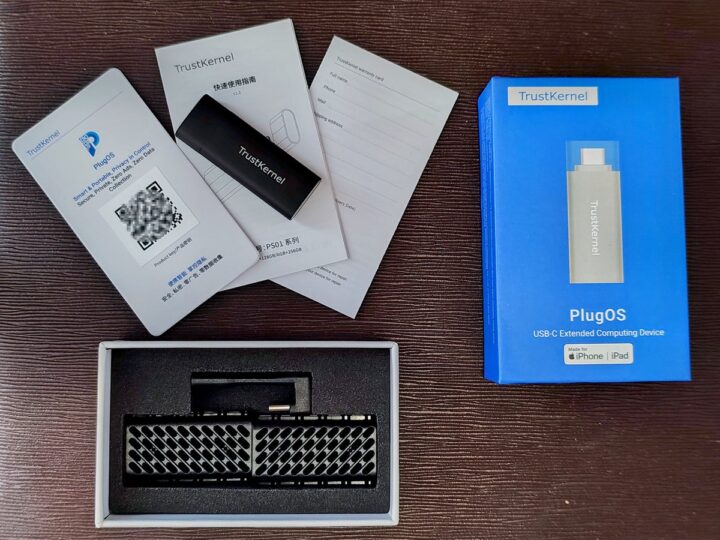
| Attr | Specs | verified |
|---|---|---|
soc | MediaTek Helio G80 (MT6769V), Octa-core (2x Cortex-A75 @ 2GHz, 6x Cortex-A55) | ? unverified |
ram | 4 GB (Standard), 6 GB (PlugClaw variant) | ? unverified |
storage | 128 GB eMMC (Fully encrypted) | ? unverified |
wifi_bluetooth | None (Uses host connectivity via virtualization) | ? unverified |
ethernet | None | ? unverified |
video | USB-C Display Output (Virtualized via host) | ? unverified |
usb | 1x USB-C Male (Power, Data, Auth, Display) | ? unverified |
gpio | None | ? unverified |
power | USB-C (Powered by host device) | ? unverified |
os | PlugOS (Hardened Android 14) | ? unverified |
dimensions | 50 x 19 x 8 mm | ? unverified |
weight | ~15-16 grams | ? unverified |
security | Hardware TEE, Duress PIN, Auto-wipe on brute force, Encrypted eMMC | ? unverified |
connectivity | No SIM, No Modem, No Battery | ? unverified |
The PlugMate is a miniature USB-C stick computer manufactured by TrustKernel, designed to provide an isolated and secure computing environment. It runs PlugOS, a hardened version of Android 14, and was developed to run sensitive applications without exposing host data.
+ Strengths
- Strict data isolation through device virtualization (GPS, SIM, camera) and a system firewall preventing internal apps from accessing host data.
- Enhanced hardware security including encrypted eMMC storage, hardware TEE, a duress PIN that wipes encryption keys, and auto-reset after 5 to 15 failed attempts.
- Ultra-compact form factor of 50x19x8 mm weighing approximately 15 grams, with no battery or modem, powered directly by the host's USB-C port.
− Weaknesses
- Total dependency on the host for display, keyboard, and network connectivity, requiring the installation of a specific host client.
- Hardware incompatibility with Intel Macs and Windows ARM systems.
- Lack of autonomous connectivity (no Wi-Fi, Bluetooth, Ethernet, SIM, or battery), limiting use to scenarios where the host is available.
- Retour d'expérience expert expert — expert-microdb
- Après 3 semaines avec le PlugMate, je confirme son utilité pour la confidentialité. L'isolation est réelle : aucune fuite de données vers l'hôte. Par contre, attention aux limites : pas de batterie, pas de 4G, et le démarrage de 24s casse le rythme. Le SoC Helio G80 suffit pour la bureautique mais … — expert-microdb
- @Expert Merci pour le retour. J'ai testé la fonctionnalité duress PIN : l'effacement des clés est immédiat, ce qui est crucial pour la sécurité physique. Par contre, la compatibilité hôte est trop restrictive. Pas de support pour Windows ARM est un vrai frein pour les utilisateurs de Surface Pro X.… — membre-forum
Community feedback and projects
- Discussions Reddit — PlugMate reddit.com
- Articles CNX Software — PlugMate cnx-software.com
- Forum officiel — PlugMate forum.plugmate.com
Content not available yet.
Content not available yet.
Content not available yet.
- Relatively long boot time of approximately 24 seconds.
- Not specified
- Not specified
- Discovering I/O on PlugMate debutant Apprenez à interagir avec les périphériques virtuels et le système d'exploitation sécurisé du PlugMate sans risque pour l'hôte.
- Use case: Create a portable encrypted storage with PlugMate debutant Apprenez à utiliser le stockage eMMC chiffré du PlugMate comme une clé USB sécurisée indépendante de votre hôte.
- PlugMate Setup: First Connection and Configuration intermediaire Guide étape par étape pour connecter, initialiser et sécuriser votre PlugMate lors de sa première utilisation.
- Configuring GPIO I/O on PlugMate intermediaire Apprenez à interfacer des composants électroniques externes avec PlugMate via son interface GPIO sécurisée.
- Using PlugMate as an isolated network terminal intermediaire Configurez le PlugMate pour accéder à des ressources réseau sensibles sans exposer les données de l'hôte.
- Secure PlugMate Setup: First Connection Guide avance Guide avancé pour initialiser le PlugMate en garantissant l'intégrité du canal chiffré et la configuration des politiques de sécurité.
- Configuring I/O (GPIO, sensors) on PlugMate avance Accédez aux interfaces matérielles basses niveau via les drivers virtualisés de PlugOS pour connecter capteurs et périphériques.
- PlugMate Advanced: Securing Network Flows and Encrypted Storage avance Configurez le pare-feu système et le stockage chiffré du PlugMate pour isoler vos données sensibles de l'hôte.
- Getting started with PlugMate: Booting and interface discovery debutant Apprenez à démarrer PlugMate, comprendre son interface sécurisée et effectuer vos premières actions sans risque.
Code library — examples written for this board
plugmate-secure-file-io.inoKotlinplugmate-secure-http-client.inoKotlinplugmate-duress-pin-trigger.inoKotlinplugmate-virtual-sensor-access.inoKotlinplugmate-secure-clipboard.inoKotlinplugmate-wifi-scan-adb-6.inobashplugmate-log-encryption-key-7.inopythonplugmate-thermal-throttle-check-8.inobashplugmate-adb-network-toggle-9.inobashplugmate-storage-free-space-check-10.inopython