Arduino Yún
⚡ The essentials in 60 seconds
- microcontroller_side_atmel_microchip_atmega32u4 — — the same native-USB AVR as the Leonardo. Datasheet (live, fetched 2026-10-13): — 32 KB self-programmable flash, 2.5 KB SRAM, 1 KB EEPROM, up to 16 MHz, USB 2.0 device, hardware UART/SPI/I²C, PWM and 10-bit ADC.
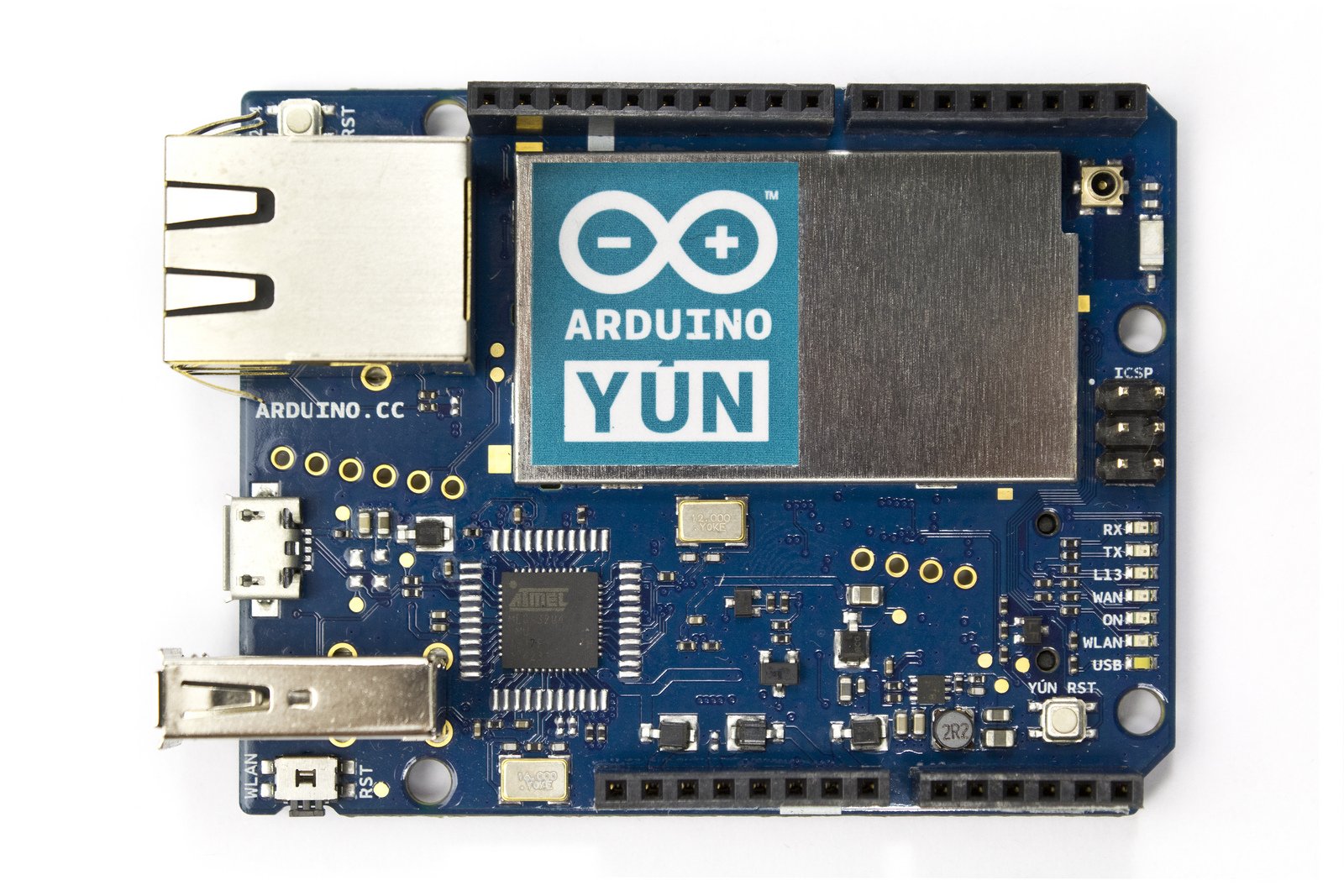
- linux_side_qualcomm_atheros_ar9331 — (NOT an Intel Quark). Proof: the current OpenWrt device tree for the board is literally named ar9331_arduino_yun.dts with compatible = "arduino,yun", "qca,ar9331" ( fetched 2026-10-13), and Arduino's own firmware tree builds it as CONFIG_TARGET_ar71xx_generic_Yun=y with -mips32r2 -mtune=mips32r2 on Linux 3.3 ( fetched 2026-10-13). - CPU: MIPS 24Kc-class 32-bit MIPS (MIPS32 release 2 per the toolchain flags above). - Wi-Fi: AR9331-integrated 2.4 GHz radio driven by kmod-ath9k (default in the Yun firmware .config above; &wmac enabled in the DTS). 802.11b/g/n 1×1. - Ethernet: AR9331 integrated 10/100 switch (ð0/ð1 enabled in the DTS), one RJ45 jack on the board. - USB: AR9331 USB 2.0 host (dr_mode = "host" in the DTS) feeding the external USB-A port; Rev.2 "improved USB hub" (blog post above). - Console: console=ttyATH0,250000 (DTS chosen node) — the 250000-baud AR9331 serial console reachable through the USB serial bridge.
- storage — 16 MB SPI NOR flash on the Linux side — partition map in the DTS: u-boot 256 KB (read-only) @0x0, u-boot-env 64 KB, firmware 0xF90000 (~15.5 MB), nvram 64 KB, art (Wi-Fi calibration) 64 KB read-only @0xFF0000. Plus a microSD slot used to expand Linux storage (official tutorial YunDiskSpaceExpander sketch, forum topic
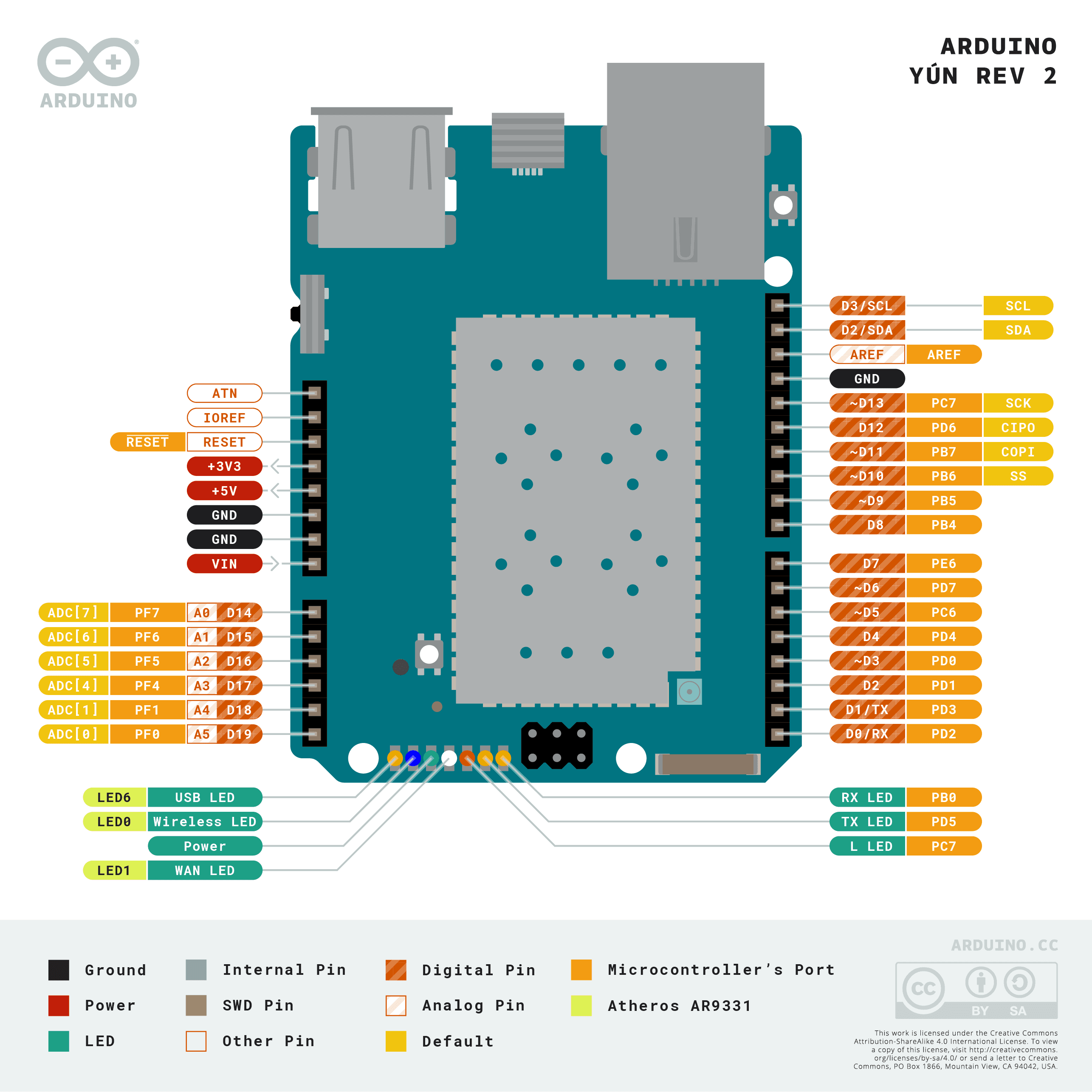
- gpio_headers_atmega32u4_side_uno_form_factor — 14 digital I/O (PWM-capable channels among 3, 5, 6, 9, 10, 11), 6 analog inputs (A4/A5 = I²C), ICSP (SPI), 5 V logic.
- inter_cpu_link — the AR9331 and the 32U4 are wired together over SPI and UART with output-enable buffers — the DTS exports exactly those three control GPIOs: yun:oe:spi (gpio 21), yun:oe:hs (handshake, gpio 22), yun:oe:uart (gpio 23) (DTS above). This is the hardware under the Bridge library.
- power — USB micro-B (5 V, programming + power) and barrel jack / VIN.
- On this board : 9 tutorials · 10 code
The Arduino Yún, introduced in 2013, represents a unique chapter in the history of embedded electronics, designed to bridge the gap between simple microcontroller projects and complex internet-connected systems. Unlike standard Arduino boards that rely on a single chip to handle both hardware control and communication, the Yún is a dual-processor hybrid. It combines an 8-bit AVR microcontroller with a fully independent Linux-capable system-on-chip, all housed within the familiar Uno-sized form factor. This architecture allows developers to write simple, real-time code for sensors and actuators on the microcontroller side, while leveraging the power of a full operating system for networking, data processing, and cloud connectivity on the Linux side. Although the board is now considered end-of-life and retired from the official Arduino store, its design philosophy remains a significant reference point for understanding how to integrate high-level computing with low-level hardware control.
At the heart of the Yún’s microcontroller side is the Atmel ATmega32U4, the same native-USB chip found in the Arduino Leonardo. This component handles the direct interaction with the physical world, managing digital and analog inputs, pulse-width modulation for motor control, and standard communication protocols like I2C and SPI. It operates at up to 16 MHz and includes 32 KB of flash memory for storing sketches. However, the true innovation of the Yún lies in its Linux side, powered by the Qualcomm Atheros AR9331. It is important to clarify a common misconception: the Yún does not use an Intel Quark processor, which was used in other Arduino boards like the Galileo or the 101. Instead, the AR9331 is a MIPS-based processor that runs a customized version of OpenWrt, a lightweight Linux distribution designed for embedded devices. This Linux system runs on a 32-bit MIPS architecture and provides the heavy lifting for network tasks, including Wi-Fi and Ethernet connectivity, which the microcontroller alone could not handle efficiently.
Communication between these two distinct brains is managed through a hardware bridge that connects the ATmega32U4 and the AR9331 via both SPI and UART interfaces. This link is controlled by specific GPIO pins that manage data flow and handshaking, ensuring that the two processors can exchange information reliably. On the software side, this hardware link is abstracted by the Bridge library, a set of tools that provides a shared key-value store, a mailbox system, and a console interface. This allows a sketch running on the microcontroller to send data to the Linux side, where it can be accessed via a REST API. Conversely, the Linux system can trigger actions on the microcontroller or run shell commands directly from the Arduino code using the Process class. This capability enables users to execute Linux commands, such as curl for web requests or opkg for package management, directly from their Arduino sketches, effectively turning the microcontroller into a remote controller for the Linux machine.
The Yún’s Linux side is equipped with 16 MB of SPI NOR flash storage, which houses the operating system and user applications. While this is sufficient for basic networking tasks, it is relatively small by modern standards, often requiring users to expand storage via a microSD card slot to install additional software like Node.js or Python libraries. The board also features a USB host port, allowing the connection of external devices such as USB drives or webcams, and an Ethernet jack for wired network access. The Wi-Fi capabilities are provided by the integrated AR9331 radio, supporting 2.4 GHz 802.11b/g/n standards. The system is powered via a micro-USB port or a barrel jack, making it versatile for different deployment scenarios. The Linux environment is managed through a web-based configuration panel accessible via the local network, allowing users to update firmware, configure network settings, and monitor system status without needing to connect a monitor or keyboard.
Despite its innovative design, the Yún faced several challenges during its lifecycle. Users reported issues with the Bridge library, such as blocking calls that could hang the sketch if the Linux side was not fully booted, and socket exhaustion problems when handling numerous network connections. The limited flash storage also posed constraints for more complex applications, necessitating careful management of installed packages. Security was another area of concern in the original 2013 model, as the bridge communication was initially unencrypted. This was addressed in the Yún Rev.2, released in 2018, which introduced SSL support for secure communication between the microcontroller and the Linux side, along with a more robust power supply and improved USB hub design. The Rev.2 also featured a horizontal USB connector and a new Ethernet connector, reflecting Arduino’s response to user feedback and the evolving needs of the IoT community.
The Yún ecosystem also spawned several variants, including the Yún Mini, a smaller version of the board, and the Yún Shield, which allowed other Arduino boards to gain Linux capabilities by adding the AR9331 module as an add-on. This shield approach democratized access to Linux-powered IoT projects for users who already owned Uno-class boards. The Yún’s legacy is evident in its influence on subsequent Arduino boards that integrate Wi-Fi and Bluetooth, such as the MKR series and the Nano 33 IoT, which adopt a more integrated approach to connectivity. Although the Yún is no longer in production and its official documentation has been moved to legacy archives, it remains a valuable educational tool for understanding the complexities of hybrid embedded systems. Its architecture teaches important lessons about resource management, inter-processor communication, and the trade-offs between real-time control and high-level computing. For hobbyists and educators, the Yún serves as a historical benchmark for IoT development, illustrating the early attempts to bring the full power of Linux to the maker community in a compact, accessible package.
Pinout diagram
| Attr | Specs | verified |
|---|---|---|
microcontroller_side_atmel_microchip_atmega32u4 | — the same native-USB AVR as the Leonardo. Datasheet (live, fetched 2026-10-13): — 32 KB self-programmable flash, 2.5 KB SRAM, 1 KB EEPROM, up to 16 MHz, USB 2.0 device, hardware UART/SPI/I²C, PWM and 10-bit ADC. | ✔ |
linux_side_qualcomm_atheros_ar9331 | (NOT an Intel Quark). Proof: the current OpenWrt device tree for the board is literally named ar9331_arduino_yun.dts with compatible = "arduino,yun", "qca,ar9331" ( fetched 2026-10-13), and Arduino's own firmware tree builds it as CONFIG_TARGET_ar71xx_generic_Yun=y with -mips32r2 -mtune=mips32r2 on Linux 3.3 ( fetched 2026-10-13). - CPU: MIPS 24Kc-class 32-bit MIPS (MIPS32 release 2 per the toolchain flags above). - Wi-Fi: AR9331-integrated 2.4 GHz radio driven by kmod-ath9k (default in the Yun firmware .config above; &wmac enabled in the DTS). 802.11b/g/n 1×1. - Ethernet: AR9331 integrated 10/100 switch (ð0/ð1 enabled in the DTS), one RJ45 jack on the board. - USB: AR9331 USB 2.0 host (dr_mode = "host" in the DTS) feeding the external USB-A port; Rev.2 "improved USB hub" (blog post above). - Console: console=ttyATH0,250000 (DTS chosen node) — the 250000-baud AR9331 serial console reachable through the USB serial bridge. | ✔ |
storage | 16 MB SPI NOR flash on the Linux side — partition map in the DTS: u-boot 256 KB (read-only) @0x0, u-boot-env 64 KB, firmware 0xF90000 (~15.5 MB), nvram 64 KB, art (Wi-Fi calibration) 64 KB read-only @0xFF0000. Plus a microSD slot used to expand Linux storage (official tutorial YunDiskSpaceExpander sketch, forum topic | ✔ |
ram | ? unverified | |
gpio_headers_atmega32u4_side_uno_form_factor | 14 digital I/O (PWM-capable channels among 3, 5, 6, 9, 10, 11), 6 analog inputs (A4/A5 = I²C), ICSP (SPI), 5 V logic. | ? unverified |
inter_cpu_link | the AR9331 and the 32U4 are wired together over SPI and UART with output-enable buffers — the DTS exports exactly those three control GPIOs: yun:oe:spi (gpio 21), yun:oe:hs (handshake, gpio 22), yun:oe:uart (gpio 23) (DTS above). This is the hardware under the Bridge library. | ? unverified |
power | USB micro-B (5 V, programming + power) and barrel jack / VIN. | ? unverified |
typical_current_draw_operating_temperature | ? unverified | |
intel_quark_note_task_brief_correction | the Quark line (X1000, 32 nm, ≤400 MHz, i586/P54C ISA, no SIMD, EOL announced January 2019 with final shipments July 2022) powered the Intel Galileo/Edison/Curie and the Arduino 101 — not the Yun ( fetched 2026-10-13). The Yun's Linux SoC is the MIPS-based AR9331 shown above. | ✔ |
- Manufacturer: Arduino (Arduino LLC / Arduino AG at the time of sale).
- Year introduced: 2013. The official board page arduino.cc/en/Main/ArduinoBoardYun was already live in September 2013 (first Wayback CDX captures: 2013-09-14, and Arduino itself says "Since its launch in 2013, the Yùn — a small Linux machine and a microcontroller in a small Arduino form factor" (official blog, 2018-03-29:
- Status: End of life / retired (as of 2026-10-13): - the product page is gone from the store ( → 404, checked 2026-10-13); - the board page is gone from docs.arduino.cc (/hardware/yun, /retail/boards/yun, /legacy/yun all → 404, checked 2026-10-13; current boards like still resolve, so the Yun was removed, not the site broken); - the Bridge library repository is archived ( "archived": true, last push 2021-05-12, GitHub API 2026-10-13); - the Yun forum category now sits under Official Hardware → Retired on (category tree fetched 2026-10-13).
- Launch price: >
- Variants (all documented by official sources): - Yún (original, 2013) — the board this sheet describes. - Yún Mini and Yún Shield — the shield ("Arduino/Genuino Yún or Yún Shield Web panel", official repo description let any Arduino add Linux; shield support landed in IDE 1.6.9 ( - Yún Rev.2 (2018, product code ABX00020) — "true open-source design", more robust power supply, new Ethernet connector, horizontal USB connector, improved USB hub, OpenWRT stack updated, SSL support on the Arduino↔Linux bridge (
- Task-brief correction: the assignment named github.com/arduino/ArduinoYun and github.com/arduino/meta-arduino-yun as sources; neither repository exists (GitHub API 404 for both, 2026-10-13). The real official Yun repositories are listed in §Resources. Likewise, the brief described the Linux side as an "Intel Quark X1000": that is wrong for the Yun — see §SoC & specs.
+ Strengths
- MCU + Linux on one board, talking over SPI/UART: the Bridge library ( archived) exposes a shared key-value store, a mailbox, a console, and process spawning as a C++ API on the AVR side and a Python/REST service (arduino/YunBridge, — "Python" per GitHub API) on the Linux side.
- REST API out of the box: the Linux side serves the key-value store over HTTP (/data/get, /data/put, mailbox endpoints), so any language on the LAN can talk to the sketch — the sketch side is YunServer/YunClient (library source above).
- Process class: run Linux shell commands straight from a sketch (runShellCommand, runShellCommandAsynchronously) — e.g. curl, opkg, GPIO sysfs on the AR9331 (library source above).
- Network sketch upload + web console + web panel (YunWebUI repo above).
- microSD storage expansion with the official YunDiskSpaceExpander sketch (blog:
- Yún Shield: the same Linux+Wi-Fi module concept as a shield for Uno-class boards (
- Rev.2 security: SSL support on the Arduino↔Linux bridge (2018 blog post above) — Arduino explicitly acknowledged earlier "challenges … especially from a security point of view" (same post).
- No Bluetooth/BLE, no CAN, no audio, no display — the Yun's differentiator is the Linux side, not peripherals.
− Weaknesses
- Bridge.begin blocks forever / breaks boot. The call waits for the Linux side; if the sketch runs while Linux is still booting it can interrupt the boot and hang the sketch permanently: , explanation thread .
- Socket/connection exhaustion: YunClient hangs after ~256 connections or connection attempts, sometimes unrecoverable even by reset: .
- Bridge saturation at low throughput: hangs and lost characters around 50 bytes/s through the bridge: .
- YunServer + SoftwareSerial periodic hangs: .
- Board silently disappears from the network after days of otherwise-stable operation: .
- Web panel hangs on "Waiting for changes to be applied" after some configuration changes: .
- Third-party OpenWrt images break the bridge (Bridge.begin hangs until Arduino's bridge packages are restored): .
- Security by default: early firmware shipped an open, unencrypted bridge; Arduino admitted software "challenges … especially from a security point of view" and added SSL only in Rev.2 (
- 16 MB flash pressure: the stock Linux root is tight; official guidance was to expand onto microSD (blog 2014-05-06 above).
- EOL ecosystem: Bridge repo archived; official docs/store pages deleted (see §Identity); opkg feeds for the old Attitude Adjustment base no longer maintained.
- Retour d'expérience expert expert — expert-arduino
- Retour d'expérience sur la Yun. C'est une bête étrange : un ATmega32U4 collé à un Linux AR9331. Le concept est génial mais la réalité est douloureuse. Le problème majeur reste Bridge.begin qui bloque indéfiniment si le sketch démarre avant que Linux soit prêt. J'ai passé des heures à comprendre pou… — expert-arduino
- Je confirme le souci de blocage au démarrage, c'est monnaie courante. J'ai tenté de migrer vers une image OpenWRT standard pour contourner la lourdeur de la distribution Arduino, erreur fatale : le bridge ne fonctionne plus du tout et Bridge.begin reste bloqué. Il faut impérativement restaurer les … — maker-flux
Community feedback and projects
- The problem with arduino yun forum.arduino.cc
- Why does the Arduino yun resets every 30 minutes? forum.arduino.cc
- Who is currently looking after the Yun system? Packages, OpenWRT, updates, etc forum.arduino.cc
- Arduino YUN failed update forum.arduino.cc
- Finding people with Arduino Yun boards to help test my updates forum.arduino.cc
Content not available yet.
- Official firmware / software repos (Arduino org on GitHub, all verified 2026-10-13)
- Official firmware / software repos (Arduino org on GitHub, all verified 2026-10-13)
- Official firmware / software repos (Arduino org on GitHub, all verified 2026-10-13)
- Official firmware / software repos (Arduino org on GitHub, all verified 2026-10-13)
- Official firmware / software repos (Arduino org on GitHub, all verified 2026-10-13)
- Official firmware / software repos (Arduino org on GitHub, all verified 2026-10-13)
- Official firmware / software repos (Arduino org on GitHub, all verified 2026-10-13)
- Official firmware / software repos (Arduino org on GitHub, all verified 2026-10-13)
- Official firmware / software repos (Arduino org on GitHub, all verified 2026-10-13)
- Mainline OpenWrt support
- Chip references
- Chip references
- Chip references
- Official blog posts
- Official blog posts
- Official blog posts
- Community
- Archived official pages
- Bridge.begin blocks forever / breaks boot. The call waits for the Linux side; if the sketch runs while Linux is still booting it can interrupt the boot and hang the sketch permanently: , explanation thread .
- Socket/connection exhaustion: YunClient hangs after ~256 connections or connection attempts, sometimes unrecoverable even by reset: .
- Bridge saturation at low throughput: hangs and lost characters around 50 bytes/s through the bridge: .
- YunServer + SoftwareSerial periodic hangs: .
- Board silently disappears from the network after days of otherwise-stable operation: .
- Web panel hangs on "Waiting for changes to be applied" after some configuration changes: .
- Third-party OpenWrt images break the bridge (Bridge.begin hangs until Arduino's bridge packages are restored): .
- Security by default: early firmware shipped an open, unencrypted bridge; Arduino admitted software "challenges … especially from a security point of view" and added SSL only in Rev.2 (
- 16 MB flash pressure: the stock Linux root is tight; official guidance was to expand onto microSD (blog 2014-05-06 above).
- EOL ecosystem: Bridge repo archived; official docs/store pages deleted (see §Identity); opkg feeds for the old Attitude Adjustment base no longer maintained.
- Premiers pas sur la Yún : Bridge, Console et LED debutant Schéma : IMG-yun-debutant-1-yun-premiers-pas-bridge.svg — Arduino Yún vue de dessus, flèches sur la puce ATmega32U4, le SoC Atheros AR9331 avec son blindage radio, le port micro-USB et la LED marquée L.
- Connecter la Yún au WiFi et piloter une broche depuis le navigateur debutant Schéma : IMG-yun-debutant-2-yun-config-wifi-arduino-local.svg — Yún avec ant WiFi, câble Ethernet et flèche vers un navigateur affichant http://arduino.local, panneau de configuration WiFi ; une LED sur la pin 13 reliée à un bouton du tableau de bord web.
- Envoyer un capteur analogique sur le réseau : potentiomètre et Bridge REST debutant Schéma : IMG-yun-debutant-3-yun-potentiometre-web-bridge.svg — Yún sur breadboard : potentiomètre 10 kΩ sur A0, câble réseau/ant WiFi, et navigateur affichant la valeur renvoyée par http://arduino.local/arduino/analog/0.
- runShellCommandOnLinux : faire exécuter des commandes Linux depuis le sketch intermediaire IMG-yun-intermediaire-4-yun-runshellcommand-linux.svg — Yún en coupe conceptuelle : à gauche l'ATmega32U4 avec son croquis, flèche « Bridge /ttyATH0 » vers la droite représentant Linino OS (terminal # ping -c1), retour de la sortie vers le Moniteur série.
- L'API REST du Bridge en détail : /arduino, /data et routes personnalisées intermediaire IMG-yun-intermediaire-5-yun-api-rest-complete.svg — Yún au centre, autour d'elle quatre bulles HTTP : GET /arduino/digital/13/1, GET /data/get/temp, POST /data/send, GET /mail/send ; flèches navigateur, curl et smartphone.
- Alerte email : bouton sur la Yún et envoi via sendmail intermediaire IMG-yun-intermediaire-6-yun-bouton-alerte-mail.svg — Yún avec bouton poussoir sur la pin 2, flèche vers une envelople email sortante et un pictogramme serveur SMTP ; en médaillon, la config SMTP dans la page arduino.local.
- Serveur web embarqué : YunServer, YunClient et pages dynamiques avance IMG-yun-avance-7-yun-serveur-web-yunserver.svg — Yún avec un serveur HTTP dessiné dans la partie Linux : navigateur connecté sur le port 5555, requête GET /temperature, réponse JSON ; le Bridge relie le serveur au 32U4 qui lit un capteur sur A1.
- Vivre côté Linux : SSH, opkg, Python et routes Lua personnalisées avance IMG-yun-avance-8-yun-opkg-python-lua-linux.svg — terminal SSH sur la Yún (prompt root@arduino) : commandes opkg install python, ls /usr/lib/lua, éditeur vi ; en arrière-plan la Yún et son stockage interne 32 Mo + slot microSD.
- Téléverser par WiFi, logger sur microSD, et récupérer une Yún briquée avance IMG-yun-avance-9-yun-televersement-wifi-recuperation.svg — Yún avec trois zones annotées : 1) antenne + éclair « téléversement WiFi » vers l'IDE, 2) fente microSD avec flèche « logs CSV », 3) bouton de restauration maintenu 30 s et broches du connecteur pour le mode recovery.
Code library — examples written for this board
clignotant-rest.inoArduinoconsole-bridge.inoArduinovaleurs-partagees.inoArduinoprocess-shell.inoArduinoserveur-json.inoArduinolecture-fichier.inoArduinorelais-consigne.inoArduinostats-systeme.inoArduinoreleve-periodique.inoArduinoalerte-obscurite.inoArduino
Examples and repos found online
- arduino/YunBridge github.com
- arduino-libraries/Bridge github.com
- arduino/openwrt-yun github.com
- arduino/YunWebUI github.com
- mat-lo/yun-examples github.com