Raspberry Pi Compute Module 4 (CM4, 2020) — Board Sheet
⚡ The essentials in 60 seconds
- soc — Broadcom BCM2711 — quad-core Cortex-A72 (ARM v8-A, 64-bit) @ 1.5 GHz, same silicon as Raspberry Pi 4 Model B; VideoCore VI GPU, OpenGL ES 3.x, H.265/HEVC 4Kp60 decode, H.264 1080p60 decode / 1080p30 encode. (CM4 datasheet RP-008168-DS, downloaded 2026-10-13; launch post)
- ram — 1 / 2 / 4 / 8 GB LPDDR4-3200 — the datasheet specifies the SDRAM "with ECC". (CM4 datasheet §1.2; Product Brief)
- storage — on-module eMMC 0 / 8 / 16 / 32 / 64 GB, peak bandwidth 100 MB/s — "four times faster than previous Compute Modules"; eMMC is wired to the primary SD-card interface, so modules with eMMC cannot use an external SD card / external eMMC (SDIO 2.0 connector exists only for CM4Lite). (CM4 datasheet; Wikipedia)
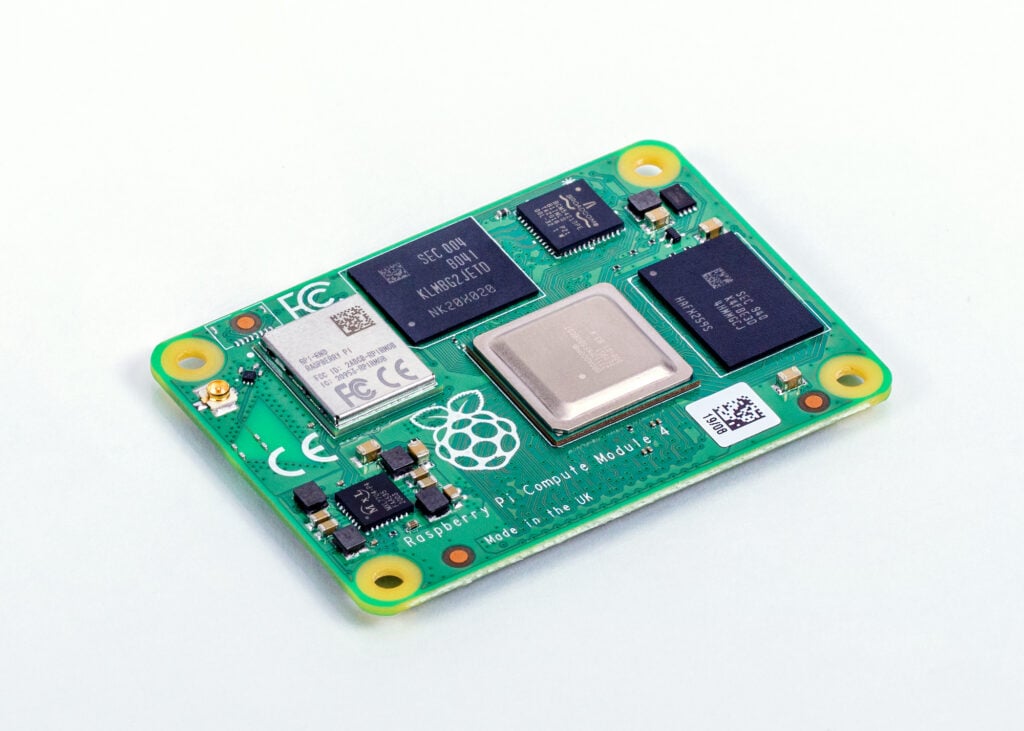
- form_factor — 55 mm × 40 mm × 4.7 mm, 4 × M2.5 mounting holes, I/O via two 100-pin high-density connectors (one power/low-speed, one high-speed) — a deliberate compatibility break with the JEDEC DDR2-SODIMM outline of CM1/CM3/CM3+. (CM4 datasheet; launch post)
- networking — on-module Gigabit Ethernet PHY supporting IEEE 1588 (time-sensitive networking; the PHY needs an external transformer/magnetics on the carrier); optional wireless module Cypress/Infineon CYW43455 ("BCM43455") — dual-band 2.4/5.0 GHz 802.11b/g/n/ac + Bluetooth 5.0 / BLE, with on-board PCB antenna, electronic antenna switch to an external U.FL antenna, and per-rail disable pins WL_nDisable / BT_nDisable. Wireless carries modular compliance certification to cut product certification cost. (CM4 datasheet §2.1–2.2; launch post + James Adams staff comment confirming BCM43455; Product Brief)
- pcie_usb — 1 × PCIe 1-lane host, Gen 2 (5 Gb/s) — the lane the Pi 4B spends on its USB 3 controller is exposed to the carrier board (NVMe, extra NICs, etc.); 1 × USB 2.0 high-speed port only (no USB 3 on CM4). (CM4 datasheet §1.2, §2.3–2.4; Wikipedia CM4 section)
- On this board : 9 tutorials · 10 code
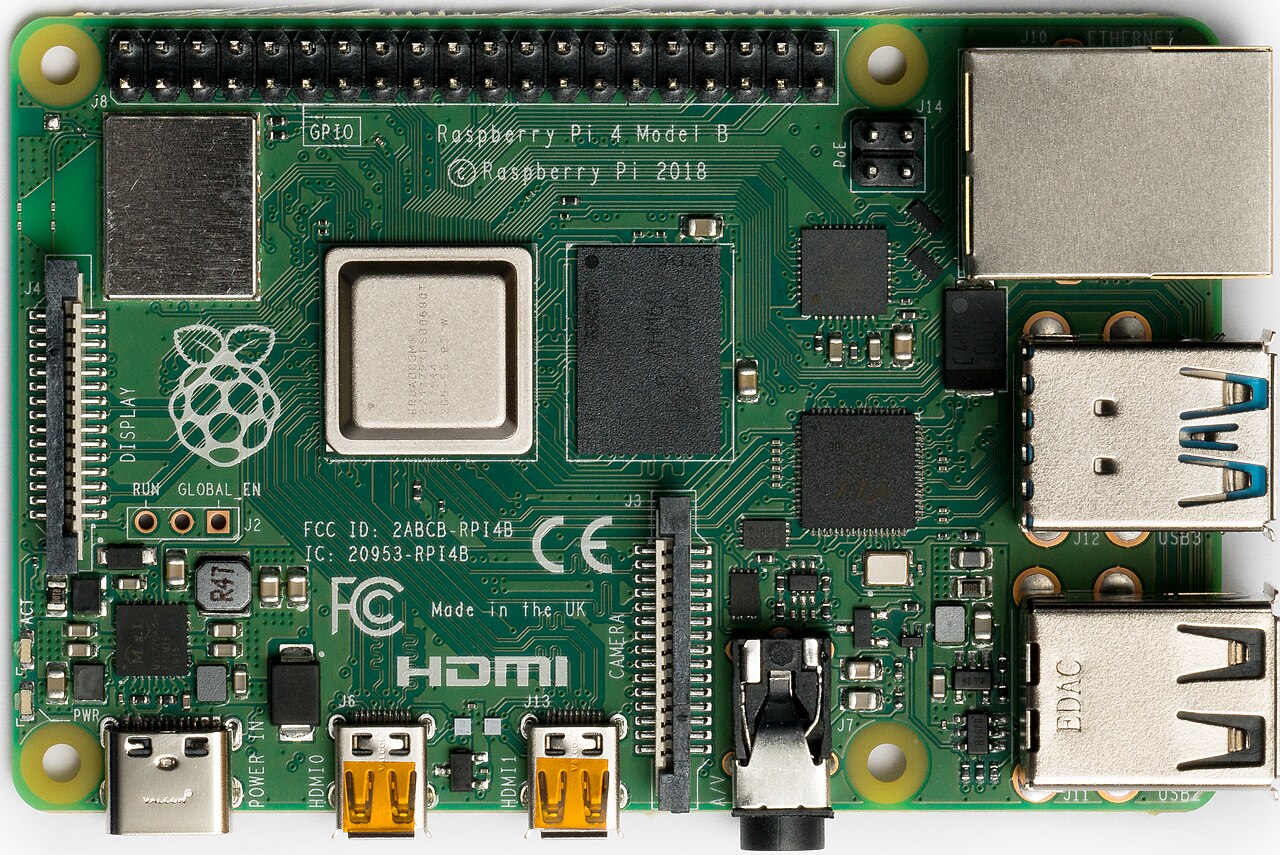
The Raspberry Pi Compute Module 4, launched in October 2020, represents a significant evolution in the company’s System-on-Module (SoM) line, designed primarily for industrial and commercial applications where space is limited and reliability is paramount. Unlike the familiar credit-card-sized Raspberry Pi boards that hobbyists often use, the Compute Module 4 is a compact, rectangular board measuring just 55 by 40 millimeters. It does not have its own ports or connectors for monitors, keyboards, or network cables. Instead, it is designed to be plugged into a custom carrier board, which provides the necessary interfaces. This approach allows manufacturers to create sleek, integrated devices without the bulk of standard connectors, making it ideal for products like digital signage, thin clients, and automated control systems. The module is built around the Broadcom BCM2711 system-on-chip, the same silicon found in the Raspberry Pi 4 Model B. This chip features a quad-core Cortex-A72 processor running at 1.5 GHz, providing substantial computing power for its size. It includes a VideoCore VI graphics processor capable of decoding 4K video at 60 frames per second, ensuring smooth visual performance for high-resolution displays.
A defining characteristic of the Compute Module 4 is its extreme configurability. At launch, it was available in thirty-two different variants, allowing developers to choose the exact combination of memory and storage needed for their specific project. The module offers options for 1, 2, 4, or 8 gigabytes of LPDDR4 RAM, which is fast memory that helps the processor handle multiple tasks efficiently. For storage, users can select from models with no internal storage, known as Lite versions, or with 8, 16, 32, or 64 gigabytes of embedded MultiMediaCard (eMMC) storage. eMMC is a type of flash memory soldered directly onto the board, offering greater durability and speed than removable SD cards. In fact, the storage bandwidth on the Compute Module 4 is four times faster than previous Compute Modules, reaching peak speeds of 100 megabytes per second. This speed is crucial for applications that need to read and write data quickly, such as logging sensor data or loading complex software. It is important to note that if you choose a model with eMMC storage, you cannot use an external SD card for booting, as the internal storage shares the same interface. Only the Lite versions, which lack internal storage, can boot from an SD card.
Connectivity is another area where the Compute Module 4 distinguishes itself from standard Raspberry Pi boards. It exposes a single-lane PCI Express Gen 2 interface, a high-speed connection standard typically used for graphics cards and fast storage drives in desktop computers. On the Compute Module 4, this lane is available to the carrier board, enabling the use of NVMe solid-state drives for even faster storage or additional network cards for high-speed networking. This feature was a first for the Raspberry Pi family and opened up new possibilities for performance-critical embedded systems. The module also includes a Gigabit Ethernet PHY, which is the hardware component that handles network communication. Notably, this PHY supports IEEE 1588, a standard for precise time synchronization, which is essential for industrial automation and audio-video systems that require multiple devices to operate in perfect sync. For wireless needs, optional variants include dual-band Wi-Fi and Bluetooth 5.0, certified for regulatory compliance to simplify product certification.
The input and output capabilities of the Compute Module 4 are extensive. It provides twenty-eight general-purpose input-output (GPIO) pins, which are programmable pins used to connect sensors, buttons, and other electronic components. A unique feature of these GPIOs is their ability to operate at either 1.8 volts or 3.3 volts, offering flexibility for connecting to different types of industrial sensors. In contrast, standard Raspberry Pi boards are fixed at 3.3 volts. The module also supports multiple display and camera interfaces, including two HDMI outputs, two MIPI DSI interfaces for connecting small LCD screens, and two MIPI CSI-2 interfaces for cameras. This makes it suitable for devices that need to drive multiple screens or process video from several cameras simultaneously. However, users should be aware that the Compute Module 4 does not have a built-in real-time clock (RTC) or audio jack. If your application requires keeping time when the power is off, you must add an external RTC module to your carrier board.
Power management is carefully designed for embedded use. The module operates on a single 5-volt input and includes specific control pins, such as GLOBAL_EN, which allows the system to be shut down completely with very low power consumption, around 15 microamps. This is critical for battery-powered devices. The module can also provide power to the carrier board, supplying up to 600 milliamps on its 3.3-volt and 1.8-volt rails. Thermal management is a key consideration, as the compact size means less surface area for heat dissipation. The processor will automatically slow down, or throttle, if it reaches 85 degrees Celsius to prevent damage. For extreme environments, extended-temperature variants are available that can operate from minus 40 to plus 85 degrees Celsius. These versions are designed for outdoor or harsh industrial settings where standard electronics might fail.
Software support for the Compute Module 4 is identical to that of the Raspberry Pi 4 Model B, meaning it runs the same operating systems, including Raspberry Pi OS, Ubuntu, and various specialized distributions. The bootloader, which is the software that starts the operating system, is stored in an on-board EEPROM. This allows for more secure and flexible boot options, including booting from NVMe drives over the PCIe interface. However, updating this bootloader is more complex than on standard Pi boards and typically requires a special recovery mode using a USB connection. Developers often use tools like rpiboot to flash the module or update its firmware. While the module is powerful and versatile, it is not without challenges. It lacks USB 3.0 ports, offering only one USB 2.0 port, because the USB 3.0 controller on the Pi 4 is connected to the PCIe lane that is exposed to the user. This trade-off favors high-speed storage and networking over legacy USB peripherals. Additionally, the on-board antenna for Wi-Fi and Bluetooth must be positioned carefully away from metal enclosures to ensure good signal performance, often requiring an external antenna connector for metal cases. Despite these constraints, the Compute Module 4 remains a popular choice for professional embedded projects due to its balance of performance, connectivity, and form factor, with production guaranteed until at least 2034.
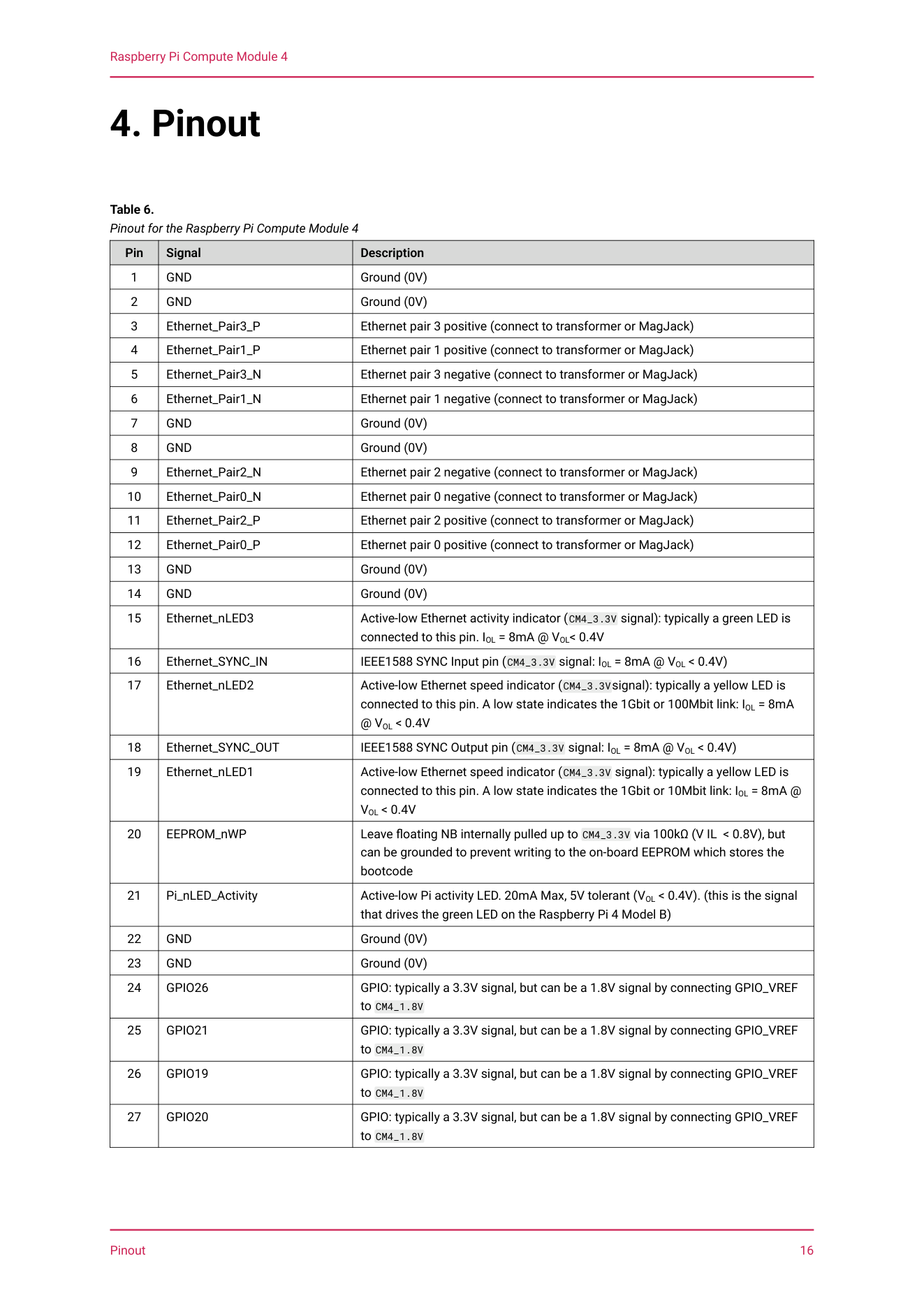
Pinout diagram
| Attr | Specs | verified |
|---|---|---|
soc | Broadcom BCM2711 — quad-core Cortex-A72 (ARM v8-A, 64-bit) @ 1.5 GHz, same silicon as Raspberry Pi 4 Model B; VideoCore VI GPU, OpenGL ES 3.x, H.265/HEVC 4Kp60 decode, H.264 1080p60 decode / 1080p30 encode. (CM4 datasheet RP-008168-DS, downloaded 2026-10-13; launch post) | ✔ |
ram | 1 / 2 / 4 / 8 GB LPDDR4-3200 — the datasheet specifies the SDRAM "with ECC". (CM4 datasheet §1.2; Product Brief) | ✔ |
storage | on-module eMMC 0 / 8 / 16 / 32 / 64 GB, peak bandwidth 100 MB/s — "four times faster than previous Compute Modules"; eMMC is wired to the primary SD-card interface, so modules with eMMC cannot use an external SD card / external eMMC (SDIO 2.0 connector exists only for CM4Lite). (CM4 datasheet; Wikipedia) | ✔ |
form_factor | 55 mm × 40 mm × 4.7 mm, 4 × M2.5 mounting holes, I/O via two 100-pin high-density connectors (one power/low-speed, one high-speed) — a deliberate compatibility break with the JEDEC DDR2-SODIMM outline of CM1/CM3/CM3+. (CM4 datasheet; launch post) | ✔ |
networking | on-module Gigabit Ethernet PHY supporting IEEE 1588 (time-sensitive networking; the PHY needs an external transformer/magnetics on the carrier); optional wireless module Cypress/Infineon CYW43455 ("BCM43455") — dual-band 2.4/5.0 GHz 802.11b/g/n/ac + Bluetooth 5.0 / BLE, with on-board PCB antenna, electronic antenna switch to an external U.FL antenna, and per-rail disable pins WL_nDisable / BT_nDisable. Wireless carries modular compliance certification to cut product certification cost. (CM4 datasheet §2.1–2.2; launch post + James Adams staff comment confirming BCM43455; Product Brief) | ✔ |
pcie_usb | 1 × PCIe 1-lane host, Gen 2 (5 Gb/s) — the lane the Pi 4B spends on its USB 3 controller is exposed to the carrier board (NVMe, extra NICs, etc.); 1 × USB 2.0 high-speed port only (no USB 3 on CM4). (CM4 datasheet §1.2, §2.3–2.4; Wikipedia CM4 section) | ✔ |
video_display | dual HDMI 2.0 (up to 4Kp60), 2-lane + 4-lane MIPI DSI, 2-lane + 4-lane MIPI CSI-2, plus 1 × DPI parallel RGB display on GPIO — more display/camera interfaces than any flagship board. (CM4 datasheet §1.2; Product Brief) | ✔ |
gpio | 28 GPIO signals supporting 1.8 V or 3.3 V signalling (per-bank VGPIO_VREF tied to either rail — Pi 4B is 3.3 V only), breakout: up to 5 × UART, 5 × I²C, 5 × SPI, 1 × SDIO, 1 × DPI, 1 × PCM (I²S), 2 × PWM, 3 × GPCLK. Default GPIO drive strength 4 mA (configurable 1–8 mA), internal pulls typ. 47 kΩ. The SoC's Bank 2 pins (8 of 54) are reserved on-module for eMMC, HDMI hot-plug and ACT LED/USB-boot control and must not be used. (CM4 datasheet §1.2, §3.3; Peripheral Software Guide, GitHub mirror, retrieved 2026-10-13) | ✔ |
no_adc_dac_no_on_module_rtc_no_audio_jack | — none appear in the datasheet feature list; the CM4IO carrier adds a battery-backed RTC socket. (CM4 datasheet §1.2; CM docs CM4IO section) | ✔ |
power | single +5 V input; absolute maximum VIN 6.0 V (stress rating); controlled by GLOBAL_EN (chip-enable: shutdown current 15 µA when low, ~8 mA with GLOBAL_EN high but software-idle); idle ≈ 400 mA typical, operating ≈ 1.4 A typical at 5 V (≈ 2–7 W); on-module +3.3 V and +1.8 V regulators can each back-feed 600 mA to carrier-board loads. Power-up sequencing pins: GLOBAL_EN, RUN_PG, nRPI_BOOT, EEPROM_nWP. (CM4 datasheet §3.3, §5.1–5.4, §6.1) | ✔ |
thermal | BCM2711 throttles to stay under 85 °C; operating range −20…+85 °C (extended variants −40…+85 °C); RF performance optimal only to +75 °C; datasheet warns the module "may run warmer than the Raspberry Pi 4 Model B" because the smaller PCB provides less passive heat sinking. MTBF (ground benign) 377 000 h (382 000 h for CM4Lite). (CM4 datasheet §3.2; Product Brief) | ✔ |
carrier_io_board | the official CM4 IO Board (160 × 90 mm) provides 2 × HDMI, 2 × USB 2.0, GbE RJ45 with PoE header, PCIe Gen 2 x1 socket, microSD slot (Lite only), 2 × DSI + 2 × CSI FPC, 40-pin HAT footprint, RTC battery socket, 12 V barrel input (up to 26 V if PCIe unused), selectable 1.8/3.3 V GPIO, and eMMC-flash jumpers. CM4 mounts on CM5IO (reduced features) and CM5 mounts on CM4IO (reduced features). (CM docs CM4IO section, retrieved 2026-10-13) | ✔ |
- Manufacturer / developer: Raspberry Pi Ltd (board designed by Dominic Plunkett, the first Raspberry Pi product he led after joining in late 2019; announced by Eben Upton). (Official launch post, 19 Oct 2020)
- Launch: 19 October 2020, "today we're announcing the launch of Compute Module 4, starting from $25" — 16 months after the Raspberry Pi 4 Model B it is derived from. At launch there were 32 variants (4 RAM × 4 eMMC × wireless on/off), priced $25 (1 GB, Lite, no wireless) to $90 (8 GB, 32 GB eMMC, wireless); the four 1 GB no-wireless SKUs deliberately matched CM3+ price points ($25/$30/$35/$40). The companion Compute Module 4 IO Board launched at $35. (Launch post; Wikipedia "Raspberry Pi 4", retrieved 2026-10-13)
- Price history: the April 2022-era product brief listed an MSRP range of $30–95 (quoted by Wikipedia); the July 2026 product brief lists current prices of $41.25 (CM4001000, 1 GB Lite) up to $195 (CM4108064, 8 GB / 64 GB / wireless) — a steep memory-driven increase, with extended-temperature variants "price on application". (CM4 Product Brief RP-008169, published July 2026, downloaded 2026-10-13; Wikipedia)
- Status: Active / in production. The product brief states CM4 "will remain in production until at least January 2034". It is succeeded in the SoM line by Compute Module 5 (2024, BCM2712) — CM5 reuses the CM4 dual-100-pin form factor — but official docs still recommend CM4 (or CM5) for new designs, and CM4/CM5IO are cross-compatible with reduced functionality. (Product Brief, July 2026; official Compute Module docs, GitHub mirror, retrieved 2026-10-13)
- Variants: RAM 1 / 2 / 4 / 8 GB; eMMC 0 (Lite) / 8 / 16 / 32 / 64 GB (64 GB added after launch — launch offered up to 32 GB); wireless on/off; extended-temperature −40…+85 °C variants (ET suffix) announced 3 Mar 2025 for selected SKUs. Sibling CM4S (2022) puts the same BCM2711 internals in the old DDR2-SODIMM form factor but loses PCIe, the second HDMI and Ethernet. Ordering codes are CM4xyzwww (x = wireless, y = RAM GB, z = eMMC tens-of-GB; e.g. CM4104032 = wireless, 4 GB, 32 GB). (Launch post; Product Brief; CM docs; Wikipedia)
+ Strengths
- The PCIe lane is yours. CM4 is the first Compute Module — and first Pi-family product — to expose the BCM2711's PCIe Gen 2 x1 host interface on the module edge: NVMe boot (BOOT_ORDER=0xf6), dual/multi-GbE NICs, and even external GPUs became the CM4 signature use case; the launch post markets "Single-lane PCI Express 2.0 interface" as a headline feature. (Launch post, retrieved 2026-10-13; CM bootloader docs; Wikipedia)
- 32-SKU configurability (RAM × eMMC × radio) — first CM with a RAM choice and first with optional certified dual-band Wi-Fi/BT; modular certification explicitly marketed to cut time-to-market. (Launch post; Product Brief)
- 4× faster on-module storage than CM3/CM3+ (100 MB/s peak eMMC, 8-bit bus) with ECC LPDDR4 — industrial reliability story without SD cards. (CM4 datasheet §1.2)
- IEEE 1588 PTP-capable GbE PHY on-module — unique in the Pi line (flagship boards use discrete PHYs without that claim), aimed at industrial/AV sync. (CM4 datasheet §2.2; Product Brief)
- 1.8 V GPIO option + DPI parallel display + PCM — low-voltage industrial signalling and raw LCD panels that no flagship Pi exposes. (CM4 datasheet §1.2, §3.3)
- Embedded power-control pins: GLOBAL_EN (15 µA shutdown), RUN_PG power-good, per-rail WL/BT disable, EEPROM write-protect — designed for battery and regulatory-constrained products. (CM4 datasheet §2, §5.3)
- Extended-temperature variants (−40…+85 °C) for outdoor/extreme indoor use, announced 3 Mar 2025. (News post via Wikipedia "Raspberry Pi 4" reference list, retrieved 2026-10-13; Product Brief ET table)
- Form-factor family: CM4's dual-100-pin outline was reused by CM5 (2024), and CM4/CM5IO are cross-compatible with reduced functionality; CM4S (2022) offers the same silicon as a drop-in for legacy CM3 SODIMM carriers (minus PCIe/HDMI-2/Ethernet). (CM docs, retrieved 2026-10-13; Wikipedia)
- IO Board as a product: official docs position CM4IO not just as a dev kit but "as a standalone product… or as a reference design for your own carrier (IO) board", with KiCad design files published (RP-008173-DS). (CM docs + datasheet index, retrieved 2026-10-13)
− Weaknesses
- USB 2.0 only. CM4 exposes one USB 2.0 HS port; the Pi 4B's USB 3 lives in the VL805 hanging off the PCIe lane that CM4 hands to the user. Carrier designs needing USB 3 must add their own VL805/PCIe hub. (CM4 datasheet §1.2, §2.4; Wikipedia CM4 section)
- Runs hotter than a Pi 4B at equal load: "it may run warmer than the Raspberry Pi 4 Model B" — less PCB metal, no connector shells acting as heatsink; throttling at 85 °C case; thermal design (and often a heatsink/antenna trade-off) is on the product designer. (CM4 datasheet §3.2, retrieved 2026-10-13)
- Bootloader updates are awkward by design: no recovery.bin from eMMC/SD, rpi-eeprom-update disabled by default, and self-update mode "does not update the bootloader atomically — if a power failure occurs during an EEPROM update, you could corrupt the EEPROM". Field updates need usbboot access or careful self-update windows. (CM bootloader docs, retrieved 2026-10-13)
- eMMC models cannot use the SD slot (shared controller) — a CM4 that shipped with eMMC ignores microSD entirely; only Lite variants use it. (CM4 datasheet §1.2; Wikipedia)
- PCIe device compatibility is uneven. The community maintains a dedicated CM4 PCIe compatibility test database (pipci) because behaviour varies per bridge/NIC/SSD chip; e.g. the Seeed dual-GbE carrier's LAN7800 needed a hand-built OpenWrt image and its USB-3-on-PCIe architecture capped routing at ~700 Mbit/s, while DFRobot's directly-attached Realtek NIC hit full gigabit; CM4 Wi-Fi AP throughput measured only ~60 Mbit/s. (Jeff Geerling, 28 May 2021, retrieved 2026-10-13; pipci compatibility database)
- rpiboot host-side gotchas (official known issues): the rpiboot packaged in Ubuntu ≤ 24.04 "has been known to fail to communicate with the device" (build from source); USB hubs can stop the host enumerating the module — connect directly. (Flashing guide known issues, retrieved 2026-10-13)
- Power-sequencing traps on custom carriers: boot halts if any stage fails; the datasheet checklist calls out back-feeding the 3.3 V/1.8 V rails from the carrier (even via Ethernet/digital pins) as a boot-stop cause, and the +5 V rail must hold > 4.75 V (ideally > 4.9 V) under a 2 A test load. GLOBAL_EN must be handled, not floated. (CM4 datasheet §6.1, retrieved 2026-10-13)
- On-board antenna is unforgiving: it "should be positioned in the product such that it is not surrounded by metal, including any ground plane"; metal enclosures need the U.FL Antenna Kit (dtparam=ant2 to select the external antenna). (CM4 datasheet §2.1; CM docs antenna section)
- CM4S is a different beast: same name family but no PCIe, no second HDMI, no Ethernet vs CM4 — a frequent early-2023 purchase mistake. (Wikipedia CM4 section, retrieved 2026-10-13; CM docs)
- Price shock 2024→2026: current list prices ($41.25–$195, July 2026 brief) are roughly double launch-era figures due to memory pricing; ET variants are quote-only with MOQ lead times of 10–12 weeks. (Product Brief, July 2026; compare launch post pricing)
- Documentation inconsistency on peripheral counts: launch post claims 6 × UART / 6 × I²C, datasheet says 5 / 5 (see SoC note above). (Launch post vs CM4 datasheet §1.2)
- No battery-backed RTC on the module — carriers needing wall-clock time add an RTC (the CM4IO ships a battery holder + the Peripheral Guide walks through a PCF8523 on I²C1).
- Retour d'expérience expert expert — expert-raspberrypi
- Retour d'experience sur le CM4. Les points forts sont reels : le PCIe Gen 2 x1 change tout pour du NVMe ou des cartes réseau dediees, et la config 32 SKUs avec eMMC ECC est top pour l'industriel. Mais attention aux pieges documentes. La chauffe est plus critique que sur un Pi 4B a cause du PCB redu… — expert-raspberrypi
- Merci pour ce retour clair. Je debute avec un projet industriel et je bute sur le point alimentation. Tu mentionnes le sequencement, mais dans la datasheet, la partie sur le back-feeding des rails 3.3V et 1.8V est un peu floue pour moi. Est-ce que le simple fait de connecter un capteur externe sur … — maker-bleu
- Pour le back-feeding, oui, c'est un vrai piege. Si ton carrier board alimente les rails 3.3V ou 1.8V en même temps que le module, ou si des pins Ethernet/GPIO injectent du courant quand le module est eteint, le boot peut échouer ou endommager les regulators. Le datasheet insiste la-dessus dans la c… — expert-raspberrypi
Community feedback and projects
- How to boot a Raspberry Pi Compute Module 4 (with eMMC ) from a SD card stackoverflow.com
- How do I export a custom kernel image on raspberry Pi compute module 4 / io board in headless mode and verify if it has loaded successfully stackoverflow.com
- 5Gbps Ethernet on the Raspberry Pi Compute Module 4 jeffgeerling.com
- Time Card and PTP on a Raspberry Pi Compute Module 4 jeffgeerling.com
- Hackaday Guide to the New Raspberry Pi Compute Module 4 hackaday.com
- Tiny dual-Gigabit CM4 routers
- PCIe-on-Pi compatibility lab (pipci)
- Turing Pi 2 Raspberry Pi CM4 cluster
- NVMe-boot embedded products
- Home Assistant / Pi-hole / NAS carriers on CM4
- cm4-product-brief.pdf datasheet
- Official product/news launch post
- CM4 datasheet RP-008168-DS (interfaces, pinout, electrical, power, troubleshooting)
- CM4 Product Brief (pricing, ordering codes, 2034 production date)
- CM4 IO Board datasheet / KiCad design files
- CM4 IO Board datasheet / KiCad design files
- CM4S datasheet
- introduction
- eMMC flashing
- EEPROM bootloader
- Peripheral Software Guide
- datasheet index
- Official Compute Module docs hub
- Whitepapers
- Whitepapers
- usbboot / rpiboot (flashing tool)
- usbboot / rpiboot (flashing tool)
- Kernel Device Tree overlays README (PCIe dtparams)
- Community
- Community
- Community
- Community
- Wikipedia
- Wikipedia
- USB 2.0 only. CM4 exposes one USB 2.0 HS port; the Pi 4B's USB 3 lives in the VL805 hanging off the PCIe lane that CM4 hands to the user. Carrier designs needing USB 3 must add their own VL805/PCIe hub. (CM4 datasheet §1.2, §2.4; Wikipedia CM4 section)
- Runs hotter than a Pi 4B at equal load: "it may run warmer than the Raspberry Pi 4 Model B" — less PCB metal, no connector shells acting as heatsink; throttling at 85 °C case; thermal design (and often a heatsink/antenna trade-off) is on the product designer. (CM4 datasheet §3.2, retrieved 2026-10-13)
- Bootloader updates are awkward by design: no recovery.bin from eMMC/SD, rpi-eeprom-update disabled by default, and self-update mode "does not update the bootloader atomically — if a power failure occurs during an EEPROM update, you could corrupt the EEPROM". Field updates need usbboot access or careful self-update windows. (CM bootloader docs, retrieved 2026-10-13)
- eMMC models cannot use the SD slot (shared controller) — a CM4 that shipped with eMMC ignores microSD entirely; only Lite variants use it. (CM4 datasheet §1.2; Wikipedia)
- PCIe device compatibility is uneven. The community maintains a dedicated CM4 PCIe compatibility test database (pipci) because behaviour varies per bridge/NIC/SSD chip; e.g. the Seeed dual-GbE carrier's LAN7800 needed a hand-built OpenWrt image and its USB-3-on-PCIe architecture capped routing at ~700 Mbit/s, while DFRobot's directly-attached Realtek NIC hit full gigabit; CM4 Wi-Fi AP throughput measured only ~60 Mbit/s. (Jeff Geerling, 28 May 2021, retrieved 2026-10-13; pipci compatibility database)
- rpiboot host-side gotchas (official known issues): the rpiboot packaged in Ubuntu ≤ 24.04 "has been known to fail to communicate with the device" (build from source); USB hubs can stop the host enumerating the module — connect directly. (Flashing guide known issues, retrieved 2026-10-13)
- Power-sequencing traps on custom carriers: boot halts if any stage fails; the datasheet checklist calls out back-feeding the 3.3 V/1.8 V rails from the carrier (even via Ethernet/digital pins) as a boot-stop cause, and the +5 V rail must hold > 4.75 V (ideally > 4.9 V) under a 2 A test load. GLOBAL_EN must be handled, not floated. (CM4 datasheet §6.1, retrieved 2026-10-13)
- On-board antenna is unforgiving: it "should be positioned in the product such that it is not surrounded by metal, including any ground plane"; metal enclosures need the U.FL Antenna Kit (dtparam=ant2 to select the external antenna). (CM4 datasheet §2.1; CM docs antenna section)
- CM4S is a different beast: same name family but no PCIe, no second HDMI, no Ethernet vs CM4 — a frequent early-2023 purchase mistake. (Wikipedia CM4 section, retrieved 2026-10-13; CM docs)
- Price shock 2024→2026: current list prices ($41.25–$195, July 2026 brief) are roughly double launch-era figures due to memory pricing; ET variants are quote-only with MOQ lead times of 10–12 weeks. (Product Brief, July 2026; compare launch post pricing)
- Documentation inconsistency on peripheral counts: launch post claims 6 × UART / 6 × I²C, datasheet says 5 / 5 (see SoC note above). (Launch post vs CM4 datasheet §1.2)
- No battery-backed RTC on the module — carriers needing wall-clock time add an RTC (the CM4IO ships a battery holder + the Peripheral Guide walks through a PCF8523 on I²C1).
- Premier démarrage d'un CM4 Lite depuis la microSD de l'IO Board debutant Schéma : IMG-compute-module-4-debutant-1-booter-cm4-lite-microsd.svg — CM4 Lite monté sur l'IO Board, microSD insérée, alimentation barillet 12 V, écran HDMI et câble Ethernet ; le jumper J2 (nRPI_BOOT) est bien retiré.
- GPIO du CM4 : comprendre les banks 1,8 V / 3,3 V avant de câbler debutant Schéma : IMG-compute-module-4-debutant-2-gpio-1v8-vgpio-vref-cm4.svg — CM4 sur IO Board, broche GPIO17 reliée via une résistance 330 Ω à une LED puis au GND ; un sélecteur de tension met le bank soit sur CM5_3.3V soit sur CM5_1.8V (VGPIO_VREF).
- Basculer le Wi-Fi du CM4 sur l'antenne externe U.FL (dtparam=ant2) debutant Schéma : IMG-compute-module-4-debutant-3-antenne-wifi-externe-ant2-cm4.svg — CM4 wireless avec son antenne PCB embarquée d'un côté et un petit câble U.FL vers une antenne externe de l'autre ; un commutateur électronique d'antenne est dessiné entre les deux, sélectionné au boot par dtparam=ant2.
- Bootloader EEPROM du CM4 : maîtriser BOOT_ORDER via usbboot intermediaire Schéma : IMG-compute-module-4-intermediaire-1-ordre-boot-eeprom-cm4.svg — CM4 sur IO Board avec jumper J2 (nRPI_BOOT) posé, câble micro-USB J11 relié à un PC hôte exécutant rpiboot ; une puce EEPROM sur le module est mise en évidence avec les valeurs BOOT_ORDER 0xf1, 0xf2, 0xf15, 0xf6.
- Ajouter une RTC au CM4 (PCF8523 sur I2C1 via dt-blob) intermediaire Schéma : IMG-compute-module-4-intermediaire-2-rtc-i2c-dt-blob-cm4.svg — CM4 sur IO Board ; sur l'empreinte HAT 40 broches, un module RTC PCF8523 avec pile bouton est branché sur SDA1/SCL1 (GPIO44/45) ; un porte-pile est aussi dessiné sur le connecteur RTC dédié de l'IO Board.
- Son sur CM4 : DAC I2S/PCM (PCM5102) sans prise jack intermediaire Schéma : IMG-compute-module-4-intermediaire-3-audio-i2s-pcm5102-cm4.svg — CM4 sur IO Board ; l'interface PCM/I2S de l'empreinte HAT (SCLK, LRCLK, BCLK, DIN) relie un petit DAC PCM5102 muni d'un amplificateur vers deux haut-parleurs ; une croix barre la prise jack, absente du CM4.
- Horodatage industriel : PTP IEEE 1588 sur le PHY Ethernet du CM4 avance Schéma : IMG-compute-module-4-avance-1-ptp-1588-gbe-cm4.svg — deux CM4 sur IO Board reliés par un câble Ethernet droit ; chaque module porte la mention « PHY GbE compatible IEEE 1588 » ; un graphique d'offset temporel en µs s'affiche sur un écran de contrôle.
- Provisionner une flotte de CM4 : secure boot et images personnalisées avance Schéma : IMG-compute-module-4-avance-2-boot-secure-flotte-cm4.svg — chaîne de production simplifiée : un PC hôte lance rpi-sb-provisioner vers un CM4 en mode rpiboot ; à côté, pi-gen fabrique une image custom ; des clés (root public key) sont dessinées en coffret sécurisé.
- Affichage numérique : kiosk double HDMI 4Kp60 sur CM4 avance Schéma : IMG-compute-module-4-avance-3-kiosk-double-hdmi-cm4.svg — CM4 sur IO Board avec deux écrans HDMI 2.0 côte à côte affichant un tableau de bord plein écran ; le décodage vidéo 4Kp60 (HEVC) du VideoCore VI est indiqué sur le module.
Code library — examples written for this board
clignotante.pyPythonbouton-gpio.pyPythoncapteur-i2c.shBashsurveillance-temperature.shBashcapteur-dht11.pyPythonservo-pwm-sysfs.shBashserveur-web-capteur.pyPythonwifi-station.shBashjournal-cron.shBashveilleur-systemd.pyPython
Examples and repos found online
- raspberrypi/usbboot github.com
- raspberrypi/rpi-eeprom github.com
- raspberrypi/rpicam-apps github.com
- raspberrypi/linux github.com