LattePanda Alpha
⚡ The essentials in 60 seconds
- soc_cpu — Intel Core m3-7Y30 (Kaby Lake-Y), 2 cores / 4 threads, 1.0 GHz base – 2.6 GHz burst, x86-64; 4.5 W TDP (CNX). Intel product page: (linked from CNX article)
- gpu — Intel HD Graphics 615, 300–900 MHz (docs). HDMI output, DisplayPort via USB-C, eDP for internal panels; 4K capable (Wikipedia)
- co_processor_i_o — Microchip/Atmel ATmega32U4 — the same MCU as the Arduino Leonardo ("Coprocessor: ATmega32U4" in the docs spec table; "contains an ATmega32U4 chip on its board (also known as Arduino Leonardo)" —
- ram — 8 GB dual-channel LPDDR3-1866 (docs: "8GB Dual Channel"; LPDDR3-1866 per CNX)
- storage — 0 GB (Alpha 800) or 64 GB eMMC 5.0 (Alpha 864); MicroSD slot; M.2 M-key socket, NVMe/SATA, PCIe 4×; M.2 E-key socket, PCIe 2×/USB 2.0/UART/PCM (docs spec table; E-key also exposes I2C per
- networking — Gigabit Ethernet (PCIe, Wake-on-LAN supported), Wi-Fi 802.11ac 1×1 dual-band 2.4/5 GHz, Bluetooth 4.2 (docs spec table)
- On this board : 9 tutorials · 10 code
The LattePanda Alpha represents a distinct category in the world of single-board computers, bridging the gap between powerful personal computing and accessible hardware control. Announced in December 2017 and launched via Kickstarter, this board was designed to offer PC-class performance in a compact form factor, measuring just 115 by 78 millimeters. Unlike many popular single-board computers that rely on ARM processors, the Alpha is built around an Intel Core m3-7Y30 processor, part of the Kaby Lake family. This x86-64 architecture allows the board to run full desktop operating systems such as Windows 10 and 11, as well as various Linux distributions, providing compatibility with a vast ecosystem of software that is typically unavailable on smaller, lower-power devices. The processor features two cores and four threads, with a base clock speed of 1.0 GHz that can burst up to 2.6 GHz, all while maintaining a low thermal design power of 4.5 watts. This efficiency makes it suitable for embedded applications where power consumption and heat generation are critical constraints.
A defining characteristic of the LattePanda Alpha is its dual-processor design. In addition to the main Intel CPU, the board integrates a Microchip ATmega32U4 microcontroller, which is the same chip found in the Arduino Leonardo. This coprocessor handles all general-purpose input and output (GPIO) functions, effectively giving the board the programmability of an Arduino alongside the computational power of a PC. The GPIO pins are exposed through two 50-pin headers, providing access to digital and analog inputs, pulse-width modulation (PWM), and communication interfaces like I2C and I2S. Because these pins are wired directly to the ATmega32U4, they follow the electrical characteristics and timing of the Arduino Leonardo, allowing developers to use standard Arduino IDE sketches to control hardware. This setup enables a unique workflow where high-level logic and user interfaces run on the Windows or Linux side, while real-time sensor reading and motor control are handled by the microcontroller, communicating with the main processor via internal USB serial connections.
The board’s connectivity options are extensive, catering to both modern peripherals and legacy industrial equipment. It features three USB 3.0 Type-A ports and one USB Type-C port, which supports Power Delivery for input and can also output DisplayPort signals. For video, the Alpha supports HDMI, DisplayPort over USB-C, and an internal eDP interface for connecting small touchscreen displays, such as the official 7-inch IPS panel. Networking is robust, with Gigabit Ethernet supporting Wake-on-LAN, dual-band Wi-Fi 802.11ac, and Bluetooth 4.2. Storage flexibility is a key consideration in the Alpha’s design, though it varies by model. The Alpha 800 variant ships with no onboard flash storage, requiring users to install an M.2 SSD or boot from a USB drive, while the Alpha 864 includes 64 GB of eMMC 5.0 storage. Both models feature an M.2 M-key socket that supports PCIe 4x lanes, enabling the use of fast NVMe SSDs or even external desktop GPUs through adapters, a capability rarely seen in single-board computers. An additional M.2 E-key socket is available for Wi-Fi or other expansion modules.
Powering the Alpha requires attention to detail, as it accepts input via USB-C Power Delivery or a 12V DC barrel jack, with a recommended supply of 12V at 3A. The board also includes a LiPo battery port, allowing for mobile applications with 2 to 4-cell battery packs. However, users should be aware that the original Core m3-7Y30 version is now discontinued, having been replaced by revised models with Intel Core i5 processors. Despite its capabilities, the Alpha has faced criticism regarding its thermal management. Under sustained load, the passive heatsink may be insufficient, leading to thermal throttling where the processor slows down to prevent overheating. Active cooling, such as a fan, is often recommended for demanding tasks. Additionally, the board lacks physical power and reset buttons, relying on automatic power-on when connected to a power source, which can be inconvenient for certain deployment scenarios.
Software support is broad but comes with nuances. While Windows 10 and 11 are fully supported, with pre-activated images available for certain SKUs, Linux support is primarily community-maintained. Official documentation focuses on Ubuntu 16.04, and while newer distributions can boot, issues with Wi-Fi, audio, or display drivers may require manual configuration. The board’s x86 nature also allows for advanced projects, such as running Android x86 or even macOS through Hackintosh methods, though the latter is unsupported and legally complex. The LattePanda Alpha stands as a powerful tool for developers who need the versatility of a full PC combined with the direct hardware access of a microcontroller, making it ideal for robotics, IoT gateways, and interactive installations where both heavy computation and precise I/O control are required.
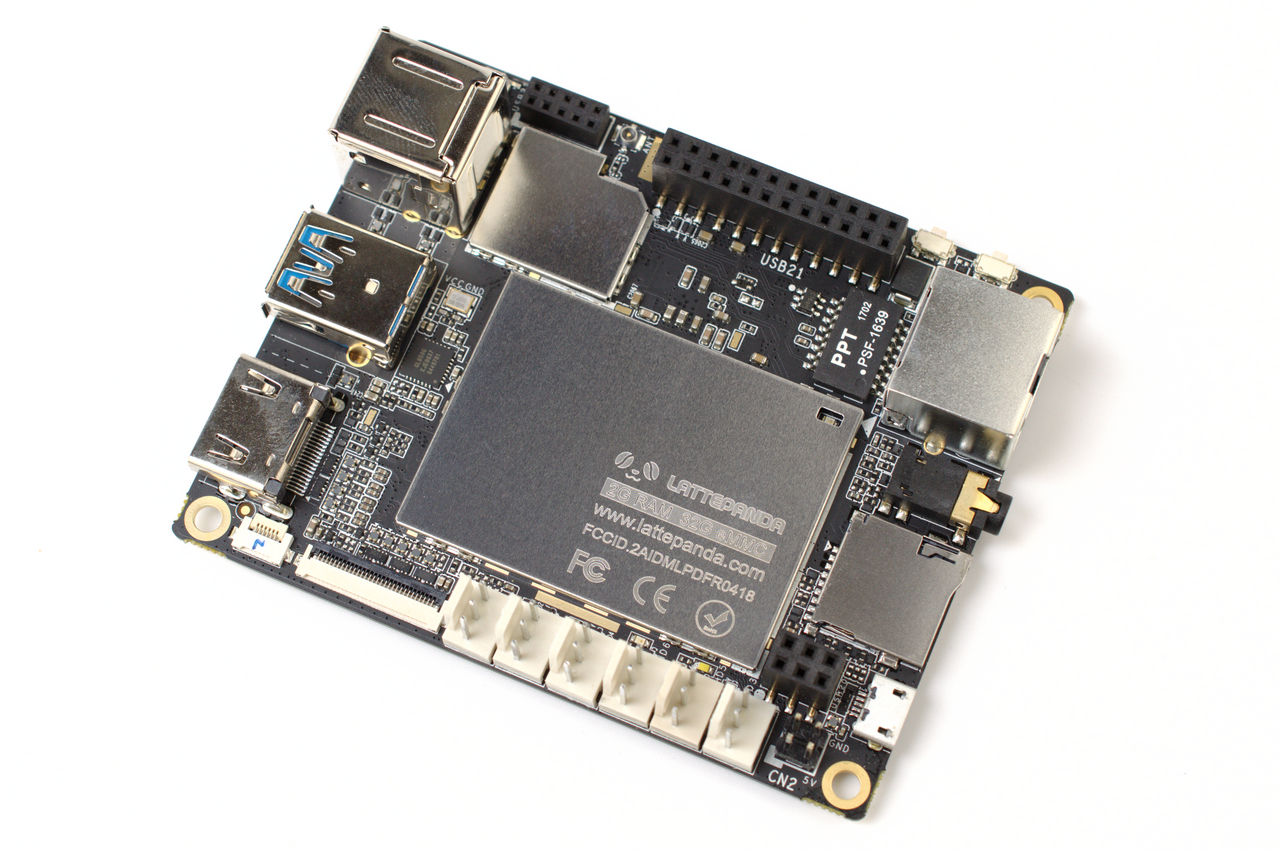
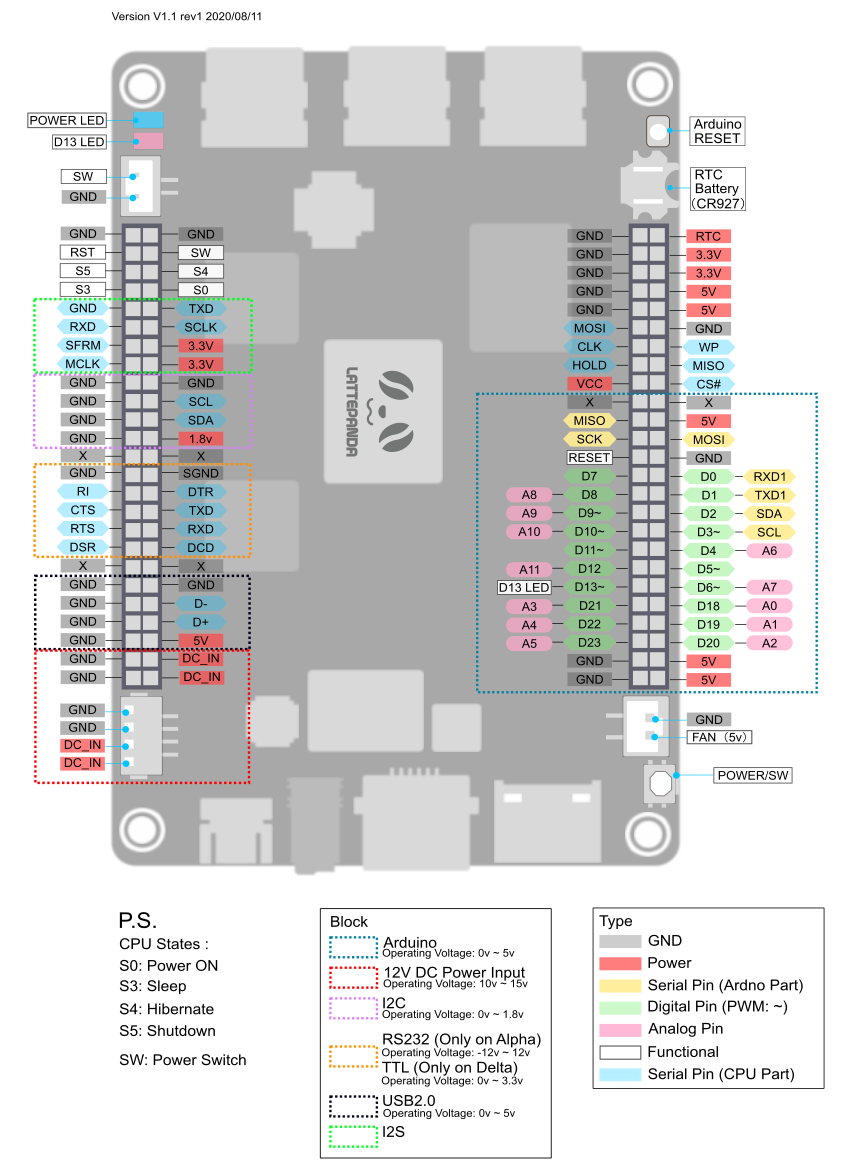
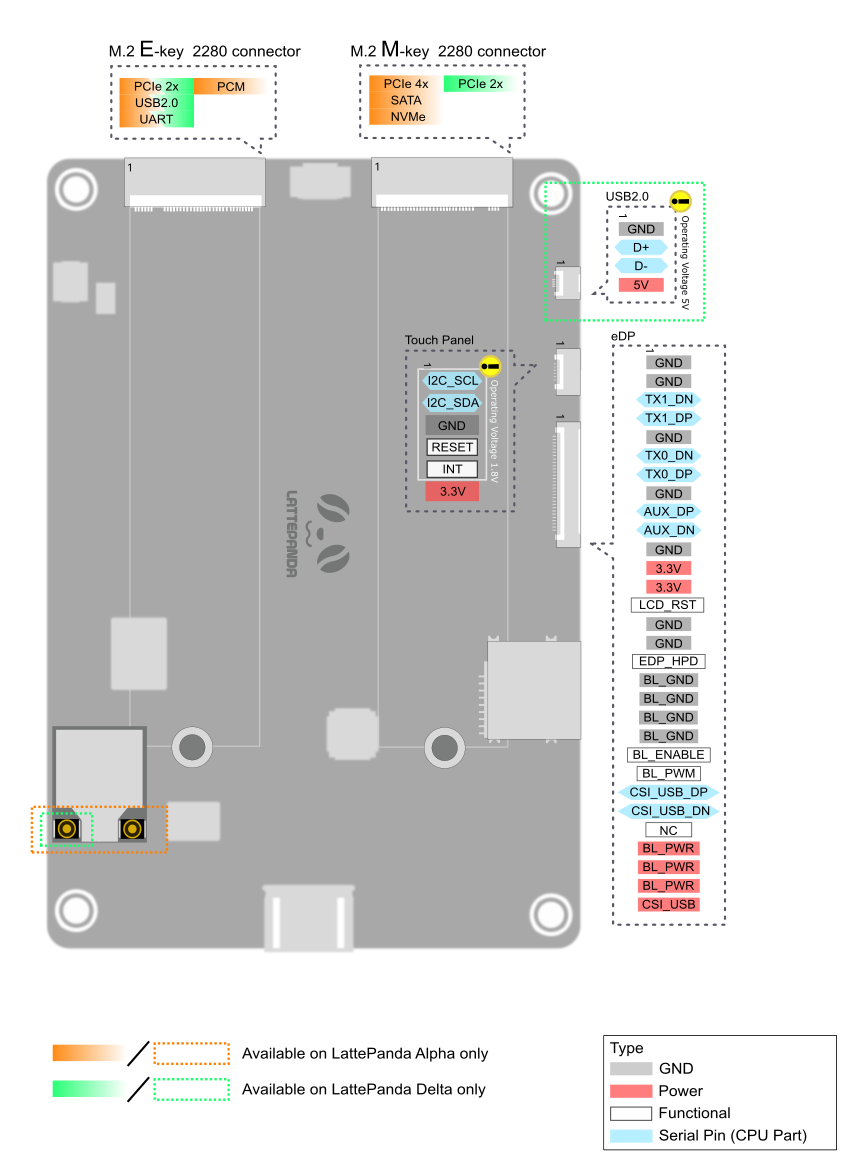
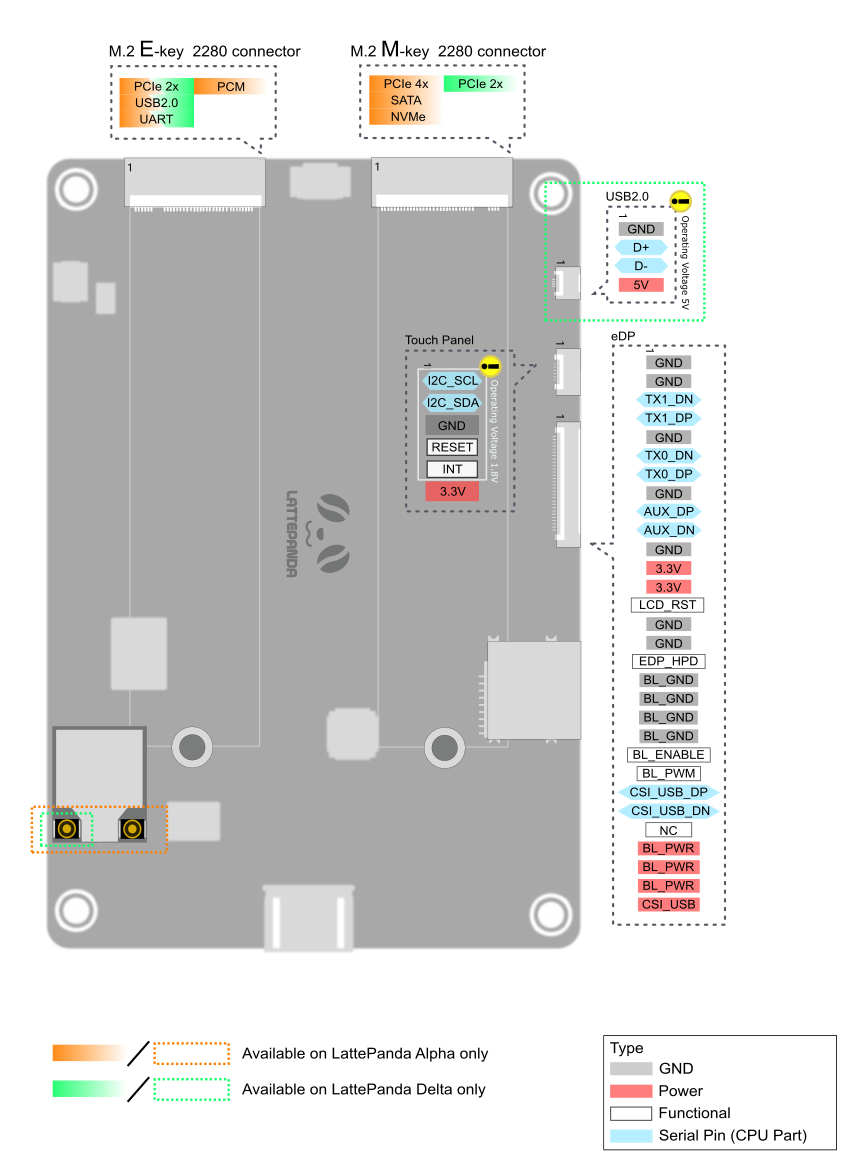
Pinout diagram
| Attr | Specs | verified |
|---|---|---|
soc_cpu | Intel Core m3-7Y30 (Kaby Lake-Y), 2 cores / 4 threads, 1.0 GHz base – 2.6 GHz burst, x86-64; 4.5 W TDP (CNX). Intel product page: (linked from CNX article) | ✔ |
gpu | Intel HD Graphics 615, 300–900 MHz (docs). HDMI output, DisplayPort via USB-C, eDP for internal panels; 4K capable (Wikipedia) | ? unverified |
co_processor_i_o | Microchip/Atmel ATmega32U4 — the same MCU as the Arduino Leonardo ("Coprocessor: ATmega32U4" in the docs spec table; "contains an ATmega32U4 chip on its board (also known as Arduino Leonardo)" — | ✔ |
ram | 8 GB dual-channel LPDDR3-1866 (docs: "8GB Dual Channel"; LPDDR3-1866 per CNX) | ? unverified |
storage | 0 GB (Alpha 800) or 64 GB eMMC 5.0 (Alpha 864); MicroSD slot; M.2 M-key socket, NVMe/SATA, PCIe 4×; M.2 E-key socket, PCIe 2×/USB 2.0/UART/PCM (docs spec table; E-key also exposes I2C per | ✔ |
networking | Gigabit Ethernet (PCIe, Wake-on-LAN supported), Wi-Fi 802.11ac 1×1 dual-band 2.4/5 GHz, Bluetooth 4.2 (docs spec table) | ? unverified |
usb_video_audio | 3× USB 3.0 Type-A; 1× USB Type-C (Power Delivery input + DisplayPort + USB 3.0); HDMI; 3.5 mm audio jack; RS-232 on header (docs) | ? unverified |
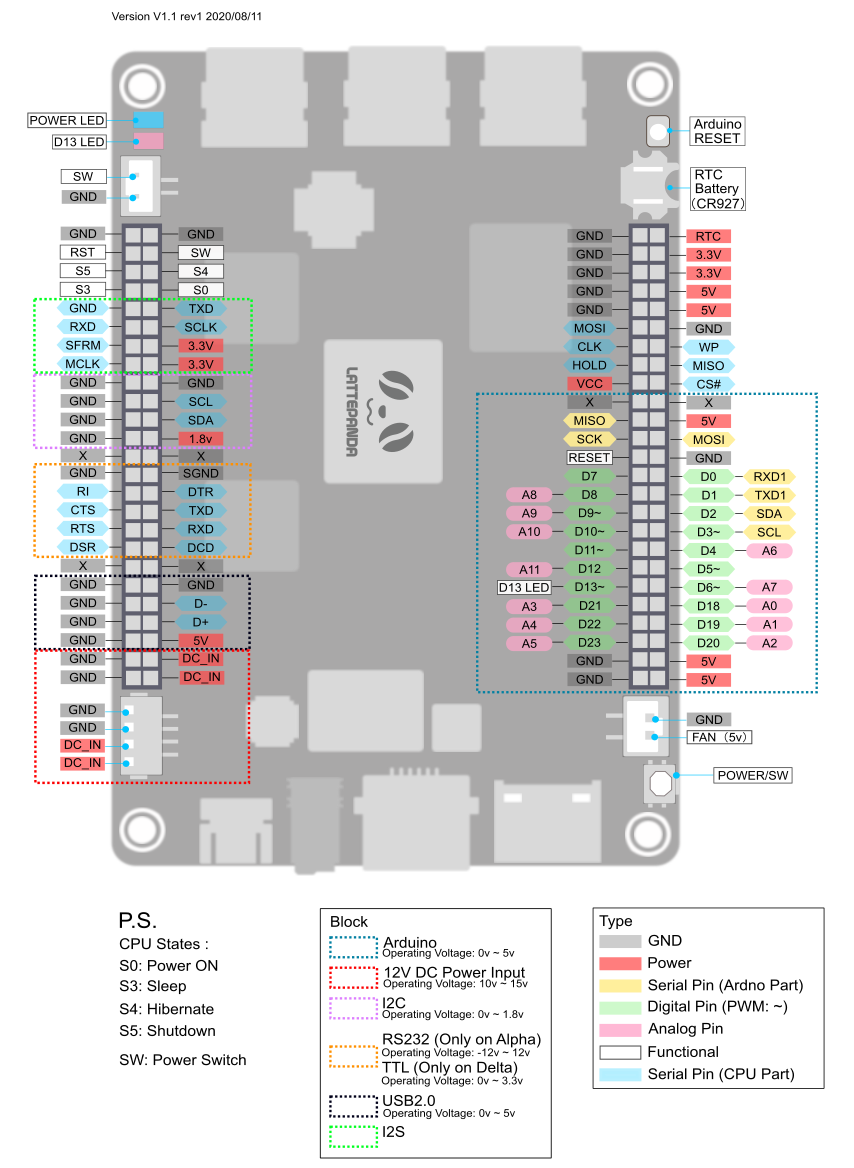
gpio_expansion_headers | 2× 50-pin headers carrying I2C, I2S, USB 2.0, RS-232, system-control pins, EC (BIOS) pins and the Arduino-compatible pins (D0–D13, A0–A5 style, driven by the ATmega32U4) — CNX 2017-12-08 article + ("2x 50p GPIOs including I2C, I2S, USB, RS232, UART, RTC"). Pinout diagrams: (front) and back variant. - PWM, 10-bit ADC and all other electrical characteristics of the I/O pins follow the ATmega32U4/Arduino Leonardo datasheet, since the pins are wired to that MCU ( | ✔ |
power | USB-C PD input (official 45 W PD adapter) or 12 V DC via JST PH2.0-4P header, 7.4–15 V accepted; LiPo battery port (10-pin, 2–4 cells); recommended supply 12 V / 3 A. Boot ≈ 10 W, typical operation ≈ 5 W without heavy load — | ✔ |
dimensions | 115 × 78 × 14 mm (docs spec table and product page). | ? unverified |
cooling | passive heatsink or active fan (fan ships in the box on later SKUs; "adjustable cooling fan header" per CNX). | ? unverified |
operating_temperature | not stated on the fetched official pages. | ? unverified |
- Manufacturer: DFRobot (Zhiwei Robotics Corp., Shanghai, China), sold under the LattePanda brand — and
- Announced: December 2017, launched on Kickstarter alongside the LattePanda Delta (funding target 125,000 CAD; backers were promised delivery in May 2018) — - Note: the task brief guessed "CES 2017"; the authoritative CNX Software coverage of the Alpha/Delta announcement is dated 2017-12-08 (crowdfunding launch, ahead of CES 2018). The original Atom x5-Z8300 LattePanda dates from the late-2015 Kickstarter.
- Launch price: Kickstarter pledges from US$269 (Alpha 800, no eMMC) to US$419 (Alpha 864 bundle with Windows 10 Pro, 7" touch display and "titan" case) — ; retail press quoted ~US$358 for the Alpha (TechRepublic, Oct 2018, cited by
- Status: the original Core m3-7Y30 Alpha is discontinued/EOL. The lattepanda.com product page now sells only the revised "Alpha 800s/864s" with Intel Core i5-8210Y/8200Y ( and the line moved on to LattePanda 3 Delta, Mu and Sigma. Docs for the m3 generation remain at
- Variants (m3-7Y30 generation): - Alpha 800 — 8 GB RAM, 0 GB eMMC (no onboard flash; boot from M.2/USB) - Alpha 864 — 8 GB RAM, 64 GB eMMC 5.0, optional Windows 10 Pro - Later "s" revisions (Alpha 800s/864s) switched to Core i5-8210Y/8200Y; an "Alpha S" (Core m3-8100Y) also appears in the official spec table — and
+ Strengths
- x86 + Arduino on one board: a full Windows/Linux PC paired with an ATmega32U4 (Arduino Leonardo) that owns the GPIO headers — program it with the stock Arduino IDE over the internal USB connection. This "hackable computer" concept is the board's core differentiator (docs intro:
- PC-class performance in SBC format: Kaby Lake m3 with 8 GB RAM and NVMe storage — laptop-grade x86 software stack (Visual Studio, .NET, Docker, RealSense cameras, VR headsets per docs) at ~5 W typical.
- PCIe expansion: M.2 M-key runs PCIe 4×, enabling NVMe SSDs, M.2-to-PCIe adapters, and documented external desktop GPU setups ( + demo video
- Triple display interfaces: HDMI, DP-over-USB-C, and internal eDP with capacitive touch-panel connector (official 7" 1024×600 IPS display).
- Embedded-friendly power: 7.4–15 V DC input, LiPo battery port with charging (2–4 cells), RTC header + RTC battery, Wake-on-LAN, BIOS options for auto power-on.
- Windows 10 heritage: the LattePanda line was the flagship Windows-first SBC; the original LattePanda was a supported Windows 10 IoT Core device (archived Microsoft docs above), which is why DFRobot's Windows driver/BLOB repo predates most Linux-first vendors.
− Weaknesses
- No power/reset button on board. Power-on is automatic on plug-in; there is no onboard power or reset button, a long-standing complaint (official docs link the feature request: "Suggest an on/off/reset button for Alpha" — linked from Workarounds: external power-button header on later SKUs, BIOS auto-power-on, or cutting the supply.
- Thermals / throttling. The 4.5 W TDP m3-7Y30 still needs active cooling under sustained load; the launch coverage notes boards "still need to be cooled, so a large heatsink and/or a case with a fan" (CNX 2017-12-08, URL above). Mick Hellstrom's widely-cited review "LattePanda Alpha: The big mistake?" ( documents thermal throttling and value concerns; treat as anecdotal but consistent.
- Alpha 800 ships with 0 GB eMMC. The "Flash 0GB/64GB" spec line (docs) surprises buyers: the 800 SKU has no storage and no OS — you must add an M.2 SSD before first boot.
- Windows image fragmentation. Win10 images are revision-specific ("select the appropriate Windows 10 Image based on the specific version of the LattePanda Alpha you are using") and hosted on Dropbox links in the docs — fragile distribution,
- Linux support is community-maintained. Official docs stop at Ubuntu 16.04; on newer distros Wi-Fi/audio/eDP issues are reported in the forum (
- macOS needs different Wi-Fi. Stock card unsupported in the Hackintosh path (docs OS page note).
- Power-brick sensitivity. Under-voltage supplies cause boot reboots; docs mandate 12 V/3 A (io_playability page above). Forum users built DIY 18650 packs —
- BIOS updates are Windows-centric. The firmware repo (Batchfile-based flashers) targets Windows —
- Retour d'expérience expert expert — expert-pi-like
- Petit retour d'experience après quelques mois avec la LattePanda Alpha. L'atout majeur reste le combo x86 et Arduino via l'ATmega32U4, très pratique pour prototyper sans pont USB série. La puissance du m3-7Y30 est reelle pour un format 115x78mm, mais attention a la gestion thermique : sans heatsink… — expert-pi-like
- Salut expert-pi-like, merci pour le retour. Je confirme pour l'absence de bouton, c'est très frustrant quand on doit couper le courant a chaque test. Par contre, je bute sur le support Linux. Les docs officielles s'arretent a Ubuntu 16.04 et j'ai des soucis de Wi-Fi et d'audio avec des versions plu… — maker_bricoleur
- Pour faire suite a maker_bricoleur, le support Linux est effectivement communautaire et souvent casse sur les versions recentes. J'ai du bidouiller les drivers pour faire fonctionner le Wi-Fi 802.11ac et l'audio sur ma config. C'est documente par intermittence sur le forum officiel mais rien de cen… — linux_hacker_01
Community feedback and projects
- LattePanda Alpha: The big mistake? // Review - MickMake mickmake.com
- Run LLaMA 7B on LattePanda Alpha with 8GB RAM - DFRobot Maker Community community.dfrobot.com
- Ava v2 - 3D Vision & Verbal Robot hackaday.io
Content not available yet.
- Official docs (Alpha edition)
- Hardware interface / M.2 / power details
- Pinout diagrams
- Pinout diagrams
- GitHub org (BIOS firmware, docs source, 3D models, certifications)
- GitHub org (BIOS firmware, docs source, 3D models, certifications)
- GitHub org (BIOS firmware, docs source, 3D models, certifications)
- GitHub org (BIOS firmware, docs source, 3D models, certifications)
- Official forum
- Product pages
- Product pages
- Product pages
- CPU datasheet page
- CPU datasheet page
- Launch coverage
- Background
- Background
- Windows IoT Core (archived, context for the family)
- No power/reset button on board. Power-on is automatic on plug-in; there is no onboard power or reset button, a long-standing complaint (official docs link the feature request: "Suggest an on/off/reset button for Alpha" — linked from Workarounds: external power-button header on later SKUs, BIOS auto-power-on, or cutting the supply.
- Thermals / throttling. The 4.5 W TDP m3-7Y30 still needs active cooling under sustained load; the launch coverage notes boards "still need to be cooled, so a large heatsink and/or a case with a fan" (CNX 2017-12-08, URL above). Mick Hellstrom's widely-cited review "LattePanda Alpha: The big mistake?" ( documents thermal throttling and value concerns; treat as anecdotal but consistent.
- Alpha 800 ships with 0 GB eMMC. The "Flash 0GB/64GB" spec line (docs) surprises buyers: the 800 SKU has no storage and no OS — you must add an M.2 SSD before first boot.
- Windows image fragmentation. Win10 images are revision-specific ("select the appropriate Windows 10 Image based on the specific version of the LattePanda Alpha you are using") and hosted on Dropbox links in the docs — fragile distribution,
- Linux support is community-maintained. Official docs stop at Ubuntu 16.04; on newer distros Wi-Fi/audio/eDP issues are reported in the forum (
- macOS needs different Wi-Fi. Stock card unsupported in the Hackintosh path (docs OS page note).
- Power-brick sensitivity. Under-voltage supplies cause boot reboots; docs mandate 12 V/3 A (io_playability page above). Forum users built DIY 18650 packs —
- BIOS updates are Windows-centric. The firmware repo (Batchfile-based flashers) targets Windows —
- Faire clignoter une LED sur les broches du coprocesseur debutant Schéma : IMG-lattepanda-alpha-debutant-1-led-mcu.svg — LED et résistance 330 Ω sur la broche D13 du connecteur 50 broches, reliée à la masse
- Bouton poussoir et console série avec le coprocesseur debutant Schéma : IMG-lattepanda-alpha-debutant-2-bouton-serie.svg — bouton poussoir sur D2 vers la masse avec résistance de pull-up interne, LED sur D13
- Premier script Python sur le PC x86 de la carte debutant Schéma : IMG-lattepanda-alpha-debutant-3-premier-python.svg — LattePanda Alpha démarrant sous Ubuntu depuis une clé USB ou un SSD M.2, terminal Python ouvert
- Pont série SoC ↔ MCU : le tunnel x86 vers ATmega32U4 intermediaire Schéma : IMG-lattepanda-alpha-intermediaire-1-pont-serie-soc-mcu.svg — tunnel série USB interne reliant le script Python du SoC x86 au sketch Arduino de l ATmega32U4
- Lire un capteur analogique du MCU depuis Python (Firmata) intermediaire Schéma : IMG-lattepanda-alpha-intermediaire-2-capteur-analogique.svg — capteur analogique sur A0 et capteur PIR numerique sur D9 du coprocesseur, valeurs lues par pyFirmata sur le SoC
- Wi-Fi 802.11ac et Bluetooth 4.2 depuis le SoC intermediaire Schéma : IMG-lattepanda-alpha-intermediaire-3-wifi-bluetooth.svg — carte Wi-Fi double bande 2,4 et 5 GHz et Bluetooth 4.2 de la LattePanda Alpha connectant un routeur et un peripherique BLE
- Docker et conteneurs x86 sur la carte avance Schéma : IMG-lattepanda-alpha-avance-1-docker.svg — conteneurs Docker x86 64 bits s executant sur le Core m3 7Y30 de la LattePanda Alpha avec acces au reseau et a un volume SSD
- Vision par caméra : OpenCV sur le SoC x86 avance Schéma : IMG-lattepanda-alpha-avance-2-camera-vision.svg — camera USB ou RealSense branchee sur un port USB 3.0 Type A de la LattePanda Alpha, pipeline OpenCV avec detection de visage
- Flasher une image, dual-boot et remise à neuf avance Schéma : IMG-lattepanda-alpha-avance-3-image-recovery.svg — etapes de flash d une image Windows ou Ubuntu sur cle USB puis sur le stockage eMMC ou M2 de la LattePanda Alpha via le menu demarrage UEFI touche Echap
Code library — examples written for this board
clignotante.pyPythonbouton.pyPythonservo.pyPythonanalogique.pyPythonrespiration.pyPythonneopixel.pyPythonpont_serie.pyPythonjournal_systeme.pyPythontableau_bord.pyPythonclavier_media.inoArduino
Examples and repos found online
- anonymous5l/macpanda github.com
- enderaltin/LattePanda-Alpha-m3_8100Y-Sequoia_Hackintosh github.com
- Pr0gCat/LattePanda-Alpha-Monterey github.com
- aralab-unr/Quadrotors-controller-using-LattePanda github.com
- PINTO0309/OpenVINO-DeeplabV3 github.com