Raspberry Pi 2 Model B (2015) — Board Sheet
⚡ The essentials in 60 seconds
- soc — BCM2836 — 4× ARM Cortex-A7 (ARMv7-A, 32-bit) @ 900 MHz, GPU VideoCore IV (~250 MHz, OpenGL ES 2.0, 1080p30 H.264 encode/decode, MPEG-2/VC-1 licensed). v1.2+: BCM2837B0 (4× Cortex-A53) with the same VideoCore IV. (Wikipedia)
- ram — 1 GB LPDDR2 shared CPU/GPU — 2× the Pi 1. (Wikipedia)
- storage — microSD only; no onboard storage.
- connectivity — 1× 10/100 Mbps Ethernet + 4× USB 2.0, all on the single 480 Mbps USB bus via the LAN9514 combo chip; full-size HDMI, 3.5 mm 4-pole composite+audio jack. No WiFi/Bluetooth. (Wikipedia)
- gpio — standard 40-pin J8 header — 3.3 V/5 V, I²C0 (+muxable I²C1), SPI0/SPI1, UART0, hardware PWM (GPIO18), 28 GPIOs; 3.3 V logic, no ADC/DAC. (pinout.xyz; official docs)
- power — micro-USB 5 V, ~400–600 mA typical board draw under load (quad-core era); polyfuse-protected.
- On this board : 9 tutorials · 10 code
The Raspberry Pi 2 Model B, launched in February 2015, represents a pivotal moment in the history of affordable single-board computers. Developed by the Raspberry Pi Foundation in the United Kingdom in collaboration with Broadcom, and manufactured at Sony’s facility in Pencoed, Wales, this board was introduced at the same accessible price point of thirty-five US dollars as its predecessors. However, it delivered a significant leap in performance that fundamentally changed what hobbyists and educators could expect from a low-cost device. The original model, designated as version 1.1, featured the Broadcom BCM2836 system-on-chip, which housed four ARM Cortex-A7 processor cores running at 900 megahertz. To put this in perspective, a processor core is essentially the engine that performs calculations; having four of them allows the computer to handle multiple tasks simultaneously, a capability known as multi-core processing. This quad-core architecture provided roughly four to six times the computational headroom of the previous Raspberry Pi 1, effectively rendering many competing thirty-dollar ARMv6 boards obsolete. Alongside the processor upgrade, the board included one gigabyte of LPDDR2 memory, which is twice the amount found in the first generation. This increase in random-access memory, or RAM, was crucial because it allowed the system to keep more data readily available for the processor, enabling smoother web browsing and the ability to run heavier software applications that were previously impossible on the earlier models.
Despite its impressive performance for the time, the Raspberry Pi 2 Model B maintained a familiar physical footprint and connectivity layout. It shares the same mechanical dimensions as the Pi 1 Model B+, measuring 65 by 56 millimeters with four mounting holes, ensuring compatibility with existing cases and accessories. The board features a standard forty-pin general-purpose input-output header, often referred to as GPIO. This header allows users to connect electronic components like sensors, motors, and LEDs directly to the computer. The GPIO pins operate at 3.3 volts and provide various communication protocols, including I2C, SPI, and UART, which are standard methods for chips to talk to each other. Notably, the board does not include analog-to-digital converters, meaning it cannot directly read analog signals from certain sensors without additional hardware. Connectivity options include a full-size HDMI port for video output, a 3.5-millimeter jack for audio and composite video, and four USB 2.0 ports. However, it is important to note that the Ethernet port and the USB ports share a single 480-megabit-per-second bus via a LAN9514 combo chip. This architecture means that heavy data transfers over USB can impact network performance, and the Ethernet connection itself is limited to 100 megabits per second. Additionally, the board lacks built-in Wi-Fi or Bluetooth, requiring users to rely on external USB dongles for wireless connectivity.
The software ecosystem for the Raspberry Pi 2 was robust during its prime, marking the golden era for ARMv7 Linux distributions. The official operating system, Raspberry Pi OS (formerly Raspbian), was provided in a 32-bit format, which was the standard for the BCM2836 chip. This 32-bit limitation meant that the board could not address more than four gigabytes of memory, a ceiling that was not an issue given its one-gigabyte limit. A wide variety of operating systems were available, including Arch Linux ARM, Fedora, Ubuntu MATE, and Alpine Linux. Windows 10 IoT Core was also supported at launch, though it has since been discontinued. For users interested in modern applications, the 32-bit constraint has become a significant factor. Current versions of Raspberry Pi OS have moved to ARMv8 architecture, effectively dropping support for the original Pi 2’s 32-bit-only instruction set. Consequently, the practical software ceiling for these boards today is often considered to be the Bullseye release of Raspberry Pi OS, which still supports ARMv7. Users looking for newer features may need to rely on community-maintained images or older, stable releases.
A complex aspect of the Raspberry Pi 2’s history involves its later revisions, which introduced subtle but important changes. In 2016, the version 1.2 revision was released, which replaced the original BCM2836 chip with the BCM2837B0. This newer chip contains four Cortex-A53 cores, which are technically 64-bit capable and belong to the same silicon family as the Raspberry Pi 3. However, these boards were sold as Pi 2s and were fused to run in 32-bit mode, limiting their potential. While this change offered slightly better performance per clock cycle, it introduced a notable quirk: many BCM2837B0 boards shipped with an unprogrammed Ethernet MAC address. As a result, the board would generate a random MAC address every time it booted. This behavior disrupts network services that rely on consistent device identification, such as DHCP reservations or firewall rules. Users encountering this issue must manually set a static MAC address in the boot configuration file to ensure network stability. Furthermore, while the hardware is 64-bit capable, official 64-bit operating system images were never officially supported for the Pi 2 line, leaving users in a 32-bit environment despite the underlying hardware’s potential.
Power management and thermal performance are critical considerations for the Raspberry Pi 2. The board is powered via a micro-USB connector and typically draws between 400 and 600 milliamperes under load. Because the quad-core processor generates more heat than the single-core predecessors, the board is more susceptible to thermal throttling. This is a safety mechanism where the processor slows down its speed to prevent overheating, which occurs when the temperature exceeds 85 degrees Celsius. Additionally, the board can throttle performance if the power supply is insufficient, a condition known as undervoltage. The quad-core transients can cause the voltage to sag if the power adapter is weak, leading to instability or data corruption. The board also includes a polyfuse, a resettable fuse that protects the USB ports from over-current situations. If a connected device draws too much power, the polyfuse trips, temporarily disabling the USB ports until the fault is removed and the board is power-cycled.
Despite being considered end-of-life or legacy hardware today, the Raspberry Pi 2 Model B has enjoyed an unusually long lifespan. Revisions continued to be produced for years, with a version 1.3 revision appearing as recently as 2025. This longevity is a testament to the board’s utility in specific applications. It remains a viable option for lightweight server tasks, such as running Pi-hole for network-wide ad blocking or acting as a node in a small Kubernetes cluster for educational purposes. Its one gigabyte of RAM and quad-core processor make it suitable for retro gaming emulation of older consoles like the Nintendo 64 or PlayStation 1, as well as for home automation systems like Home Assistant, provided the software versions are compatible with the 32-bit architecture. The board’s legacy is defined by its role in democratizing computing power, offering a significant performance boost at a low cost, and establishing the foundation for the extensive ecosystem of hardware and software that defines the Raspberry Pi brand today.
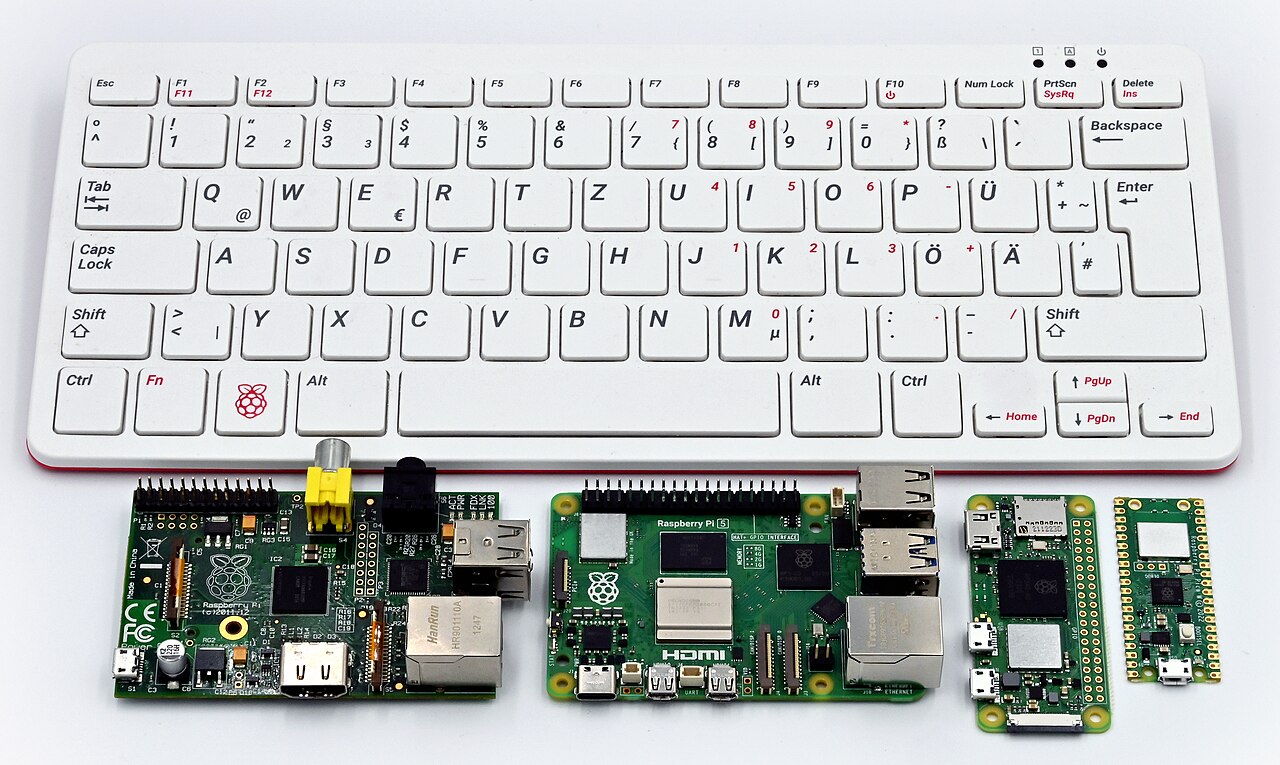
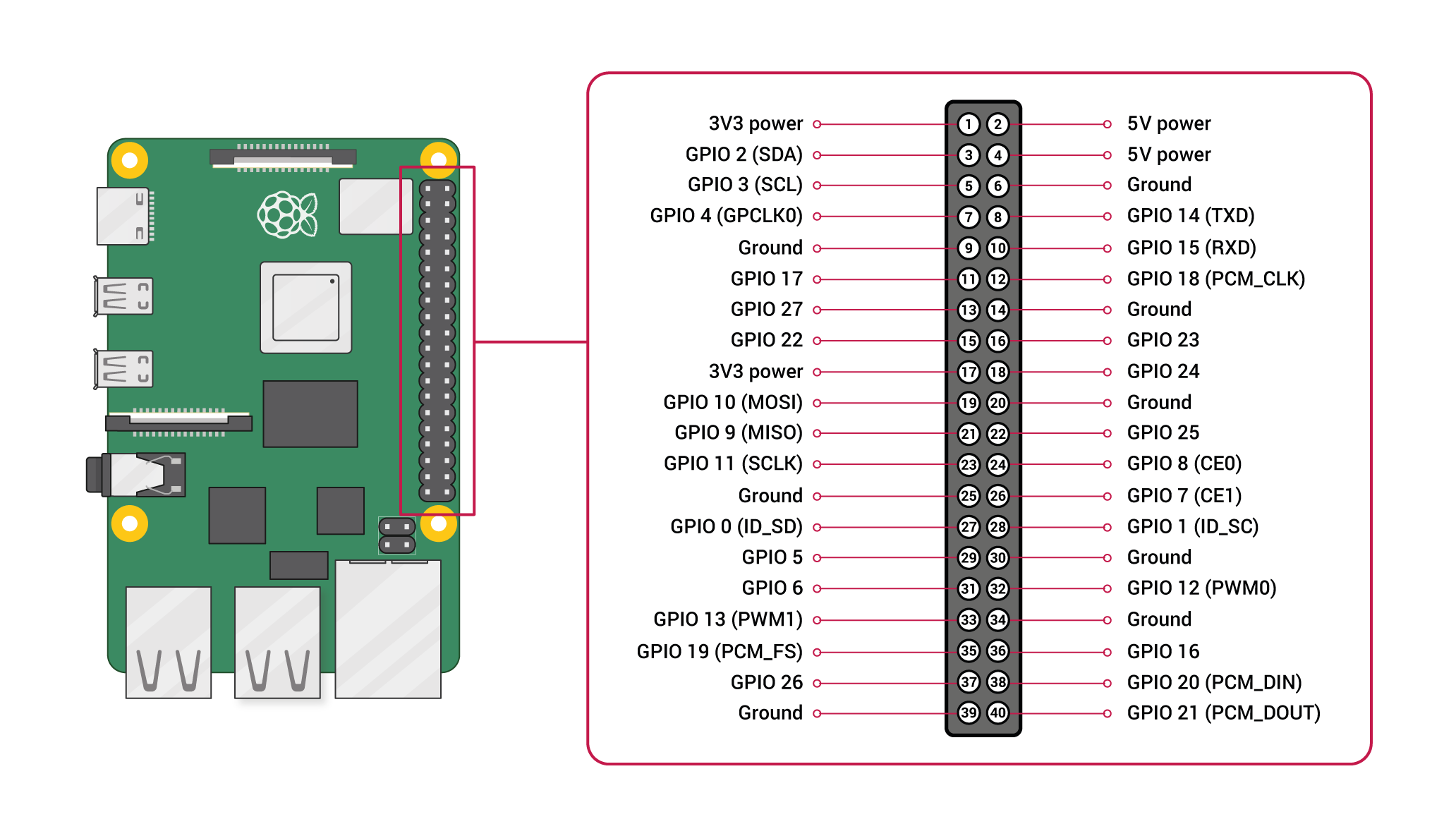
Pinout diagram
| Attr | Specs | verified |
|---|---|---|
soc | BCM2836 — 4× ARM Cortex-A7 (ARMv7-A, 32-bit) @ 900 MHz, GPU VideoCore IV (~250 MHz, OpenGL ES 2.0, 1080p30 H.264 encode/decode, MPEG-2/VC-1 licensed). v1.2+: BCM2837B0 (4× Cortex-A53) with the same VideoCore IV. (Wikipedia) | ✔ |
ram | 1 GB LPDDR2 shared CPU/GPU — 2× the Pi 1. (Wikipedia) | ✔ |
storage | microSD only; no onboard storage. | ? unverified |
connectivity | 1× 10/100 Mbps Ethernet + 4× USB 2.0, all on the single 480 Mbps USB bus via the LAN9514 combo chip; full-size HDMI, 3.5 mm 4-pole composite+audio jack. No WiFi/Bluetooth. (Wikipedia) | ✔ |
gpio | standard 40-pin J8 header — 3.3 V/5 V, I²C0 (+muxable I²C1), SPI0/SPI1, UART0, hardware PWM (GPIO18), 28 GPIOs; 3.3 V logic, no ADC/DAC. (pinout.xyz; official docs) | ✔ |
power | micro-USB 5 V, ~400–600 mA typical board draw under load (quad-core era); polyfuse-protected. | ? unverified |
temperature | throttles above 85 °C or on undervoltage; quad-core loads run warmer than Pi 1. (Wikipedia) | ✔ |
mechanical | Pi 1 B+ outline (65 × 56 mm, 4 mounting holes). (Wikipedia) | ✔ |
- Manufacturer / developer: Raspberry Pi (Trading) Ltd. / Raspberry Pi Foundation, UK, with Broadcom; Sony Pencoed (Wales) production. (Wikipedia, retrieved 2026-10-13)
- Launch: February 2015 — "a significant leap in performance… 900 MHz quad-core CPU and 1 GB of RAM" at US$35. (Wikipedia; launch blog)
- Status: End-of-life / legacy, but unusually long-lived: revisions kept shipping for years — v1.2 (2016) switched SoC, and a v1.3 (2025) revision appeared. (Wikipedia)
- Variants: - v1.1 (2015): Broadcom BCM2836, quad-core 32-bit Cortex-A7 @ 900 MHz, 1 GB RAM. (Wikipedia) - v1.2 (2016): BCM2837 (Cortex-A53, 64-bit capable) still sold as Pi 2, run in 32-bit mode. (Wikipedia) - v1.3 (2025): BCM2837-based revision. (Wikipedia)
+ Strengths
- First quad-core Pi — roughly 4–6× the Pi 1's CPU headroom at the same $35, which killed off most $35 ARMv6 competition. (Wikipedia)
- 1 GB RAM made real desktop browsing and heavier servers (Nextcloud-lite, game servers) feasible. (Wikipedia)
- v1.2's bait-and-switch SoC: a Cortex-A53 (Pi 3-class silicon, 32-bit fused) in a Pi 2 — later stock is faster per-clock than v1.1. (Wikipedia)
- Same 40-pin HAT ecosystem and B+ mechanicals as the Pi 1 B+. (Wikipedia)
- Long software tail: last Pi 2 revision (v1.3) shipped as recently as 2025. (Wikipedia)
− Weaknesses
- v1.2 random MAC address: BCM2837B0 boards sold as "Pi 2" left the Ethernet MAC unprogrammed at factory, so the MAC changes every boot — breaks DHCP reservations/firewall rules; set a static MAC in /boot/cmdline.txt (smsc95xx.macaddr=…). Documented in the official Raspberry Pi hardware documentation.
- 32-bit ceiling (v1.1): BCM2836 is ARMv7 without V8; no official 64-bit path, and ARMv7 is dropped by current Raspberry Pi OS. (Wikipedia)
- 100 Mbps Ethernet + shared USB bus unchanged from B+ — network-bound server use caps early. (Wikipedia)
- Throttling/undervoltage: 85 °C throttle plus brown-out throttling with weak supplies; quad-core transients make marginal 5 V rails sag. (Wikipedia)
- Polyfuse trips on USB over-current, same family-wide F1 design. (eLinux R-Pi Troubleshooting)
- No WiFi/BT — Pi 3 was the wireless sibling; Pi 2 buyers needed dongles. (Wikipedia)
- Retour d'expérience expert expert — expert-raspberrypi
- Retour d'experience sur cette Pi 2 Model B. C'est une carte solide pour le retro ou les projets legers, mais attention aux pieges si vous recuperez du stock. Le point fort reste le rapport perf/prix historique avec ses 4 coeurs et 1 GB de RAM, largement suffisant pour de la navigation ou un petit s… — expert-raspberrypi
- Merci pour le rappel sur la MAC, je me battais depuis deux jours avec mon serveur NAS qui changeait d'IP a chaque redemarrage. J'ai mis la ligne dans cmdline.txt et c'est regle. Par contre, je confirme le problème de puissance. Avec un chargeur micro-USB bas de gamme, des que je lance une compilati… — hackeur-du-vendredi
- Petite question pour les experts. Je viens de récupérer une Pi 2 v1.1 (donc BCM2836) pour monter un pi-hole. Je vois que le support ARMv7 va disparaitre des distributions officielles. Est-ce que vous recommandez de rester sur une vieille version de Raspberry Pi OS ou est-ce qu'il y a des alternativ… — linux_nouveau
Community feedback and projects
- CentOS 7 Linux Officially Released for Raspberry Pi 2, Banana Pi, and CubieTruck forum.banana-pi.org
- [BPI test]Raspberry Pi 2 vs Banana Pi vs x86 vs x64 unRAR PAR2 Benchmarks forum.banana-pi.org
- Installing OpenCV on the Raspberry Pi 2 Model B with the Raspbian OS stackoverflow.com
- Raspberry Pi 2 Model B, benchmarks and more learn.adafruit.com
Content not available yet.
- v1.2 random MAC address: BCM2837B0 boards sold as "Pi 2" left the Ethernet MAC unprogrammed at factory, so the MAC changes every boot — breaks DHCP reservations/firewall rules; set a static MAC in /boot/cmdline.txt (smsc95xx.macaddr=…). Documented in the official Raspberry Pi hardware documentation.
- 32-bit ceiling (v1.1): BCM2836 is ARMv7 without V8; no official 64-bit path, and ARMv7 is dropped by current Raspberry Pi OS. (Wikipedia)
- 100 Mbps Ethernet + shared USB bus unchanged from B+ — network-bound server use caps early. (Wikipedia)
- Throttling/undervoltage: 85 °C throttle plus brown-out throttling with weak supplies; quad-core transients make marginal 5 V rails sag. (Wikipedia)
- Polyfuse trips on USB over-current, same family-wide F1 design. (eLinux R-Pi Troubleshooting)
- No WiFi/BT — Pi 3 was the wireless sibling; Pi 2 buyers needed dongles. (Wikipedia)
- Allumer une LED via le GPIO 40 broches debutant Schéma : IMG-model-2b-debutant-1-model2b-led-gpio.svg — Raspberry Pi 2 Model B, connecteur J8 à 40 broches, LED et résistance 330 Ω câblées entre GPIO17 et masse
- Bouton poussoir et messages dans la console debutant Schéma : IMG-model-2b-debutant-1-model2b-bouton-console.svg — bouton poussoir entre GPIO4 et masse avec résistance de pull-up interne, terminal affichant les appuis
- Premier script Python : faire clignoter la LED debutant Schéma : IMG-model-2b-debutant-1-model2b-premier-python.svg — script Python exécuté dans le terminal, LED clignotante reliée au GPIO17, éditeur de texte ouvert sur blink.py
- Variateur de lumière : PWM sur une LED intermediaire Schéma : IMG-model-2b-intermediaire-1-model2b-pwm-led.svg — LED sur GPIO18 (sortie PWM matérielle du Pi 2), oscillogramme de rapport cyclique variable et rampe d'intensité lumineuse
- Lire un capteur sur le bus I2C intermediaire Schéma : IMG-model-2b-intermediaire-2-model2b-i2c-capteur.svg — bus I2C0 du connecteur J8 (SDA/SCL) relié à un capteur de température avec adresses 0x76/0x77 détectées par i2cdetect
- Piloter le Pi 2 en SSH et stabiliser son réseau intermediaire Schéma : IMG-model-2b-intermediaire-3-model2b-ssh-reseau.svg — Raspberry Pi 2 Model B relié en Ethernet 100 Mbps au routeur, ordinateur portable connecté en SSH, adresse MAC épinglée
- Boot sur SD, USB, et récupération d'une carte muette avance Schéma : IMG-model-2b-avance-1-model2b-boot-sd-usb.svg — étapes de gravure d'une image sur microSD avec l'Imager, partition boot FAT (config.txt, cmdline.txt) et amorce USB selon la révision
- Surveiller température et fréquence sous charge quad-core avance Schéma : IMG-model-2b-avance-2-model2b-thermique.svg — les 4 cœurs Cortex-A7 du Pi 2 en charge, sonde de température affichant le seuil de throttling à 85 °C et courbe de fréquence qui plafonne
- Serveur web léger : nginx ou Caddy sur le Pi 2 avance Schéma : IMG-model-2b-avance-3-model2b-serveur-web.svg — Raspberry Pi 2 Model B en serveur web derrière le routeur, nginx/Caddy servant une page vers un navigateur, 1 Go de RAM et Ethernet 100 Mbps mis en avant
Code library — examples written for this board
led_blink.pyPythonbutton_led.pyPythonservo_sweep.pyPythondht_temp.pyPythonoled_i2c.pyPythonmcp3008_read.pyPythoncam_photo.pyPythonweb_led.pyPythongpiotools_blink.shBashblink_c.cC
Examples and repos found online
- raspberrypi/noobs github.com
- WiringPi/WiringPi github.com
- joan2937/pigpio github.com
- raspberrypi/userland github.com
- retropie/retropie-setup github.com