Raspberry Pi 3 Model A+ (2018) — Board Sheet
⚡ The essentials in 60 seconds
- soc — Broadcom BCM2837B0 — 4× ARM Cortex-A53 (ARMv8-A, 64-bit capable) @ 1.4 GHz. (product brief; Wikipedia spec table)
- gpu — VideoCore IV (Pi 3 family) — OpenGL ES 1.1/2.0, H.264 & MPEG-4 decode 1080p30, H.264 encode 1080p30 (multimedia line quoted from the brief; VideoCore IV identification via Wikipedia).
- ram — 512 MB LPDDR2, shared CPU/GPU. (product brief)
- storage — microSD (OS + data); no onboard storage.
- connectivity — 2.4 GHz and 5 GHz IEEE 802.11b/g/n/ac WLAN (modular/compliance-certified radio module, FCC-modular per launch post) + Bluetooth 4.2/BLE; 1× USB 2.0 port; no Ethernet. (product brief; launch post; Ethernet absence per Wikipedia spec table)
- video_audio_i_o — full-size HDMI; MIPI DSI display port; MIPI CSI camera port; 4-pole 3.5 mm jack with stereo audio and composite video. (product brief)
- On this board : 9 tutorials · 10 code
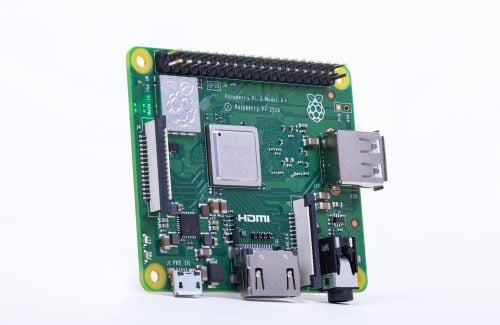
The Raspberry Pi 3 Model A+ stands as a distinctive entry in the lineage of single-board computers, representing a deliberate shift toward compactness and cost-efficiency without sacrificing the core processing power that made the platform famous. Launched on November 15, 2018, at a price point of twenty-five US dollars, this board was introduced as the final model of the "classic" Raspberry Pi generation. It occupies a unique niche by delivering the high-performance silicon of the larger Raspberry Pi 3 Model B+ within a significantly smaller physical footprint. Measuring just sixty-five by fifty-six millimeters, it shares the same mechanical outline as the original Raspberry Pi 1 Model A+, making it an ideal candidate for projects where space is at a premium. The board is currently active and remains in production, with official documentation stating that manufacturing will continue until at least January 2030, ensuring long-term availability for educational and industrial applications.
At the heart of the Raspberry Pi 3 Model A+ lies the Broadcom BCM2837B0 system-on-chip. This component integrates four ARM Cortex-A53 cores, which operate at a clock speed of 1.4 gigahertz. To understand what this means for a user, consider that the clock speed dictates how many cycles the processor can perform per second; a higher frequency generally allows for faster execution of tasks. The Cortex-A53 architecture is based on the ARMv8-A instruction set, which is 64-bit capable. This means the chip can handle larger amounts of data per cycle compared to older 32-bit processors, offering better efficiency and support for modern operating systems. The graphics processing is handled by a VideoCore IV GPU, which supports OpenGL ES 1.1 and 2.0 standards. This allows the board to handle hardware-accelerated graphics and video decoding, specifically supporting H.264 and MPEG-4 formats at 1080p resolution with thirty frames per second. While this is sufficient for media playback and basic graphical interfaces, it is not designed for heavy 3D gaming or complex visual rendering.
Memory management is a critical aspect of this board’s design, defined by its 512 megabytes of LPDDR2 RAM. Unlike desktop computers that often have separate memory for the CPU and GPU, the Raspberry Pi uses a shared memory architecture. This means the 512 megabytes must be divided between the operating system, running applications, and the graphics processor. While this amount of memory is adequate for lightweight tasks, command-line operations, and simple media centers, it can become a bottleneck for more demanding applications. For instance, running a full desktop environment with multiple browser tabs open may lead to performance issues or require the use of swap space on the storage medium. Users should be aware that allocating a large portion of this memory to the GPU for emulation or graphics-intensive tasks will leave less room for the operating system, potentially causing instability.
Connectivity options on the Raspberry Pi 3 Model A+ reflect its compact design philosophy. It features dual-band wireless networking, supporting both 2.4 gigahertz and 5 gigahertz IEEE 802.11b/g/n/ac standards. The inclusion of 5 gigahertz Wi-Fi is a significant advantage, as this frequency band is less crowded than the traditional 2.4 gigahertz band, often resulting in faster and more stable connections in urban environments. The board also includes Bluetooth 4.2 with Low Energy support, allowing for connection to modern peripherals like keyboards, mice, and sensors. However, unlike its larger sibling, the Model B+, the A+ lacks an Ethernet port. This means that wired networking is not natively supported, and users must rely on Wi-Fi or use the single USB port for a wired adapter, which would then occupy the only available USB slot. The board is equipped with one USB 2.0 port, which also supports On-The-Go functionality. This allows the Raspberry Pi to act as a peripheral device itself, such as a virtual keyboard or network adapter, when connected to a host computer.
The input and output interfaces provide a versatile range of options for hobbyists and engineers. The board includes a full-size HDMI port for connecting to modern monitors and televisions. For more specialized displays, it offers MIPI DSI and MIPI CSI ports. MIPI DSI is a standard interface for connecting small, low-power displays directly to the board, often used in portable devices, while MIPI CSI is designed for camera modules, enabling vision-based projects. Additionally, a four-pole 3.5 millimeter jack provides both stereo audio output and composite video. The composite video capability is a legacy feature that remains useful for connecting to older televisions or analog monitors, a trait that distinguishes it from many modern computing devices. The general-purpose input-output header consists of forty pins, following the standard family layout. This header provides access to various communication protocols such as I2C, SPI, UART, and hardware PWM, allowing the board to interact with a wide array of electronic components. It is important to note that these pins operate at 3.3-volt logic levels and do not include analog-to-digital converters, meaning external hardware is required for reading analog signals.
Powering the Raspberry Pi 3 Model A+ can be done in two ways. The standard method is via a micro-USB connector, which requires a five-volt supply with a current of at least 2.5 amperes. Alternatively, power can be fed directly through the GPIO header, a feature that is particularly useful for embedded applications where a clean, cable-free integration into an enclosure is desired. The board does not support Power over Ethernet, a feature found on some other models, due to the absence of an Ethernet port and dedicated power pins. Thermal management is a consideration given the compact size. The board operates within a temperature range of zero to fifty degrees Celsius. While the launch materials claimed improved thermal performance compared to previous models, the small form factor means that sustained heavy loads can lead to thermal throttling, where the processor slows down to prevent overheating. Adequate ventilation is therefore recommended for intensive tasks.
Software support for the Raspberry Pi 3 Model A+ is robust, primarily centered around Raspberry Pi OS, formerly known as Raspbian. Because the BCM2837B0 chip is 64-bit capable, the board can run both 32-bit and 64-bit versions of the operating system. The 32-bit version is the traditional choice and is well-optimized for the hardware, while the 64-bit version offers advantages for newer software stacks and containerized applications. At launch, the board was supported by Raspbian and NOOBS, and it also featured improved USB mass-storage booting, allowing users to boot from a USB drive if configured correctly. The ecosystem also supports numerous third-party distributions, including Ubuntu, DietPi, RetroPie for gaming, and LibreELEC for media centers. The bootloader uses a traditional SD-card FAT partition method, relying on files like bootcode.bin and start.elf, which differs from the more modern EEPROM-based recovery methods found in later Raspberry Pi models.
Despite its strengths, the Raspberry Pi 3 Model A+ has limitations that users must consider. The 512 megabytes of RAM is the lowest in the Raspberry Pi 3 family, making it less suitable for multitasking or memory-heavy applications. The single USB port is a significant constraint, as connecting a keyboard, mouse, or external storage may require a USB hub, which can complicate the setup. The lack of Ethernet and Power over Ethernet limits its utility in certain industrial or networked scenarios where wired reliability is paramount. Furthermore, the Cortex-A53 cores are subject to a known hardware erratum, specifically erratum 843419, which requires a software workaround in the Linux kernel. This workaround can incur a slight performance penalty, although it ensures system stability. The board also lacks a real-time clock battery, meaning the system time must be synchronized via network time protocol each time it boots, which can be problematic for offline deployments.
In summary, the Raspberry Pi 3 Model A+ is a specialized tool designed for users who prioritize size and cost over expandability. It successfully packs the processing power of the 3B+ into a compact frame, offering modern wireless connectivity and versatile I/O options. It is well-suited for projects like 3D printer servers, digital signage, simple media players, and IoT hubs where space is limited and wired networking is not required. However, its memory constraints and limited USB connectivity require careful project planning. As the final product of the classic BCM283x line, it holds historical significance as a bridge between the early Raspberry Pi generations and the more powerful, redesigned models that followed. Its continued production status underscores its enduring relevance in the maker community and educational sectors.
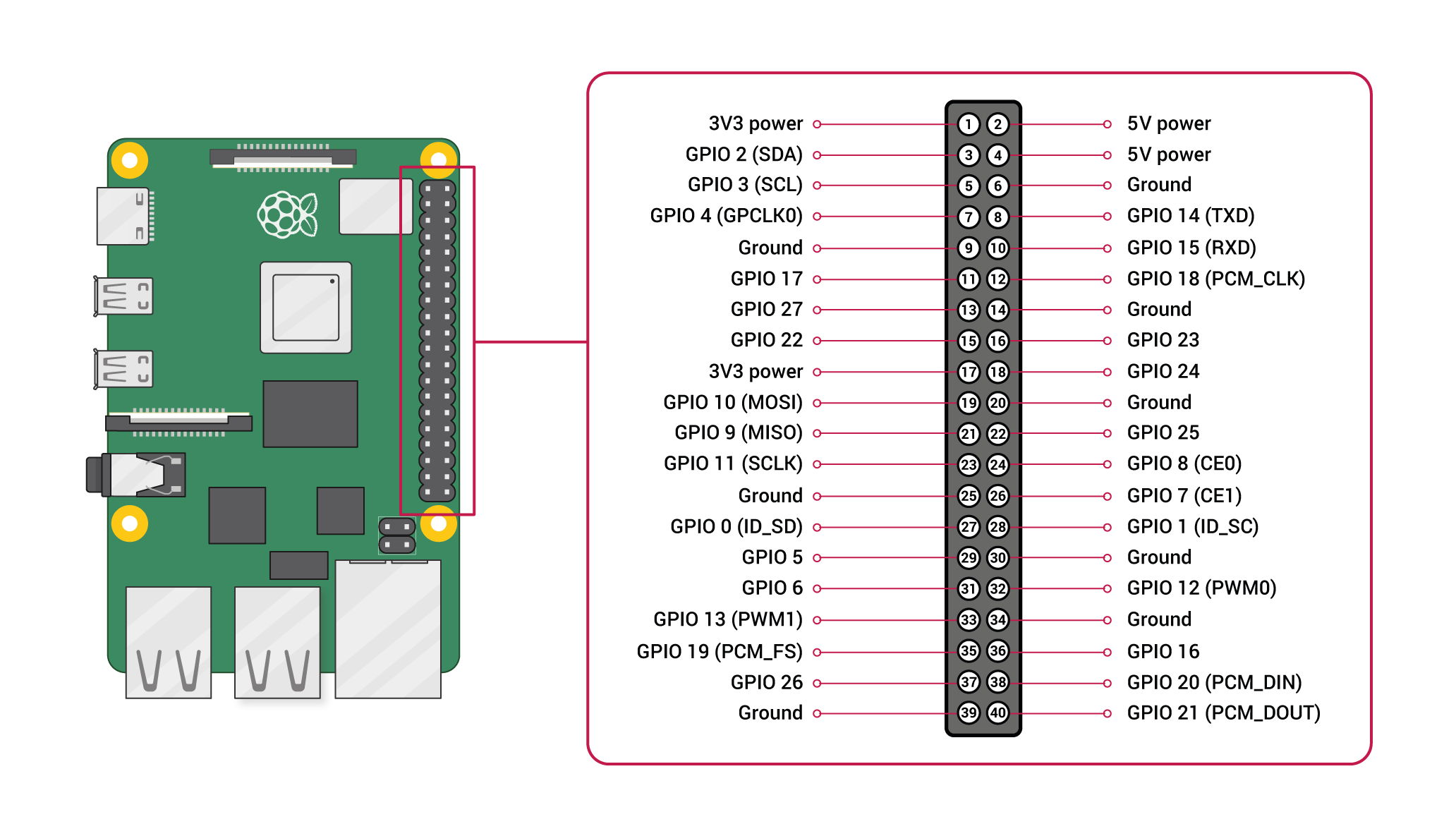
Pinout diagram
| Attr | Specs | verified |
|---|---|---|
soc | Broadcom BCM2837B0 — 4× ARM Cortex-A53 (ARMv8-A, 64-bit capable) @ 1.4 GHz. (product brief; Wikipedia spec table) | ✔ |
gpu | VideoCore IV (Pi 3 family) — OpenGL ES 1.1/2.0, H.264 & MPEG-4 decode 1080p30, H.264 encode 1080p30 (multimedia line quoted from the brief; VideoCore IV identification via Wikipedia). | ✔ |
ram | 512 MB LPDDR2, shared CPU/GPU. (product brief) | ✔ |
storage | microSD (OS + data); no onboard storage. | ? unverified |
connectivity | 2.4 GHz and 5 GHz IEEE 802.11b/g/n/ac WLAN (modular/compliance-certified radio module, FCC-modular per launch post) + Bluetooth 4.2/BLE; 1× USB 2.0 port; no Ethernet. (product brief; launch post; Ethernet absence per Wikipedia spec table) | ✔ |
video_audio_i_o | full-size HDMI; MIPI DSI display port; MIPI CSI camera port; 4-pole 3.5 mm jack with stereo audio and composite video. (product brief) | ✔ |
gpio | extended 40-pin header (family-standard J8 pinout): 3.3 V/5 V rails, I²C, SPI, UART, hardware PWM; 3.3 V logic only, no ADC/DAC. (pinout.xyz, canonical pin reference) | ✔ |
power | 5 V / 2.5 A DC via micro-USB connector, or 5 V DC via GPIO header (embedded feeding); the micro-USB port also carries USB OTG, so the board supports USB gadget mode (virtual keyboard / network adapter / serial device when plugged into a PC). (product brief; Wikipedia, "Special-purpose features", citing forum thread) | ✔ |
temperature | operating 0–50 °C per the brief. | ? unverified |
mechanical | 65 × 56 mm, "same mechanical footprint as Raspberry Pi 1 Model A+" (dimensions from the brief's mechanical drawing). (product brief) | ✔ |
- Manufacturer / developer: Raspberry Pi (Trading) Ltd. (now Raspberry Pi Ltd.), UK, with Broadcom silicon; built on Sony's contract line at Pencoed, Wales. (Wikipedia, retrieved 2026-10-13)
- Launch: 15 November 2018, at US$25 — official announcement: "New product: Raspberry Pi 3 Model A+ on sale now at $25" ("TL;DR: you can now get the 1.4 GHz clock speed, 5GHz wireless networking and improved thermals of Raspberry Pi 3B+ in a smaller form factor, and at the smaller price of $25"). (Official launch post, retrieved 2026-10-13; launch date also fixed by the archived copy of that post, 15 Nov 2018, cited in Wikipedia)
- Status: Active — the current product brief (rev. April 2024) states: "Raspberry Pi 3 Model A+ will remain in production until at least January 2030." (Official product brief PDF, RP-008331-DS-1, retrieved 2026-10-13) Wikipedia's production table likewise lists it as still on sale (accessed 1 Feb 2026). (Wikipedia)
- Variants: effectively a single revision (BCM2837B0-based); no RAM or clock variants were released. It is the final A-series model and, per the launch post, the last product of the "classic Pi" generation ("whatever we do next will of necessity be less of an evolution… new core silicon, new process node, new memory technology"). (Wikipedia; launch post)
+ Strengths
- $25 quad-core 64-bit with dual-band Wi-Fi — the cheapest 802.11ac Pi ever listed, and the only A-series board with wireless at all. (product brief; Wikipedia)
- 3B+ silicon in the 65 × 56 mm A+ outline — "the same features as the 3B+, but with 512 MB RAM and in a smaller form factor". (Wikipedia)
- USB OTG gadget mode (like Zero and Pi 4) — emulates HID/ethernet-serial against a host PC. (Wikipedia)
- 5 V power input on the GPIO header — clean integration into powered enclosures, HAT stacks and 3D-printer electronics (no micro-USB cable dangling). (product brief)
- FCC-modular certified radio — "the entire board is certified as a radio module under FCC rules, which… will significantly reduce the cost of conformance testing Raspberry Pi–based products". (launch post)
- DSI + CSI + HDMI + composite simultaneously available — unusual I/O spread for the price; the composite jack keeps it useful with legacy displays/FPV-style analog links. (product brief)
- Historic bookend: explicitly framed by Raspberry Pi as the closing product of the classic BCM283x line before the BCM2711/Pi 4 redesign. (launch post)
− Weaknesses
- 512 MB RAM ceiling. Half of a 3B+; on modern Raspberry Pi OS the desktop works but browser/multiservice loads hit swap/OOM quickly, and any large gpu_mem allocation (emulation front-ends) starves the OS. (RAM figure: product brief; consequence is documented community consensus — see Raspberry Pi forums)
- One USB port, no hub, no Ethernet. A USB keyboard/SSD and a USB Wi-Fi dongle can't coexist; wired networking needs the single USB port (sacrificing gadget mode or a peripheral). (product brief; Wikipedia spec table)
- No PoE. The official PoE HAT rides the 3B+'s Ethernet + dedicated pins; the 3A+ has neither Ethernet nor the PoE header — only third-party GPIO 5 V injectors. (Wikipedia, PoE HAT; GPIO 5 V input per product brief)
- Cortex-A53 erratum 843419. The BCM2837B0's A53 cores fall in the affected MIDR revision range; Linux carries the workaround (CONFIG_ARM64_ERRATUM_843419), which costs some performance on affected cores. (Linux kernel cpu_errata.c, retrieved 2026-10-13)
- Thermal headroom in a tiny outline. 1.4 GHz BCM2837B0 on a 65 × 56 mm board with no heatspreader throttles under sustained AVX-free-but-heavy loads (stress/CPU burn); the brief mandates well-ventilated operation. (product brief warnings section)
- Undervoltage/polyfuse family quirks: marginal 5 V rails brown-out and throttle; USB over-current trips the input polyfuse — same design family-wide. (eLinux R-Pi Troubleshooting)
- No RTC — time must come from NTP (Wi-Fi) each boot; matters for offline/camera deployments. (Family trait; Wikipedia)
- Retour d'expérience expert expert — expert-raspberrypi
- Après plusieurs semaines d'utilisation de la 3 Model A+, je confirme ce que la fiche technique laisse entendre. Le format 65x56 mm est super pour les boîtiers compacts, et le Wi-Fi 5 GHz est un vrai plus par rapport aux anciens modèles A. Par contre, les 512 MB de RAM sont vite saturés avec le bure… — expert-raspberrypi
- Salut, merci pour ce retour. Je hésite à la prendre pour un projet domotique fixe. Tu dis que le port USB unique est un problème, mais est-ce que ça veut dire que je ne peux pas avoir à la fois un dongle Wi-Fi externe et un disque dur USB ? Ou est-ce que le Wi-Fi interne suffit pour la plupart des … — maker-2024
- Le port USB unique est effectivement le gros point noir. Si tu branches un SSD, tu ne peux pas mettre un dongle Wi-Fi, mais heureusement le Wi-Fi interne (802.11ac) est correct. Par contre, n'espère pas utiliser un hub USB pour connecter plusieurs choses, ça fait souvent des coupures à cause de la … — geek-du-sud
Community feedback and projects
- Raspberry Pi 3A+ with Mono C# to control SPI connection stackoverflow.com
- How to add the chart of "voltage fluctuations per core" in Netdata monitoring the status of Raspberry Pi 3A+ stackoverflow.com
- Raspberry Pi Model 3A+ theverge.com
- Can the same SD card be used for Raspberry Pi Zero and Raspberry Pi 3A+ that is to be accessed wirelessly (SSH & wpa_supplicant)? raspberrypi.stackexchange.com
- Does the power port of the Raspberry Pi 3a+ have lines for transfering data? raspberrypi.stackexchange.com
- raspberry-pi-3-a-plus-product-brief.pdf datasheet
- Official product brief (datasheet), RP-008331-DS-1, April 2024
- Official launch announcement
- Canonical product page
- Official documentation hub (hardware, schematics, power)
- Wikipedia family article (specs table, production status)
- GPIO pinout reference
- Troubleshooting (power, polyfuse, throttling)
- Linux kernel Cortex-A53 errata workarounds
- Community
- Community
- 512 MB RAM ceiling. Half of a 3B+; on modern Raspberry Pi OS the desktop works but browser/multiservice loads hit swap/OOM quickly, and any large gpu_mem allocation (emulation front-ends) starves the OS. (RAM figure: product brief; consequence is documented community consensus — see Raspberry Pi forums)
- One USB port, no hub, no Ethernet. A USB keyboard/SSD and a USB Wi-Fi dongle can't coexist; wired networking needs the single USB port (sacrificing gadget mode or a peripheral). (product brief; Wikipedia spec table)
- No PoE. The official PoE HAT rides the 3B+'s Ethernet + dedicated pins; the 3A+ has neither Ethernet nor the PoE header — only third-party GPIO 5 V injectors. (Wikipedia, PoE HAT; GPIO 5 V input per product brief)
- Cortex-A53 erratum 843419. The BCM2837B0's A53 cores fall in the affected MIDR revision range; Linux carries the workaround (CONFIG_ARM64_ERRATUM_843419), which costs some performance on affected cores. (Linux kernel cpu_errata.c, retrieved 2026-10-13)
- Thermal headroom in a tiny outline. 1.4 GHz BCM2837B0 on a 65 × 56 mm board with no heatspreader throttles under sustained AVX-free-but-heavy loads (stress/CPU burn); the brief mandates well-ventilated operation. (product brief warnings section)
- Undervoltage/polyfuse family quirks: marginal 5 V rails brown-out and throttle; USB over-current trips the input polyfuse — same design family-wide. (eLinux R-Pi Troubleshooting)
- No RTC — time must come from NTP (Wi-Fi) each boot; matters for offline/camera deployments. (Family trait; Wikipedia)
- Allumer une LED en C avec libgpiod sur le GPIO 40 broches debutant Schéma : IMG-model-3a-plus-debutant-1-model3a-led-gpio.svg — Raspberry Pi 3 Model A+ et son connecteur 40 broches : GPIO17 (broche 11) vers résistance 330 Ω puis LED, cathode vers GND (broche 14)
- Bouton poussoir et retour console avec gpiozero debutant Schéma : IMG-model-3a-plus-debutant-2-model3a-bouton-console.svg — Raspberry Pi 3 A+ : bouton entre GPIO27 (broche 13) et GND (broche 20), LED + 330 Ω entre GPIO17 (broche 11) et GND (broche 14)
- Premier script Python : inventaire du système debutant Schéma : IMG-model-3a-plus-debutant-3-model3a-premier-python.svg — Raspberry Pi 3 A+ en terminal SSH : affichage du SoC BCM2837B0 quad Cortex-A53, 512 MB de RAM, WiFi dual-band et heure NTP
- Variation d'intensité d'une LED avec le PWM matériel intermediaire Schéma : IMG-model-3a-plus-intermediaire-1-model3a-pwm-led.svg — Raspberry Pi 3 A+ : LED + 330 Ω sur GPIO18 (broche 12, PWM matériel), GND broche 14, oscillogramme du rapport cyclique
- Capteur I2C : température et pression avec BME280 intermediaire Schéma : IMG-model-3a-plus-intermediaire-2-model3a-i2c-capteur.svg — Raspberry Pi 3 A+ relié en I2C (SDA GPIO2 broche 3, SCL GPIO3 broche 5, 3,3 V, GND) à un module BME280
- Connexion WiFi station et administration en SSH intermediaire Schéma : IMG-model-3a-plus-intermediaire-3-model3a-wifi-ssh.svg — Raspberry Pi 3 A+ (sans port Ethernet) connecté en 802.11ac 5 GHz à une box, terminal SSH distant via raspberrypi.local
- Démarrage SD/USB et récupération d'une carte qui ne boot plus avance Schéma : IMG-model-3a-plus-avance-1-model3a-boot-sd-usb.svg — Raspberry Pi 3 A+ : ordre de démarrage microSD puis clé USB sur l'unique port, partition boot FAT avec start.elf/config.txt, remise à zéro par réécriture
- Surveillance thermique et fréquence des quatre Cortex-A53 avance Schéma : IMG-model-3a-plus-avance-2-model3a-thermique.svg — Raspberry Pi 3 A+ : les 4 cœurs Cortex-A53 identiques (pas de big.LITTLE), sonde thermique du SoC BCM2837B0, courbe température/fréquence sous contrainte
- Serveur multimédia HDMI avec le GPU VideoCore IV avance Schéma : IMG-model-3a-plus-avance-3-model3a-media-gpu.svg — Raspberry Pi 3 A+ en borne multimédia : sortie HDMI full-size et jack vidéo composite, décodage H.264 1080p30 par le GPU VideoCore IV, flux depuis un NAS en WiFi
Code library — examples written for this board
led_blink.pyPythonbutton_led.pyPythonservo_sweep.pyPythondht_temp.pyPythonoled_i2c.pyPythonmcp3008_read.pyPythoncam_photo.pyPythonweb_led.pyPythongpiotools_blink.shBashblink_c.cC
Examples and repos found online
- raspberrypi/linux github.com
- joan2937/pigpio github.com
- retropie/retropie-setup github.com