Raspberry Pi Model B (Rev 1, 2012) — Board Sheet
⚡ The essentials in 60 seconds
- soc — Broadcom BCM2835 — single-core 32-bit ARM1176JZF-S (ARMv6, VFPv2 FPU) + VideoCore IV GPU. CPU at 700 MHz (typical; up to ~1 GHz with overvoltage overclock). (Wikipedia)
- gpu — VideoCore IV, ~250 MHz; OpenGL ES 2.0 (~24 GFLOPS on BCM2835), 1080p30 H.264 decode and encode; MPEG-2 and VC-1 decode require paid licenses. (Wikipedia)
- ram — 256 MB shared LP-DDR (CPU/GPU split configurable via gpu_mem=); no onboard storage — full-size SD card slot (not microSD) is the only boot/root medium. (Wikipedia)
- connectivity — 1× 10/100 Mbps Ethernet (SMSC LAN9512 USB hub+NIC combo chip; Ethernet and the 2 USB 2.0 ports share one 480 Mbps USB path), 2× USB 2.0 (bus-powered, no hubs-friendly), composite video (3.5 mm 4-pole jack) + HDMI 1.3/1.4 (full-size, DVI-capable), 3.5 mm analog audio. No WiFi/Bluetooth. (Wikipedia)
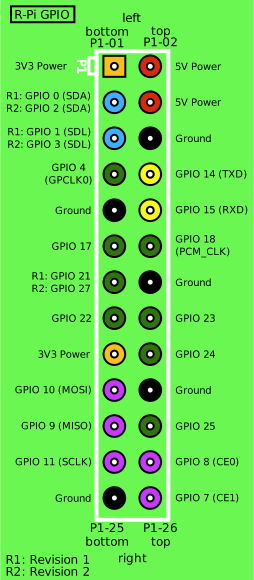
- gpio — 26-pin P1 header (2×13) — 3.3 V and 5 V power, GND, 1× I²C (GPIO0/1), 1× SPI (SPI0), 1× UART (TXD/RXD), 1× hardware PWM (GPIO18), plus general GPIO (BCM 0,1,4,7–11,17,18,21–25). 3.3 V logic only, no 5 V-tolerant pins, no ADC, no DAC. (Official pinout reference — pinout.xyz; Raspberry Pi hardware documentation)
- power — micro-USB or GPIO 5 V; official guidance ~700 mA budget; protected by resettable polyfuse F1 on 5 V rail. Typical consumption is in the low-watt range (order of 1–4 W depending on load).
- On this board : 9 tutorials · 10 code
Launched on February 29, 2012, the Raspberry Pi Model B (Revision 1) stands as a pivotal artifact in the history of personal computing, marking the beginning of the modern single-board computer era. Developed by the Raspberry Pi Foundation in the United Kingdom in collaboration with Broadcom, this compact circuit board was introduced at an unprecedented price point of thirty-five US dollars. Its release was so impactful that it crashed the websites of major distributors like Premier Farnell and RS Components, with one reporting over one hundred thousand pre-orders on the very first day. While early units were manufactured in Taiwan and China, production shifted to the Sony plant in Pencoed, Wales, starting in September 2012. Today, this specific revision is considered end-of-life and legacy hardware, having been superseded by the Model B Rev 2 and later the Model B+. It represents the original vision of making a capable, affordable Linux computer accessible to students and hobbyists, a mission that has since resulted in over seventy-five million units sold across the entire Raspberry Pi family.
At the heart of this board lies the Broadcom BCM2835 System on a Chip, a component that integrates both the central processing unit and the graphics processing unit into a single package. The CPU is a single-core ARM1176JZF-S, running at a typical frequency of 700 megahertz. To understand this speed, consider that a megahertz represents one million cycles per second; while this may seem slow by modern standards, it was sufficient for the lightweight tasks intended for this device. The chip also includes a VideoCore IV GPU running at approximately 250 megahertz, capable of handling OpenGL ES 2.0 graphics and decoding 1080p H.264 video. Notably, this hardware could also encode H.264 video, a feature that was remarkable for a thirty-five-dollar device in 2012. However, users should be aware that decoding MPEG-2 and VC-1 video formats required the purchase of separate software license keys, a restriction that limited out-of-the-box media playback capabilities for certain formats.
Memory and storage on the Model B Rev 1 reflect the cost constraints of its time. The board is equipped with 256 megabytes of low-power double data rate RAM, which is shared between the CPU and the GPU. This shared architecture means that users could configure the split of memory usage via a setting in the configuration file, allocating more resources to graphics or processing as needed. There is no onboard storage such as a hard drive or solid-state drive; instead, the board relies entirely on a full-size SD card slot. This is a significant distinction from later models that moved to smaller microSD cards. The SD card serves as the sole medium for booting the operating system and storing user data. The bootloader is unique in that it loads directly from the SD card’s FAT partition without any EEPROM or USB boot capability, meaning recovery from a corrupted system requires physically re-flashing the SD card.
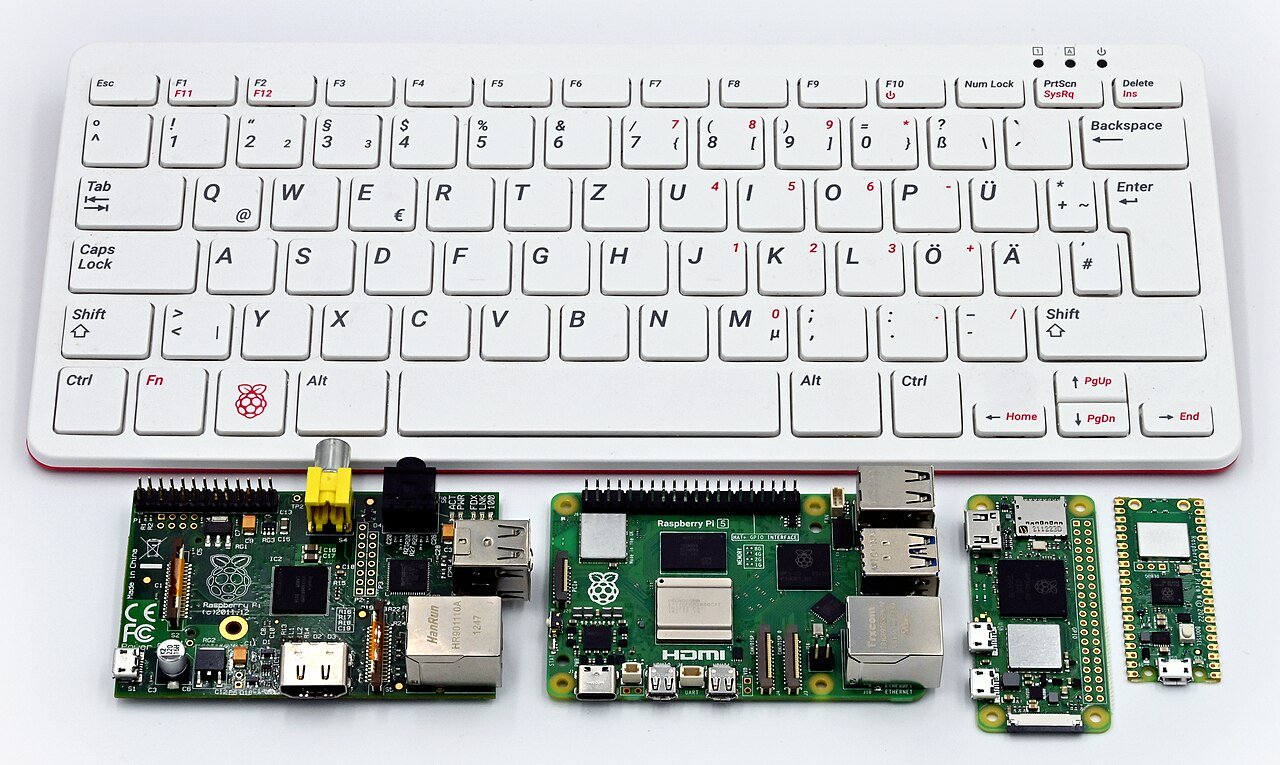
Connectivity options on the Model B Rev 1 are comprehensive for its size but reveal certain architectural bottlenecks. The board features one Ethernet port and two USB 2.0 ports. Crucially, these ports share a single internal USB 2.0 path via the SMSC LAN9512 chip, which combines a USB hub and a network interface controller. This design means that the Ethernet speed is capped at 10/100 megabits per second and that heavy data transfer over USB can impact network performance. There is no built-in Wi-Fi or Bluetooth, so wireless connectivity requires external adapters. Video output is provided through a full-size HDMI port, which is compatible with DVI displays, as well as a composite video jack using a 3.5-millimeter four-pole connector. Audio is delivered via a standard 3.5-millimeter analog jack. The board is powered via a micro-USB connector or through the GPIO header, with a recommended power budget of around 700 milliamps. A resettable polyfuse protects the 5-volt rail, though it can trip during USB over-current events, leading to weak power delivery that may require hardware intervention to resolve.
The General Purpose Input/Output, or GPIO, header is a 26-pin connector arranged in two rows of thirteen. This interface allows users to connect electronic components directly to the board, enabling physical computing projects. The pins provide 3.3-volt and 5-volt power, ground connections, and various communication protocols including I2C, SPI, and UART. It is important to note that the GPIO pins operate at 3.3-volt logic levels and are not tolerant of 5-volt signals, meaning connecting 5-volt devices directly can damage the board. Unlike modern microcontrollers, this SoC does not include an Analog-to-Digital Converter or Digital-to-Analog Converter, limiting the types of sensors and actuators that can be directly interfaced without additional hardware. The board also lacks a reset button and has no hardware pull-up resistors on the I2C lines, which are electrical considerations that hobbyists must account for in their circuit designs.
Software support for the Model B Rev 1 has evolved over time. Historically, it was the primary target for Raspbian, a Debian-based operating system optimized for the ARMv6 architecture. As of recent years, modern releases of Raspberry Pi OS have dropped support for this older architecture. Users today must rely on legacy 32-bit images, such as the Buster release, or third-party distributions like RetroPie for gaming, LibreELEC for media centers, and RISC OS. The board’s legacy status means that while it can still run many lightweight applications, it lacks the performance and software compatibility of newer models. Despite these limitations, the Raspberry Pi Model B Rev 1 remains a celebrated piece of hardware, recognized for democratizing access to computing and inspiring a global community of makers and educators. Its design choices, from the shared USB/Ethernet path to the full-size ports, offer valuable lessons in the trade-offs between cost, performance, and usability in embedded systems design.
Pinout diagram
| Attr | Specs | verified |
|---|---|---|
soc | Broadcom BCM2835 — single-core 32-bit ARM1176JZF-S (ARMv6, VFPv2 FPU) + VideoCore IV GPU. CPU at 700 MHz (typical; up to ~1 GHz with overvoltage overclock). (Wikipedia) | ✔ |
gpu | VideoCore IV, ~250 MHz; OpenGL ES 2.0 (~24 GFLOPS on BCM2835), 1080p30 H.264 decode and encode; MPEG-2 and VC-1 decode require paid licenses. (Wikipedia) | ✔ |
ram | 256 MB shared LP-DDR (CPU/GPU split configurable via gpu_mem=); no onboard storage — full-size SD card slot (not microSD) is the only boot/root medium. (Wikipedia) | ✔ |
connectivity | 1× 10/100 Mbps Ethernet (SMSC LAN9512 USB hub+NIC combo chip; Ethernet and the 2 USB 2.0 ports share one 480 Mbps USB path), 2× USB 2.0 (bus-powered, no hubs-friendly), composite video (3.5 mm 4-pole jack) + HDMI 1.3/1.4 (full-size, DVI-capable), 3.5 mm analog audio. No WiFi/Bluetooth. (Wikipedia) | ✔ |
gpio | 26-pin P1 header (2×13) — 3.3 V and 5 V power, GND, 1× I²C (GPIO0/1), 1× SPI (SPI0), 1× UART (TXD/RXD), 1× hardware PWM (GPIO18), plus general GPIO (BCM 0,1,4,7–11,17,18,21–25). 3.3 V logic only, no 5 V-tolerant pins, no ADC, no DAC. (Official pinout reference — pinout.xyz; Raspberry Pi hardware documentation) | ✔ |
power | micro-USB or GPIO 5 V; official guidance ~700 mA budget; protected by resettable polyfuse F1 on 5 V rail. Typical consumption is in the low-watt range (order of 1–4 W depending on load). | ? unverified |
temperature | no hard cutoff documented for this board; firmware throttles CPU above 85 °C or on undervoltage detection. (Wikipedia) | ✔ |
- Manufacturer / developer: Raspberry Pi (Trading) Ltd. / Raspberry Pi Foundation, UK, developed with Broadcom. Boards were first built in Taiwan/China, then production moved to the Sony plant in Pencoed, Wales from September 2012. (Wikipedia, retrieved 2026-10-13)
- Launch: 29 February 2012, initial price US$35. Demand crashed distributor sites (Premier Farnell, RS Components); one distributor reported >100,000 pre-orders on day one. (Wikipedia)
- Status: End-of-life / legacy. Superseded by Model B Rev 2 (2012), Model B+ (2014). The BCM2835 platform survives only in the Pi Zero line.
- Variants: Rev 1 (this board, 256 MB, mounting holes, unpopulated compound-cap footprint), Rev 1.0 "E14A" revisions, then Rev 2 (Sept 2012, minor corrections; 512 MB RAM from Oct 2012). (Wikipedia; Raspberry Pi blog: "Model B Now Ships with 512 MB of RAM", 15 Oct 2012)
- Identity details: PCB marked "Raspberry Pi R1.0 / Sony", 85.6 × 53.98 mm, first-gen form factor.
+ Strengths
- The board that started the modern SBC market; first mass-market sub-$40 Linux computer (75 M+ units sold across the family as of March 2026). (Wikipedia)
- Hardware 1080p H.264 encode and decode on a $35 board — unprecedented in 2012. (Wikipedia)
- Full-size SD slot and full-size HDMI (later models moved to microSD/mini-HDMI/USB-C era).
- Homage to the BBC Micro: "Model A/B" naming. (Wikipedia)
- Historic quirks: Rev 1 mounting holes (later removed), unpopulated components, P1 header without the extra pins of the 40-pin standard.
− Weaknesses
- Polyfuse F1 trips: a USB over-current event can trip the resettable fuse; the board then powers only weakly (undervoltage LED symptoms) and may need desoldering/bypass of F1. Documented in the community troubleshooting reference. (eLinux R-Pi Troubleshooting)
- Reverse-polarity diode D1 (early boards): some early Model A/B boards include D1 for reverse-polarity protection; it drops voltage and causes undervoltage with marginal supplies. Removal is a classic mod.
- 256 MB RAM + 100 Mbps shared USB: heavy desktop use and USB storage are painful; Ethernet bandwidth is capped by the single USB 2.0 port feeding the LAN9512. (Wikipedia)
- Undervoltage/instability with phone chargers; firmware throttles at 85 °C or on brown-out. (Wikipedia)
- MPEG-2/VC-1 codecs locked behind paid license keys. (Wikipedia)
- No hardware I²C pull-ups / no reset button / no IR — early-revision electrical gotchas discussed extensively on the official forums. (Raspberry Pi forums)
- Retour d'expérience expert expert — expert-raspberrypi
- Retour sur la Model B Rev 1 : c'est une piece historique, mais il faut être conscient de ses defauts electriques. Le point fort reste le decodeur H.264 1080p matériel pour 35 dollars, ce qui etait revolutionnaire en 2012. Par contre, attention au polyfuse F1 : un pic de courant sur l'USB le fait sa… — expert-raspberrypi
- Merci pour le rappel sur le F1, j'ai exactement ce souci. Ma carte ne démarre que si je branche un hub alimente, sinon la LED rouge clignote. J'ai lu qu'il fallait dessouder le fusible, mais je n'ose pas trop. Concernant la D1, est-ce qu'elle est presente sur toutes les Rev 1 ou seulement certaines… — maker-du-35
- Pour la D1, regarde près du connecteur d'alimentation micro-USB. Si tu vois une diode, tu peux la retirer pour gagner quelques centiemes de volts, utile avec des cables longs. Le vrai problème c'est les 256 Mo de RAM et l'absence de pull-ups I2C sur le header P1, ca oblige a mettre des résistances … — linux-pi-legacy
Community feedback and projects
- Help SIM5320 Breakout Board construction for Raspberry Pi model B electronics.stackexchange.com
- How should I mount a raspberry pi model B rev 1 raspberrypi.stackexchange.com
- Is Raspberry Pi really credit card sized? nomarketingbs.blogspot.com
- Credit card-sized Raspberry Pi computer will handle 1080p video for $25 theverge.com
Content not available yet.
- Polyfuse F1 trips: a USB over-current event can trip the resettable fuse; the board then powers only weakly (undervoltage LED symptoms) and may need desoldering/bypass of F1. Documented in the community troubleshooting reference. (eLinux R-Pi Troubleshooting)
- Reverse-polarity diode D1 (early boards): some early Model A/B boards include D1 for reverse-polarity protection; it drops voltage and causes undervoltage with marginal supplies. Removal is a classic mod.
- 256 MB RAM + 100 Mbps shared USB: heavy desktop use and USB storage are painful; Ethernet bandwidth is capped by the single USB 2.0 port feeding the LAN9512. (Wikipedia)
- Undervoltage/instability with phone chargers; firmware throttles at 85 °C or on brown-out. (Wikipedia)
- MPEG-2/VC-1 codecs locked behind paid license keys. (Wikipedia)
- No hardware I²C pull-ups / no reset button / no IR — early-revision electrical gotchas discussed extensively on the official forums. (Raspberry Pi forums)
- Allumer une LED via le GPIO avec libgpiod debutant Schéma : IMG-model-b-rev1-debutant-1-modelb1-led-gpio-libgpiod.svg — Raspberry Pi Model B Rev 1, connecteur P1 26 broches, GPIO17 (broche 11) vers résistance 330 Ω puis LED vers GND (broche 6)
- Lire un bouton poussoir et afficher l'état dans la console debutant Schéma : IMG-model-b-rev1-debutant-2-modelb1-bouton-console.svg — Bouton poussoir entre GPIO4 (broche 7) et GND (broche 9), résistance de pull interne activée, terminal affichant l'état lu
- Premier script Python : faire clignoter la LED debutant Schéma : IMG-model-b-rev1-debutant-3-modelb1-premier-script-python.svg — Script Python exécuté dans le terminal, LED sur GPIO17 clignotant, éditeur de texte montrant le code du programme
- Variation d'intensité LED avec le PWM matériel (et son piège) intermediaire Schéma : IMG-model-b-rev1-intermediaire-1-modelb1-pwm-led.svg — LED sur GPIO18 (broche 12), unique sortie PWM matérielle du BCM2835, signal carré animé montrant le rapport cyclaire variable
- Lire un capteur I2C (température/humidité) sur le bus 1 intermediaire Schéma : IMG-model-b-rev1-intermediaire-2-modelb1-i2c-capteur.svg — Capteur I2C sur SDA0 (GPIO0, broche 3) et SCL0 (GPIO1, broche 5), 3,3 V et GND, résistances de pull-up externes 4,7 kΩ, adresses listées dans i2cdetect
- Configurer l'Ethernet 10/100 et piloter le Pi en SSH intermediaire Schéma : IMG-model-b-rev1-intermediaire-3-modelb1-ethernet-ssh.svg — Raspberry Pi Model B Rev 1 sans WiFi, câble Ethernet RJ45 vers la box, ordinateur portable se connectant en SSH, puce LAN9512 partagée avec l'USB
- Boot sur SD, partitions et procédure de recouvrement avance Schéma : IMG-model-b-rev1-avance-1-modelb1-boot-sd-recouvrement.svg — Carte SD format standard insérée dans le Model B Rev 1, amorçage en deux étapes bootcode.bin / start.elf depuis la partition FAT, PC écrivant l'image avec balenaEtcher pour le recouvrement
- Surveiller température et fréquence du BCM2835 avance Schéma : IMG-model-b-rev1-avance-2-modelb1-surveillance-thermique.svg — Boîtier du Model B Rev 1 avec son dissipateur, sonde de température, jauges vcgencmd mesure_temp et mesure_clock arm, graphique d'historique avec seuil de throttling à 85 °C
- Héberger un serveur web léger sur 256 MB de RAM avance Schéma : IMG-model-b-rev1-avance-3-modelb1-serveur-web-leger.svg — Model B Rev 1 en serveur, câble Ethernet vers le routeur, navigateur d'un ordinateur affichant une page servie par lighttpd, jauge de RAM 256 MB mise en avant
Code library — examples written for this board
led_blink.pyPythonbutton_led.pyPythonservo_sweep.pyPythondht_temp.pyPythonoled_i2c.pyPythonmcp3008_read.pyPythonwebcam_photo.shBashweb_led.pyPythongpiotools_blink.shBashblink_c.cC
Examples and repos found online
- raspberrypi/noobs github.com
- WiringPi/WiringPi github.com
- joan2937/pigpio github.com
- raspberrypi/userland github.com
- raspberrypi/linux github.com