NanoPi R5S (FriendlyElec)
⚡ The essentials in 60 seconds
- soc — Rockchip RK3568B2 — quad-core Arm Cortex-A55 up to 2.0 GHz, Armv8.2-64 (wiki; compatible = "friendlyarm,nanopi-r5s", "rockchip,rk3568" in rk3568-nanopi-r5s.dts).
- gpu — Arm Mali-G52 1-Core-2EE — OpenGL ES 1.1/2.0/3.2, Vulkan 1.0/1.1, OpenCL 2.0 Full Profile (wiki).
- npu — 0.8 TOPS (RKNN); VPU: 4Kp60 H.265/H.264/VP9 decode, 1080p60 H.264/H.265 encode (wiki, CNX).
- ram — 2 gb
- storage — 8/16/32/64 GB eMMC (5.1 per product page); microSD (UHS-I); M.2 Key-M socket, M.2 2280, PCIe 2.1 x1, NVMe (wiki; product page says "PCIe2.0"); optional SPI NOR for network boot (CNX).
- ethernet — 1× GbE WAN via SoC GMAC (gmac0, RGMII) + Realtek RTL8211F-CG PHY; 2× 2.5GbE LAN via two Realtek RTL8125BG PCIe controllers (wiki + product page). CNX measured up to 2.35 Gbps Rx / 1.85 Gbps Tx on 2.5G and 941 Mbps on GbE (review part 1).
- On this board : 9 tutorials · 10 code
The NanoPi R5S, introduced in May 2022 by FriendlyElec, stands out as a compact single-board computer designed primarily for networking tasks, though its architecture allows for broader multimedia and server applications. At its core lies the Rockchip RK3568B2 system-on-chip, a quad-core processor based on the Arm Cortex-A55 architecture. For those unfamiliar with these terms, the Cortex-A55 is a modern, energy-efficient CPU design that prioritizes performance per watt over raw peak speed, making it ideal for devices that run continuously, such as home routers or media servers. This processor operates at speeds up to 2.0 GHz and is paired with either 2 GB or 4 GB of LPDDR4X RAM, a type of memory known for its low power consumption and high bandwidth. The board’s storage options are flexible, offering onboard eMMC storage ranging from 8 GB to 64 GB depending on the specific variant, along with a microSD card slot for additional capacity. A significant upgrade over previous models in the NanoPi R-series is the inclusion of an M.2 Key-M socket, which supports NVMe solid-state drives. This allows users to install fast, reliable storage directly onto the board, a feature particularly beneficial for running operating systems or applications that require quick read and write speeds, such as database servers or high-definition media libraries.
The defining feature of the NanoPi R5S is its networking configuration, which positions it as a capable 2.5 Gigabit Ethernet gateway. The board features three Ethernet ports: one native Gigabit Ethernet port intended for the Wide Area Network (WAN) connection, and two 2.5 Gigabit Ethernet ports for the Local Area Network (LAN). The WAN port utilizes the SoC’s built-in GMAC controller paired with a Realtek RTL8211F-CG physical interface chip, while the two faster LAN ports are driven by separate Realtek RTL8125BG PCIe controllers. This setup allows the device to handle high-speed internet connections and internal network traffic with minimal bottlenecks. Independent benchmarks have shown that the 2.5G ports can achieve throughputs of approximately 2.35 Gbps when receiving data and 1.85 Gbps when transmitting, while the Gigabit port reaches near its theoretical maximum of 941 Mbps. It is important to note that while the hardware supports these speeds, early firmware versions experienced performance issues with the 2.5G ports, which were later addressed through software optimizations. Users should also be aware that the exact mapping of which PCIe controller connects to which physical port can vary or be undocumented in some community resources, so verifying interface names via command-line tools is recommended during setup.
Beyond networking, the NanoPi R5S integrates multimedia capabilities that distinguish it from pure router appliances. It includes an Arm Mali-G52 GPU, which supports modern graphics APIs like Vulkan and OpenGL ES, enabling hardware-accelerated video decoding up to 4K resolution at 60 frames per second for formats such as H.265 and VP9. This makes the board suitable for use as a media center or a lightweight desktop computer. Additionally, it features a Neural Processing Unit (NPU) with 0.8 TOPS of performance, allowing for basic artificial intelligence tasks like object detection or image classification, although this is a secondary use case compared to its networking role. Video output is provided via an HDMI port, supporting resolutions up to 4096×2304 at 60 Hz. Connectivity options include two USB 3.2 Gen 1 Type-A ports for high-speed peripherals and a USB 2.0 header. Notably, the USB-C port on this board is dedicated exclusively to power input and does not support data transfer or On-The-Go (OTG) functions. For debugging or advanced hardware interfacing, the board exposes GPIO pins through a 12-pin FPC connector and a 2x8-pin header, offering access to UARTs, PWM, and SPI interfaces, though these operate at 3.3V and 1.8V levels respectively, requiring careful attention to voltage compatibility when connecting external components.
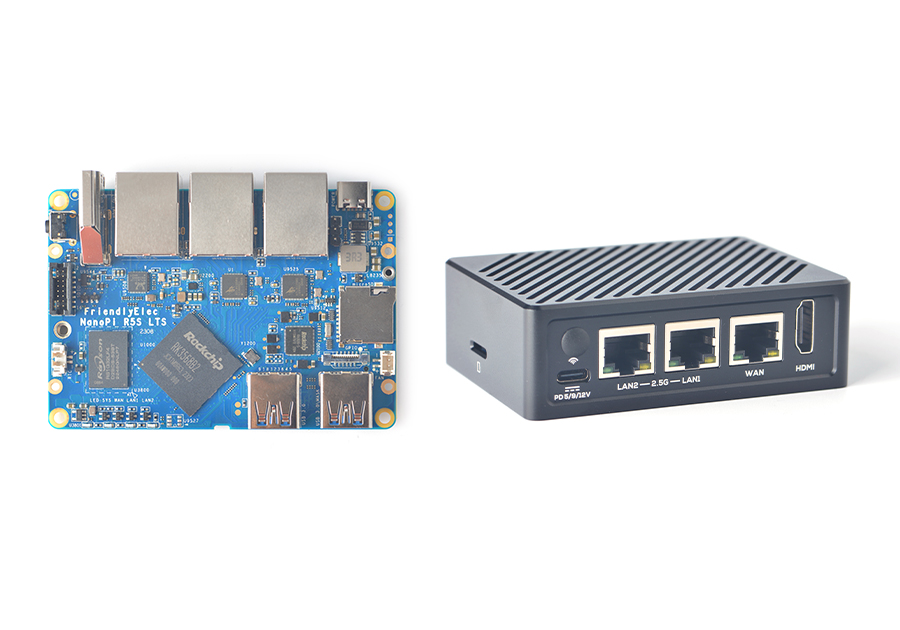
Powering the device requires a USB-C Power Delivery (PD) charger, with FriendlyElec recommending a minimum of 10 watts (5V/2A). The board supports input voltages of 5V, 9V, and 12V, providing flexibility in power supply choices. However, users have reported that some fast chargers may introduce a slight delay in power delivery, and a stable PD-capable supply is effectively mandatory for reliable operation. The board is designed to operate passively within a metal enclosure, which acts as a heatsink; tests have shown that the CPU temperature remains below 50°C even under load when housed in this case. The operating temperature range is specified as 0°C to 70°C, making it suitable for most indoor environments. The physical dimensions are compact, with the bare PCB measuring 62x90x1.6 mm, allowing it to fit into tight spaces typical of home networking setups.
Software support for the NanoPi R5S is extensive, reflecting its popularity in the maker community. FriendlyElec provides official images for FriendlyWrt, a customized version of OpenWrt optimized for routing, as well as Debian, Ubuntu, Android, and Proxmox VE. The board is also supported by Armbian, a popular community-driven Linux distribution, which offers mainline kernel support and updated bootloaders. Upstream OpenWrt support was added in the 24.10 release branch, ensuring that users can run standard, community-maintained firmware rather than relying solely on vendor-specific builds. Installation is straightforward, typically involving writing an image to a microSD card, booting from it, and then flashing the system to the internal eMMC or an NVMe drive using provided tools. The board includes a MASK button and a reset button, which facilitate recovery and reflashing processes via USB. Despite its robust feature set, users should be aware of certain quirks, such as the need for specific firewall configurations in FriendlyWrt to allow certain traffic types and the importance of using a high-quality USB-to-serial adapter for the debug UART, which operates at a high baud rate of 1,500,000 bps. Overall, the NanoPi R5S represents a versatile, high-performance option for enthusiasts seeking a compact, power-efficient device that bridges the gap between a dedicated router and a general-purpose single-board computer.
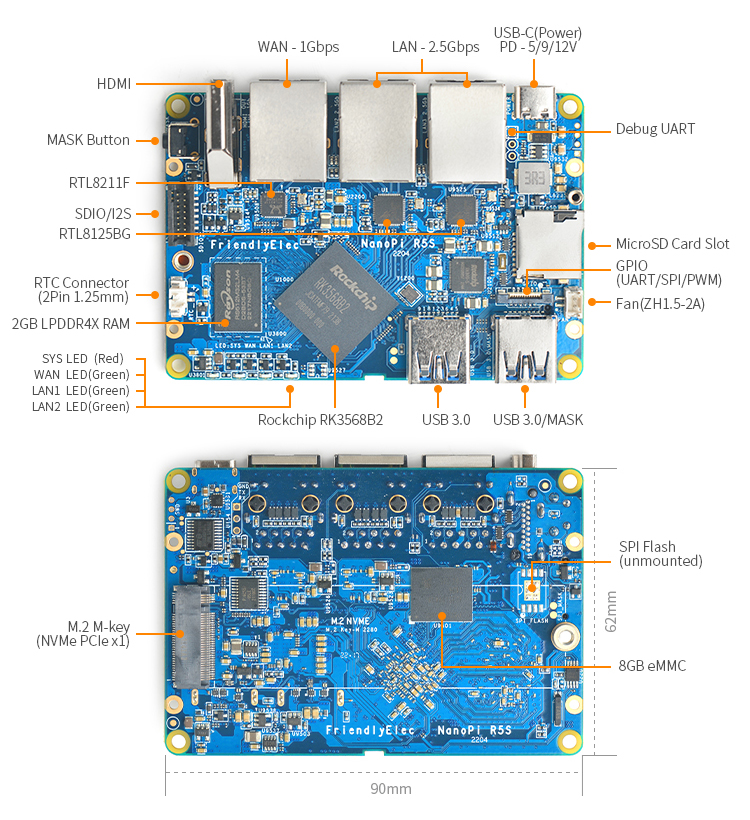
Pinout diagram
| Attr | Specs | verified |
|---|---|---|
soc | Rockchip RK3568B2 — quad-core Arm Cortex-A55 up to 2.0 GHz, Armv8.2-64 (wiki; compatible = "friendlyarm,nanopi-r5s", "rockchip,rk3568" in rk3568-nanopi-r5s.dts). | ✔ |
gpu | Arm Mali-G52 1-Core-2EE — OpenGL ES 1.1/2.0/3.2, Vulkan 1.0/1.1, OpenCL 2.0 Full Profile (wiki). | ? unverified |
npu | 0.8 TOPS (RKNN); VPU: 4Kp60 H.265/H.264/VP9 decode, 1080p60 H.264/H.265 encode (wiki, CNX). | ? unverified |
ram | 2 gb | ? unverified |
storage | 8/16/32/64 GB eMMC (5.1 per product page); microSD (UHS-I); M.2 Key-M socket, M.2 2280, PCIe 2.1 x1, NVMe (wiki; product page says "PCIe2.0"); optional SPI NOR for network boot (CNX). | ? unverified |
ethernet | 1× GbE WAN via SoC GMAC (gmac0, RGMII) + Realtek RTL8211F-CG PHY; 2× 2.5GbE LAN via two Realtek RTL8125BG PCIe controllers (wiki + product page). CNX measured up to 2.35 Gbps Rx / 1.85 Gbps Tx on 2.5G and 941 Mbps on GbE (review part 1). | ✔ |
usb | 2× USB 3.2 Gen 1 Type-A (1.4 A over-current limit each); 1× USB 2.0 host on 4-pin header; USB-C is power input only (product page). | ? unverified |
video | 1× HDMI 1.4/2.0, up to 4096×2304@60 / 1080p@120, 10-bit Deep Color, 3-D (wiki). | ? unverified |
wifi_bt | none onboard — FriendlyElec relies on USB WiFi dongles or an M.2 PCIe WiFi module (RTL8822CE listed for Android) (wiki, CNX). | ✔ |
gpio_expansion | - 12-pin 0.5 mm FPC connector: up to 1× SPI (SPI1_M1: GPIO3_C3 CLK, GPIO3_C2 MISO, GPIO3_C1 MOSI, GPIO3_A1 CS0), 3× UARTs (UART5 on GPIO3_C3/C2, UART9 on GPIO4_C5/C6, UART7 on GPIO3_C4/C5), 4× PWM (PWM12/13 on GPIO4_C5/C6, PWM14/15 on GPIO3_C4/C5), 8× GPIOs — all 3.3 V levels (wiki pin table). - 2×8-pin 1.27 mm connector: SDIO 3.0 (SDMMC2, 4-bit, SD3.0/MMC 4.51) + I2S1 (2× SDO, 3× SDI) — pins GPIO3_C6…D5, 1.8 V levels (wiki pin table). - No ADC/DAC broken out (RK3568 SARADC is not exposed on the connectors per the wiki pin tables). | ? unverified |
debug | 3-pin 2.54 mm UART header, 3.3 V, 1 500 000 bps (wiki). | ? unverified |
misc | 4× GPIO LEDs (SYS red, WAN/LAN1/LAN2 green), MASK button (eMMC flash), Reset button (mainline: gpio-keys, KEY_RESTART on GPIO4_A0), IR receiver (38 kHz, product page), RTC HYM8563TS with 2-pin battery connector, 5 V fan header (ZH1.5). | ? unverified |
power | USB-C, PD-capable, 5 V/9 V/12 V input; wiki recommends a PD charger ≥10 W (≥5 V/2 A) (wiki, product page). | ? unverified |
dimensions_temp | PCB 62×90×1.6 mm, 8-layer; case 68×94.5×30 mm; 57.5 g bare. Operating range 0 °C to 70 °C (wiki). FriendlyElec measured CPU never exceeding 50 °C in the metal case (CNX). | ✔ |
- Manufacturer: FriendlyElec (Shenzhen Fanyou Electronics), brand also known as FriendlyARM.
- Year introduced: 2022. Announced 2022-05-12 (CNX Software), on sale 2022-05-30 (CNX Software). The Armbian build config also records INTRODUCED="2022" (armbian/build config).
- Status: Active. As of 2026-10-13 the store lists a "NanoPi R5S-LTS" revision, in stock, with current images (FriendlyWrt 25.12, Debian 13, Ubuntu 24.04, Android 14, Proxmox VE 8.2.7) (product page, fetched 2026-10-13).
- Launch price: USD 59 (2 GB RAM / 8 GB eMMC), USD 75 with metal enclosure (CNX Software, 2022-05-30).
- Current price: USD 128 for the R5S-LTS (4 GB RAM / 64 GB eMMC), +$15 with case (product page, fetched 2026-10-13).
- Variants: RAM 2 GB or 4 GB LPDDR4X; eMMC 8 GB / 16 GB / 32 GB historically, 64 GB on the current LTS SKU (wiki lists 8/16 GB, product page 8/32 GB, store sells 4 GB/64 GB). SoC is the RK3568B2 die (plastic package, same features as RK3568 per CNX). Family siblings: NanoPi R5C (2 ports, M.2 E-key WiFi) and R5A/R5LS.
- Note vs. task brief: the brief guessed "2×GbE + 1×2.5GbE". Sources unanimously say the opposite: 1× GbE (WAN) + 2× 2.5GbE (LAN) — wiki ("one Native Gigabit Ethernet, and two PCIe 2.5Gbps Ethernet"), Armbian config header ("1x GbE 2x 2.5GbE"), CNX.
+ Strengths
- Router-first design: the only NanoPi R-series of its generation with two 2.5GbE RTL8125BG LAN ports plus a native GbE WAN (GMAC), making it a 2.5G-bridge/VPN gateway class device (wiki).
- M.2 Key-M NVMe slot (2280, PCIe 2.1 x1) — fast, replaceable storage vs. SD-only R2S/R4S predecessors (wiki).
- Cortex-A55 efficiency: markedly cooler than R4S's A72-based RK3399; ≤50 °C in the metal case per FriendlyElec (CNX).
- Multimedia on a router: Mali-G52 GPU, 0.8 TOPS NPU (RKNN), 4Kp60 VPU decode, HDMI 2.0 — it doubles as a media/NPU box (wiki; NPU test section §8.16).
- USB-C PD power at 5/9/12 V — rare on router SBCs of that era (wiki).
- Passive metal enclosure sold as accessory; RTC with battery header for offline clocks; MASK button + Maskrom for recovery (product page).
- No onboard WiFi by design — FriendlyElec documents a USB-WiFi/AP compatibility list instead (CNX).
− Weaknesses
- Launch-time 2.5GbE performance was poor. CNX's June 2022 review measured 2.5G throughput "sometimes only a little faster than Gigabit Ethernet" (Tx as low as ~1.85 Gbps even after fixes); FriendlyElec shipped NIC interrupt/offload optimizations afterwards (review part 1, part 2, giveaway note).
- Mainline kernel WAN Ethernet was broken at first. The initial 2023 DTS needed arm64: dts: rockchip: fix gmac support for NanoPi R5S (31425b1fad), a phy-supply fix for gmac0 (fdc68be8a8) and a gmac0 reset-pin fix merged 2026-04-27 (c83c4a09d4) — kernels between those dates may fail to bring up the WAN port depending on the exact fix set.
- LED triggers churn in mainline: LED config was reworked (1631cbdb80) and the netdev LED triggers were later dropped from the DT (912b1f2a79, soc-dt-6.17) — LAN/WAN blink-by-default behavior differs between vendor 5.10/6.1 kernels and recent mainline.
- Power-on quirks: FriendlyElec's own FAQ: "Unable to power on — try to replace the power adapter and cable… some fast chargers with Type-C interface will have a delay, it may take a few seconds to start providing power"; ≥5 V/2 A required (wiki §5.11). A PD-capable supply is effectively mandatory.
- USB-C is power-only; OTG is on a USB-A port. For UMS/RockUSB reflashing, the OTG port is "the USB-A closest to the edge", not the USB-C (armbian/build board config comment).
- FriendlyWrt firewall defaults can block dial-up/traffic until WAN zone policies are set to Accept or fw4 reload is run (wiki §5.11).
- Debug UART runs at 1 500 000 bps (wiki) — many cheap USB-UART adapters cap well below that; plan for a capable adapter (CP2102N/FT232H-class).
- 8 GB eMMC on launch SKUs is tight for Docker/media images; the wiki's own images are multi-GB (wiki §4.5).
- Retour d'expérience expert expert — expert-pi-like
- Retour sur la NanoPi R5S après quelques mois. Le concept de routeur avec 2x 2.5GbE (RTL8125BG) et 1x GbE WAN est solide, et le slot M.2 NVMe change tout par rapport au SD card des R4S. Cependant, attention aux pièges du début. La performance du 2.5G a été médiocre au lancement (CNX mesurait ~1.85 G… — expert-pi-like
- Merci pour ce résumé. Je confirme le souci d'alimentation : j'ai perdu une après-midi à comprendre pourquoi elle ne démarrait pas systématiquement avec un vieux chargeur 5V/2A standard. Il a fallu passer à un chargeur PD 12V pour que ce soit stable. Par contre, j'ai une question sur le débogage. Le… — hacker-du-coin
- Pour le USB-UART, le CP2102 suffit souvent si on force la vitesse dans le terminal (putty ou minicom), mais il perd des caractères à 1.5 Mbps. Un FT232H ou un CP2102N récent est plus fiable. Sinon, pour le reflash, si tu as un écran HDMI, c'est plus simple. Le vrai piège restant concerne les LEDs :… — linux-router-01
Community feedback and projects
- NanoPi R5S router review - Part 1: Unboxing, OpenWrt, and iperf3 benchmarking www.cnx-software.com
- NanoPi R5S preview - Part 2: Ubuntu 20.04 (FriendlyCore) www.cnx-software.com
- NanoPi R5S Rockchip RK3568 mini router launched for $59 and up www.cnx-software.com
Content not available yet.
- Official wiki (specs, pinout, OS install, FriendlyWrt guide)
- Product page (R5S-LTS, price, OS list)
- Image/tool downloads
- Mainline device tree
- Mainline device tree
- Armbian board config (CSC)
- Armbian board config (CSC)
- OpenWrt target definitions
- FriendlyElec GitHub
- CNX Software coverage
- CNX Software coverage
- CNX Software coverage
- Launch-time 2.5GbE performance was poor. CNX's June 2022 review measured 2.5G throughput "sometimes only a little faster than Gigabit Ethernet" (Tx as low as ~1.85 Gbps even after fixes); FriendlyElec shipped NIC interrupt/offload optimizations afterwards (review part 1, part 2, giveaway note).
- Mainline kernel WAN Ethernet was broken at first. The initial 2023 DTS needed arm64: dts: rockchip: fix gmac support for NanoPi R5S (31425b1fad), a phy-supply fix for gmac0 (fdc68be8a8) and a gmac0 reset-pin fix merged 2026-04-27 (c83c4a09d4) — kernels between those dates may fail to bring up the WAN port depending on the exact fix set.
- LED triggers churn in mainline: LED config was reworked (1631cbdb80) and the netdev LED triggers were later dropped from the DT (912b1f2a79, soc-dt-6.17) — LAN/WAN blink-by-default behavior differs between vendor 5.10/6.1 kernels and recent mainline.
- Power-on quirks: FriendlyElec's own FAQ: "Unable to power on — try to replace the power adapter and cable… some fast chargers with Type-C interface will have a delay, it may take a few seconds to start providing power"; ≥5 V/2 A required (wiki §5.11). A PD-capable supply is effectively mandatory.
- USB-C is power-only; OTG is on a USB-A port. For UMS/RockUSB reflashing, the OTG port is "the USB-A closest to the edge", not the USB-C (armbian/build board config comment).
- FriendlyWrt firewall defaults can block dial-up/traffic until WAN zone policies are set to Accept or fw4 reload is run (wiki §5.11).
- Debug UART runs at 1 500 000 bps (wiki) — many cheap USB-UART adapters cap well below that; plan for a capable adapter (CP2102N/FT232H-class).
- 8 GB eMMC on launch SKUs is tight for Docker/media images; the wiki's own images are multi-GB (wiki §4.5).
- Contrôler la LED SYS du NanoPi R5S debutant Schéma : IMG-nanopi-r5s-debutant-1-nanopir5s-sys-led.svg — NanoPi R5S vu de dessus avec les quatre LED (SYS rouge, WAN, LAN1, LAN2 vertes) mises en évidence
- Bouton Reset et console série du NanoPi R5S debutant Schéma : IMG-nanopi-r5s-debutant-2-nanopir5s-bouton-console.svg — NanoPi R5S avec le bouton Reset (GPIO4_A0), le bouton MASK, l'en-tête UART 3 pins 2,54 mm et le branchement d'un adaptateur USB-UART
- Premier script Python sur le NanoPi R5S debutant Schéma : IMG-nanopi-r5s-debutant-3-nanopir5s-premier-script-python.svg — NanoPi R5S sous Debian avec un terminal affichant un script Python qui lit température, fréquence CPU et adresses des trois ports Ethernet
- Piloter les GPIO du NanoPi R5S avec libgpiod intermediaire Schéma : IMG-nanopi-r5s-intermediaire-1-nanopir5s-gpio-libgpiod.svg — connecteur FPC 12 pins du NanoPi R5S avec la broche GPIO3_C3 (3,3 V) reliée à une résistance et une LED, et le bouton Reset sur GPIO4_A0
- Routeur Linux : bridge WAN/LAN et forwarding sur le R5S intermediaire Schéma : IMG-nanopi-r5s-intermediaire-2-nanopir5s-routeur-linux.svg — NanoPi R5S en routeur : port GbE eth0 en WAN vers la box, ports 2,5G eth1+eth2 en bridge LAN, avec sysctl net.ipv4.ip_forward activé
- Pi-hole : serveur DNS filtrant sur le NanoPi R5S intermediaire Schéma : IMG-nanopi-r5s-intermediaire-3-nanopir5s-pihole-dns.svg — NanoPi R5S routeur hébergeant Pi-hole : requêtes DNS du LAN traversant le port 53, listes de blocage, requêtes autorisées sortant vers le DNS amont
- OpenWrt upstream 24.10 en routeur 2,5G complet avance Schéma : IMG-nanopi-r5s-avance-1-nanopir5s-openwrt.svg — NanoPi R5S sous OpenWrt 24.10 (target rockchip) : flux de données WAN GbE vers bridge lan.eth1+eth2, flow offloading matériel activé, mesures iperf3
- Surveillance thermique et fréquence du RK3568B2 avance Schéma : IMG-nanopi-r5s-avance-2-nanopir5s-surveillance-thermique.svg — NanoPi R5S dans son boîtier métal passif avec sondes : température thermal_zone, cpufreq des quatre Cortex-A55, courbe température/fréquence et seuils de throttling
- NAS Samba sur NVMe avec VLANs de gestion avance Schéma : IMG-nanopi-r5s-avance-3-nanopir5s-nas-samba.svg — NanoPi R5S avec SSD NVMe M.2 en partage Samba, bridge br-lan découpé en VLAN 10 (données) et VLAN 20 (gestion), pare-feu entre zones
Code library — examples written for this board
clignotante.pyPythonbouton-gpio.pyPythoncapteur-i2c.shBashsurveillance-temperature.shBashcapteur-dht11.pyPythonservo-pwm-sysfs.shBashserveur-web-capteur.pyPythonreseau-ethernet.shBashjournal-cron.shBashveilleur-systemd.pyPython
Examples and repos found online
- stupidloud/nanopi-openwrt github.com
- sbwml/builder github.com
- inindev/nanopi-r5 github.com
- anaelorlinski/OpenWrt-NanoPi-R5S-Builds github.com
- bdew/nixos-nanopi github.com