nRF52840-MDK (boards.json id: nrf52840-mdk)
⚡ The essentials in 60 seconds
- cpu — Arm Cortex-M4 with FPU @ 64 MHz — Nordic comparison table ("64 MHz Arm Cortex-M4 with FPU") and PlatformIO (Frequency 64MHz) (, ). No GPU.
- memory — 1 MB flash + 256 KB RAM (both sources above; also the board wiki).
- radio_2_4_ghz_multiprotocol — Bluetooth Low Energy (board marketed "Bluetooth 5" in 2018; Nordic's current table lists the family as BT 5.4), Bluetooth Mesh, Thread / Zigbee / IEEE 802.15.4, ANT, 2.4 GHz proprietary (wiki + Nordic table). TX power +8 dBm — MakerDiary's own nRF52840 product descriptions: "2.4 GHz Transceiver with +8 dBm TX Power" (makerdiary.com/products.json, fetched 2026-10-14).
- security — Arm TrustZone + CryptoCell 310 hardware crypto subsystem (board wiki; "TrustZone® Cryptocell 310 Security Subsystem" in MakerDiary's product feed).
- peripherals — on-chip USB 2.0 Full-speed device controller, NFC-A tag, QSPI and High-Speed SPI, PWM/PDM/I2S, 12-bit ADC + COMP (Nordic table "ADC, Comp"; wiki).
- gpio — Nordic's table lists 48 GPIOs for the nRF52840 (package-dependent, QFN48 / WLCSP).
- On this board : 9 tutorials · 10 code
In the crowded landscape of wireless development boards, the nRF52840-MDK from MakerDiary stands out as a compelling entry point for engineers and hobbyists interested in the Internet of Things. This open-source hardware platform is built around the Nordic Semiconductor nRF52840, a highly integrated system-on-chip that serves as the brain of the operation. To understand what this board offers, one must first appreciate the silicon at its core. The nRF52840 features an Arm Cortex-M4 processor running at 64 MHz. For those less familiar with embedded systems, a Cortex-M4 is a 32-bit microcontroller architecture designed for efficiency and real-time control, and the "FPU" designation means it includes a Floating Point Unit, allowing it to handle complex mathematical calculations involving decimals much faster than older chips that could only process whole numbers. This processing power is paired with 1 MB of flash memory for storing your program and 256 KB of RAM for temporary data, providing ample space for sophisticated applications that would overwhelm smaller microcontrollers.
The true strength of the nRF52840-MDK lies in its radio capabilities, which are managed by a multiprotocol 2.4 GHz transceiver. This means the board can communicate using several different wireless standards without needing additional hardware. It supports Bluetooth Low Energy, which is widely used for connecting wearables and sensors to smartphones, as well as Bluetooth Mesh for large-scale lighting or sensor networks. It also handles IEEE 802.15.4, the underlying standard for protocols like Thread and Zigbee, which are popular in smart home automation. Additionally, it supports ANT, a protocol common in fitness equipment, and allows for proprietary 2.4 GHz communication. With a transmit power of +8 dBm, the board can maintain robust wireless links over reasonable distances. Security is also a priority, with hardware-accelerated encryption provided by the Arm TrustZone and CryptoCell 310 subsystem, ensuring that sensitive data, such as passwords or authentication keys, is protected at the hardware level.
What makes the MDK particularly user-friendly is its integrated debugging and programming interface. Unlike many development boards that require you to purchase a separate external programmer to flash code or debug errors, the nRF52840-MDK includes a built-in DAPLink debugger. This technology allows for drag-and-drop programming, where the board appears as a removable drive on your computer, and you simply copy a compiled file onto it to update the firmware. It also provides a virtual COM port for serial communication, letting you see debug messages from your code in real-time. A clever aspect of the board’s USB architecture is the use of a Microchip USB hub controller. This setup allows the nRF52840’s own native USB controller to be exposed directly to the host computer, in addition to the debugger. This is crucial for applications where the device itself needs to act as a USB peripheral, such as a custom keyboard, a mouse, or a USB sniffer for network analysis.
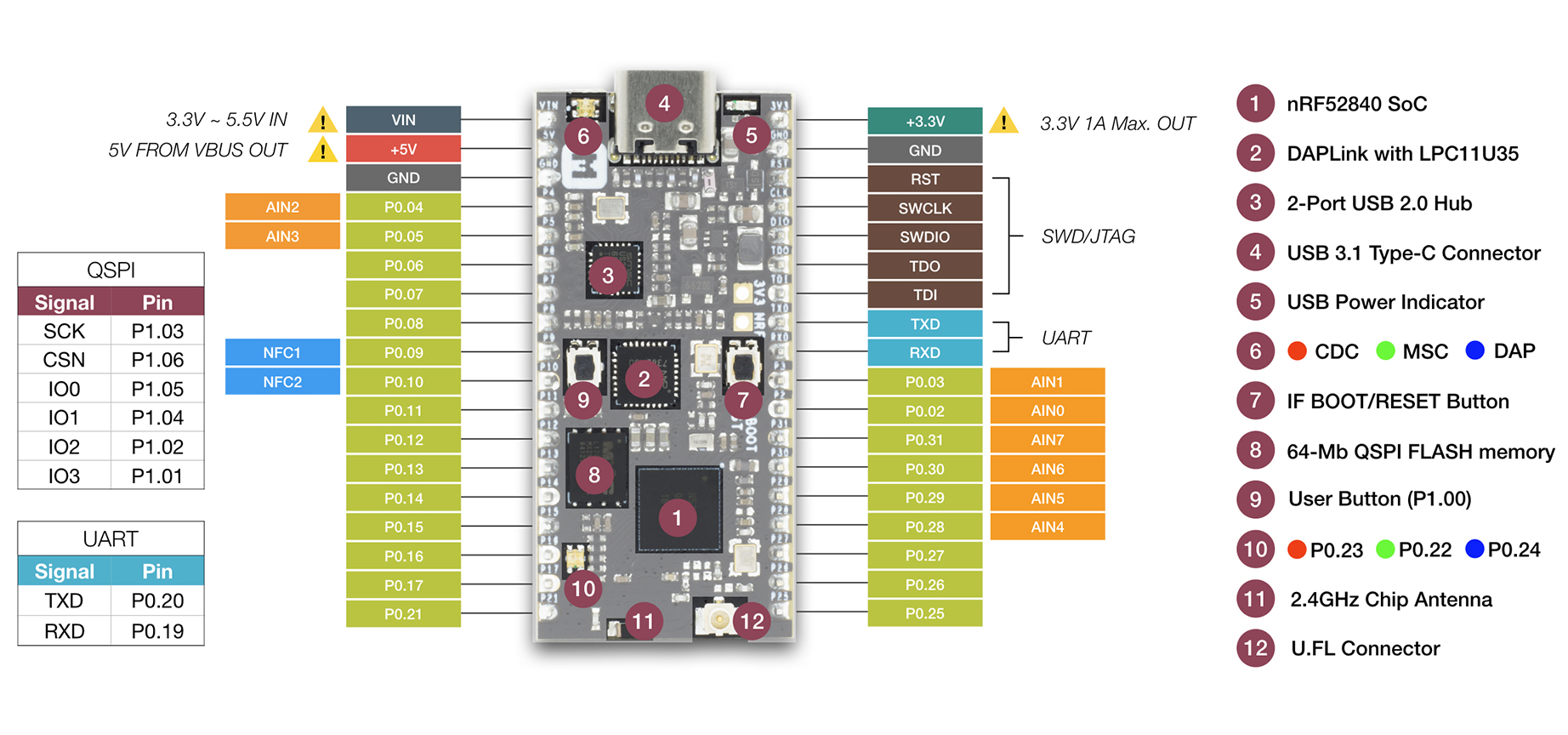
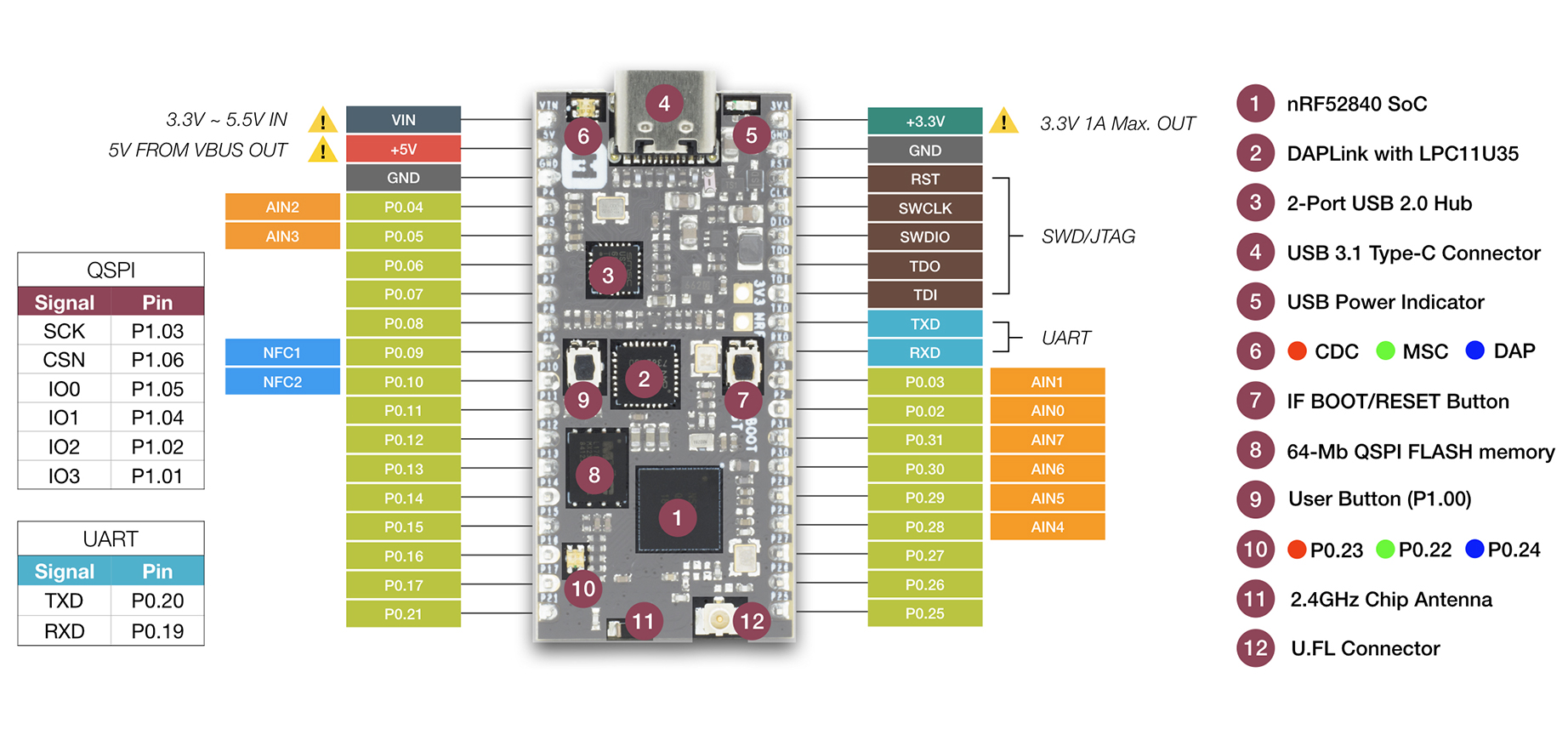
The physical design of the board is pragmatic and developer-focused. It measures just 50 by 23 millimeters, making it compact enough for tight enclosures, yet it features dual 18-pin headers that are spaced to be compatible with standard breadboards. This allows for easy prototyping without soldering. Up to 24 of the chip’s general-purpose input/output pins are broken out to these headers, giving you plenty of flexibility to connect sensors, actuators, and other peripherals. For wireless performance, the board includes an on-board chip antenna, which is ideal for most indoor applications. However, for projects requiring longer range or specific antenna placements, there is a U.FL connector that allows you to attach an external antenna. This flexibility is rare at such a low price point. Power management is handled by a 3.3-volt regulator capable of delivering up to 1 amp of peak current, and the board can be powered via USB or an external voltage source between 1.7 and 5.5 volts. It is important to note that while the board is power-efficient, it does not include a battery charging circuit or a holder for coin-cell batteries, so users planning for battery-powered deployments must design their own power supply and management circuitry.
Software support for the nRF52840-MDK is extensive, reflecting the popularity of the Nordic nRF52 series. The board is fully supported by the Zephyr RTOS, a modern, scalable real-time operating system that is becoming the industry standard for embedded development. It is also compatible with the legacy nRF5 SDK from Nordic, as well as the newer nRF Connect SDK. For developers who prefer higher-level abstractions, there are community-supported options for Rust and TinyGo, and the board can be used with Apache Mynewt and RIOT OS. While there is no official Arduino core provided by MakerDiary, the generic nRF52 Arduino support can often be configured to work with this board, though it requires some manual setup. Similarly, while CircuitPython is a popular choice for rapid prototyping, there is currently no official build for this specific board, so users should be aware of this limitation if they rely on that ecosystem.
Despite its strengths, potential users should be aware of some documented challenges. The project’s GitHub repository has not been actively updated since 2021, which means some example code and documentation may be outdated relative to the latest versions of Zephyr or the nRF Connect SDK. Users have reported issues with USB enumeration on certain operating systems, particularly macOS, where the board might not be immediately recognized. Additionally, flashing code using the drag-and-drop method requires careful attention to merging the SoftDevice (the Bluetooth stack) with the application code before copying it to the drive; failing to do so is a common source of confusion for beginners. There is also a known risk when flashing the UF2 bootloader on the USB Dongle variant, which can potentially brick the device if not done correctly. Nevertheless, the nRF52840-MDK remains a powerful, cost-effective, and versatile tool for anyone looking to dive into low-power wireless development, offering a professional-grade feature set in a small, open-source package.
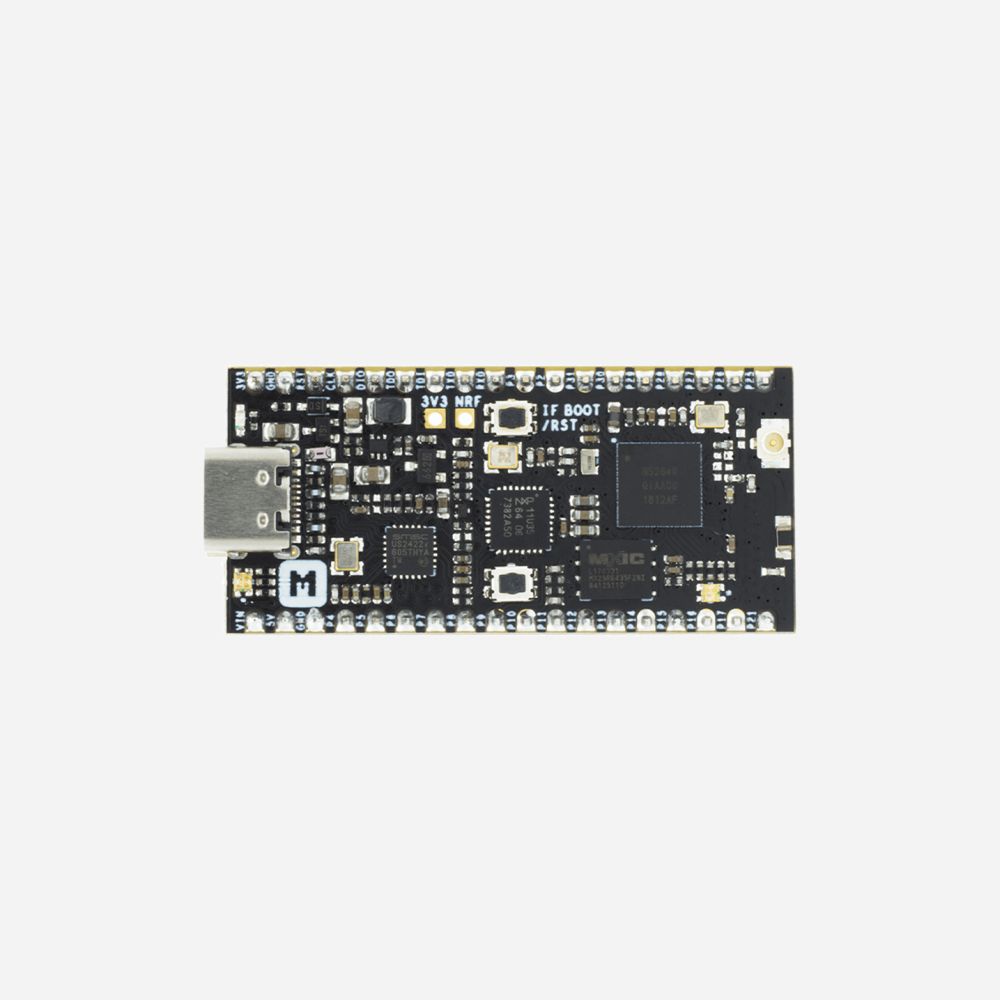
Pinout diagram
| Attr | Specs | verified |
|---|---|---|
cpu | Arm Cortex-M4 with FPU @ 64 MHz — Nordic comparison table ("64 MHz Arm Cortex-M4 with FPU") and PlatformIO (Frequency 64MHz) (, ). No GPU. | ✔ |
memory | 1 MB flash + 256 KB RAM (both sources above; also the board wiki). | ? unverified |
radio_2_4_ghz_multiprotocol | Bluetooth Low Energy (board marketed "Bluetooth 5" in 2018; Nordic's current table lists the family as BT 5.4), Bluetooth Mesh, Thread / Zigbee / IEEE 802.15.4, ANT, 2.4 GHz proprietary (wiki + Nordic table). TX power +8 dBm — MakerDiary's own nRF52840 product descriptions: "2.4 GHz Transceiver with +8 dBm TX Power" (makerdiary.com/products.json, fetched 2026-10-14). | ? unverified |
security | Arm TrustZone + CryptoCell 310 hardware crypto subsystem (board wiki; "TrustZone® Cryptocell 310 Security Subsystem" in MakerDiary's product feed). | ? unverified |
peripherals | on-chip USB 2.0 Full-speed device controller, NFC-A tag, QSPI and High-Speed SPI, PWM/PDM/I2S, 12-bit ADC + COMP (Nordic table "ADC, Comp"; wiki). | ? unverified |
gpio | Nordic's table lists 48 GPIOs for the nRF52840 (package-dependent, QFN48 / WLCSP). | ? unverified |
supply_voltage | 1.7 v | ? unverified |
temperature | −40 °C to +85 °C (Nordic table). | ? unverified |
debugger | integrated DAPLink — MSC drag-and-drop programming, CDC virtual COM port, HID/WEBUSB-HID CMSIS-DAP debug channel. | ? unverified |
usb_topology | Microchip USB 2.0 Hi-Speed 2-port hub controller, downstream port 1 → DAPLink, downstream port 2 → nRF52840 native USB (the SoC enumerates directly — key for USB dongle/ble-usb applications). Reversible USB 3.1 Type-C connector. | ? unverified |
external_flash | ultra-low-power 64-Mbit (8 MB) QSPI FLASH. | ? unverified |
antenna | on-board 2.4 GHz chip antenna, with U.FL connector selectable for an external antenna (antenna selection for custom applications). | ? unverified |
user_i_o | programmable user button, RGB LED, IF Boot/Reset button. | ? unverified |
power | 3.3 V regulator with 1 A peak output, VBUS & VIN power-path management. | ? unverified |
mechanical | breadboard-friendly dual 18-pin headers; 50 × 23 × 13 mm with headers soldered (wiki). | ? unverified |
sensors | none on-board — the hardware feature list contains no environmental or motion sensor (wiki, 2026-10-14). | ? unverified |
- Manufacturer: MakerDiary (Shenzhen), open-source hardware; repo MIT-licensed, "Copyright (c) 2019 makerdiary.com" (, fetched 2026-10-14).
- Year: GitHub repository makerdiary/nrf52840-mdk created 2018-07-06, first issues opened early 2019 (API created_at: 2018-07-06T01:52:11Z, fetched 2026-10-14). Retail listings (Seeed p-3079, Amazon B07MPPHY5B) date from the 2018–2019 window ( "available on the following channels").
- Status (2026-10-14): Active / current. Listed on MakerDiary's own shop feed (fetched 2026-10-14) as "nRF52840-MDK IoT Development Kit" at €29.90, alongside the nRF52840 MDK USB Dongle (PCBA) at €12.99 and w/ Case at €19.90.
- Launch price:
- Variants: - nRF52840-MDK V1.0 — the header board documented here (only hardware revision released; the wiki's Hardware Resource table lists V1.0 only, ). - nRF52840 MDK USB Dongle (PCBA and w/Case) — USB-key form factor, ships with a UF2 bootloader, chip antenna, marketed for Bluetooth 5.4 / mesh / Thread / Zigbee / ANT and as a BLE/802.15.4 sniffer with Wireshark (, fetched 2026-10-14). - Sibling nRF52840 boards from the same vendor (not MDK): nRF52840 Connect Kit, nRF52840 M.2 Module / Developer Kit, Pitaya Go (shop feed, 2026-10-14). The older nRF52832-MDK (V1/V2) is the 51-series predecessor .
+ Strengths
- Fully integrated debugger at a low price — DAPLink (MSC+CDC+CMSIS-DAP) behind a Microchip USB HS hub, so the nRF52840's own USB controller is also exposed; Nordic's own DKs cost several times more (€29.90 vs. Nordic DK pricing, shop feed 2026-10-14).
- Antenna flexibility: on-board chip antenna plus U.FL for an external antenna, selectable — rare at this price point.
- 64-Mbit external QSPI flash for OTA staging / data logging (wiki).
- Hardware security: TrustZone + CryptoCell 310 (wiki) — used by the OpenSK FIDO2 authenticator project on the MDK family .
- Open source: MIT-licensed repo with V1.0 schematic, board file, pinout PDF and 3D STEP downloads (wiki Hardware Resource).
- Multiprotocol: BLE 5, Bluetooth Mesh, Thread, Zigbee, ANT, 2.4 GHz proprietary from one €30 board (wiki); the USB-dongle sibling doubles as a Wireshark BLE/802.15.4 sniffer (dongle wiki).
- Breadboard-friendly dual 18-pin headers, 50 × 23 mm (wiki).
− Weaknesses
- USB enumeration failures: "USB port not recognized" (#53, 2022) and "Board and DAPLink does not show up at all on Mac" (#37, 2020) — the DAPLINK drive never appears on some hosts.
- macOS quirks: "nRF connect does not recognise 'makerdiary' device on MacOS" (#47).
- Stale examples/toolchain drift: repo last pushed 2021-05-28 (GitHub API, fetched 2026-10-14); "bluetooth peripherial_hr sample not compiling" (#55) against Zephyr 3.5+; "Documentation no longer accurate now that the nrf528xx have moved to openthread/ot-nrf528xx" (#52); "The example HEX file is invalid." (#45); "script failed when doing zephyr test" (#42).
- Flash not sticking: "after make flash the code is not uploaded on board" (#31); SoftDevice+app hexes must be merged with mergehex before drag-and-drop (getting-started note) — a frequent self-inflicted variant of this.
- BLE/USB samples gaps: "MAC address is 00:00:00:00:00:00" in hci_usb (#57); "USB_DEVICE_VID not set" (#56).
- I²C oddity: "Peculiar i2c issue" (#44).
- External antenna usage under-documented: "How to use external antenna?" (#51) — the U.FL path exists but the selection procedure is thin in the docs.
- OpenOCD with on-board DAPLink: maintainer of the Rust BSP "was unable to get this working with the openocd that ships with ubuntu 18.04" and moved to J-Link ( README).
- USB Dongle variant — bricking risk: flashing the UF2 bootloader hex via the DAPLINK drive can leave the dongle in a bad state ("Bricked device", Nordic DevZone, ).
- Windows < 10 needs the Arm Mbed serial driver for the CDC port (getting-started).
- No official Arduino/CircuitPython support (see Systems; CircuitPython board page 404).
- Retour d'expérience expert expert — expert-microcontroleur
- Je reviens vers vous avec un retour d'experience sur la nrf52840-mdk. C'est une carte très interessante pour son prix, surtout grace au debugger DAPLink integre et la possibilite d'utiliser soit l'antenne embarquée soit un port U.FL. Le SoC nRF52840 avec 1MB de flash est très solide. Par contre, at… — expert-microcontroleur
- Merci pour ce retour. Je confirme le point sur MacOS. J'ai passe deux soirees a essayer de faire reconnaitre la carte par nRF Connect sans succes, comme decrit dans l'issue 47. C'est frustrant car le hardware a l'air correct. Est-ce que quelqu'un a reussi a compiler les exemples de developpement re… — hobbyiste_ble
- Pour les problèmes de compilation, il faut souvent mettre à jour manuellement les modules Zephyr ou le SDK, car les exemples ne suivent pas. Concernant l'USB, si le hub Microchip pose problème, essayez de brancher la carte sur un port differents ou sans hub externe si possible. Malgre ces soucis de… — dev_embedded_fr
Community feedback and projects
- Nrf52 makerdiary usb dongle - ESPHome - Home Assistant Community community.home-assistant.io
- Sniffing BLE with multiple NRF52840-DONGLEs? electronics.stackexchange.com
- Secure-by-design firmware development with Wasefire googblogs.com
- USB enumeration failures: "USB port not recognized" (#53, 2022) and "Board and DAPLink does not show up at all on Mac" (#37, 2020) — the DAPLINK drive never appears on some hosts.
- macOS quirks: "nRF connect does not recognise 'makerdiary' device on MacOS" (#47).
- Stale examples/toolchain drift: repo last pushed 2021-05-28 (GitHub API, fetched 2026-10-14); "bluetooth peripherial_hr sample not compiling" (#55) against Zephyr 3.5+; "Documentation no longer accurate now that the nrf528xx have moved to openthread/ot-nrf528xx" (#52); "The example HEX file is invalid." (#45); "script failed when doing zephyr test" (#42).
- Flash not sticking: "after make flash the code is not uploaded on board" (#31); SoftDevice+app hexes must be merged with mergehex before drag-and-drop (getting-started note) — a frequent self-inflicted variant of this.
- BLE/USB samples gaps: "MAC address is 00:00:00:00:00:00" in hci_usb (#57); "USB_DEVICE_VID not set" (#56).
- I²C oddity: "Peculiar i2c issue" (#44).
- External antenna usage under-documented: "How to use external antenna?" (#51) — the U.FL path exists but the selection procedure is thin in the docs.
- OpenOCD with on-board DAPLink: maintainer of the Rust BSP "was unable to get this working with the openocd that ships with ubuntu 18.04" and moved to J-Link ( README).
- USB Dongle variant — bricking risk: flashing the UF2 bootloader hex via the DAPLINK drive can leave the dongle in a bad state ("Bricked device", Nordic DevZone, ).
- Windows < 10 needs the Arm Mbed serial driver for the CDC port (getting-started).
- No official Arduino/CircuitPython support (see Systems; CircuitPython board page 404).
- Faire clignoter la LED RGB avec Zephyr debutant Votre première LED sur le nRF52840-MDK : deux commandes west suffisent, le programmateur DAPLink est déjà embarqué sur la carte.
- Programmer par glisser-déposer via le DAPLink debutant Zéro outil à installer : déposez un .hex sur le lecteur DAPLINK et votre firmware tourne — à condition de savoir merger le SoftDevice.
- Diffuser une fréquence cardiaque BLE vers nRF Toolbox debutant La démo phare du wiki MakerDiary : un flash, un smartphone, et la courbe cardiaque apparaît dans l'app Nordic — la chaîne BLE complète validée.
- Monter un projet Zephyr complet avec PlatformIO intermediaire Une seule ligne de config et PlatformIO livre le compilateur, le framework Zephyr et le flashage CMSIS-DAP pour le nRF52840-MDK.
- Piloter une LED par Bluetooth LE avec le SDK nRF5 intermediaire Un service GATT personnalisé, une écriture depuis le téléphone, et la LED de la carte s'allume — le BLE applicatif de bout en bout.
- Utiliser la carte comme adaptateur Bluetooth USB sous Linux intermediaire Le nRF52840 a son propre contrôleur USB, exposé sur le hub de la carte : un sample Zephyr et Linux voit un vrai radio BLE hci0.
- Construire un réseau Thread avec OpenThread avance Frontière 802.15.4/IPv6 : un MDK comme RCP, un Raspberry Pi comme border router, un second MDK comme nœud — et le sniffer pour voir le mesh.
- Développer en Rust embarqué avec nrf52840-mdk-rs avance Le BSP communautaire nrf52840-mdk-rs apporte Rust sans std sur la carte : hal, pins, et un chemin de flash fiable malgré les soucis OpenOCD.
- Transformer la carte en clé de sécurité FIDO2 avec OpenSK avance Le projet FIDO2 open source de Google tourne sur la famille MDK : CryptoCell 310, USB natif en HID, et une clé d'authentification que vous buildez vous-même.
Code library — examples written for this board
led_blink.cCbouton_gpiote.cCconsole_uart.cCadc_saadc.cCpwm_fade.cCble_nus.cCsystem_off.cCwatchdog.cCnvcu_storage.cCapp_timer_rtc.cC
Examples and repos found online
- nrfconnect/sdk-nrf github.com
- makerdiary/mynewt_nrf52840_mdk github.com
- nihalpasham/rtic-twim-twis-dma-demo github.com