Hardkernel ODROID-C2 (Amlogic S905)
⚡ The essentials in 60 seconds
- soc — Amlogic S905 (Meson Gxbb family) — quad Arm Cortex-A53 @ 1.5 GHz, ARMv8-A 64-bit (U-Boot doc; Wikipedia table). The S905 itself is spec'd to 2.0 GHz and CNX's pre-launch table listed 2.0 GHz, but the C2 ships fused at 1.5 GHz (U-Boot doc, Wikipedia).
- gpu — ARM Mali-450 MP3 — "3 Pixel + 2 Vertex" shader cores (Wikipedia; CNX says "penta core (3+2) Mali-450"). OpenGL ES 2.0-class; supported on vendor images only via proprietary blobs (/dev/mali, /dev/ump) (ALARM page).
- vpu — hardware decode of 8/10-bit H.265 up to 4K@60, H.264 up to 4K@30, plus H.263/VC1/ MPEG1-2/AVS/RealVideo; H.264 encode up to 1080p60 (CNX 2016-03-01).
- ram — 2 GB DDR3 @ 912 MHz (Wikipedia table). Mainline DTS declares exactly 2 GiB (reg = <0x0 0x0 0x0 0x80000000>). No 1 GB variant exists.
- storage — microSD slot (UHS-1-capable hardware per CNX launch spec) plus an on-board eMMC module socket (8/16/32/64 GB Toshiba/SanDisk modules). No SPI NOR.
- video_out — full-size HDMI 2.0, up to 4K/60 Hz, with CEC (U-Boot doc; CNX). Composite video possible only via an unpopulated 2-pin header (CNX).
- On this board : 9 tutorials · 10 code
The Hardkernel ODROID-C2 stands as a pivotal moment in the history of single-board computers, a compact device that challenged the status quo the very moment it arrived. Launched on February 29, 2016, the C2 was deliberately released on the same day as the Raspberry Pi 3, positioning itself as a direct competitor in the ultra-low-cost market. With a listed launch price of US$40, it was one of only three 64-bit ARM development boards available at that price point, alongside the Raspberry Pi 3 and the Pine A64+. Manufactured by South Korea’s Hardkernel Co., Ltd., the C2 is part of the broader ODROID family, serving as the direct successor to the ODROID-C1 and C1+ models. While those earlier boards relied on 32-bit architecture, the C2 marked a significant leap forward by adopting the Amlogic S905 system-on-chip, a component that brought TV-box-class performance to a developer-friendly form factor. This strategic timing and hardware choice established the C2 as a flagship of the low-cost ODROID "C" line, paving the way for later models like the ODROID-C4.
At the heart of the ODROID-C2 is the Amlogic S905, a quad-core processor based on the ARM Cortex-A53 architecture. This is a 64-bit ARMv8-A design, a crucial distinction from the 32-bit Cortex-A5 chips found in its predecessors. The processor operates at a clock speed of 1.5 GHz, a figure that is important to understand in context. While the S905 silicon itself is capable of running at up to 2.0 GHz, Hardkernel fused the specific chips used in the C2 to run at 1.5 GHz, likely to balance performance with thermal management and power efficiency on the small board. The system is paired with 2 GB of DDR3 RAM running at 912 MHz, a substantial amount of memory for a board of its era and price, ensuring smooth multitasking for most lightweight server or media center applications. The graphics processing is handled by an ARM Mali-450 MP3 GPU, which features three pixel shader cores and two vertex shader cores. While this GPU supports OpenGL ES 2.0, it is worth noting that full acceleration on modern Linux distributions often requires proprietary binary blobs provided by the manufacturer, as open-source drivers do not fully support this specific generation of Amlogic hardware.
One of the most significant advantages of the ODROID-C2 over its contemporaries, particularly the Raspberry Pi 3, was its networking capabilities. The C2 features a true Gigabit Ethernet port, achieved through a Realtek RTL8211F PHY connected via an RGMII interface. This means the network controller is directly attached to the processor’s high-speed bus, rather than being bridged over USB as was common in many budget boards of that time. This architectural choice allowed the C2 to achieve significantly higher network throughput, making it an ideal choice for building home network appliances, such as DNS blockers, lightweight NAS servers, or Pi-hole devices. For wireless connectivity, however, the board does not include built-in Wi-Fi or Bluetooth. Users must rely on USB dongles, which occupy one of the four available USB 2.0 ports. These ports are managed by an on-board Genesys Logic GL852G hub, providing standard connectivity for peripherals, though the lack of native wireless support remains a notable limitation for modern IoT projects.
Storage options on the C2 are versatile, offering both a microSD card slot and a dedicated socket for eMMC modules. While the microSD slot supports UHS-1 hardware, mainline Linux drivers often cap its speed, leading to slower read/write performance compared to the eMMC option. The eMMC modules, available in capacities ranging from 8 GB to 64 GB, connect via a high-speed interface that supports HS200 DDR modes, offering much faster and more reliable storage for operating systems. This makes the eMMC module the preferred choice for users seeking a responsive system, especially when running demanding applications like Kodi media centers. The board also includes a built-in infrared receiver, a rare feature on single-board computers, which allows it to be controlled by a standard IR remote. This, combined with its powerful video processing unit capable of decoding 4K H.265 video at 60 frames per second, makes the C2 a natural fit for home theater PC builds.
The physical interface of the ODROID-C2 includes a 40-pin GPIO header, providing access to general-purpose input/output pins, I2C, UART, PWM, and other protocols. All I/O pins operate at 3.3 volts, a standard logic level for modern electronics, though users should always consult the specific pinout diagram before wiring external components to avoid damage. Power is supplied via a 5V barrel jack or, less ideally, through the micro-USB OTG port. The board requires a robust 2-amp power supply to handle peak loads, especially when multiple USB peripherals are connected. Insufficient power can lead to instability or data corruption, a common pitfall for users repurposing older smartphone chargers. The board also features a red power LED and a blue user LED, which can be configured for various system status indicators, such as heartbeat or disk activity.
Despite its strengths, the ODROID-C2 is now considered a legacy product. Hardkernel has shifted its focus to newer models like the C4 and N2, and the official software support has largely moved away from the vendor’s original Linux 3.14 kernel. Today, the C2 is best supported by community-maintained distributions such as Armbian, Arch Linux ARM, and DietPi, which provide modern mainline Linux kernels. These distributions offer better security updates and hardware support, although some features, like USB OTG gadget mode and thermal throttling, remain limited or unsupported in mainline drivers due to the proprietary nature of the Amlogic boot chain and firmware. The boot process itself requires proprietary binary blobs signed by Amlogic, meaning a fully open-source boot chain is not possible. Nevertheless, the C2 remains a capable and well-documented platform for learning embedded Linux, building media centers, or creating network appliances, thanks to its strong community support and the extensive upstreaming work done by developers at BayLibre and the Linux-Meson project.
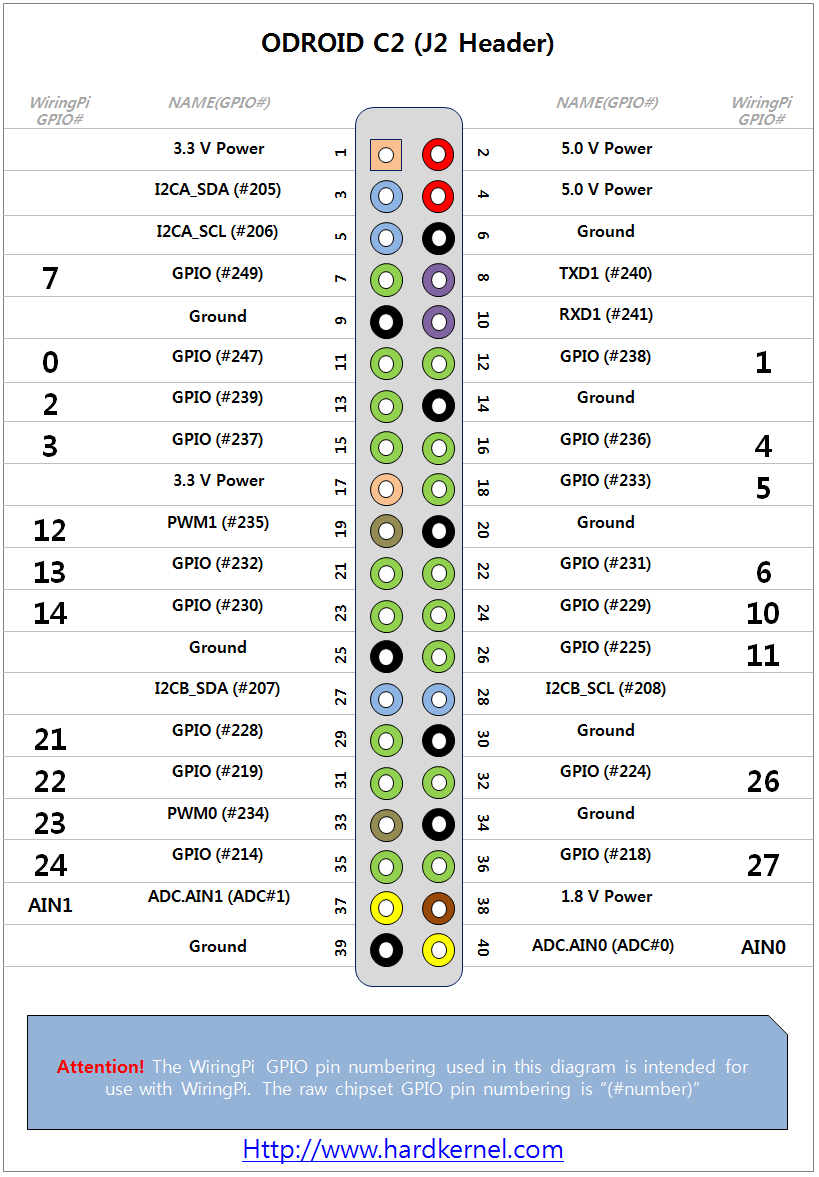
Pinout diagram
| Attr | Specs | verified |
|---|---|---|
soc | Amlogic S905 (Meson Gxbb family) — quad Arm Cortex-A53 @ 1.5 GHz, ARMv8-A 64-bit (U-Boot doc; Wikipedia table). The S905 itself is spec'd to 2.0 GHz and CNX's pre-launch table listed 2.0 GHz, but the C2 ships fused at 1.5 GHz (U-Boot doc, Wikipedia). | ? unverified |
gpu | ARM Mali-450 MP3 — "3 Pixel + 2 Vertex" shader cores (Wikipedia; CNX says "penta core (3+2) Mali-450"). OpenGL ES 2.0-class; supported on vendor images only via proprietary blobs (/dev/mali, /dev/ump) (ALARM page). | ✔ |
vpu | hardware decode of 8/10-bit H.265 up to 4K@60, H.264 up to 4K@30, plus H.263/VC1/ MPEG1-2/AVS/RealVideo; H.264 encode up to 1080p60 (CNX 2016-03-01). | ✔ |
ram | 2 GB DDR3 @ 912 MHz (Wikipedia table). Mainline DTS declares exactly 2 GiB (reg = <0x0 0x0 0x0 0x80000000>). No 1 GB variant exists. | ? unverified |
storage | microSD slot (UHS-1-capable hardware per CNX launch spec) plus an on-board eMMC module socket (8/16/32/64 GB Toshiba/SanDisk modules). No SPI NOR. | ? unverified |
video_out | full-size HDMI 2.0, up to 4K/60 Hz, with CEC (U-Boot doc; CNX). Composite video possible only via an unpopulated 2-pin header (CNX). | ? unverified |
audio | HDMI audio only — no 3.5 mm jack (CNX comparison "Audio: HDMI"); 7-pin I2S header for external audio (CNX). Mainline sound card: amlogic,gx-sound-card, I2S → HDMI TX (DTS sound node). | ? unverified |
ethernet | Gigabit RJ45 via Realtek RTL8211F PHY, RGMII (phy-mode = "rgmii", PHY comment "Realtek RTL8211F (0x001cc916)" in the mainline DTS; CNX). This was a headline advantage over the same-day Raspberry Pi 3 (100 Mbit over USB). | ? unverified |
wifi_bluetooth | none on board — requires a USB dongle (CNX: "No, requires USB dongle"; an optional 802.11 b/g/n + BT module could be added). No cellular/radios. | ? unverified |
usb | 4× USB 2.0 host behind an on-board Genesys Logic GL852G hub (DTS: hub@1 { compatible = "usb5e3,610"; / Genesys Logic GL852G / }) + 1× micro-USB OTG port (U-Boot doc). | ? unverified |
gpio_expansion | 40-pin header (J2) with GPIO, I2C, UART, PWM, 1-Wire and ADC; all I/O 3.3 V except power pins (CNX launch spec: "All I/Os are 3.3V, except […]"). The mainline DTS names the header signals (J2 Header Pin7…36 on the GPIOX/GPIOY banks, I2C A SDA/SCK, I2C B SDA/SCK, PWM D, PWM B) and enables saradc (ADC), i2c_A, uart_AO (console, 115200 8N1). | ? unverified |
ir | built-in infrared receiver, mainline DTS sets linux,rc-map-name = "rc-odroid" (works with ir-keytable on Armbian/mainline). | ? unverified |
leds | red power LED (always on with power) + blue user LED, heartbeat trigger by default (c2:blue:alive in mainline DTS; /sys/class/leds/blue:heartbeat/ on vendor/ALARM images) (ALARM page). | ✔ |
debug | serial console on the SoC uart_AO (115200 8N1, DTS stdout-path). | ? unverified |
power | 5 V / 2 A, via 2.5×0.8 mm barrel jack (Wikipedia table) or the micro-USB OTG port (CNX: "5V via micro USB OTG port or power barrel"). Mainline DTS models the rails: P5V0 input, 3.3 V/1.8 V/1.5 V fixed regulators, and a GPIO-switched 5 V USB hub/OTG supply. | ? unverified |
board | 85 × 56 mm (Wikipedia; CNX). | ? unverified |
temperature_range | ? unverified |
- Manufacturer: Hardkernel Co., Ltd. (South Korea), brand "ODROID" — the U-Boot project describes the board as "a single board computer manufactured by Hardkernel" (U-Boot board docs: ODROID-C2, retrieved 2026-10-13).
- Year introduced: 2016. Hardkernel deliberately launched the C2 the very same day as the Raspberry Pi 3 (29 February 2016) (CNX Software, "Raspberry Pi 3, ODROID-C2 and Pine A64+ Development Boards Comparison", 2016-03-01, retrieved 2026-10-13).
- Launch price: US$40 listed at launch (CNX comparison table, 2016-03-01; total $48.70 shipped to the US). CNX grouped it with the RPi 3 and Pine A64+ as "the only ultra low cost (<$40) 64-bit ARM development boards" then available (CNX 2016-03-01).
- Status: Legacy / end-of-life in practice, but unusually well maintained. The successor ODROID-C4 (Amlogic S905X3) launched in 2020 (CNX, "$50 ODROID-C4…", 2020-04-23, retrieved 2026-10-13). The C2 still receives current community images in 2026: Armbian builds it from master (armbian/build config/boards/odroidc2.conf, retrieved 2026-10-13), Arch Linux ARM ships ArchLinuxARM-odroid-c2-latest.tar.gz (ALARM platform page, retrieved 2026-10-13), and DietPi ships DietPi_OdroidC2-ARMv8-Trixie (DietPi supported hardware, retrieved 2026-10-13).
- Variants: a single board revision/spec — 2 GB RAM only (unlike the earlier C1's 1 GB). Options are add-ons, not board variants: Toshiba/SanDisk eMMC modules (8/16/32/64 GB) on the on-board socket, and USB Wi-Fi dongles (CNX 2016-03-01 comparison, retrieved 2026-10-13).
- Family context (low-cost ODROID line): the C2 is the direct successor of the ODROID-C1 (2014) and C1+ (2015) — those older boards carry the Amlogic S805 quad Cortex-A5 — and precedes the C4 (2020) (Wikipedia: ODROID comparison table, retrieved 2026-10-13). ⚠️ Common confusion to avoid: the C2 is not a 32-bit Cortex-A5/S802-class board. That description fits the C1's S805. The C2 is 64-bit ARMv8 (Cortex-A53) — see next section.
+ Strengths
- Same-day launch vs Raspberry Pi 3 and, at $40, one of only three sub-$40 64-bit ARM boards at launch (with RPi 3 and Pine A64+) (CNX 2016-03-01).
- Real Gigabit Ethernet (RTL8211F, RGMII — not a USB bridge) when the RPi 3 still had 100 Mbit-over-USB: this made the C2 the go-to cheap network appliance board of 2016–2018.
- HDMI 2.0 4K/60 + H.265 4K60 hardware decode — a TV-box-class SoC on a dev board; the basis of many Kodi/LibreELEC media-center builds (CNX 2016-03-01).
- eMMC module socket — removable, and far faster/more reliable than microSD for OS images (mainline DTS enables the BOOT-bank 8-bit bus up to 200 MHz with HS200 DDR support).
- Built-in IR receiver with a dedicated upstream Linux remote keymap (rc-odroid) — rare on SBCs; Hardkernel sold a small IR remote.
- Flagship of the low-cost ODROID "C" line: the C1/C1+ (2014/2015) proved the $35–40 TV-box-SoC formula and the C2 industrialized it with GbE + 4K, paving the way for the C4 (2020) (Wikipedia ODROID table; CNX C4 launch).
- Textbook case of the Amlogic mainline upstreaming story (BayLibre → Armbian → Debian cloud images): see linux-meson.com and the BayLibre post it links.
- No security engine / TPM / secure enclave documented; the only "secure" element is the proprietary signed boot chain (BL1 bootsig), which locks rather than protects (U-Boot boot-flow docs).
− Weaknesses
- Power-supply trap (5 V / 2 A): the board is specified for a 5 V 2 A supply (Wikipedia ODROID table); the barrel plug is the small 2.5×0.8 mm type, shared with the C1 family, so "spare" Pi-style micro-USB cables/adapters are a common mismatch. Powering via the micro-USB OTG port is electrically possible (CNX) but puts hub + peripherals on the same marginal input — under-spec chargers and long thin cables cause brown-out reboots and SD corruption.
- Slow/finicky microSD in practice: the vendor spec calls the slot UHS-1, but the mainline DTS caps the SD host at cap-sd-highspeed, max-frequency = <100000000> — i.e. plain SDR50/ SDR100, no UHS-I DDR modes — so mainline/Armbian I/O on ordinary cards is modest and cheap cards degrade badly (meson-gxbb-odroidc2.dts).
- Legacy vendor kernel: official images stayed on Amlogic's Linux 3.14 long after mainline support matured (CNX on the 3.14 kernel, search archive retrieved 2026-10-13) — GPU/VPU acceleration worked there, but security updates and modern userspace lagged; that's why Armbian/DietPi/ALARM mainline images are the sane default today.
- Mainline gaps (measured from the DTS + U-Boot support matrix): - USB OTG gadget is disabled in mainline (&usb0 { status = "disabled"; }), and the U-Boot matrix lists USB OTG: No for S905 (U-Boot Amlogic matrix) — no gadget/peripheral mode on current stacks. - No DVFS via SCPI on mainline (&scpi_clocks { status = "disabled"; } in the DTS) — clocks come from the fixed clock driver instead of the vendor co-processor path. - No thermal sensor on S905 per the U-Boot matrix ("Thermal Sensor: No") — no hwmon readings, no thermal throttling feedback. - IR decoder and CEC are not supported in U-Boot (matrix rows "Infrared Decoder: No", "CEC: No") — cosmetic, but relevant for bootloader-level remote control.
- GPU/VPU = proprietary blob land: Mali-450 support needs Hardkernel/Amlogic blobs (/dev/mali, /dev/ump, xf86-video-odroid-c2) (ALARM page); mainline (Panfrost-era) acceleration does not cover Gxbb, so mainline desktops run on modetest/fbdev-class graphics.
- Bootloader blob lock-in: you cannot build a fully open boot chain — BL1/FIP binaries are non-redistributable-source Amlogic/Hardkernel artifacts required even for mainline U-Boot (U-Boot ODROID-C2 doc).
- No on-board Wi-Fi/BT in the Wi-Fi era — every wireless build needs a dongle that eats one of only four USB2 ports (CNX 2016-03-01).
- No hardware I2S codec / analog audio out — audio over HDMI only (CNX), which surprises kiosk/interfacing builders.
- Ecosystem drift: Hardkernel's attention (and new images) moved to C4/N2/C5; the C2 lives on community-maintained mainline — fine today, but vendor Android 5.1 and 3.14-era images are security-ancient and should never be exposed to networks.
- Retour d'expérience expert expert — expert-pi-like
- Bon retour sur l'ODROID-C2. C'est une bête de 2016 mais elle tient bien la route pour du réseau. Les points forts sont réels : le port Gigabit Ethernet réel (RTL8211F, pas d'USB bridge) change tout comparé aux Pi 3 de l'époque, et le décodage H.265 4K via le Mali-450 est efficace en multimédia. Par… — expert-pi-like
- Merci pour ce résumé. J'ai justement un souci avec l'alimentation. J'utilisais un chargeur USB standard via le port OTG pour gagner de la place, mais ça reboote aléatoirement dès que je branche un dongle Wi-Fi. Tu confirmes que le port OTG est trop marginal pour les périphériques USB ? J'ai vu que … — maker-bricoleur
- Oui, le port OTG met le hub et les ports USB sur la même ligne électrique, c'est très instable avec des périphériques. Pour le Wi-Fi, n'oublie pas qu'il n'y a rien d'intégré, il faut un dongle USB qui bouffe un des 4 ports. Si tu veux du réseau stable, le GbE est parfait mais vérifie bien tes câble… — linux-meson-fan
Community feedback and projects
- Odroid C2 don't boot with last build image forum.manjaro.org
- Odroid C2 no longer booting forum.manjaro.org
- odroid m1,c2,xu4 cannot connect to wifi network via wifi dongle. corrupt beacon and probe response forum.armbian.com
- LibreELEC 7.0 Ported to Amlogic S905 TV Boxes & ODROID-C2 Board www.cnx-software.com
Content not available yet.
- Official wiki (specs, pinout, schematics, power notes)
- CNX, 2016-06-07
- arch/arm64/boot/dts/amlogic/meson-gxbb-odroidc2.dts
- Amlogic support matrix
- U-Boot board doc (boot flow, FIP signing, dd offsets)
- github.com/hardkernel/linux
- linux-meson.com
- "How We Improved AmLogic Support in Mainline Linux"
- LibreELEC/amlogic-boot-fip
- board page
- build config
- platform page
- supported hardware
- forum.odroid.com
- Wikipedia: ODROID
- launch-day comparison 2016-03-01
- odroid-c2 news tag
- Power-supply trap (5 V / 2 A): the board is specified for a 5 V 2 A supply (Wikipedia ODROID table); the barrel plug is the small 2.5×0.8 mm type, shared with the C1 family, so "spare" Pi-style micro-USB cables/adapters are a common mismatch. Powering via the micro-USB OTG port is electrically possible (CNX) but puts hub + peripherals on the same marginal input — under-spec chargers and long thin cables cause brown-out reboots and SD corruption.
- Slow/finicky microSD in practice: the vendor spec calls the slot UHS-1, but the mainline DTS caps the SD host at cap-sd-highspeed, max-frequency = <100000000> — i.e. plain SDR50/ SDR100, no UHS-I DDR modes — so mainline/Armbian I/O on ordinary cards is modest and cheap cards degrade badly (meson-gxbb-odroidc2.dts).
- Legacy vendor kernel: official images stayed on Amlogic's Linux 3.14 long after mainline support matured (CNX on the 3.14 kernel, search archive retrieved 2026-10-13) — GPU/VPU acceleration worked there, but security updates and modern userspace lagged; that's why Armbian/DietPi/ALARM mainline images are the sane default today.
- Mainline gaps (measured from the DTS + U-Boot support matrix): - USB OTG gadget is disabled in mainline (&usb0 { status = "disabled"; }), and the U-Boot matrix lists USB OTG: No for S905 (U-Boot Amlogic matrix) — no gadget/peripheral mode on current stacks. - No DVFS via SCPI on mainline (&scpi_clocks { status = "disabled"; } in the DTS) — clocks come from the fixed clock driver instead of the vendor co-processor path. - No thermal sensor on S905 per the U-Boot matrix ("Thermal Sensor: No") — no hwmon readings, no thermal throttling feedback. - IR decoder and CEC are not supported in U-Boot (matrix rows "Infrared Decoder: No", "CEC: No") — cosmetic, but relevant for bootloader-level remote control.
- GPU/VPU = proprietary blob land: Mali-450 support needs Hardkernel/Amlogic blobs (/dev/mali, /dev/ump, xf86-video-odroid-c2) (ALARM page); mainline (Panfrost-era) acceleration does not cover Gxbb, so mainline desktops run on modetest/fbdev-class graphics.
- Bootloader blob lock-in: you cannot build a fully open boot chain — BL1/FIP binaries are non-redistributable-source Amlogic/Hardkernel artifacts required even for mainline U-Boot (U-Boot ODROID-C2 doc).
- No on-board Wi-Fi/BT in the Wi-Fi era — every wireless build needs a dongle that eats one of only four USB2 ports (CNX 2016-03-01).
- No hardware I2S codec / analog audio out — audio over HDMI only (CNX), which surprises kiosk/interfacing builders.
- Ecosystem drift: Hardkernel's attention (and new images) moved to C4/N2/C5; the C2 lives on community-maintained mainline — fine today, but vendor Android 5.1 and 3.14-era images are security-ancient and should never be exposed to networks.
- Faire clignoter une LED via le GPIO debutant Schéma : IMG-odroid-c2-debutant-1-odroidc2-led-gpio.svg — LED et résistance 330 ohms branchées sur le connecteur J2 de l'ODROID-C2
- Bouton poussoir et messages console debutant Schéma : IMG-odroid-c2-debutant-2-odroidc2-bouton-console.svg — bouton poussoir avec résistance de pull-up 10 kΩ vers 3,3 V sur le connecteur J2
- Premier script Python sur l'ODROID-C2 debutant Schéma : IMG-odroid-c2-debutant-3-odroidc2-premier-python.svg — script Python pilotant la LED bleue via /sys/class/leds sur l'ODROID-C2
- Variation d'intensité d'une LED avec PWM intermediaire Schéma : IMG-odroid-c2-intermediaire-1-odroidc2-pwm-led.svg — LED pilotée par un signal PWM via le connecteur J2 avec transistor de puissance
- Lire un capteur I2C (température/pression) intermediaire Schéma : IMG-odroid-c2-intermediaire-2-odroidc2-i2c-capteur.svg — capteur BME280 relié au bus I2C A du connecteur J2 de l'ODROID-C2
- Ethernet Gigabit et accès SSH intermediaire Schéma : IMG-odroid-c2-intermediaire-3-odroidc2-ethernet-ssh.svg — ODROID-C2 en tête de réseau via son port RJ45 Gigabit (RTL8211F) avec session SSH depuis un poste
- Boot microSD/eMMC et chaîne de démarrage Amlogic avance Schéma : IMG-odroid-c2-avance-1-odroidc2-boot-emmc-recouvrement.svg — chaîne de boot BL1 → FIP → U-Boot puis système sur microSD ou module eMMC de l'ODROID-C2
- Surveillance fréquence et charge CPU avance Schéma : IMG-odroid-c2-avance-2-odroidc2-surveillance-thermique.svg — sondes cpufreq et loadavg de l'ODROID-C2 remontant vers un journal et un graphique
- Serveur web léger et conteneurs avance Schéma : IMG-odroid-c2-avance-3-odroidc2-serveur-web-conteneurs.svg — ODROID-C2 servant un site nginx et des conteneurs Podman sur son lien Gigabit
Code library — examples written for this board
clignotante.pyPythonbouton-gpio.pyPythoncapteur-i2c.shBashsurveillance-temperature.shBashcapteur-dht11.pyPythonservo-pwm-sysfs.shBashserveur-web-capteur.pyPythonreseau-ethernet.shBashjournal-cron.shBashveilleur-systemd.pyPython
Examples and repos found online
- mattjlewis/diozero github.com
- OtherCrashOverride/c2play github.com
- hallee/espresso-arm github.com
- hypriot/image-builder-odroid-c2 github.com