ODROID-M1 (Hardkernel)
⚡ The essentials in 60 seconds
- soc — Rockchip RK3568B2 — a plastic-package variant of the RK3568 chosen during the IC shortage (CNX; Hardkernel forum explanation, forum.odroid.com f=29 t=44218).
- cpu — quad-core Arm Cortex-A55 (Armv8.2-A, 64-bit) @ up to 2.0 GHz (Wikipedia lists 1.992 GHz) — confirms the "quad A55" claim.
- gpu_npu — Arm Mali-G52 MP2 GPU; 0.8 TOPS NPU AI accelerator (CNX).
- ram — 4 gb
- storage — - MicroSD socket (mainline: sdmmc0 enabled, DTS) - eMMC module socket (mainline: sdhci enabled; eMMC 5.1 per Wikipedia) - 16 MB SPI NOR flash preinstalled with Petitboot (CNX; mainline DTS enables the Rockchip SPI flash controller with jedec,spi-nor and fixed partitions) - Native SATA 3.0 port + SATA power connector (5 V only), tested ≈500 MB/s (CNX) - M.2 NVMe M-Key socket, 2-lane PCIe 3.0, tested ≈1600 MB/s — about 4× the same SSD on a Raspberry Pi CM4 system (CNX). Mainline DTS enables pcie3x2 + pcie30phy (DTS).
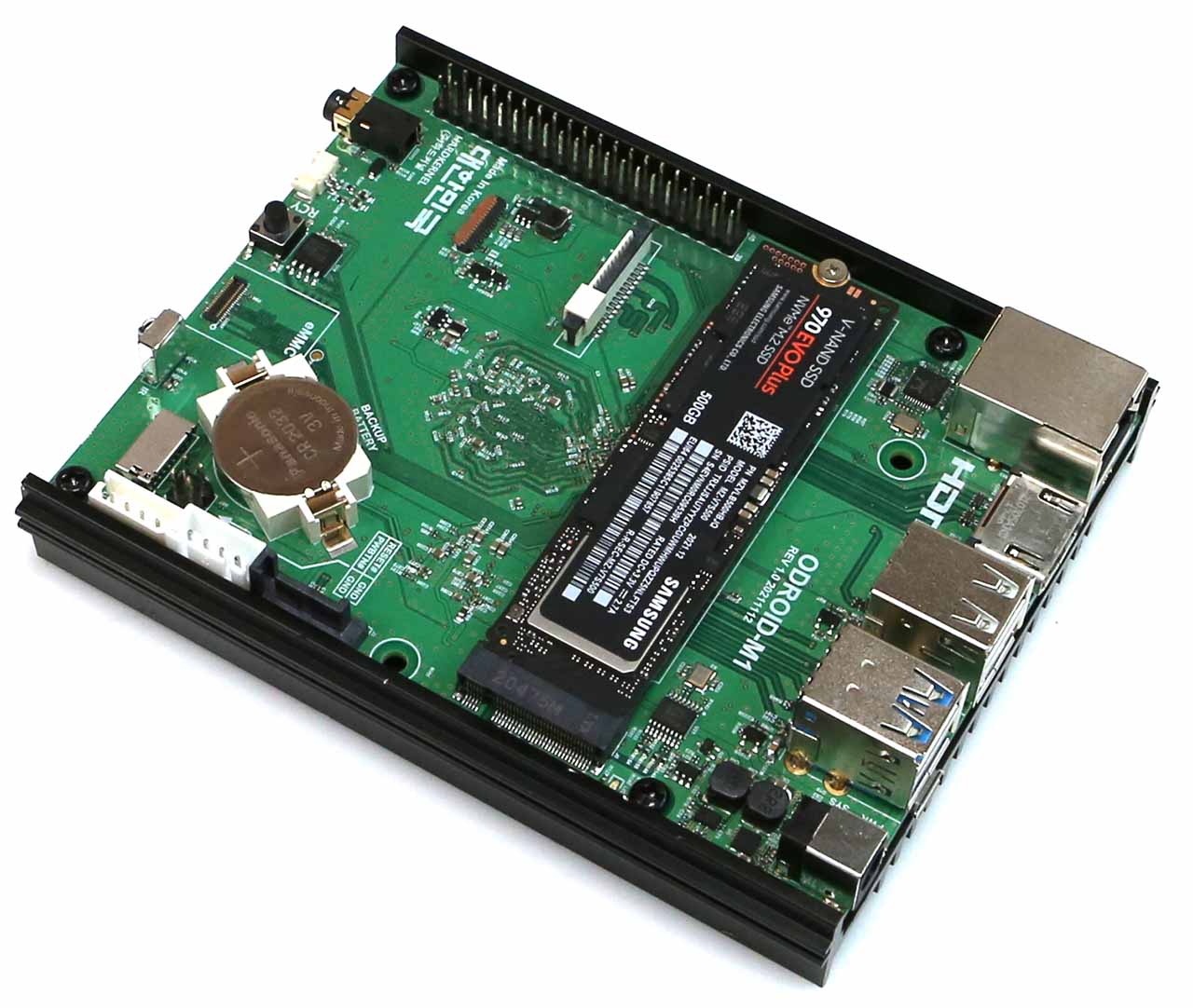
- video — 1× HDMI 2.0 up to 4Kp60 with HDR/EDID; 1× 4-lane MIPI DSI (tested with 1280×800 display) (CNX). Mainline enables VOP2 + HDMI TX (DTS; commit "Enable vop2 and hdmi tx on ODROID-M1").
- On this board : 9 tutorials · 10 code
One of the most defining characteristics of the ODROID-M1 is its exceptional storage flexibility, particularly regarding high-speed data access. The board includes an M.2 NVMe M-Key socket that supports PCIe 3.0 with two lanes. In practical terms, this allows for read speeds of approximately 1,600 MB/s, which is roughly four times faster than the same SSD would perform on a Raspberry Pi CM4 system. This makes the M1 an attractive choice for network-attached storage (NAS) applications or any scenario requiring rapid data retrieval. Beyond NVMe, the board offers native SATA 3.0 connectivity with a dedicated power connector, though it is important to note that this port supplies only 5 volts. This is sufficient for 2.5-inch solid-state drives or portable hard drives, but 3.5-inch desktop hard drives require external power sources. Additionally, the board supports eMMC modules and microSD cards, giving users multiple layers of storage options. A unique feature is the 16 MB SPI NOR flash preloaded with Petitboot, a flexible boot manager that simplifies the process of booting from NVMe or SATA devices, although users must be mindful of the physical SPI Boot Select switch, which determines whether the system uses this flash memory or defaults to other boot methods.
Connectivity options on the ODROID-M1 are robust, though they come with a notable omission: there is no onboard Wi-Fi or Bluetooth. Users requiring wireless capabilities must rely on external USB dongles, a design choice that keeps the board’s cost lower and allows for more flexibility in choosing wireless standards. For wired networking, the board features a Gigabit Ethernet port powered by a Realtek RTL8211F transceiver, ensuring stable and fast local network connections. The USB interface includes two USB 3.0 ports, one of which can be configured as a USB 2.0 On-The-Go (OTG) port via a jumper, along with two USB 2.0 ports and a micro-USB device port. For display output, the M1 supports HDMI 2.0, capable of driving 4K resolution at 60 frames per second with HDR support. It also includes a MIPI DSI interface for connecting small displays, which was tested with a 1280x800 screen, and a MIPI CSI interface for camera modules. Audio is handled by an RK809 or RK817 codec, providing a 3.5 mm headphone jack and a mono speaker output.
The physical design of the ODROID-M1 is larger than many "Raspberry Pi-like" boards, measuring 122 x 90 x 16 mm, with a substantial heatsink that extends the footprint to 123 x 100 mm. This larger size accommodates the powerful components and the extensive cooling required for sustained performance. The board is powered via a DC barrel jack accepting 7.5 to 15.5 volts, with a 12V 2A adapter recommended for optimal stability. Power consumption is remarkably efficient, with idle usage around 1.3 watts and heavy load peaks at 4.5 watts. During stress tests, temperatures peaked just over 50°C at an ambient temperature of 35°C, indicating effective thermal management. The board also includes a 40-pin GPIO expansion header, which provides access to general-purpose input/output lines for hardware projects, although the exact pinout and voltage levels should be verified against the official Hardkernel documentation, which may require manual browser access due to automated fetch restrictions.
Software support for the ODROID-M1 is comprehensive, catering to both official and community-driven ecosystems. Hardkernel provides official images for Ubuntu 20.04 and 22.04 LTS, as well as Android 11, though these initially shipped with a Linux 4.19 kernel. For users seeking modern kernel features, such as the Panfrost GPU driver, community distributions like Armbian and DietPi are highly recommended. These distributions support the board with mainline Linux kernels, which have seen significant improvement since the initial device tree was added in late 2022. The mainline support includes drivers for the GPU, HDMI, audio, and storage controllers, making the board increasingly compatible with standard Linux software. A known issue in earlier mainline kernels involved a pinmux regression affecting analog audio, but this was resolved in October 2025, highlighting the active maintenance of the board’s software stack.
In summary, the ODROID-M1 is a versatile single-board computer that excels in storage performance and connectivity, making it ideal for home servers, media centers, and development projects. Its combination of a powerful quad-core processor, fast NVMe storage, and extensive I/O options offers a compelling value proposition. While it lacks built-in wireless connectivity and requires attention to boot configuration due to its SPI flash setup, these are minor trade-offs for its performance capabilities. With strong community support and active mainline Linux integration, the ODROID-M1 remains a relevant and powerful choice for enthusiasts and professionals alike.
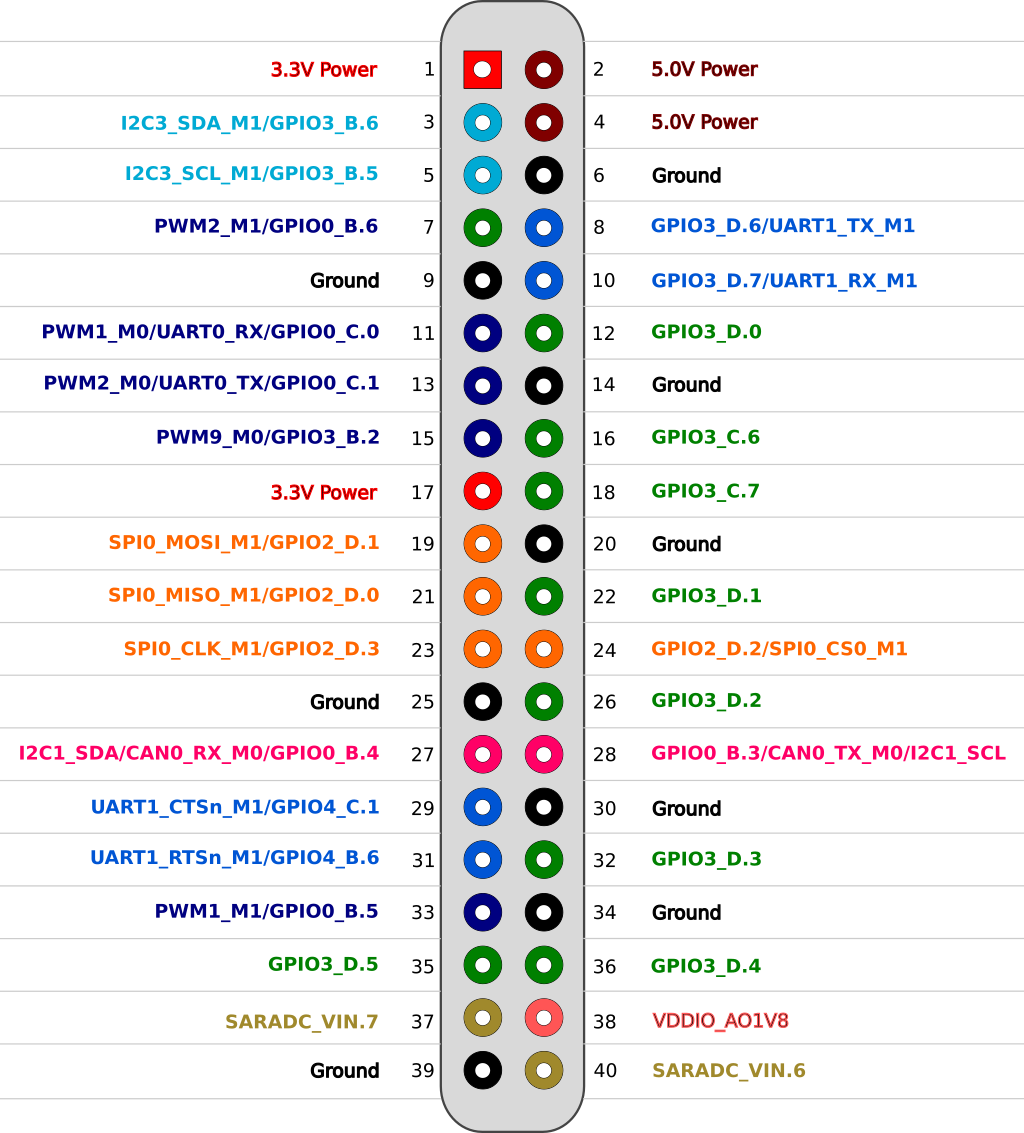
Pinout diagram
| Attr | Specs | verified |
|---|---|---|
soc | Rockchip RK3568B2 — a plastic-package variant of the RK3568 chosen during the IC shortage (CNX; Hardkernel forum explanation, forum.odroid.com f=29 t=44218). | ✔ |
cpu | quad-core Arm Cortex-A55 (Armv8.2-A, 64-bit) @ up to 2.0 GHz (Wikipedia lists 1.992 GHz) — confirms the "quad A55" claim. | ? unverified |
gpu_npu | Arm Mali-G52 MP2 GPU; 0.8 TOPS NPU AI accelerator (CNX). | ? unverified |
ram | 4 gb | ? unverified |
storage | - MicroSD socket (mainline: sdmmc0 enabled, DTS) - eMMC module socket (mainline: sdhci enabled; eMMC 5.1 per Wikipedia) - 16 MB SPI NOR flash preinstalled with Petitboot (CNX; mainline DTS enables the Rockchip SPI flash controller with jedec,spi-nor and fixed partitions) - Native SATA 3.0 port + SATA power connector (5 V only), tested ≈500 MB/s (CNX) - M.2 NVMe M-Key socket, 2-lane PCIe 3.0, tested ≈1600 MB/s — about 4× the same SSD on a Raspberry Pi CM4 system (CNX). Mainline DTS enables pcie3x2 + pcie30phy (DTS). | ✔ |
video | 1× HDMI 2.0 up to 4Kp60 with HDR/EDID; 1× 4-lane MIPI DSI (tested with 1280×800 display) (CNX). Mainline enables VOP2 + HDMI TX (DTS; commit "Enable vop2 and hdmi tx on ODROID-M1"). | ? unverified |
camera | 1× 2-lane MIPI CSI (CNX). | ? unverified |
audio | 3.5 mm headphone jack + mono speaker output (1.3 W @ 8 Ω); RK809/RK817 codec on I2S1 (CNX; mainline simple-audio-card "Analog RK817", DTS). | ? unverified |
networking | 1× Gigabit Ethernet RJ45 via Realtek RTL8211F transceiver (CNX); mainline: GMAC0 RGMII with generic ethernet-phy-ieee802.3-c22 PHY (DTS). No onboard WiFi/Bluetooth — absent from every spec sheet reviewed; Hardkernel sells USB WiFi dongles instead (CNX M1S review). | ✔ |
usb | 2× USB 3.0 (one configurable as USB 2.0 OTG via jumper), 2× USB 2.0, 1× micro-USB device port (CNX). | ? unverified |
gpio | 40-pin expansion header (CNX; Wikipedia counts 24 usable GPIO lines) + separate UART header for the serial console. | ? unverified |
power | DC barrel jack (5.5×2.1 mm), 7.5–15.5 V, 12 V/2 A adapter recommended (CNX); Wikipedia states 7.5–17 V up to 25 W. Mainline DTS models a fixed dc_12v input regulator. | ? unverified |
power_consumption_hardkernel_via_cnx | suspend 0.06 W, idle 1.3 W, heavy load 4.5 W. | ? unverified |
thermal | stress test peaked a little over 50 °C at 35 °C ambient with the stock heatsink (CNX). | ? unverified |
dimensions_weight | board 122 × 90 × 16 mm; heatsink 123 × 100 × 19 mm; 253 g with heatsink (CNX). | ? unverified |
misc | power button, SPI Boot Select switch, IR receiver (mainline: gpio-ir-receiver, DTS), RTC battery holder, 2 system LEDs (red power, blue heartbeat — both in mainline DTS), M.2 LED. | ? unverified |
- Manufacturer: Hardkernel Co., Ltd. (South Korea) — device tree copyright line "Copyright (c) 2022 Hardkernel Co., Ltd." (mainline DTS).
- Year introduced: 2022. Launched March 29, 2022 per CNX Software (launch article); Wikipedia's ODROID table also lists 2022 (en.wikipedia.org/wiki/ODROID). - Note: some task briefs date the CNX announcement to 2023 — that is the ODROID-M1S (announced 2023-11-14, CNX). The original M1 is a 2022 product.
- Status: Active. At launch Hardkernel stated Rockchip guarantees RK3568B2 supply for 15 years and planned B2B availability of the M1 until 2036+ (CNX launch article). Successors exist (ODROID-M1S 2023, ODROID-M2 2024) but the M1 remains in Hardkernel's Rockchip product line (CNX M2 article).
- Launch price: $90 for the 8 GB RAM model; $70 for the 4 GB model (out of stock at launch) (CNX launch article).
- Variants: 4 GB and 8 GB LPDDR4 at launch (CNX; Wikipedia lists the 8 GB model).
+ Strengths
- Fast native NVMe on a sub-$100 ARM SBC: 2-lane PCIe 3.0 M.2 slot measured at ≈1600 MB/s at launch — ~4× the same SSD on a Raspberry Pi CM4 (CNX). Combined with GbE this made the M1 an early budget NAS/mini-server favorite.
- Three simultaneous storage classes: NVMe + native SATA 3.0 (with 5 V SATA power) + eMMC module + microSD — SATA and SPI flash were later removed on the M1S, making them M1-specific (CNX M1S article).
- 16 MB SPI flash with Petitboot + SPI Boot Select switch — network/disk boot flexibility unusual on RK3568 boards (CNX).
- 12 V DC jack and power button (the M1S reverted to 5 V USB-C), plus RTC battery holder and IR receiver (CNX).
- 0.8 TOPS NPU (RK3568 RNNP) and hardware video codecs (RK3568 family feature; CNX SoC comparison links).
- Form factor note: despite the "pi-like" catalog grouping, the M1 is not Raspberry-Pi-sized: 122 × 90 × 16 mm (vs 85 × 56 mm on a Pi 4), with the large under-board heatsink extending to 123 × 100 mm (CNX). The Pi-like comparison is functional (GPIO header, HDMI, GbE, maker positioning), not mechanical.
- Mainline-friendly today: full device tree in torvalds/linux with GPU (Panfrost), HDMI, audio, NVMe, eMMC, SD, NOR, IR, LEDs, SARADC enabled (DTS).
− Weaknesses
- Official images ship a 4.19 BSP kernel (Linux 4.19.219 on Ubuntu, 4.19.193 on Android at launch) — no modern mainline features (Panfrost GPU, etc.) on the vendor stack; mainline support arrived separately (CNX launch article).
- Mainline analog-audio pinmux regression (fixed Oct 2025): I2S1 claimed pins already held, producing rockchip-pinctrl ... pin gpio1-10 already requested / rockchip-i2s-tdm ... Error applying setting and dead RK817 audio; fixed by limiting I2S1 pins to SCLK/LRCK/SDI0/SDO0 (commit d425aef66e62).
- SATA port power is 5 V only — fine for 2.5″ SSDs/HDDs, but 3.5″ spinning drives need external power (CNX launch article).
- No onboard WiFi/BT — USB dongle required (spec sheets, CNX; accessory use in CNX M1S review).
- Boot-source switch gotcha: the SPI Boot Select switch decides whether the SPI NOR (Petitboot) path is used; with Petitboot active, SD/eMMC boot behaves differently than users expect.
- Big heatsink constrains enclosures: 123 × 100 × 19 mm heatsink vs 122 × 90 mm board; Hardkernel's metal case uses a sliding-slot design (CNX).
- RK3568B2 vs RK3568 naming: B2 is a package variant forced by the 2021-2022 chip shortage; datasheets/lead-time confusion documented by Hardkernel (forum thread, via CNX).
- Retour d'expérience expert expert — expert-pi-like
- Petit bilan sur l'ODROID-M1 après quelques mois d'utilisation. Le point fort incontestable reste le stockage : le port M.2 NVMe en PCIe 3.0 x2 est vraiment rapide, on atteint les 1600 Mo/s annoncés, ce qui écrase tout ce qu'on peut faire sur un Raspberry Pi CM4. C'est un vrai atout pour un NAS ou u… — expert-pi-like
- Merci pour ce retour. Tu confirmes bien que le format n'est pas du tout Pi-like en réalité ? J'ai vu les dimensions (122x90mm) et le radiateur qui dépasse, ça va me poser problème pour mon boîtier existant prévu pour un Pi 4. De plus, l'absence de WiFi/Bluetooth embarqué est un peu frustrante, on e… — makershadow
- Exact pour les dimensions, le radiateur fait 123x100x19mm, ça ne rentre dans aucun boîtier standard Pi. Pour l'audio, le bug de pincmux I2S1 qui tuait le codec RK817 sur mainline a été corrigé récemment (octobre 2025), donc si tu as un noyau à jour, l'audio fonctionne. Mais sur les vieilles images … — expert-pi-like
Community feedback and projects
- ODROID-M1: RK3568 NPU on the open stack (rocket kernel driver + Mesa Teflon) forum.armbian.com
- ODROID-M1 NPU fully working on Armbian 6.18.x forum.armbian.com
- RGMII Settings in DTB files for Odroid-M1 forum.armbian.com
- ODROID-M1 not booting from SD card / NVMe forum.manjaro.org
- ODROID-M1 on BTRFS forum.manjaro.org
Content not available yet.
- Official images ship a 4.19 BSP kernel (Linux 4.19.219 on Ubuntu, 4.19.193 on Android at launch) — no modern mainline features (Panfrost GPU, etc.) on the vendor stack; mainline support arrived separately (CNX launch article).
- Mainline analog-audio pinmux regression (fixed Oct 2025): I2S1 claimed pins already held, producing rockchip-pinctrl ... pin gpio1-10 already requested / rockchip-i2s-tdm ... Error applying setting and dead RK817 audio; fixed by limiting I2S1 pins to SCLK/LRCK/SDI0/SDO0 (commit d425aef66e62).
- SATA port power is 5 V only — fine for 2.5″ SSDs/HDDs, but 3.5″ spinning drives need external power (CNX launch article).
- No onboard WiFi/BT — USB dongle required (spec sheets, CNX; accessory use in CNX M1S review).
- Boot-source switch gotcha: the SPI Boot Select switch decides whether the SPI NOR (Petitboot) path is used; with Petitboot active, SD/eMMC boot behaves differently than users expect.
- Big heatsink constrains enclosures: 123 × 100 × 19 mm heatsink vs 122 × 90 mm board; Hardkernel's metal case uses a sliding-slot design (CNX).
- RK3568B2 vs RK3568 naming: B2 is a package variant forced by the 2021-2022 chip shortage; datasheets/lead-time confusion documented by Hardkernel (forum thread, via CNX).
- Allumer une LED depuis le connecteur GPIO debutant Schéma : IMG-odroid-m1-debutant-1-odroidm1-led-gpio.svg — LED et résistance 330 Ω branchées sur le connecteur 40 broches de l'ODROID-M1, masse commune
- Lire un bouton et afficher dans la console debutant Schéma : IMG-odroid-m1-debutant-2-odroidm1-bouton-console.svg — bouton-poussoir entre une broche GPIO et la masse, résistance de pull-up interne activée, terminal console à l'écran
- Premier script Python : état de la carte debutant Schéma : IMG-odroid-m1-debutant-3-odroidm1-premier-script-python.svg — ODROID-M1 avec son SSD NVMe M.2, un terminal affichant le rapport système généré par le script Python
- Variation d'intensité d'une LED en PWM intermediaire Schéma : IMG-odroid-m1-intermediaire-1-odroidm1-pwm-led.svg — LED de puissance pilotée par un transistor NPN depuis une broche PWM du connecteur 40 broches, avec résistance de base
- Lire un capteur I2C (température/humidité) intermediaire Schéma : IMG-odroid-m1-intermediaire-2-odroidm1-i2c-capteur.svg — petit capteur I2C à 4 broches relié au bus SDA/SCL du connecteur 40 broches de l'ODROID-M1 avec résistances de pull-up
- Ethernet Gigabit et accès SSH intermediaire Schéma : IMG-odroid-m1-intermediaire-3-odroidm1-ethernet-ssh.svg — ODROID-M1 relié par câble RJ45 au routeur (Ethernet Gigabit Realtek RTL8211F), un ordinateur portable se connectant en SSH, absence de WiFi notée
- Booter sur NVMe, eMMC ou SD et récupérer une carte bloquée avance Schéma : IMG-odroid-m1-avance-1-odroidm1-boot-nvme.svg — les trois supports de démarrage de l'ODROID-M1 (microSD, module eMMC, SSD M.2 NVMe), le switch SPI Boot Select et la puce SPI NOR 16 Mo avec Petitboot
- Surveillance thermique et fréquence CPU avance Schéma : IMG-odroid-m1-avance-2-odroidm1-thermique.svg — ODROID-M1 avec son dissipateur 123×100 mm, sondes de température des quatre coeurs Cortex-A55 et courbe de fréquence dans un terminal
- NAS Samba et conteneurs Docker sur NVMe avance Schéma : IMG-odroid-m1-avance-3-odroidm1-nas-samba.svg — ODROID-M1 en serveur NAS : SSD NVMe et disque SATA 2,5 pouces partagés en Samba, conteneurs Docker, clients du réseau local
Code library — examples written for this board
clignotante.pyPythonbouton-gpio.pyPythoncapteur-i2c.shBashsurveillance-temperature.shBashcapteur-dht11.pyPythonservo-pwm-sysfs.shBashserveur-web-capteur.pyPythonreseau-ethernet.shBashjournal-cron.shBashveilleur-systemd.pyPython
Examples and repos found online
- inindev/odroid-m1 github.com
- sstent/nixos-on-odroid-m1 github.com
- TheRemote/Legendary-ODROID-M1 github.com