Pine64 PINE A64 / PINE A64+ (Allwinner A64)
⚡ The essentials in 60 seconds
- soc — Allwinner A64 (early marketing also called it "R18"; Pine64 was evasive about which name was on the chips at launch — CNX 2015-12-09).
- cpu — 4× Arm Cortex-A53 (ARMv8-A, 64- and 32-bit execution states), NEON SIMD, VFPv4, 32 KB L1 I + 32 KB L1 D per core, 512 KB shared L2. Clock: 1152 MHz per the official wiki; CNX and most press list "1.2 GHz" (same OPP class). An AR100 (Cortex-M) coprocessor core exists in the A64 power domain (mainline DTS comment on reg_fldo2/vdd-cpus).
- gpu — Arm Mali-400MP2 dual-core, OpenGL ES 2.0 / OpenVG 1.1 (official wiki). Video: H.265 up to 4K (CNX launch spec); HDMI 1.4 up to 4K@30 Hz.
- ram — 512 MB, 1 GB or 2 GB DDR3 (official wiki "RAM Variants"). DRAM parts are DDR3L-compatible, run at 1.36 V from the AXP803 (mainline DTS comment: AXP803 DCDC5 "cannot reach 1.35 V accurately, use 1.36 V").
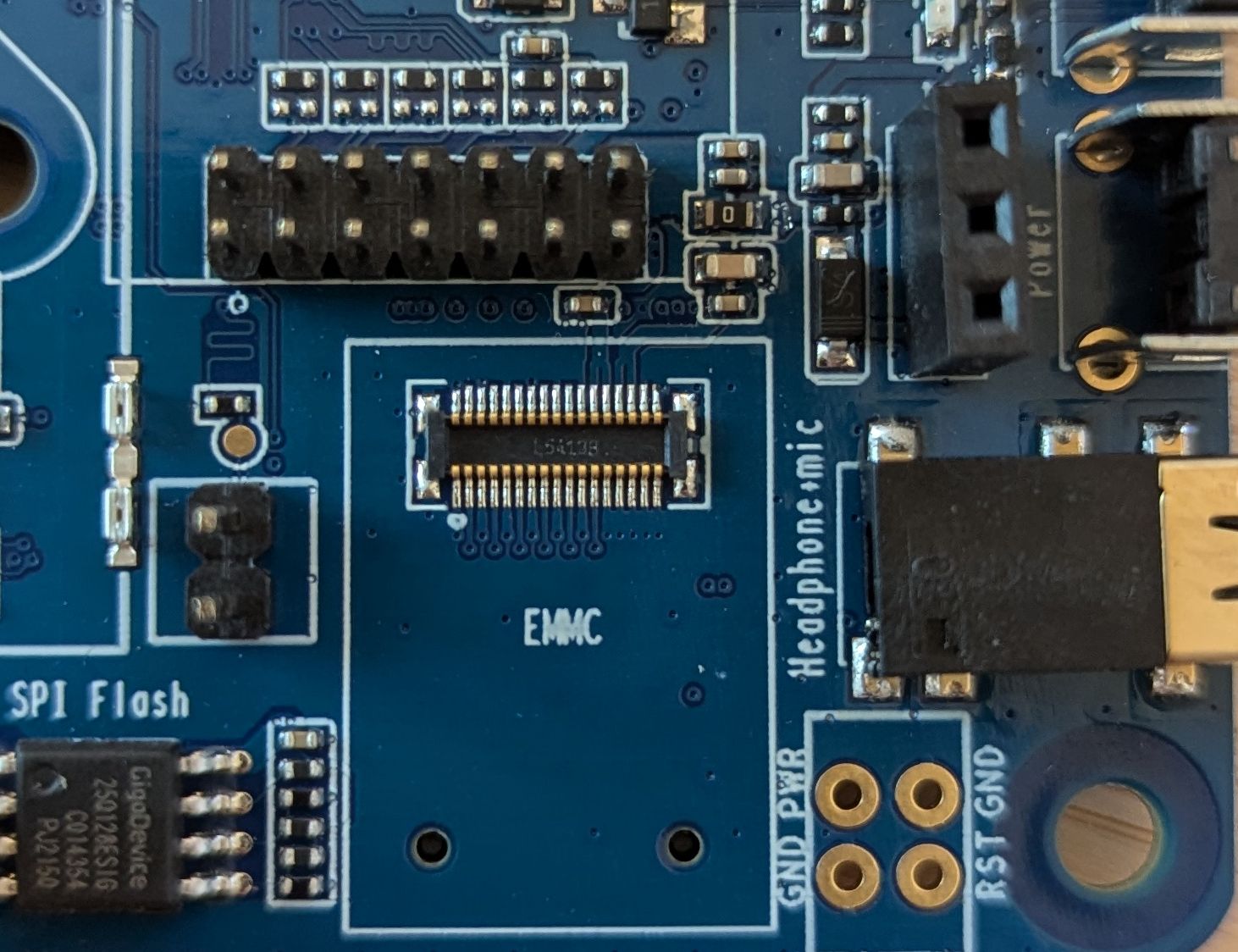
- storage — no on-board flash — bootable microSD (SDHC/SDXC, "max capacity of 256 GB" per official wiki) or USB storage; optional plug-in eMMC modules on a dedicated header (Wikipedia: Pine64).
- video_i_o — full-size HDMI Type-A (1.4a); MIPI DSI 4-lane up to 1080p and CSI camera up to 5 MP + capacitive-touch (TP) connectors (official wiki; DSI/CSI are A64+ features per CNX 2015-12-09).
- On this board : 9 tutorials · 10 code
In the landscape of affordable computing, few devices have left as indelible a mark as the PINE A64 and its successor, the PINE A64+. Launched in late 2015 and shipping in early 2016, this single-board computer was not merely another gadget but a pivotal moment in open-source hardware history. Marketed boldly as the first fifteen-dollar sixty-four-bit single-board computer, it challenged the status quo by offering a powerful quad-core processor at a price point that made high-performance computing accessible to hobbyists, students, and developers worldwide. The project, funded through a Kickstarter campaign that raised over one point seven million dollars, was developed by Pine Microsystems Inc., a company that would go on to create a diverse ecosystem of devices, though the original PINE A64 remains the foundational hardware for the entire brand.
At the heart of the board lies the Allwinner A64 system-on-chip, a component that sparked some initial confusion due to early marketing referring to it as the R18. This processor integrates four Arm Cortex-A53 cores, which are sixty-four-bit capable central processing units running at approximately one point one five gigahertz. For those unfamiliar with the terminology, a sixty-four-bit architecture allows the processor to handle larger amounts of data per cycle and address more memory than older thirty-two-bit systems, enabling more efficient multitasking and support for modern operating systems. The chip also includes a Mali-400MP2 graphics processing unit, capable of handling basic graphical interfaces and video playback up to four-kilohertz resolution via the HDMI port. While the graphics performance is modest by today’s standards, it was sufficient for desktop environments and media centers at the time of release.
The board was released in several variants, primarily distinguished by their memory capacity and network capabilities. The base PINE A64 model came with five hundred twelve megabytes of DDR3 RAM and a ten or one hundred megabit Ethernet connection. The PINE A64+ offered one or two gigabytes of RAM and, crucially, gigabit Ethernet support. This distinction is vital for users to understand, as the base model’s network speed is significantly slower, capping out at around eleven megabytes per second, whereas the plus version can utilize the full bandwidth of modern home networks. Both versions rely on the internal Ethernet controller of the Allwinner chip rather than a separate USB adapter, a design choice that improves efficiency but requires careful driver support. Additionally, the PINE A64+ populates connectors for MIPI DSI displays and CSI cameras, allowing for direct integration of touchscreens and camera modules, features that were absent on the base model’s unpopulated pads.
Storage on the PINE A64 is handled entirely through external media, as there is no onboard flash memory. Users must boot the system from a microSD card, with official documentation citing a maximum supported capacity of two hundred fifty-six gigabytes. While optional eMMC modules could be plugged into a dedicated header for more robust storage, the microSD card remained the standard. This reliance on removable media made the board highly flexible but also introduced a common point of failure: the quality of the SD card. Many early users experienced system instability due to counterfeit or low-quality cards, a well-documented issue in the single-board computer community that persists to this day.
Connectivity and expansion are where the PINE A64 truly shines, offering a level of versatility that was unusual for its price. The board features a forty-pin GPIO header that is mechanically compatible with the Raspberry Pi B+ standard. However, it is crucial to note that while the physical connector fits, the pinout is not identical. Users cannot simply plug in Raspberry Pi add-on boards, known as HATs, without verifying the pin assignments, as signals like UART and I2C are mapped to different physical pins. Beyond this familiar header, the board includes Pine64’s proprietary Euler bus, which exposes additional interfaces such as extra UARTs, SPI, SPDIF, and CAN bus, catering to industrial and automotive applications. A dedicated header for a Peripheral-On-Top daisy-chainable sensor bus further extends its capabilities for Internet of Things projects.
Power management is handled by an X-Powers AXP803 power management integrated circuit, which efficiently distributes power to the various components and supports battery operation via a three-point-seven-volt lithium-ion input. This feature, combined with the board’s low power consumption of approximately two and a half watts, made it attractive for portable projects. The board can be powered via a standard five-volt barrel jack, though the micro-USB port and other connectors can also supply power, a flexibility that requires caution to avoid voltage drops that could destabilize the system.
Software support for the PINE A64 has evolved significantly since its launch. Initially, the vendor provided a legacy Android five-point-one build based on an older Linux kernel, which was criticized for its lack of source code availability and stability issues. However, the community quickly rallied, with developers from the Armbian and linux-sunxi projects creating robust mainline Linux images. Today, the board is well-supported by mainline Linux kernels, meaning it uses the standard operating system code rather than vendor-specific modifications. This ensures better long-term security, driver compatibility, and performance. Armbian remains the recommended distribution for most users, providing a stable Debian or Ubuntu base with up-to-date kernels.
Despite its successes, the PINE A64 was not without its controversies and challenges. The initial Kickstarter campaign faced significant delays and shipping issues, leading to frustration among early backers. The five hundred twelve megabyte model was also found to be too limited for many modern operating systems, with Android and Ubuntu Touch requiring at least one gigabyte of RAM. Furthermore, the lack of an open-source driver for the Mali-400 GPU at launch hindered graphical performance on mainline Linux for several years, although this has since been addressed by the Lima driver project. Nevertheless, the PINE A64 stands as a testament to the power of community-driven development and open hardware, having paved the way for a generation of affordable, high-performance computing devices. Its legacy continues through its derivatives, including the SoPine module and the ClusterBoard, proving that the original vision of accessible sixty-four-bit computing was not only achieved but expanded into a thriving ecosystem.
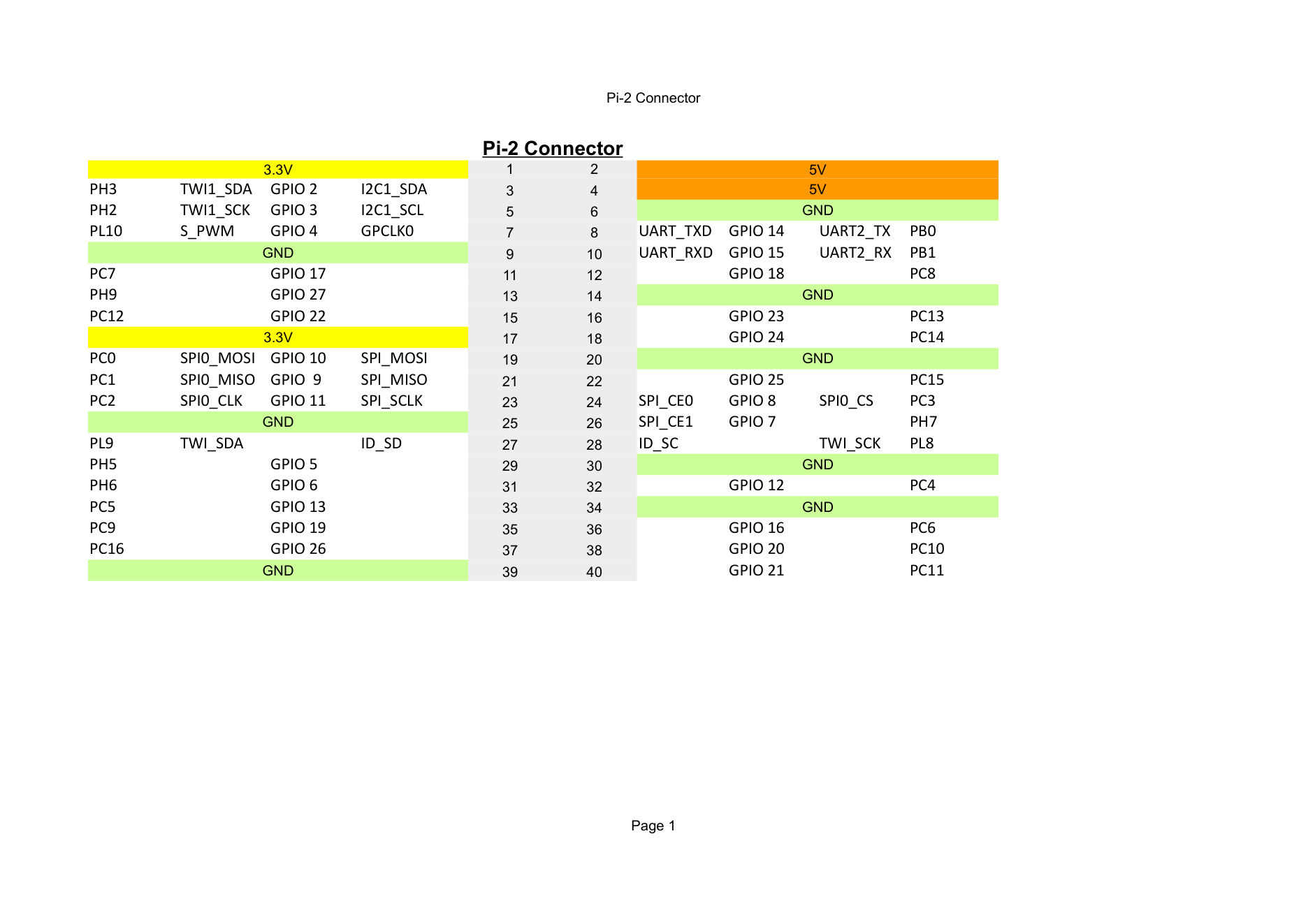
Pinout diagram
| Attr | Specs | verified |
|---|---|---|
soc | Allwinner A64 (early marketing also called it "R18"; Pine64 was evasive about which name was on the chips at launch — CNX 2015-12-09). | ✔ |
cpu | 4× Arm Cortex-A53 (ARMv8-A, 64- and 32-bit execution states), NEON SIMD, VFPv4, 32 KB L1 I + 32 KB L1 D per core, 512 KB shared L2. Clock: 1152 MHz per the official wiki; CNX and most press list "1.2 GHz" (same OPP class). An AR100 (Cortex-M) coprocessor core exists in the A64 power domain (mainline DTS comment on reg_fldo2/vdd-cpus). | ? unverified |
gpu | Arm Mali-400MP2 dual-core, OpenGL ES 2.0 / OpenVG 1.1 (official wiki). Video: H.265 up to 4K (CNX launch spec); HDMI 1.4 up to 4K@30 Hz. | ? unverified |
ram | 512 MB, 1 GB or 2 GB DDR3 (official wiki "RAM Variants"). DRAM parts are DDR3L-compatible, run at 1.36 V from the AXP803 (mainline DTS comment: AXP803 DCDC5 "cannot reach 1.35 V accurately, use 1.36 V"). | ? unverified |
storage | no on-board flash — bootable microSD (SDHC/SDXC, "max capacity of 256 GB" per official wiki) or USB storage; optional plug-in eMMC modules on a dedicated header (Wikipedia: Pine64). | ✔ |
video_i_o | full-size HDMI Type-A (1.4a); MIPI DSI 4-lane up to 1080p and CSI camera up to 5 MP + capacitive-touch (TP) connectors (official wiki; DSI/CSI are A64+ features per CNX 2015-12-09). | ✔ |
audio | 3.5 mm TRRS jack — stereo headphone out + mono mic in (official wiki; A64 codec enabled in mainline DTS &sound with "Headphone Jack"/"Microphone Jack" routing); HDMI audio. | ? unverified |
ethernet_the_classic_gotcha | the base PINE A64 is 10/100 Mbps only (RMII, Realtek RTL8201 PHY); only the PINE A64+ is gigabit (RGMII, Realtek RTL8211E) (official wiki: "10/100/1000Mbps Ethernet (PINE A64+ version), 10/100Mbps Ethernet (PINE A64 version)"; PHY datasheets linked there). Both hang off the A64's internal EMAC (ethernet@1c30000), not a USB adapter — mainline DTS: base board phy-mode = "rmii", plus board phy-mode = "rgmii-txid". The PHY supply is a switchable regulator (vcc-phy / DC1SW) that needs a ≥100 ms power-up ramp ("Ethernet PHY needs 30ms to properly power up" — mainline DTS comment). | ? unverified |
wifi_bluetooth | none soldered; optional RTL8723BS module (2.4 GHz 802.11b/g/n + BT 4.0) on a dedicated SDIO-3.0 + UART header (official wiki; RTL8723BS datasheet). | ✔ |
usb | 2× USB 2.0 host ports + 1× micro-USB OTG port (mainline DTS sets dr_mode = "host"; ehci0/1 + ohci0/1 enabled). | ? unverified |
gpio_expansion_headers_official_wiki | - 2×20-pin "Pi2" header — the 40-pin Raspberry Pi-B+-style connector (mechanically compatible, not pinout-identical; e.g. its UART sits on PB0/PB1 = mainline offsets 32/33, per sun50i-a64.dtsi uart2_pins and the Pine64 DTS comment "On Pi-2 connector"). - 2×17-pin "Euler" bus (Pine64's own expansion bus: extra UARTs, SPI, SPDIF, CAN, …). - 2×5-pin "EXP" console header (UART0 debug console). - Also: DSI, CSI, TP, RTC battery, VBAT (3.7 V Li-ion with temperature-sensor input). - Exposed GPIO banks in mainline pinctrl: PB, PC, PD, PE, PF, PG, PH (drivers/pinctrl/sunxi/pinctrl-sun50i-a64.c); mainline GPIO offset = (bank−'A')×32 + pin, so PD16 → 112, PH2 → 226. Logic level 3.3 V on the Pi-2 header (Allwinner I/O standard; see official Pine A64 Pin Assignment PDF). | ✔ |
power | DC 5 V @ 2 A barrel jack; the micro-USB connector, the Euler connector and the 3.7 V Li-ion VBAT connector are also listed as power inputs (official wiki). PMIC: X-Powers AXP803 on R_RSB with AC-power and battery power-supply nodes in mainline DTS (AXP803 datasheet). | ✔ |
consumption | ≈2.5 W per the official wiki's "Power Consumption: 2.5W" measurement sheet (wiki link). | ✔ |
temperature | ? unverified | |
size | 133 × 80 × 19 mm (official wiki). | ? unverified |
- Manufacturer: Pine Microsystems Inc. (founded Oct 2015, Fremont, CA; dissolved Jan 2020; successor Pine Store Limited, Hong Kong) — brand PINE64 (Wikipedia: Pine64, retrieved 2026-10-13).
- Year introduced: announced December 2015, Kickstarter launched 2015-12-09, early-bird boards shipped from February 2016 (kits April–May 2016) (CNX Software, "PINE A64 Development Board Kickstarter Campaign is Up", 2015-12-09, retrieved 2026-10-13). Armbian's board config records INTRODUCED="2016" (armbian/build config/boards/pine64.conf, retrieved 2026-10-13).
- Launch price: US$15 (1 GB PINE A64+, Kickstarter) and US$29 (2 GB), plus shipping ($7 US / $12 rest of world); kits $59–$99 (CNX 2015-12-09). The campaign raised over US$1.7 million (Wikipedia: Pine64). The Kickstarter itself was titled "PINE A64 – First $15 64-bit Single Board Super Computer" (Kickstarter project page).
- Variants (this board, same PCB): - PINE A64 — 512 MB DDR3, 10/100 Mbps Ethernet (Realtek RTL8201 PHY). - PINE A64+ — 1 GB (Rev B) or 2 GB (Rev C) DDR3, 10/100/1000 Mbps Ethernet (Realtek RTL8211 PHY), DSI/CSI/TP connectors populated (wiki.pine64.org/wiki/Pine64, board schematics listed there). - PINE A64/A64+ LTS (2017) — identical hardware, guaranteed supply until 2022, slightly higher price (Wikipedia: Pine64).
- Family (not covered in detail here): SoPine A64 SODIMM compute module (Jan 2017) + Clusterboard, Pinebook (A64 laptop), Pine H64 (H6 SoC), Rock64/RockPro64 (Rockchip), PinePhone/PineTab (Wikipedia: Pine64).
- Status: Legacy / EOL in practice. The LTS supply guarantee ended in 2022 (above); the old product page pine64.org/product-pine-a64.html now returns 404 (checked 2026-10-13), while mainline Linux and Armbian support remain active (see Systems).
+ Strengths
- Market positioning that started a price war: marketed and funded as the "first $15 64-bit single-board computer" (Kickstarter); in early 2016 CNX counted it, with Raspberry Pi 3 and ODROID-C2, among "the only ultra low cost (<$40) 64-bit ARM development boards" (CNX comparison, 2016-03-01). The A64 was the first cheap (sub-$20 board price) quad Cortex-A53 SoC — the Pi 3's BCM2837 was the only other A53 at that price, and it shipped with a 32-bit kernel/userspace at launch.
- The board that forced the sunxi/Armbian ecosystem to go 64-bit. At launch Pine64's engineering manager publicly asked the linux-sunxi and Armbian communities for help (CNX 2015-12-09 update, with links to the linux-sunxi group and Armbian forum topic 491); Armbian's own history reports that in 2016 it added "the first 64-bit board" (24 boards supported that year) — Pine64 was the only 64-bit board in Armbian's 2016 lineup (CNX, "Armbian History", 2018-05-08).
- Unusually rich expansion for the price: 40-pin Pi-2 header plus the 34-pin Euler bus plus DSI/CSI/TP/RTC/VBAT connectors and the WiFi/BT module socket (official wiki) — more headers than a Pi 3, and a Li-ion battery input with PMIC fuel-gauge support (AXP803 battery_power_supply in mainline DTS).
- Ecosystem play: SoPine A64 SODIMM module + 7-slot ClusterBoard with built-in gigabit switch ($99.99, 2017) — a real cheap AArch64 cluster (CNX ClusterBoard launch, Wikipedia: Pine64).
- Mainline-Linux poster child: first AArch64 board with full mainline DTS in arch/arm64/boot/dts/allwinner/ from 2016 (files dated "Copyright (c) 2016 ARM Ltd."), brought up by Andre Przywara (github.com/apritzel/pine64); still builds today (pine64 board in armbian/build).
- Peripheral-On-Top (POT) daisy-chainable sensor bus, Pine64-specific (wiki.pine64.org/wiki/POT).
− Weaknesses
- Kickstarter delays and shipping problems marred the launch — Wikipedia: "The Kickstarter project was overshadowed by delays and shipping problems"; a contemporaneous Hackaday review noted problems with production quality, software, and user support (Wikipedia: Pine64).
- Ethernet trap (the real one): the base PINE A64 is 10/100 Mbps (RTL8201, RMII) — buyers expecting gigabit got ~11 MB/s; only the A64+ has the RTL8211 RGMII gigabit PHY (official wiki + mainline DTS). Neither variant uses a USB network chip — the "GbE over USB2" story sometimes attached to this board is not supported by the schematics/DTS. Additionally the PHY rail (DC1SW "vcc-phy") needs a power-up delay; mainline carries an explicit 100 ms regulator-enable-ramp-delay workaround ("Ethernet PHY needs 30ms to properly power up and some more to initialize") — boards/DTs without it show flaky link-up (sun50i-a64-pine64-plus.dts).
- 512 MB model is OS-starved: "the 512 MiB model only works with Arch Linux and Debian Linux distributions"; Android/Ubuntu Touch/Win10 IoT need the 1 GB+ A64+ (Wikipedia: Pine64).
- Vendor BSP was a mess: no source at launch ("AFAIK, there was no source code released for the board" — CNX 2015-12-10); the legacy 3.10/lichee stack shipped Android 5.1 with a 32-bit kernel on a 64-bit-capable SoC, and early Linux images (longsleep/ayufan) were needed to make the board usable (wiki "Other Resources").
- SoC naming confusion at launch: marketing alternated "Allwinner R18" vs "A64"; Pine64 was "evasive about the processor used" (CNX 2015-12-09). Mainline settled on allwinner,sun50i-a64.
- Mali-400 GPU had no open mainline driver at launch — the Lima driver effort only picked up steam because of boards like Pine64/C.H.I.P. (CNX, "Open-Source Mali-200/Mali-400 GPU Lima Driver Gets New Commits", 2016-04-03); vendor-side 3D on legacy images worked, mainline desktop GL took years (now via lima).
- microSD quality is the #1 failure mode on this class of board (fake/slow cards) — the official wiki itself links counterfeit-card detection tools (h2testw, f3) under "Other Resources", and Armbian reports fake SD cards as a top support issue (CNX Armbian history).
- micro-USB cable voltage drop causes random SD/USB failures on 5 V boards of this era (same CNX Armbian-history report; Pine64 accepts 5 V on several inputs — use the barrel jack).
- OTG port is host-only in mainline (usb_otg dr_mode = "host" in sun50i-a64-pine64.dts) — gadget/OTG use (e.g. as a USB device for FEL-adjacent workflows) needs a DT override.
- Pi-2 header is not Raspberry-Pi-pinned: the UART is on PB0/PB1 (physical pins 11/12), I2C1 is enabled on the PH2/PH3 pin group, SPI0 on PC0–PC3 (sun50i-a64.dtsi pin groups + Pine64 DTS comments) — RPi HATs/shield adapters do not work unmodified.
- >
- Retour d'expérience expert expert — expert-pi-like
- Retour après plusieurs mois sur la PINE64. La fiche confirme ce que beaucoup ont subi au debut : les retards Kickstarter et la qualite de production mediocre documentes par Hackaday. Le vrai piege reste l'Ethernet. Ne laissez pas la confusion des noms vous tromper : la base PINE A64 est en 10/100 M… — expert-pi-like
- Salut expert-pi-like. J'ai recupere une vieille carte 512 MB qui trainait. La doc dit que c'est limite, mais je pensais pouvoir y mettre un petit serveur web. Tu confirme que Debian et Arch sont les seules options viables ? J'ai essaye de booter une image Android standard mais ca ne passe pas. Je s… — makers_toy
- Exact pour la memoire : avec 512 MB, Android ou Ubuntu Touch ne tourneront pas correctement, il faut la version 1 GB ou plus. Pour le stockage, la carte SD est le talon d'Achille de cette famille, comme le souligne la doc officielle avec les outils de detection de contrefacon. Une SD lente ou fauss… — expert-pi-like
Community feedback and projects
- pine64: massive date/time clock problem forum.armbian.com
- Pine64 PINE A64+ bluetooth - How? forum.armbian.com
- Pine A64+ latest armbian - CPU 2/3/4 offline? forum.armbian.com
- Manjaro on Pine64+ mini board same as pine64 LTS forum.manjaro.org
- Allwinner A64 Datasheet V1.1 datasheet
- datasheet PMIC AXP803 datasheet
- RTL8201CP datasheet
- A64 User Manual V1.0 datasheet
- RTL8723BS WiFi/BT datasheet
- 1 GB Rev B schematic
- 512 MB Rev B schematic
- PDF de asignación de pines Pi-2/Euler/EXP schematic
- 2 GB Rev C schematic
- wiki.pine64.org/wiki/Pine64
- 512 MB Rev B
- 1 GB Rev B
- 2 GB Rev C
- Pi-2/Euler/EXP pin assignment PDF
- Allwinner A64 Datasheet V1.1
- A64 User Manual V1.0
- AXP803 PMIC datasheet
- RTL8211E
- RTL8201CP
- RTL8723BS WiFi/BT
- sun50i-a64-pine64.dts
- sun50i-a64-pine64-plus.dts
- pinctrl-sun50i-a64.c
- armbian.com/boards/pine64
- board config
- docs.armbian.com
- linux-sunxi.org/Pine64
- CNX announcement & Kickstarter coverage (2015-12-05/09)
- CNX RPi3/C2/Pine64 comparison (2016-03-01)
- Wikipedia: Pine64
- Wikipedia: Armbian
- CNX Armbian history (2018-05-08)
- Phoronix benchmarks
- forum.pine64.org
- longsleep images
- ayufan releases
- Pine64 POT bus
- Kickstarter delays and shipping problems marred the launch — Wikipedia: "The Kickstarter project was overshadowed by delays and shipping problems"; a contemporaneous Hackaday review noted problems with production quality, software, and user support (Wikipedia: Pine64).
- Ethernet trap (the real one): the base PINE A64 is 10/100 Mbps (RTL8201, RMII) — buyers expecting gigabit got ~11 MB/s; only the A64+ has the RTL8211 RGMII gigabit PHY (official wiki + mainline DTS). Neither variant uses a USB network chip — the "GbE over USB2" story sometimes attached to this board is not supported by the schematics/DTS. Additionally the PHY rail (DC1SW "vcc-phy") needs a power-up delay; mainline carries an explicit 100 ms regulator-enable-ramp-delay workaround ("Ethernet PHY needs 30ms to properly power up and some more to initialize") — boards/DTs without it show flaky link-up (sun50i-a64-pine64-plus.dts).
- 512 MB model is OS-starved: "the 512 MiB model only works with Arch Linux and Debian Linux distributions"; Android/Ubuntu Touch/Win10 IoT need the 1 GB+ A64+ (Wikipedia: Pine64).
- Vendor BSP was a mess: no source at launch ("AFAIK, there was no source code released for the board" — CNX 2015-12-10); the legacy 3.10/lichee stack shipped Android 5.1 with a 32-bit kernel on a 64-bit-capable SoC, and early Linux images (longsleep/ayufan) were needed to make the board usable (wiki "Other Resources").
- SoC naming confusion at launch: marketing alternated "Allwinner R18" vs "A64"; Pine64 was "evasive about the processor used" (CNX 2015-12-09). Mainline settled on allwinner,sun50i-a64.
- Mali-400 GPU had no open mainline driver at launch — the Lima driver effort only picked up steam because of boards like Pine64/C.H.I.P. (CNX, "Open-Source Mali-200/Mali-400 GPU Lima Driver Gets New Commits", 2016-04-03); vendor-side 3D on legacy images worked, mainline desktop GL took years (now via lima).
- microSD quality is the #1 failure mode on this class of board (fake/slow cards) — the official wiki itself links counterfeit-card detection tools (h2testw, f3) under "Other Resources", and Armbian reports fake SD cards as a top support issue (CNX Armbian history).
- micro-USB cable voltage drop causes random SD/USB failures on 5 V boards of this era (same CNX Armbian-history report; Pine64 accepts 5 V on several inputs — use the barrel jack).
- OTG port is host-only in mainline (usb_otg dr_mode = "host" in sun50i-a64-pine64.dts) — gadget/OTG use (e.g. as a USB device for FEL-adjacent workflows) needs a DT override.
- Pi-2 header is not Raspberry-Pi-pinned: the UART is on PB0/PB1 (physical pins 11/12), I2C1 is enabled on the PH2/PH3 pin group, SPI0 on PC0–PC3 (sun50i-a64.dtsi pin groups + Pine64 DTS comments) — RPi HATs/shield adapters do not work unmodified.
- >
- Premier boot d'Armbian sur la PINE A64 (microSD, console série, rootfs) debutant Schéma : IMG-pine64-debutant-1-premiers-pas-armbian.svg — PINE A64 vue de dessus avec son connecteur microSD, son port barrel 5V et son connecteur EXP 2x5 mis en évidence, câble USB-TTL reliant l'EXP à un PC portable affichant un terminal série 115200, PC de gauche écrivant une image sur la microSD
- PINE A64 ou PINE A64+ ? Le pièg du réseau gigabit dès le premier regard debutant Schéma : IMG-pine64-debutant-2-distinguer-a64-a64plus.svg — deux PINE A64 cote a cote, la version de base avec son PHY Ethernet RTL8201 annote 10/100 et la version A64+ avec son PHY RTL8211 annote gigabit, fleches vers le connecteur RJ45, pastilles RAM 512Mo/1Go/2Go representees, terminal affichant ethtool Speed
- Faire clignoter une LED avec libgpiod (numérotation GPIO du A64 : PB0 = 32) debutant Schéma : IMG-pine64-debutant-3-blink-gpio-libgpiod.svg — PINE A64 sur breadboard, LED avec resistance de limitation branchee sur une broche du connecteur 40 broches annotee PB0 (offset 32) vers GND, terminal affichant gpioset gpiochip0 32=1, encart rappelant bank x32 + pin
- Benchmark Ethernet iperf3 : mesurer le piège 10/100 vs gigabit intermediaire Schéma : IMG-pine64-intermediaire-1-iperf3-ethernet.svg — PINE A64 reliee par cable Ethernet a un switch puis a un PC de bureau, graphique en barres comparant 94 Mbit/s (A64 de base, RTL8201) et 600+ Mbit/s (A64+, RTL8211), terminal iperf3 cote carte et cote PC, puce EMAC 1c30000 annotee dans le SoC
- Lire un capteur I²C (BME280) sur le bus i2c-1 du connecteur Pi-2 intermediaire Schéma : IMG-pine64-intermediaire-2-capteur-i2c-bme280.svg — PINE A64 sur breadboard avec un module BME280 branche sur SDA/SCL du connecteur 40 broches (broches PH2/PH3 annotees), alimente en 3,3V, terminal affichant i2cdetect -r 1 avec 0x76 detecte et valeurs brutes lues en Python
- Un serveur maison qui consomme 2,5 W : Docker léger sur la PINE A64 intermediaire Schéma : IMG-pine64-intermediaire-3-serveur-maison-docker.svg — PINE A64 dans un coin d'etagere branchee en Ethernet et barrel 5V, containers Docker (Mosquitto, reverse proxy, cron de sauvegarde) dessines comme des boites empilees, jauge de consommation 2,5W, microSD de qualite mise en garde en rouge
- Construire sa propre image Armbian pour la PINE A64 (armbian/build) avance Schéma : IMG-pine64-avance-1-construire-image-armbian.svg — PC x86 avec Docker lancant armbian/compile.sh, fleches de compilation vers une carte microSD etiquetee Armbian pine64, encart config BOARD=pine64 BRANCH=current, BOOTCONFIG pine64_plus_defconfig, CRUSTCONFIG a64_defconfig, chaine de boot BROM -> U-Boot -> kernel DTB
- Sauver une PINE A64 briquée : console série EXP et mode FEL avance Schéma : IMG-pine64-avance-2-fel-recovery-console-serie.svg — PINE A64 sans microSD alimentee par son cable micro-USB OTG relie a un PC affichant sunxi-fel, adaptateur USB-TTL branche sur le connecteur EXP 2x5 (UART0 PB8/PB9, 115200), chaine de boot BROM -> U-Boot -> kernel DTB annotee, U-Boot ecrase a l'adresse 0x4a000000
- Override du device tree : OTG en gadget, UART2, et l'Euler bus oublié avance Schéma : IMG-pine64-avance-3-device-tree-otg-euler.svg — PINE A64 avec son connecteur micro-USB OTG relie a un PC en mode peripherique, overlay device tree dr_mode peripheral affiche dans un terminal, connecteur Euler 2x17 annote (UART, SPI, SPDIF, CAN) a cote du connecteur Pi-2, module RTL8723BS enfiche sur son port SDIO
Code library — examples written for this board
clignotante.pyPythonbouton-gpio.pyPythoncapteur-i2c.shBashsurveillance-temperature.shBashcapteur-dht11.pyPythonservo-pwm-sysfs.shBashserveur-web-capteur.pyPythonreseau-ethernet.shBashjournal-cron.shBashveilleur-systemd.pyPython
Examples and repos found online
- ayufan-pine64/linux-build github.com
- ayufan-pine64/linux-pine64 github.com
- ayufan-pine64/u-boot-pine64 github.com