Arduino Portenta H7
⚡ The essentials in 60 seconds
- soc — STMicroelectronics STM32H747XI dual-core Arm MCU. - Cortex-M7 up to 480 MHz, FPU with single- and double-precision (IEEE 754), DSP instructions, MPU (ST). - Cortex-M4 up to 240 MHz (single-precision FPU), real-time coprocessor role (ST / Arduino). - Both cores share all on-chip peripherals; cores communicate through Arduino's RPC mechanism (OpenAMP/rpmsg-based) (docs.arduino.cc).
- graphics — on-chip Chrom-ART Accelerator (DMA2D) "GPU" plus dedicated JPEG encode/decode; DisplayPort over USB-C output on the board (Arduino docs + store page).
- memory — - On-chip: dual-bank flash up to 2 MB, up to 1 MB RAM (192 KB TCM, up to 864 KB user SRAM, 4 KB backup SRAM) (ST). - On-board: 8 MB SDRAM (external, FMC) and 16 MB NOR flash (store page "default configuration" list).
- connectivity — - Murata 1DX module: dual-band-capable Wi-Fi (802.11n, up to 65 Mbps, AP / STA / simultaneous AP+STA modes) + Bluetooth 5.1 (Classic and Low Energy) (Arduino docs + store page). - 10/100 Ethernet PHY on-board, exposed via the 80-pin connector pair (store page). - USB-C HS multipurpose port: programming, power, USB host/hub, DisplayPort alt-mode, OTG power delivery (store page).
- analog_digital_peripherals_stm32h747 — 3 ADCs, 2 DACs, 2 ultra-low-power comparators, low-power RTC, high-resolution timer, 12 general 16-bit timers, 2 motor-control PWM timers, 5 low-power timers, RNG, 4× DFSDM sigma-delta filters (ST product page).
- gpio_expansion — two 80-pin high-density "Arduino industrial" connectors at the bottom (plus MKR-style connector footprint); expose UART/SPI/I2C and, via the 80-pin pair, Ethernet and more (store page).
- On this board : 9 tutorials · 10 code
The Arduino Portenta H7 stands as the flagship of the industrial Portenta line, representing a significant leap in performance for developers who need more than what a standard microcontroller can offer. Introduced in 2020, this board is built around the STMicroelectronics STM32H747XI, a dual-core Arm microcontroller that brings serious computing power to the maker and industrial space. At its heart are two distinct processing cores: a Cortex-M7 running at up to 480 MHz and a Cortex-M4 running at up to 240 MHz. To understand why this matters, consider that a microcontroller is essentially a tiny computer on a chip. The M7 core is the high-performance engine, capable of handling complex calculations, graphics rendering, and heavy data processing. The M4 core acts as a real-time coprocessor, managing background tasks and ensuring that time-critical operations, such as reading sensors or controlling motors, happen without delay. These two cores share all on-chip peripherals and communicate through a mechanism called RPC (Remote Procedure Call), which allows code running on one core to easily call functions on the other, effectively letting you split your workload between high-speed processing and real-time control.
Memory and storage are equally robust, designed to handle demanding applications. The board features up to 2 MB of on-chip flash memory and 1 MB of RAM, which is substantial for an embedded system. However, it goes further by including 8 MB of external SDRAM (Synchronous Dynamic Random Access Memory) and 16 MB of NOR flash storage directly on the board. SDRAM is a type of fast memory used for temporary data storage, similar to the RAM in your laptop, allowing the Portenta H7 to handle large datasets or complex algorithms that would overwhelm smaller boards. The NOR flash provides non-volatile storage, meaning it keeps your data even when the power is turned off, which is ideal for logging data or storing firmware updates. This combination of fast volatile memory and large non-volatile storage makes the Portenta H7 suitable for applications like machine learning inference, where models need to be loaded and processed quickly.
Connectivity is another strong suit of this board. It integrates a Murata 1DX module that provides dual-band Wi-Fi (802.11n) and Bluetooth 5.1, supporting both Classic and Low Energy modes. This allows the board to connect to the internet and communicate with mobile devices or other IoT gadgets without needing external dongles. For wired connections, it includes a 10/100 Ethernet PHY (Physical Layer) interface, which is exposed through the board’s connectors, enabling stable network connections in environments where Wi-Fi might be unreliable. The board also features a versatile USB-C port that handles programming, power delivery, and USB host functionality. Uniquely, this USB-C port supports DisplayPort alternate mode, meaning you can connect a monitor directly to the board to display graphics. This is powered by an on-chip Chrom-ART Accelerator, a dedicated hardware unit that handles graphical operations, freeing up the main CPU for other tasks. This makes the Portenta H7 one of the few microcontroller boards capable of driving a full graphical user interface on an external display.
Security is a critical aspect of industrial applications, and the Portenta H7 addresses this with a dedicated NXP SE050C2 secure element. This is a specialized chip that handles cryptographic operations, such as encryption and authentication, keeping sensitive keys separate from the main processor. This hardware-based security, combined with TrustZone-M technology and a secure bootloader, ensures that your code and data remain protected from tampering. The board supports over-the-air (OTA) updates, allowing you to securely update firmware remotely, a vital feature for devices deployed in hard-to-reach locations. The power management system is flexible, supporting power from USB-C or external supplies, and includes circuitry for charging LiPo batteries, making it suitable for portable or battery-operated projects.
The programming ecosystem for the Portenta H7 is evolving. Traditionally, it has been programmed using the Arduino IDE with the Mbed OS core, which provides a familiar interface for Arduino users while leveraging the advanced features of the Arm Cortex-M architecture. However, Arduino is transitioning to a new core based on the Zephyr RTOS (Real-Time Operating System). Zephyr is a modern, scalable operating system for embedded devices that offers better modularity and security. The new Zephyr core uses a unique loading mechanism where sketches are compiled into ELF files and loaded dynamically by a precompiled loader, allowing for faster iteration and easier debugging. This migration is ongoing, and developers should be aware that some APIs and libraries may differ between the Mbed and Zephyr cores. It is also possible to run MicroPython or JavaScript on one core while running C++ on the other, offering flexibility in how you structure your application. For machine learning enthusiasts, the board supports TensorFlow Lite inference, enabling on-device AI capabilities without needing cloud connectivity.
Despite its capabilities, users should be aware of some challenges. The dual-core architecture requires careful management; for example, when using RPC, you must ensure that the M4 core has bound its functions before the M7 core attempts to call them, often requiring a small delay in the code. Wi-Fi connectivity has historically had some quirks, such as failing to reconnect automatically after an access point is lost, though workarounds and updates are available. Additionally, the transition from Mbed to Zephyr means that documentation and library compatibility are in flux, and some older tutorials may no longer apply. The board is part of a larger ecosystem that includes carrier boards and shields, such as the Vision Shield for camera applications and the Portenta X8 for Linux-based processing, allowing you to expand its capabilities as needed. With its high processing power, extensive connectivity, and robust security features, the Portenta H7 is a powerful tool for advanced IoT, industrial automation, and machine vision projects, bridging the gap between hobbyist microcontrollers and industrial-grade embedded systems.

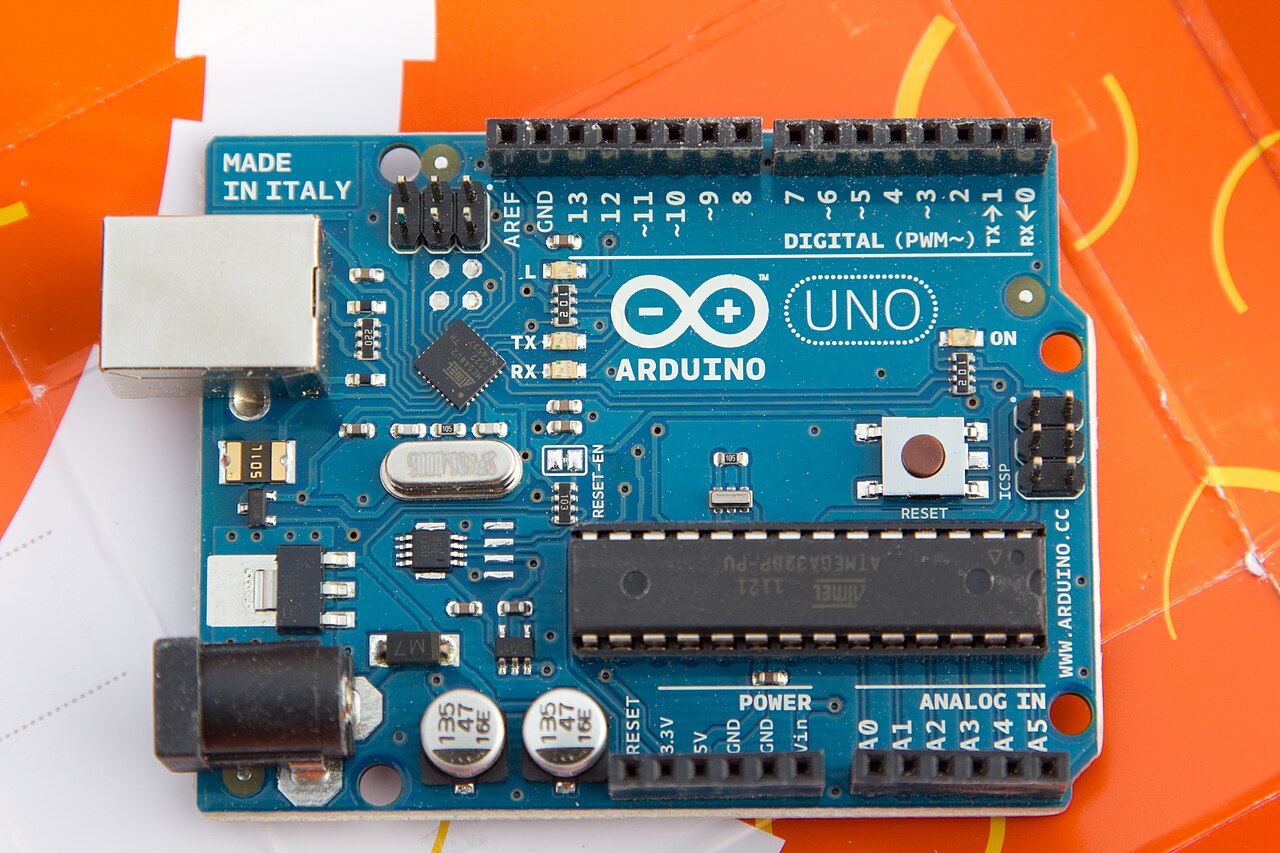
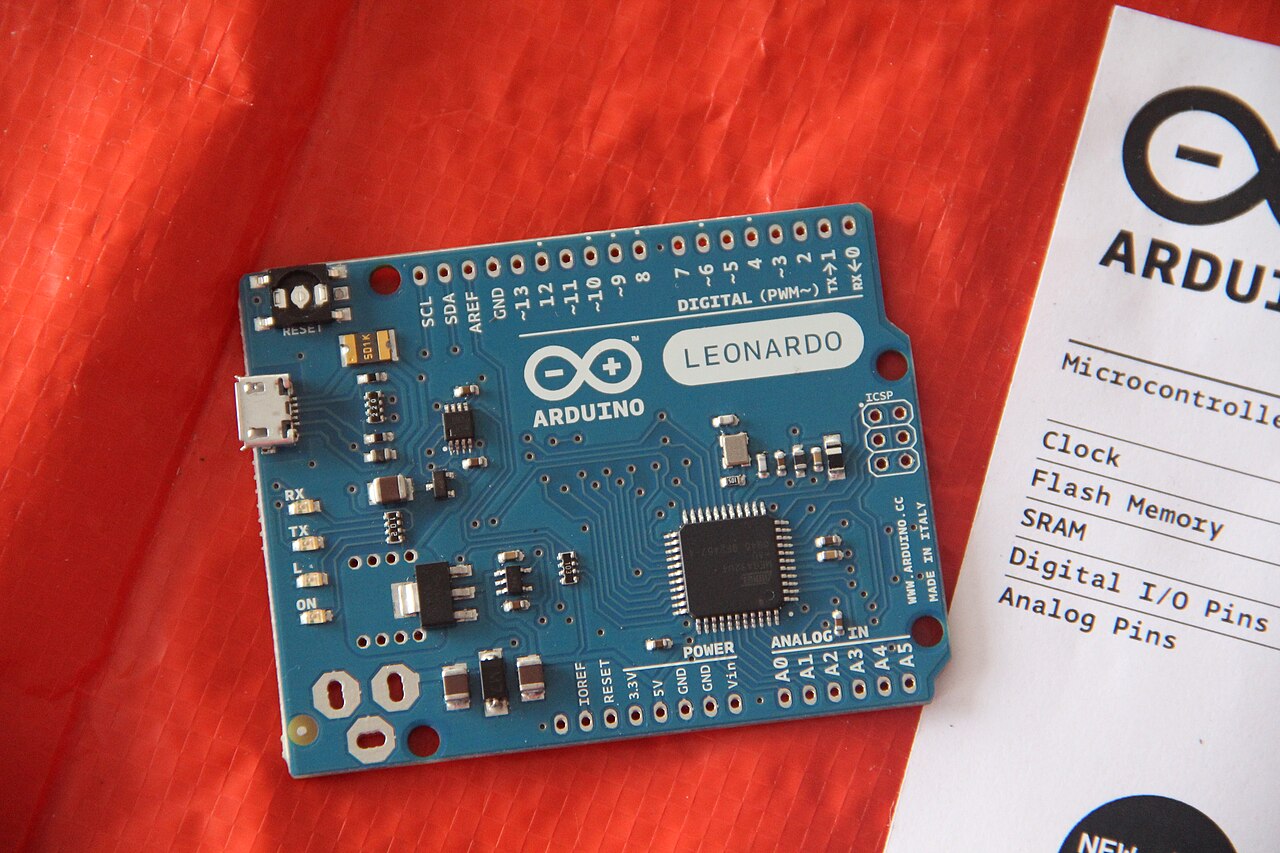
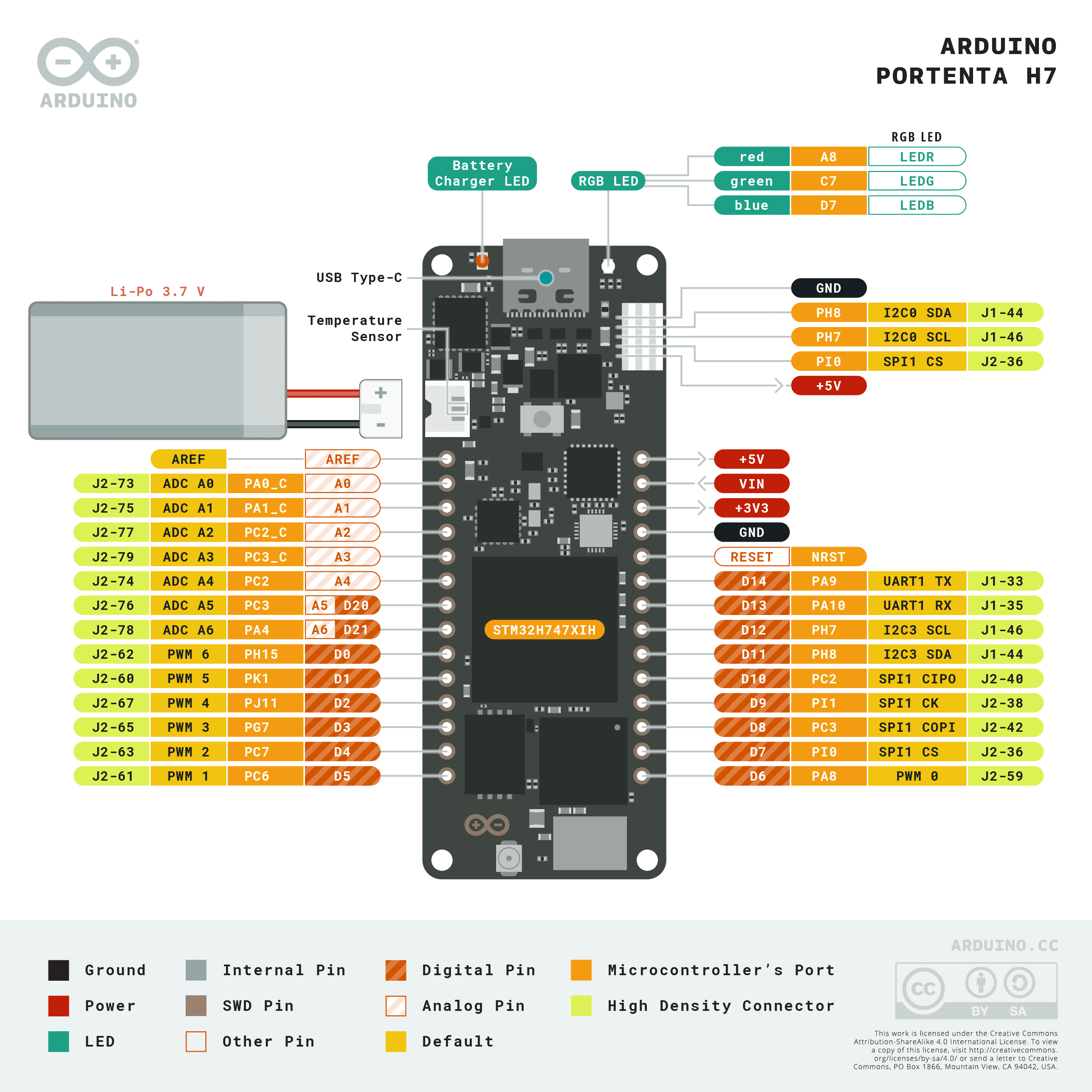
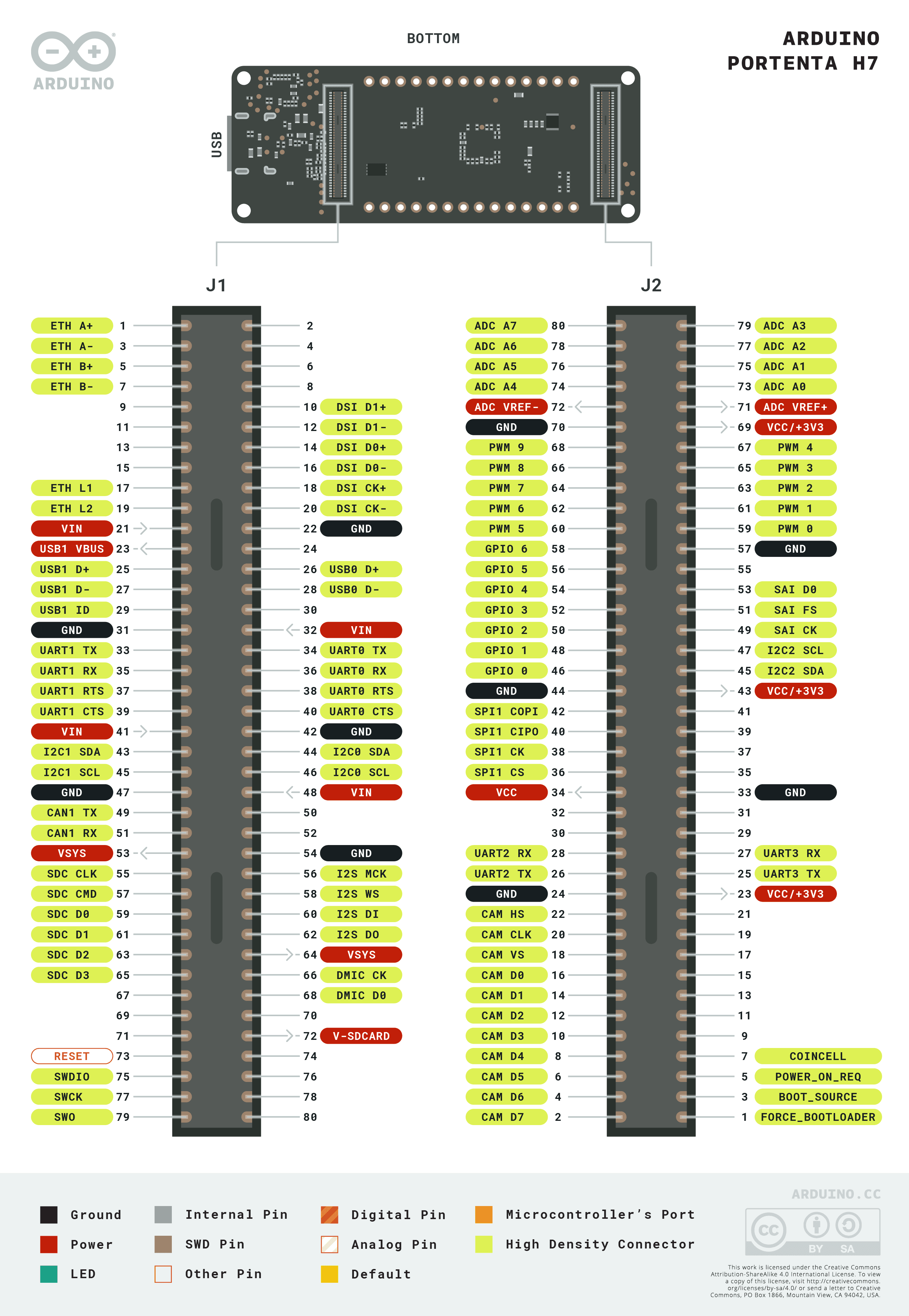
Pinout diagram
| Attr | Specs | verified |
|---|---|---|
soc | STMicroelectronics STM32H747XI dual-core Arm MCU. - Cortex-M7 up to 480 MHz, FPU with single- and double-precision (IEEE 754), DSP instructions, MPU (ST). - Cortex-M4 up to 240 MHz (single-precision FPU), real-time coprocessor role (ST / Arduino). - Both cores share all on-chip peripherals; cores communicate through Arduino's RPC mechanism (OpenAMP/rpmsg-based) (docs.arduino.cc). | ✔ |
graphics | on-chip Chrom-ART Accelerator (DMA2D) "GPU" plus dedicated JPEG encode/decode; DisplayPort over USB-C output on the board (Arduino docs + store page). | ? unverified |
memory | - On-chip: dual-bank flash up to 2 MB, up to 1 MB RAM (192 KB TCM, up to 864 KB user SRAM, 4 KB backup SRAM) (ST). - On-board: 8 MB SDRAM (external, FMC) and 16 MB NOR flash (store page "default configuration" list). | ? unverified |
connectivity | - Murata 1DX module: dual-band-capable Wi-Fi (802.11n, up to 65 Mbps, AP / STA / simultaneous AP+STA modes) + Bluetooth 5.1 (Classic and Low Energy) (Arduino docs + store page). - 10/100 Ethernet PHY on-board, exposed via the 80-pin connector pair (store page). - USB-C HS multipurpose port: programming, power, USB host/hub, DisplayPort alt-mode, OTG power delivery (store page). | ? unverified |
analog_digital_peripherals_stm32h747 | 3 ADCs, 2 DACs, 2 ultra-low-power comparators, low-power RTC, high-resolution timer, 12 general 16-bit timers, 2 motor-control PWM timers, 5 low-power timers, RNG, 4× DFSDM sigma-delta filters (ST product page). | ? unverified |
gpio_expansion | two 80-pin high-density "Arduino industrial" connectors at the bottom (plus MKR-style connector footprint); expose UART/SPI/I2C and, via the 80-pin pair, Ethernet and more (store page). | ? unverified |
security | NXP SE050C2 secure element (crypto co-processor), plus STM32 TrustZone-M, MPU, RNG (store page; ST). | ? unverified |
power | powered from USB-C (5 V VBUS) or carrier/80-pin supplies; LiPo charging circuitry present on board. | ? unverified |
boot | MCUboot-based secure bootloader, updatable (MCUboot library ships in the core; official tutorials: updating-the-bootloader, secure-boot). | ✔ |
- Manufacturer: Arduino (Arduino AG / Arduino S.r.l., Italy). Since October 2025 the Arduino company is owned by Qualcomm (Wikipedia — Arduino, retrieved 2026-10-13).
- Product: Portenta H7, the flagship of the industrial "Portenta" line; default orderable configuration codename H7-15EUNWAD, store SKU family ABX00042 (SKU visible in the store product images, e.g. ABX00042_00.iso.jpg) (store.arduino.cc/products/portenta-h7, retrieved 2026-10-13).
- Year introduced: 2020 (announced mid-2020).
- Status: Active / current product. Listed and sold on the official store at €120.80 (price extracted from the store page JSON/HTML, retrieved 2026-10-13).
- Variants (all with live pages on docs.arduino.cc, retrieved 2026-10-13 via sitemap-0.xml): - Portenta H7 — full spec (hardware/portenta-h7) - Portenta H7 Lite / H7 Lite Connected — cost-reduced variants (lite, lite connected) - Portenta X8 — companion module adding an NXP i.MX 8MP Linux processor (hardware/portenta-x8) - Carrier ecosystem: Portenta Breakout, Max Carrier, Mid Carrier, Hat Carrier, Machine Control, Vision Shield, Carrier-class shields.
+ Strengths
- True dual-core parallelism with seamless RPC: run compiled Arduino/C++ on one core and MicroPython on the other; RPC.bind/RPC.call remote procedure calls over OpenAMP (docs.arduino.cc/hardware/portenta-h7; RPC library: libraries/RPC).
- Graphics pipeline: Chrom-ART (DMA2D) + JPEG codec + DisplayPort-over-USB-C → drive a monitor from an MCU; official LVGL GUI tutorial (creating-gui-with-lvgl).
- Machine vision / ML: Vision Shield (Himax HM01B0 / GC2145 class cameras supported by core libraries Camera, Arduino_H7_Video, Himax_HM01B0, Himax_HM0360, OV7670 — all present in ArduinoCore-mbed/libraries); TensorFlow Lite and CMSIS-NN (MLC library) inference; Syntiant NDP101/120 speech-recognition engine support (syntiant_ilib, NDP libraries; speech-recognition-engine tutorial).
- Industrial security: SE050C2 secure element + secure boot + signed OTA updates (over-the-air-update tutorial, secure-boot tutorial).
- High-density 80-pin mezzanine standard → pin-compatible upgrades H7 ↔ H7 Lite ↔ X8 on the same carrier (store page).
- USB host stack (USBHOST/USBMSD/USBHID/USBAudio/USBMIDI libraries; usb-host tutorial), PDM audio (Portenta_Audio), SD card (Portenta_SDCARD), external SDRAM API (Portenta_SDRAM), CAN (Arduino_CAN), Ethernet — all shipped in the core.
- Fast boot positioning: "high-speed booting computation (ms)" for mission-critical devices (store page).
− Weaknesses
- Wi-Fi won't reconnect after AP loss (classic Mbed core): WiFi.begin alone failed to rejoin a restored AP; a WiFi.end before re-begin was required. Reported with full MRE in arduino/ArduinoCore-mbed#382 (2022, closed).
- Wi-Fi firmware can be lost/corrupted → Wi-Fi dead after bad updates; official recovery is running the FlashFormat sketch to restore the module firmware (ArduinoCore-zephyr README FAQ, retrieved 2026-10-13).
- Core migration churn: the Mbed core is being replaced by the Zephyr core; APIs, library compatibility and the flashing model (llext loader, "Standard/Debug" modes, Zephyr shell) differ, and some Zephyr functions aren't exported to sketches yet (llext_exports.c workaround) (ArduinoCore-zephyr README).
- Documentation discontinuity: the dedicated site docs.portenta.io no longer resolves (DNS ENOTFOUND, 2026-10-13) and the arduino/PortentaDocs repo is 404 (2026-10-13); content now lives on docs.arduino.cc — many old deep links are dead.
- Dual-core footguns: sketches must be flashed to both cores for RPC examples to work, and the M7 must give the M4 time to bind remote functions (official examples insert an explicit delay(100) after RPC.begin on the M7) (Basic_AddSub example).
- Zephyr loader stack-size gotcha: sketch loading via the Zephyr shell needs a large stack; users must shrink the shell stack in the board .conf on RAM-tight builds (ArduinoCore-zephyr README FAQ).
- No websocket example historically for the Mbed Wi-Fi stack (community request arduino/ArduinoCore-mbed#589); third-party stacks (e.g. khoih-prog's) filled the gap.
- Retour d'expérience expert expert — expert-arduino
- Je passe sur la Portenta H7 pour un projet industriel. La dualité des coeurs est réelle : je tourne du C++ sur le M7 et du MicroPython sur le M4 via l'RPC, ça marche bien. Par contre, attention au Wi-Fi. Comme documenté dans l'issue 382, si l'AP tombe, WiFi.begin ne suffit pas. Il faut impérativeme… — expert-arduino
- Salut, je découvre la carte. Tu parles de la corruption Wi-Fi, c'est arrivé à la livraison ou après un update ? J'ai vu que la fiche source mentionne que la doc officielle docs.portenta.io ne répond plus (DNS error), ce qui est embêtant pour la migration depuis l'autre core. Pour la partie graphiqu… — maker-hobby-99
- @maker-hobby-99 Pour le display, ça tourne mais faut lire le tuto LVGL sur docs.arduino.cc, c'est pas plug-and-play. Pour le Wi-Fi, expert-arduino a raison sur le hack WiFi.end. Le souci c'est que si tu perds la config, tu perds aussi l'accès à certaines fonctions réseau complexes une fois le modul… — debug-user-01
Community feedback and projects
- Performance of SD and USB Drives on Portenta H7 (and GIGA) forum.arduino.cc
- Portenta H7 WiFi Library Very Slow forum.arduino.cc
- Giga/Portenta H7 - difficulties with malloc on zephyr 0.52 forum.arduino.cc
- Energy meter application note
- Portenta H7 websocket control project
Content not available yet.
- docs.arduino.cc/hardware/portenta-h7/
- store.arduino.cc/products/portenta-h7
- setting-up-portenta
- dual-core-processing
- wifi-access-point
- reading-writing-flash-memory
- over-the-air-update
- secure-boot
- updating-the-bootloader
- usb-host
- lauterbach-debugger
- github.com/arduino/ArduinoCore-mbed
- github.com/arduino/ArduinoCore-zephyr
- github.com/arduino/ArduinoCore-API
- github.com/arduino-libraries/Arduino_PortentaMachineControl
- github.com/arduino-libraries/Arduino_MachineControl
- github.com/arduino/portenta-containers
- Arduino Forum Portenta category
- ArduinoDiscord
- Wi-Fi won't reconnect after AP loss (classic Mbed core): WiFi.begin alone failed to rejoin a restored AP; a WiFi.end before re-begin was required. Reported with full MRE in arduino/ArduinoCore-mbed#382 (2022, closed).
- Wi-Fi firmware can be lost/corrupted → Wi-Fi dead after bad updates; official recovery is running the FlashFormat sketch to restore the module firmware (ArduinoCore-zephyr README FAQ, retrieved 2026-10-13).
- Core migration churn: the Mbed core is being replaced by the Zephyr core; APIs, library compatibility and the flashing model (llext loader, "Standard/Debug" modes, Zephyr shell) differ, and some Zephyr functions aren't exported to sketches yet (llext_exports.c workaround) (ArduinoCore-zephyr README).
- Documentation discontinuity: the dedicated site docs.portenta.io no longer resolves (DNS ENOTFOUND, 2026-10-13) and the arduino/PortentaDocs repo is 404 (2026-10-13); content now lives on docs.arduino.cc — many old deep links are dead.
- Dual-core footguns: sketches must be flashed to both cores for RPC examples to work, and the M7 must give the M4 time to bind remote functions (official examples insert an explicit delay(100) after RPC.begin on the M7) (Basic_AddSub example).
- Zephyr loader stack-size gotcha: sketch loading via the Zephyr shell needs a large stack; users must shrink the shell stack in the board .conf on RAM-tight builds (ArduinoCore-zephyr README FAQ).
- No websocket example historically for the Mbed Wi-Fi stack (community request arduino/ArduinoCore-mbed#589); third-party stacks (e.g. khoih-prog's) filled the gap.
- Premier programme : installer le core et faire clignoter la LED (M7 à 480 MHz !) debutant Schéma : IMG-portenta-h7-debutant-1-portenta-h7-premier-programme.svg — Arduino Portenta H7 vue de dessus avec le SoC STM32H747XI (double coeur M7/M4) et la LED utilisateur LEDG mise en évidence, câble USB-C branché, deux connecteurs 80 broches annotés sous la carte
- Se connecter au Wi-Fi avec le module Murata 1DX (station WPA2) debutant Schéma : IMG-portenta-h7-debutant-2-portenta-h7-connexion-wifi.svg — Portenta H7 sur un bureau, ondes Wi-Fi reliant le module blindé Murata 1DX à une box Internet, terminal série affichant l'adresse IP obtenue, étiquette 802.11n 65 Mbps
- Apprivoiser les connecteurs 80 broches : bouton, LED et entrée analogique debutant Schéma : IMG-portenta-h7-debutant-3-portenta-h7-broches-gpio.svg — Portenta H7 sur breadboard avec ses deux connecteurs 80 broches en bas de carte, bouton poussoir sur une broche D avec pull-up interne, potentiomètre sur une broche A, porteuse Breakout à côté annotée compatible H7 Lite et X8
- Dual-core M7 ↔ M4 : appels de fonctions distants avec la bibliothèque RPC intermediaire Schéma : IMG-portenta-h7-intermediaire-1-portenta-h7-dual-core-rpc.svg — SoC STM32H747XI éclaté en deux coeurs Cortex-M7 480 MHz et Cortex-M4 240 MHz reliés par une flèche double étiquetée RPC/OpenAMP, croquis identique flashé sur chaque coeur, terminal série affichant add(1,2)=3
- Client HTTPS/TLS : interroger une API sécurisée via le Murata 1DX intermediaire Schéma : IMG-portenta-h7-intermediaire-2-portenta-h7-client-tls.svg — Portenta H7 envoyant un tunnel TLS en pointillés verts vers un serveur web distant via la box Internet, cadenas sur le tunnel, terminal série affichant le début de la réponse HTTP, étiquette certificats en flash
- Serveur web sur le port Ethernet 10/100 embarqué intermediaire Schéma : IMG-portenta-h7-intermediaire-3-portenta-h7-serveur-web-ethernet.svg — Portenta H7 reliée par un câble RJ45 (via porteuse ou connecteurs 80 broches) à un switch, un navigateur laptop affichant la page servie par l'IP de la carte, étiquettes PHY 10/100 et connecteurs 80 broches
- MicroPython + machine vision : le firmware OpenMV sur un cœur, C++ sur l'autre avance Schéma : IMG-portenta-h7-avance-1-portenta-h7-micropython-openmv.svg — Portenta H7 avec caméra branchée sur le connecteur CSI, écran OpenMV IDE affichant une image QVGA avec rectangle de détection, étiquettes MicroPython OpenMV sur un coeur et Arduino C++ sur l'autre, Vision Shield à côté
- Le core Zephyr : sketches ELF chargés à chaud via llext (fin du reflash complet) avance Schéma : IMG-portenta-h7-avance-2-portenta-h7-zephyr-llext.svg — architecture du core Zephyr sur Portenta H7 : loader Zephyr précompilé en bas, sketch compilé en ELF chargé dynamiquement par llext au-dessus, flèche d'upload sans reset, terminal Zephyr shell affichant la commande sketch
- Sécurité industrielle : bootloader MCUboot, secure boot, SE050 et OTA signé avance Schéma : IMG-portenta-h7-avance-3-portenta-h7-securite-boot-ota.svg — chaîne de confiance de la Portenta H7 en maillons : bootloader MCUboot, secure boot vérifiant la signature, élément sécurisé NXP SE050C2, mise à jour OTA signée entrant par le Wi-Fi, TrustZone-M en arrière-plan du SoC
Code library — examples written for this board
clignotante.inoArduinobouton-poussoir.inoArduinopwm-respiration.inoArduinoentree-analogique.inoArduinomulti-uart.inoArduinocapteur-i2c-bmp280.inoArduinorpc-coeur-m4.inoArduinoservo-angle.inoArduinoruban-neopixel.inoArduinobuzzer-melodie.inoArduino
Examples and repos found online
- arduino/ArduinoCore-mbed github.com
- hpssjellis/my-examples-for-the-arduino-portentaH7 github.com
- gdobato/portenta-h7 github.com
- gdobato/portenta-h7-async github.com