Radxa ZERO 3W
⚡ The essentials in 60 seconds
- soc — Rockchip RK3566 (CNX spec list, 2023-12-08; mainline compatible = "radxa,zero-3w", "rockchip,rk3566", torvalds/linux rk3566-radxa-zero-3w.dts).
- cpu — Quad-core Arm Cortex-A55 @ 1.6 GHz (arm64 / ARMv8.2-A). CNX notes the RK3566 is usually clocked up to 1.8 GHz and the board appears deliberately underclocked for thermal reasons on the tiny PCB (CNX, 2023-12-08).
- gpu — Arm Mali G52-2EE — OpenGL ES 1.1/2.0/3.2, Vulkan 1.1, OpenCL 2.0 (CNX, 2023-12-08).
- npu — 0.8 TOPS RKNN accelerator (CNX, 2023-12-08; RKNN tutorials in Radxa docs).
- vpu — 4Kp60 H.265/H.264/VP9 decode, 1080p H.265/H.264 encode (CNX, 2023-12-08).
- ram — 1 / 2 / 4 / 8 GB LPDDR4 per CNX's spec table; a later CNX project article describes Zero 3W boards with "LPDDR4X" (CNX, 2023-12-08, CNX, 2026-08-18).
- On this board : 9 tutorials · 10 code
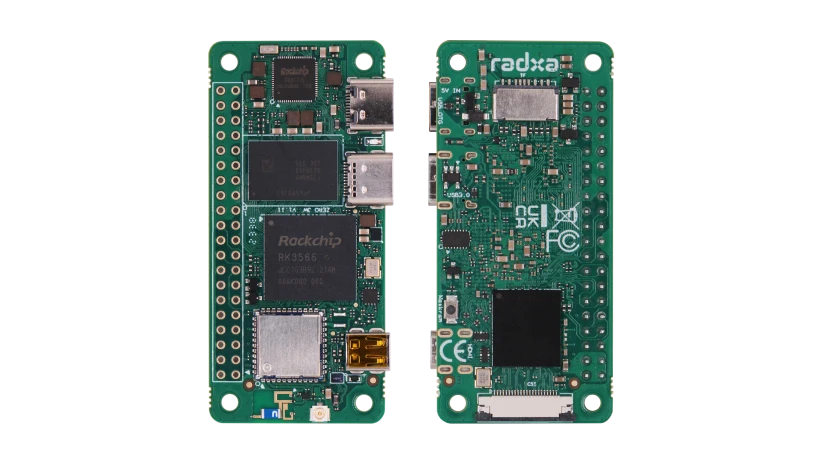
The Radxa Zero 3W is a compact single-board computer that packs a surprising amount of processing power into a footprint identical to the Raspberry Pi Zero, measuring just 65 by 30 millimeters. Announced in late 2023, this board represents a significant leap in capability for ultra-small form-factor devices. At its heart lies the Rockchip RK3566 system-on-chip, a quad-core processor based on the Arm Cortex-A55 architecture. While this chip is capable of running at higher speeds, Radxa has deliberately underclocked it to 1.6 GHz. This choice is not a limitation of the silicon but a thermal management strategy; the tiny circuit board cannot dissipate the heat generated by higher frequencies without risking stability, so the lower clock speed ensures reliable operation in passive cooling environments. The processor is paired with a Mali G52-2EE graphics unit, which supports modern graphics APIs like Vulkan and OpenGL ES, making it suitable for lightweight desktop interfaces or media playback. Additionally, the board includes a neural processing unit (NPU) with 0.8 TOPS of performance, allowing for local artificial intelligence tasks such as object detection or voice recognition without needing an internet connection.
Memory and storage options are flexible, catering to various project needs. The board is available with 1, 2, 4, or 8 GB of LPDDR4 memory, though some later documentation references LPDDR4X, a minor distinction that users should verify against their specific hardware revision. For storage, the Zero 3W features a microSD card slot for operating system installation and optional soldered eMMC storage ranging from 8 to 64 GB. Unlike removable SD cards, this eMMC is fixed at the time of purchase, offering faster and more reliable read/write speeds for applications that require frequent data access. The board’s connectivity is one of its standout features, particularly for a device of this size. It includes Wi-Fi 6 (802.11ax) and Bluetooth 5.4, a combination that is rare in the Pi Zero form factor. This wireless module supports dual-band frequencies (2.4 GHz and 5 GHz) and includes both an onboard antenna and a u.FL connector for attaching an external antenna, which can be switched via software to optimize signal strength in different environments. It is important to note that early hardware revisions used a different Wi-Fi module with limited capabilities, so users should check their board’s revision number to confirm they have the Wi-Fi 6 version.
Despite its small size, the Zero 3W offers robust input and output options. It features two USB-C ports: one for power and USB 2.0 On-The-Go (OTG) functionality, and the other as a USB 3.0 host port, enabling faster data transfer with external drives or peripherals. Video output is provided via a Micro-HDMI connector, documented to support resolutions up to 1920x1080 at 60 frames per second. For hardware projects, the board includes a 40-pin GPIO header that is compatible with Raspberry Pi accessories, though it is not soldered on the base models. This header exposes various communication protocols, including UART, SPI, I2C, and PWM, all operating at 3.3 volts. Users should be cautious with specific pins, as some have internal pull-up resistors that can interfere with general-purpose input/output usage unless modified. Additionally, the board supports MIPI CSI camera modules, specifically those used by Raspberry Pi, allowing for easy integration of visual sensors for robotics or surveillance projects.
Powering the Zero 3W requires a 5-volt supply via the USB-C port, with a recommended current of at least 2 amps. The board does not support higher voltage Power Delivery profiles, so using a non-compliant charger could damage the device. The software ecosystem is well-supported, with official images for Debian and Ubuntu, as well as Android 11. The board also has mainline Linux kernel support, meaning it can run standard distributions like Armbian and OpenWrt, which is particularly useful for building lightweight routers or network appliances. Installation is straightforward, typically involving flashing an image to a microSD card and booting from it. For advanced users, the board can be programmed via USB using specific tools, and it includes a maskrom button for recovery purposes. While the Zero 3W shares the physical dimensions of the Raspberry Pi Zero, it is not a drop-in replacement due to differences in connector types and pinout details. However, its combination of Wi-Fi 6, Bluetooth 5.4, significant RAM options, and a capable processor makes it a powerful tool for developers looking to create compact, connected devices that require more performance than traditional microcontrollers can offer.
Pinout diagram
| Attr | Specs | verified |
|---|---|---|
soc | Rockchip RK3566 (CNX spec list, 2023-12-08; mainline compatible = "radxa,zero-3w", "rockchip,rk3566", torvalds/linux rk3566-radxa-zero-3w.dts). | ✔ |
cpu | Quad-core Arm Cortex-A55 @ 1.6 GHz (arm64 / ARMv8.2-A). CNX notes the RK3566 is usually clocked up to 1.8 GHz and the board appears deliberately underclocked for thermal reasons on the tiny PCB (CNX, 2023-12-08). | ✔ |
gpu | Arm Mali G52-2EE — OpenGL ES 1.1/2.0/3.2, Vulkan 1.1, OpenCL 2.0 (CNX, 2023-12-08). | ✔ |
npu | 0.8 TOPS RKNN accelerator (CNX, 2023-12-08; RKNN tutorials in Radxa docs). | ✔ |
vpu | 4Kp60 H.265/H.264/VP9 decode, 1080p H.265/H.264 encode (CNX, 2023-12-08). | ✔ |
ram | 1 / 2 / 4 / 8 GB LPDDR4 per CNX's spec table; a later CNX project article describes Zero 3W boards with "LPDDR4X" (CNX, 2023-12-08, CNX, 2026-08-18). | ✔ |
storage | microSD slot (SDR104-capable) + optional soldered eMMC 5.1 (8/16/32/64 GB). Mainline DTS configures the eMMC as 8-bit HS200 (mmc-hs200-1_8v, non-removable) (CNX, 2023-12-08, mainline DTS). | ✔ |
wireless | "Radxa Wireless Module D8" — Wi-Fi 6 (802.11 a/b/g/n/ac/ax, 2.4 + 5 GHz), Bluetooth 5.4, onboard antenna plus u.FL connector (antenna path switched in software) (CNX, 2023-12-08). The current shipping revision (V1.12I) is listed by Radxa's FAQ with a dual-band Wi-Fi 6 module (e.g. BL-M8800DS2 / FCS960KAAMD) and BT 5.4; early revisions used an AP6212 (2.4 GHz only, BT 4.0) (Radxa FAQ Q9). In the mainline DTS the Wi-Fi hangs off sdmmc1 (SDIO, sd-uhs-sdr104) and Bluetooth uses uart1 with RTS/CTS (mainline DTS). | ✔ |
ethernet | none on 3W (that is the 3E's role) (docs.radxa.com hardware-interface). | ✔ |
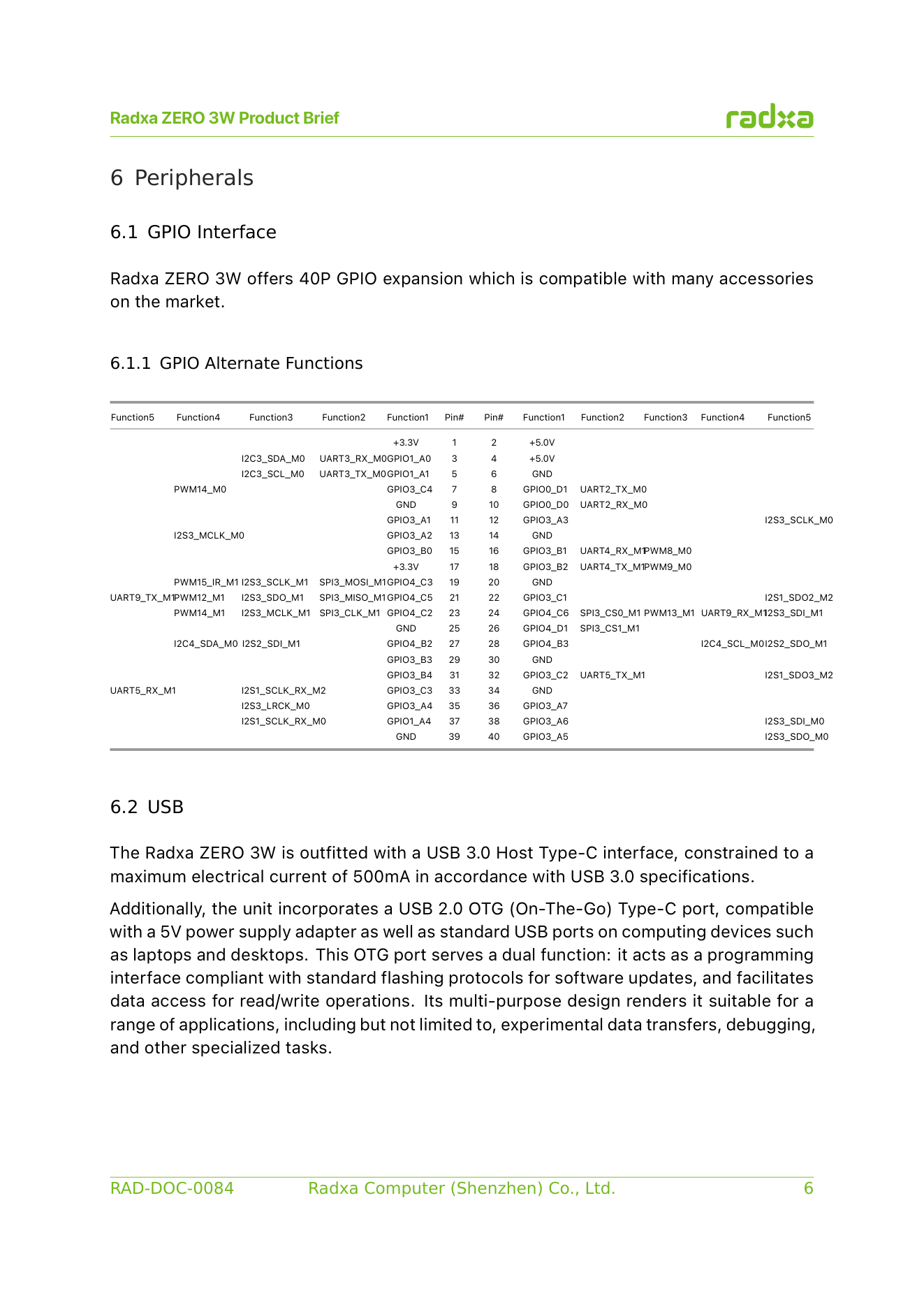
usb | 2× USB-C — USB-C 1: USB 2.0 OTG + power input; USB-C 2: USB 3.0 host (docs.radxa.com hardware-interface). | ✔ |
video_out | Micro-HDMI, documented up to 1920×1080@60 (docs preparation page); CNX notes the SoC itself supports more (CNX, 2023-12-08). | ✔ |
camera | 1× 4-lane MIPI CSI on a 22-pin 0.5 mm FPC connector (pinout incl. I2C2_SCL/SDA_M1 for camera control); Raspberry Pi Camera V1.3 (OV5647) and V2 (IMX219) supported (docs hardware-interface, CNX, 2023-12-08). | ✔ |
gpio_header | 40-pin Raspberry Pi-compatible header, not soldered on base SKUs (optional / soldered on higher SKUs) (CNX, 2023-12-08). Signal inventory per CNX: up to 28× GPIO, 5× UART, 1× SPI, 2× I2C, PCM/I2S, 6× PWM, 5 V, 3.3 V, GND. Detailed multiplexing (e.g. pin 7 = GPIO3_C4 / PWM14_M0; pins 32/33 = UART3_M0; pins 27/28 = I2C4_M0) in the official pin table. - I/O voltage: 3.3 V (all GPIOs; absolute max 3.63 V). SARADC_IN5 is also 3.3 V (max 3.3 V) (docs hardware-interface). No DAC documented on the header. - Pins 27/28 can be reworked (0 Ω resistors R45/R46, remove R32/R39) into a USB 2.0 host port on the header (docs hardware-interface). | ✔ |
debug_serial | UART2_M0 on header pins 8 (TX) / 10 (RX), 1500000 8N1 default (docs hardware-interface, FAQ Q6). | ✔ |
power | USB-C 1 only, 5 V input only (no higher PD voltage accepted); recommended 5 V/2 A (≥15 W) (docs preparation, FAQ Q5). | ✔ |
dimensions | 65 × 30 mm (Raspberry Pi Zero form factor) (CNX, 2023-12-08). | ✔ |
misc | MaskROM button for recovery/flashing (CNX, 2023-12-08). | ✔ |
- Manufacturer: Radxa (Radxa Computer (Shenzhen) Co., Ltd.), China.
- Product line: ZERO series — Radxa ZERO 3W (Wi-Fi variant); the sibling ZERO 3E replaces Wi-Fi with Gigabit Ethernet (+ optional PoE) on the same board family (docs.radxa.com, CNX Software, 2024-05-14).
- Year introduced: announced October 2023, launched with Wi-Fi 6 in December 2023 (CNX Software launch article, updated 2023-12-08).
- Status: Active (current product; documented on docs.radxa.com with a current shipping hardware revision "V1.12I" per the official FAQ, FAQ Q9).
- Launch price: from US$14.90 (1 GB RAM, Wi-Fi 6, no eMMC, no GPIO headers) up to US$66 (8 GB RAM, 64 GB eMMC, female GPIO headers soldered) at launch (CNX Software, 2023-12-08).
- Variants (3W): RAM 1 / 2 / 4 / 8 GB; storage: none, or 8 / 16 / 32 / 64 GB eMMC; 40-pin GPIO header optional (unpopulated on base SKUs, soldered on higher SKUs) (CNX Software, 2023-12-08).
- Family variants: ZERO 3E (GbE + optional PoE HAT, no Wi-Fi) (CNX, 2024-05-14). Early hardware revisions of the ZERO 3 series shipped with different Wi-Fi modules (see Problems) (Radxa FAQ Q9).
+ Strengths
- One of the most powerful SBCs in the 65×30 mm Pi Zero format at launch — quad A55 + 8 GB RAM options, vs the Pi Zero 2 W it clones dimensions of (CNX, 2023-12-08).
- Wi-Fi 6 + Bluetooth 5.4 in a Pi Zero board — rare at this size/price (CNX); dual antenna (onboard + u.FL) selectable in software.
- 0.8 TOPS NPU (RKNN) with an official AI tutorial stack (RKNN-Toolkit-Lite2, YOLOv5/v8, Whisper, DeepLab etc.) (Radxa AI docs).
- USB 3.0 Type-C host port plus a separate USB 2.0 OTG/power port — dual-USB-C in Pi Zero size (docs hardware-interface).
- Optional eMMC up to 64 GB (HS200, 8-bit) alongside microSD (mainline DTS, CNX).
- MIPI CSI accepting Raspberry Pi camera modules (OV5647/IMX219) — unusual on non-Raspberry Pi boards (CNX).
- Mainline kernel support (since 6.10) and first-class OpenWrt target status — attractive for router/AP builds (kernel commit, OpenWrt TOH).
- Header rework option to expose a third USB 2.0 host port on header pins 27/28 (docs hardware-interface).
− Weaknesses
- UART2_M0 (pins 8/10) is the U-Boot console. Enabling it as a normal UART via rsetup overlays means stray input can interrupt boot and the device may fail to boot; a specific /etc/default/u-boot + u-boot-update workaround is required (hardware-interface warning).
- Header pins 3, 5, 27, 28 carry extra I2C power pull-up resistors and "work abnormally when used as GPIOs" (hardware-interface tip).
- Wi-Fi hardware revisions differ. Early boards used an AP6212 (2.4 GHz 802.11 b/g/n, BT 4.0); current V1.12I boards use a dual-band Wi-Fi 6 / BT 5.4 module (BL-M8800DS2 / FCS960KAAMD). 5 GHz channel availability depends on driver/firmware/regulatory domain and "should be confirmed by actual testing" (FAQ Q9).
- Thermal headroom is the design limit. The RK3566 is clocked 1.6 GHz instead of its usual 1.8 GHz, which CNX attributes to heat on the tiny PCB (CNX, 2023-12-08).
- 5 V-only power input. Non-5 V supplies must not be used ("may damage the device"); weak supplies/cables cause boot failures — Radxa's boot-failure checklist leads with power supply and cable quality (FAQ Q2/Q5).
- Only one image is officially "fully tested" (bookworm KDE b1); Radxa warns other images "may have unknown problems" (download page caution).
- Not drop-in Pi Zero compatible despite the shape: Micro-HDMI (vs mini-HDMI on Pi Zero 2 W) and different CSI/microSD placement; HAT compatibility is "most accessories", not all (CNX, hardware-interface).
- eMMC is soldered, not a socketed module on production boards — capacity is fixed at purchase; programming requires the rkdeveloptool/upgrade-tool workflow (low-level-dev guide).
- Retour d'expérience expert expert — expert-pi-like
- Petit retour d'experience sur la Zero 3W après plusieurs semaines. Le format Pi Zero 2 W est super pour les projets compacts, et le RK3566 avec 8GB de LPDDR4 est correct pour le multitache, mais attention au thermique. La puce est bridee a 1.6GHz contre les 1.8GHz habituels pour eviter la surchauff… — expert-pi-like
- Salut, merci pour l'alerte sur les pins 3 et 5, je n'avais pas vu la note dans la doc. J'ai justement un projet ou je voulais mettre un petit LCD sur ces pins pour gagner de la place. Si je dois changer de pins, y a-t-il assez de GPIO disponibles ailleurs pour un affichage simple ? Par contre, pour… — maker-du-weekend
- Pour le Wi-Fi, evite de supposer que c'est du brcmfmac si tu as la nouvelle carte V1.12I avec le module BL-M8800DS2, la doc ne confirme pas le support mainline clair pour chaque revision. Sur mon setup, j'ai du bricoler les firmware pour que le 5GHz apparaisse correctement, sinon je restais bloque … — linux-tinkerer
Community feedback and projects
- Radxa Zero 3W does not boot forum.radxa.com
- Radxa Zero 3W temperatures too high even using the heatsink created especially for the radxa 3W forum.radxa.com
- IMX219 + NPU real-time object detection on Zero 3W (experimental) forum.radxa.com
- How to flash eMMC on Radxa Zero 3W? forum.radxa.com
Content not available yet.
- docs.radxa.com — ZERO 3W/3E
- docs.radxa.com/en/zero/zero3/download
- docs.radxa.com/en/zero/zero3/hardware-design/hardware-interface
- docs.radxa.com/en/zero/zero3/hardware-design/revision
- github.com/radxa-build/radxa-zero3
- low-level-dev/rsdk
- github.com/radxa
- rk3566-radxa-zero-3w.dts
- board add commit
- armbian.com/radxa-zero-3/
- openwrt.org/toh/hwdata/radxa/radxa_zero_3w
- dietpi.com
- CNX Software launch article (2023-12-08)
- ZERO 3E article (2024-05-14)
- forum.radxa.com
- arace.tech/products/radxa-zero-3w
- UART2_M0 (pins 8/10) is the U-Boot console. Enabling it as a normal UART via rsetup overlays means stray input can interrupt boot and the device may fail to boot; a specific /etc/default/u-boot + u-boot-update workaround is required (hardware-interface warning).
- Header pins 3, 5, 27, 28 carry extra I2C power pull-up resistors and "work abnormally when used as GPIOs" (hardware-interface tip).
- Wi-Fi hardware revisions differ. Early boards used an AP6212 (2.4 GHz 802.11 b/g/n, BT 4.0); current V1.12I boards use a dual-band Wi-Fi 6 / BT 5.4 module (BL-M8800DS2 / FCS960KAAMD). 5 GHz channel availability depends on driver/firmware/regulatory domain and "should be confirmed by actual testing" (FAQ Q9).
- Thermal headroom is the design limit. The RK3566 is clocked 1.6 GHz instead of its usual 1.8 GHz, which CNX attributes to heat on the tiny PCB (CNX, 2023-12-08).
- 5 V-only power input. Non-5 V supplies must not be used ("may damage the device"); weak supplies/cables cause boot failures — Radxa's boot-failure checklist leads with power supply and cable quality (FAQ Q2/Q5).
- Only one image is officially "fully tested" (bookworm KDE b1); Radxa warns other images "may have unknown problems" (download page caution).
- Not drop-in Pi Zero compatible despite the shape: Micro-HDMI (vs mini-HDMI on Pi Zero 2 W) and different CSI/microSD placement; HAT compatibility is "most accessories", not all (CNX, hardware-interface).
- eMMC is soldered, not a socketed module on production boards — capacity is fixed at purchase; programming requires the rkdeveloptool/upgrade-tool workflow (low-level-dev guide).
- Premiers pas avec la Radxa ZERO 3W : flasher Radxa OS et démarrer debutant Schéma : IMG-rz3w-debutant-1-rz3w-premiers-pas-flash-boot.svg — Radxa ZERO 3W vue de dessus (65 × 30 mm, format Raspberry Pi Zero), flèches sur le port USB-C 1 (alimentation + OTG), le port USB-C 2 (USB 3.0 host), le lecteur microSD, le bouton MaskROM et la puce Rockchip RK3566 ; en médaillon un câble USB-C 5 V/2 A et une LED d'alimentation.
- Wi-Fi 6 et Bluetooth 5.4 : se connecter, choisir l'antenne, connaître sa révision debutant Schéma : IMG-rz3w-debutant-2-rz3w-wifi-6-bluetooth-revisions.svg — Radxa ZERO 3W avec son module radio (antenne embarquée + connecteur u.FL vers une antenne externe), ondes 2,4 GHz et 5 GHz, terminal nmcli device wifi list ; en médaillon deux puces Wi-Fi annotées AP6212 (anciennes cartes, 2,4 GHz seul) et BL-M8800DS2/FCS960KAAMD (révision V1.12I, Wi-Fi 6 double bande).
- GPIO avec libgpiod : faire clignoter une LED et lire un bouton debutant Schéma : IMG-rz3w-debutant-3-rz3w-gpio-libgpiod-blink.svg — Radxa ZERO 3W avec son connecteur 40 broches compatible Raspberry Pi (non soudé sur les SKUs de base), breadboard : LED + résistance 330 Ω entre la broche 35 (GPIO3_A4) et GND, bouton poussoir entre la broche 11 (GPIO3_A1) et 3V3 ; broches 3/5/27/28 barrées en rouge (résistances de pull-up I2C).
- Installer le système sur l'eMMC : rkdeveloptool, MaskROM et gain de fiabilité intermediaire IMG-rz3w-intermediaire-4-rz3w-emmc-rkdeveloptool.svg — Radxa ZERO 3W retournée montrant la puce eMMC soudée (pas de socket), câble USB-C entre le port USB-C 1 de la carte et un PC, bouton MaskROM pointé, terminal affichant rkdeveloptool ld / wl ; en médaillon le comparateur microSD vs eMMC HS200 8 bits.
- Caméra MIPI CSI : brancher une Raspberry Pi Camera (OV5647/IMX219) sur la ZERO 3W intermediaire IMG-rz3w-intermediaire-5-rz3w-camera-mipi-csi-ov5647.svg — Radxa ZERO 3W avec le connecteur FPC 22 broches 0,5 mm (CSI 4 lanes) relié par une nappe à une Raspberry Pi Camera V2 (IMX219) ; zoom sur les broches I2C2_SCL/SDA_M1 du connecteur ; terminal v4l2-ctl --list-devices et image brute affichée dans VLC.
- Noyau mainline avec Armbian : vérifier le device tree, ajouter un overlay, lire le SARADC intermediaire IMG-rz3w-intermediaire-6-rz3w-armbian-mainline-overlay-saradc.svg — Radxa ZERO 3W sous Armbian : terminal cat /proc/device-tree/compatible (radxa,zero-3w rockchip,rk3566), fichier /boot/armbianEnv.txt avec la ligne overlays=, dossier /boot/dtb/rockchip/overlay/ ; à droite, une tension analogique appliquée sur SARADC_IN5 via un pont diviseur et la lecture in_voltage5_raw.
- NPU 0,8 TOPS : inférence RKNN (YOLO, Whisper) sur la ZERO 3W avance IMG-rz3w-avance-7-rz3w-npu-rknn-vision-embarquee.svg — Radxa ZERO 3W avec un flux caméra entrant (module CSI) et, en médaillon, la puce RK3566 dont un bloc NPU 0,8 TOPS s'allume ; terminal affichant une détection YOLO avec fps et température du SoC ; dissipateur dessiné sur la carte.
- Console série UART2 à 1,5 Mbaud : debugger U-Boot et récupérer une carte briquée avance IMG-rz3w-avance-8-rz3w-uart-debug-uboot-recovery.svg — Radxa ZERO 3W avec adaptateur USB-TTL 3,3 V câblé sur les broches 8 (TX) / 10 (RX) et GND, terminal picocom à 1500000 affichant le boot U-Boot ; en médaillon, le bouton MaskROM et le branchement USB-C 1 vers un PC pour le mode Rockusb.
- Usages réseau : point d'accès Wi-Fi 6 sous hostapd et OpenWrt officiel avance IMG-rz3w-avance-9-rz3w-openwrt-point-acces-wifi6.svg — Radxa ZERO 3W au centre d'une étoile de clients Wi-Fi (laptop, téléphone, caméra), antenne u.FL déportée, terminal hostapd et interface LuCI d'OpenWrt ; encadré rappelant que le 3W n'a pas de port Ethernet (c'est le rôle du ZERO 3E).
Code library — examples written for this board
clignotante.pyPythonbouton-gpio.pyPythoncapteur-i2c.shBashsurveillance-temperature.shBashcapteur-dht11.pyPythonservo-pwm-sysfs.shBashserveur-web-capteur.pyPythonwifi-station.shBashjournal-cron.shBashveilleur-systemd.pyPython
Examples and repos found online
- radxa/build github.com
- radxa/linux-rockchip github.com
- radxa/pyRock github.com
- Qengineering/Radxa-Zero-3-NPU-Ubuntu22 github.com
- OpenIPC/adaptive-link github.com