Raspberry Pi Zero (2015) — Board Sheet
⚡ The essentials in 60 seconds
- soc — Broadcom BCM2835 — single-core ARM1176JZF-S (ARMv6, 32-bit) @ 1 GHz ("40% faster than Raspberry Pi 1", which ran at 700 MHz); GPU VideoCore IV. (launch blog; official BCM2835 doc)
- ram — 512 MB LPDDR2 SDRAM, shared CPU/GPU. (launch blog)
- storage — microSD card slot only; no onboard storage. (launch blog)
- video — mini-HDMI socket, 1080p60 output; separate unpopulated composite video header (4 pads). (launch blog)
- usb — 2 × micro-USB sockets — one for power, one for data (USB 2.0 OTG-capable, directly from the BCM2835; no hub, no host-only ports). (launch blog; Adafruit)
- connectivity — none — no WiFi, no Bluetooth, no Ethernet (that's the Zero W line). (official docs Zero table: "Wireless Connectivity: none")
- On this board : 9 tutorials · 10 code
In November 2015, Raspberry Pi Trading Ltd. introduced a board that fundamentally altered the landscape of affordable computing: the Raspberry Pi Zero. Designed in-house by Mike Stimson and manufactured at the Sony Pencoed plant in Wales, this tiny circuit board was announced with a price tag of just five US dollars. At that time, it was described as a full-fledged member of the Raspberry Pi family, offering a complete Linux computer experience at a fraction of the cost of its predecessors. The launch was marked by a unique distribution stunt, where a free Zero was bundled on the cover of The MagPi issue #40, making it arguably one of the most widely distributed single-board computers ever created. Despite its age, the original Zero remains an active product, with the current v1.3 revision still being sold by official distributors, proving its enduring relevance in the maker community.
The core of the Raspberry Pi Zero is the Broadcom BCM2835 system-on-chip. To understand what this means for the user, it is helpful to know that a system-on-chip integrates the processor, graphics, and memory controllers onto a single piece of silicon. The BCM2835 features a single-core ARM1176JZF-S processor running at 1 GHz. While this might sound modest compared to modern smartphones, it represents a 40% speed increase over the original Raspberry Pi Model 1, which ran at 700 MHz. The chip also includes a VideoCore IV graphics processing unit, capable of decoding 1080p video at 60 frames per second. This means that despite its low cost, the Zero can handle high-definition video playback, making it suitable for media center applications or digital signage. The board comes with 512 MB of LPDDR2 SDRAM, which is shared between the CPU and GPU. This memory constraint is a critical factor in performance; while sufficient for command-line tasks and lightweight applications, it limits the board’s ability to run heavy desktop environments or multiple browser tabs simultaneously.
Physically, the Raspberry Pi Zero is remarkably compact, measuring just 65 mm by 30 mm by 5 mm. This form factor was described by the manufacturer as their smallest ever, opening up possibilities for wearable technology, embedded systems, and projects where space is at a premium. However, this small size comes with significant trade-offs in connectivity. The board features a micro-HDMI port for video output and two micro-USB sockets. One micro-USB port is dedicated to power, while the other serves as a data port. This single data port is USB 2.0 OTG-capable, meaning it can act as a host for peripherals or as a gadget itself. This dual nature allows for creative setups, such as using the Zero as a USB Ethernet adapter for a laptop, but it also means that connecting a keyboard and a mouse simultaneously requires an external USB hub. Unlike later models in the Zero family, the original Zero has no built-in Wi-Fi or Bluetooth, nor does it have an Ethernet port. Users requiring network connectivity must rely on USB adapters or the aforementioned USB gadget mode.
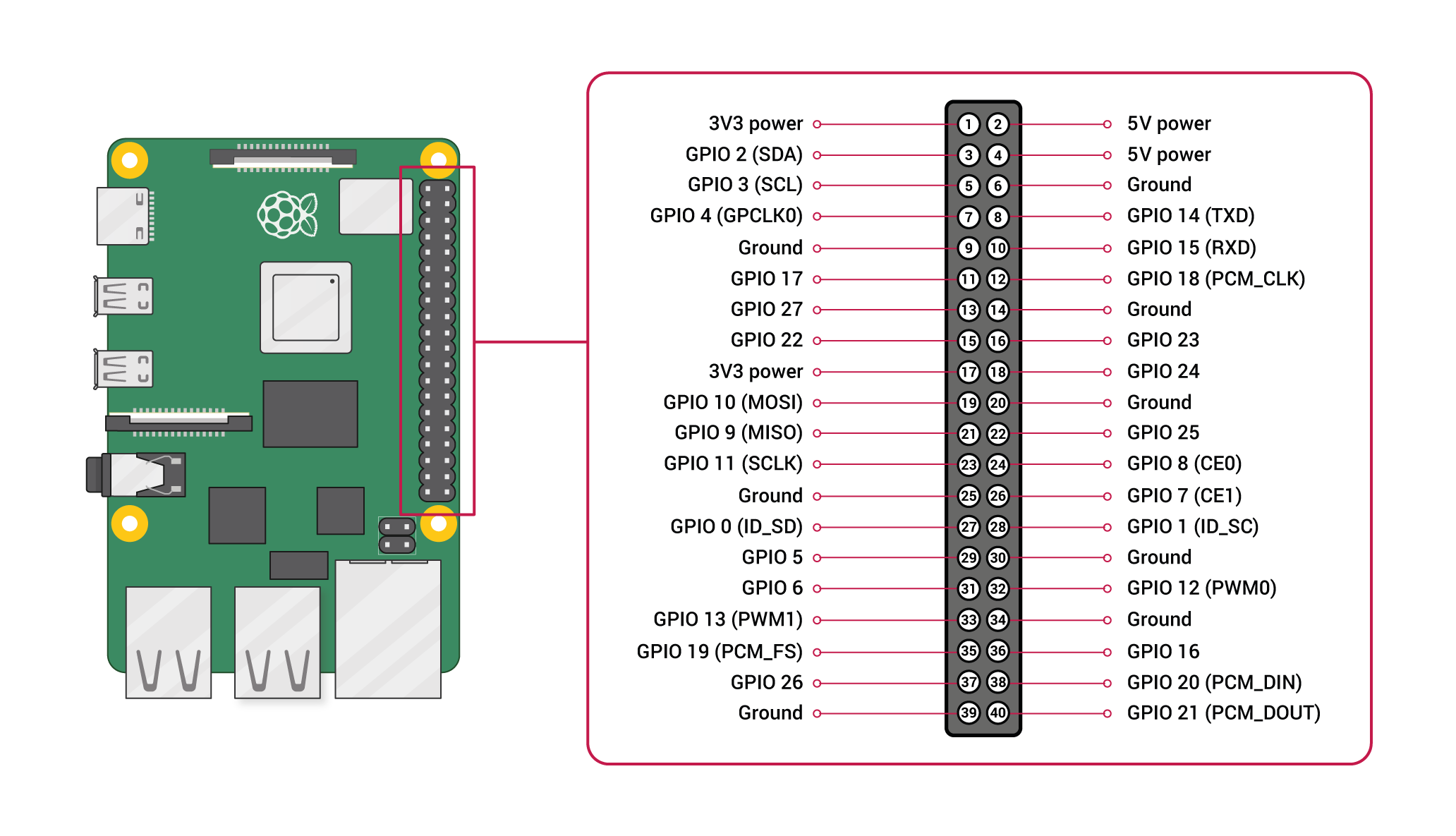
A key aspect of the Raspberry Pi Zero is its General Purpose Input/Output (GPIO) interface. The board includes a 40-pin header that is electrically identical to the pinout found on larger Raspberry Pi models like the Model A+ and B+. GPIO pins are physical connections that allow the board to interact with the outside world, sending and receiving electrical signals to control LEDs, read sensors, or communicate with other electronic components. On the Zero, this header comes unpopulated, meaning users must solder the pins themselves if they wish to use them. The GPIO operates at 3.3 V logic levels and supports standard communication protocols such as I2C, SPI, and UART. It is important to note that the Zero does not have built-in analog-to-digital converters (ADC), so it cannot directly read analog voltage levels from sensors without additional hardware. The power consumption of the board is extremely low, with official measurements showing an idle average of just 0.10 A and a maximum under stress of 0.35 A. This translates to roughly 0.5 W when idle and under 2 W when fully stressed, making it ideal for battery-powered projects.
Software support for the Zero is robust, though it has evolved since its launch. Originally running Raspbian, it now supports Raspberry Pi OS in its 32-bit ARMv6 variant. The board uses a legacy SD boot flow, meaning the operating system is written to a microSD card, which serves as the primary storage. There is no onboard storage, so the microSD card is essential for the system to boot. The bootloader is simple, relying on files like bootcode.bin and start.elf on the card, without the complex EEPROM found in newer Raspberry Pi models. This simplicity makes recovery easy, as users can simply edit files on the card to fix issues. However, the 32-bit ARMv6 architecture is a dead end for future software development. Newer Linux distributions are dropping support for this instruction set, meaning the Zero will eventually stop receiving updates, unlike the 64-bit capable Raspberry Pi 3 and later models.
Despite its limitations, the Raspberry Pi Zero has a vibrant ecosystem. The release of version 1.3 added a mini 22-pin CSI camera connector, allowing users to attach a Raspberry Pi camera module. It is crucial to note that this port requires a specific short flex cable, as standard camera ribbons do not fit. The board’s cultural impact is evident in the "pHAT" ecosystem, a range of half-size add-on boards designed specifically for the Zero’s compact dimensions. Common projects include building retro gaming consoles with RetroPie, creating network ad-blockers with Pi-hole, or serving as a server for 3D printers with OctoPrint. However, potential users should be aware of certain pitfalls. The Zero lacks undervoltage detection, a feature present on other Raspberry Pi models. This means that if the power supply is weak or the cable is too long, the voltage can drop without warning, leading to SD card corruption or system lockups. Additionally, the "adapter hell" associated with the board—needing mini-HDMI adapters, micro-USB cables, and soldering for GPIO—means the real cost of entry is higher than the five-dollar price tag suggests. Nevertheless, for those willing to navigate these challenges, the Raspberry Pi Zero remains a powerful, versatile, and historically significant tool for learning and innovation.
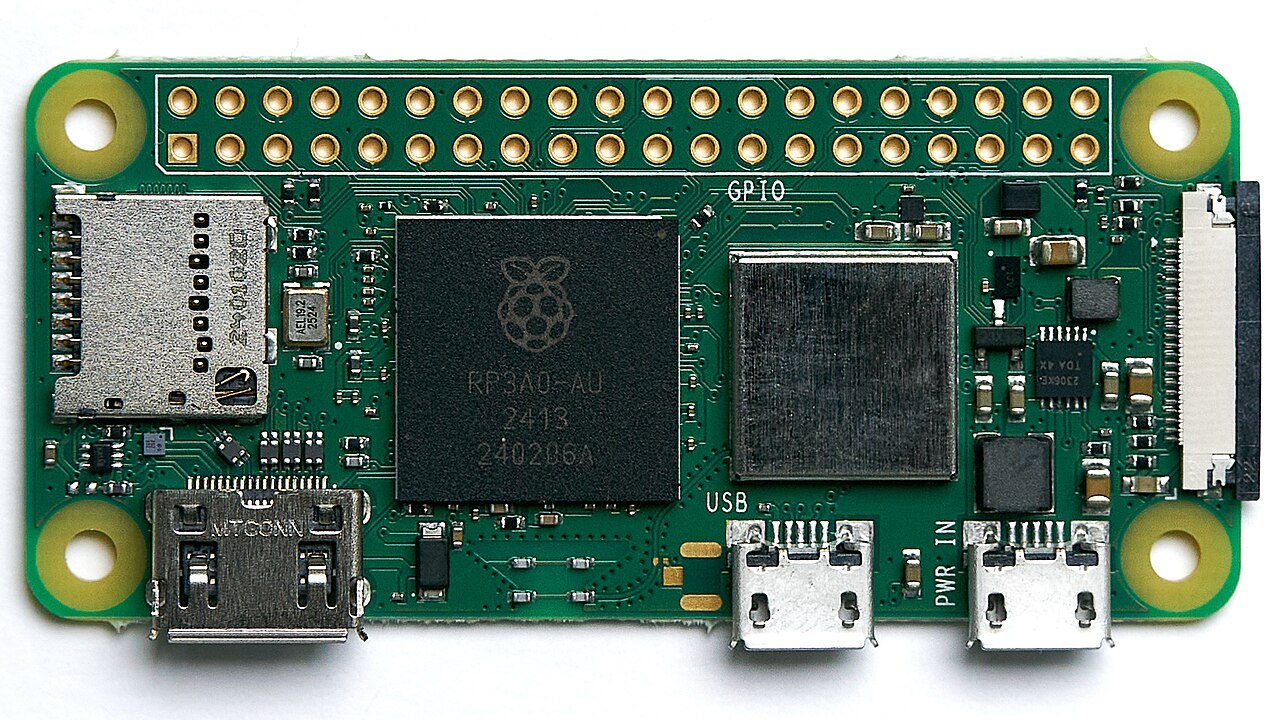
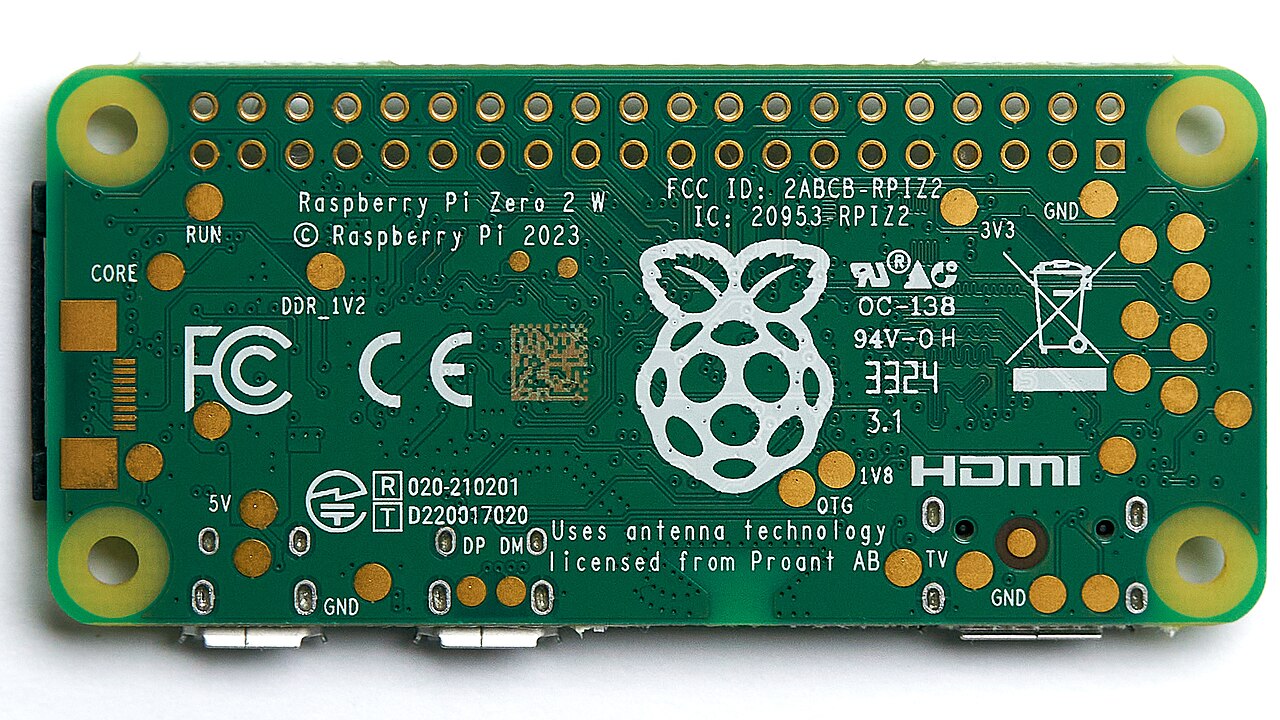
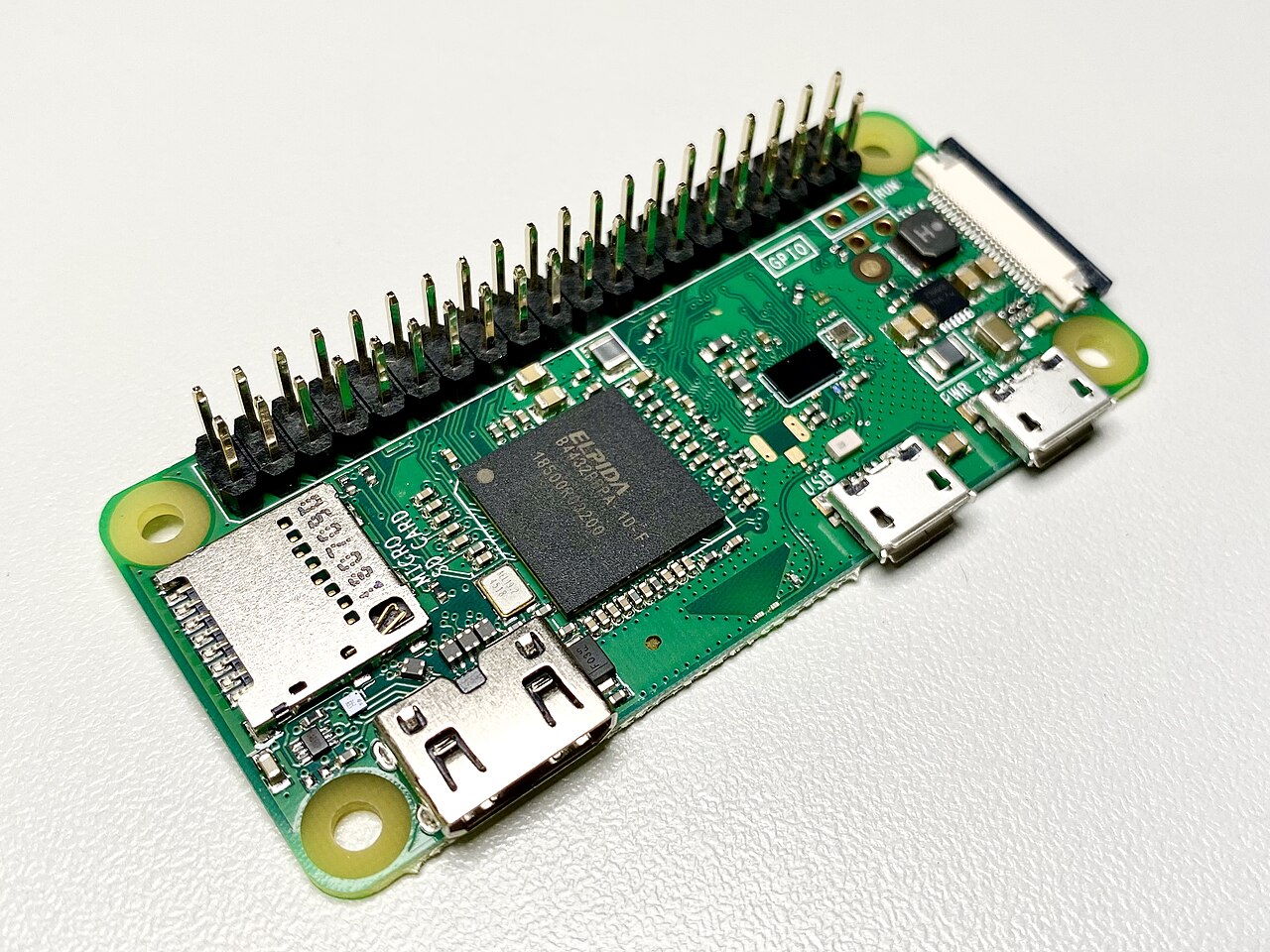
Pinout diagram
| Attr | Specs | verified |
|---|---|---|
soc | Broadcom BCM2835 — single-core ARM1176JZF-S (ARMv6, 32-bit) @ 1 GHz ("40% faster than Raspberry Pi 1", which ran at 700 MHz); GPU VideoCore IV. (launch blog; official BCM2835 doc) | ✔ |
ram | 512 MB LPDDR2 SDRAM, shared CPU/GPU. (launch blog) | ✔ |
storage | microSD card slot only; no onboard storage. (launch blog) | ✔ |
video | mini-HDMI socket, 1080p60 output; separate unpopulated composite video header (4 pads). (launch blog) | ✔ |
usb | 2 × micro-USB sockets — one for power, one for data (USB 2.0 OTG-capable, directly from the BCM2835; no hub, no host-only ports). (launch blog; Adafruit) | ✔ |
connectivity | none — no WiFi, no Bluetooth, no Ethernet (that's the Zero W line). (official docs Zero table: "Wireless Connectivity: none") | ✔ |
camera | mini 22-pin CSI connector, 0.5 mm fine pitch, 11.5 mm width — v1.3 only; needs the short Zero camera flex cable, not a standard camera ribbon. (official docs; Adafruit) | ✔ |
gpio | 40-pin header, unpopulated (user must solder), identical pinout to Model A+/B+/2B — 3.3 V logic, I²C/SPI/UART/hardware PWM available as on other Pis; no ADC/DAC. GPIO pins: 16 mA each, 50 mA total across all pins. (launch blog; pinout.xyz; power-supplies doc) | ✔ |
power | 5 V micro-USB, recommended PSU 1.2 A; USB peripheral current "limited by PSU, board, and connector ratings only". (official power doc) | ✔ |
consumption_official_measurements | typical bare-board active 100 mA; idle avg 0.10 A; H.264 video max 0.23 A; stress max 0.35 A (avg 0.23 A); halt 0.055 A — i.e. roughly 0.5 W idle, under 2 W stressed at 5 V. (official power doc table) | ✔ |
temperature | hard thermal limit 85 °C on all models (ARM throttled progressively 80–85 °C, ARM+GPU throttled at 85 °C); read with vcgencmd measure_temp. (frequency management doc) | ✔ |
mechanical | 65 mm × 30 mm × 5 mm — "our smallest ever form factor". (launch blog) | ✔ |
- Manufacturer / developer: Raspberry Pi (Trading) Ltd. (now Raspberry Pi Ltd.), UK; board designed in-house (Mike Stimson, per the launch post interview), manufactured at the Sony Pencoed plant in Wales ("made in Wales"). (launch blog, retrieved 2026-10-13)
- Launch: November 2015 (announced 26 November 2015) at US$5 — "a full-fledged member of the Raspberry Pi family… priced at just $5". (launch blog; Wikipedia, Raspberry Pi series article — the standalone Zero article now redirects there)
- Launch stunt: a free Zero was bundled on the cover of The MagPi issue #40 (December 2015, UK newsstands). (launch blog)
- Status: Active / still shipping. The official hardware documentation lists the Zero with no End-of-Life notice (unlike, e.g., Compute Module 3), and distributors still sell the current v1.3 revision. (official docs, Zero series table; Adafruit product page)
- Variants (board revisions, original Zero): - v1.0 (2015) — launch board; no camera connector. (launch blog spec list) - v1.1 / v1.2 — intermediate revisions; revision code 900092 (Sony UK) / 920092 (Embest) for v1.2. (official revision codes doc) - v1.3 (current) — adds the mini 22-pin CSI camera port ("Since version 1.3 of the original Zero, all Zero models also include a mini 22-pin… CSI port"); revision codes 900093 / 920093. (official docs introduction; revision codes; Adafruit) - Related boards (separate sheets): Zero W (Feb 2017, WiFi/BT), Zero WH (Zero W with pre-soldered header), Zero 2 W (2021, RP3A0). (Wikipedia; official docs)
+ Strengths
- The $5 full Linux computer — "radically redefined the entry point for computing at a price of just $5"; cheapest way to run a general-purpose Linux distro with a real SoC. (Wikipedia; launch blog)
- Tiny + ultra-low-power: 65×30×5 mm and ~0.1 A idle make it viable for wearables, battery and embedded projects where a Pi B is overkill. (launch blog; official power doc)
- USB OTG gadget mode: the single data port can emulate Ethernet, serial (CDC-ACM), MIDI, mass storage, or a full gadget composite — the basis of the popular "Zero as a USB stick Linux" build. (Adafruit guide)
- Full 40-pin GPIO (electrically identical to A+/B+/2B) despite the board size — HATs work electrically once you solder a header. (launch blog; pinout.xyz)
- CSI camera port from v1.3 in a board this small (with Zero-specific flex cable). (official docs)
- VideoCore IV media stack: 1080p60 H.264 decode on a $5 board (MPEG-2/VC-1 via licensed codecs, as on the whole BCM2835 family). (Wikipedia)
- Cultural impact: the MagPi #40 covermount made it arguably the most widely distributed single-board computer ever; spawned the pHAT (half-size HAT) ecosystem. (launch blog)
− Weaknesses
- No undervoltage detection on the Zero range — official docs: low-voltage detection exists "on all models since the Pi B+ (2014) except the Zero range". A sagging 5 V rail gives no warning, just SD corruption and lockups. (official power doc)
- Powering from a PC USB port is discouraged — "voltage often sags and can cause SD card corruption"; use a proper 5 V supply. (Adafruit product page)
- Adapter hell at boot: mini-HDMI (not micro!), micro-USB OTG cable for any USB device, and a soldered GPIO header are all needed just to interact with the board — the "bare board $5" price is not the real entry cost. (Adafruit; launch blog comments on reseller pricing)
- Single USB data port: keyboard and mass storage can't both be used without a bus-powered hub (which then fights the power port). (Adafruit)
- CSI port needs the 22-pin Zero flex cable — "It DOES NOT work with a standard Raspberry Pi Camera cable"; the short FFC is fiddly and easy to tear. (Adafruit)
- 512 MB RAM + 1 GHz single-core ARMv6: desktop browsing is painful; heavy swapping also wears cheap SD cards. (launch blog specs)
- BCM2835 peripheral spec has known errors — official docs: "The peripheral specification document contains a number of errors", with a community errata list; bare-metal/driver work must consult it. (official BCM2835 doc; errata list)
- 32-bit ARMv6 dead end: no 64-bit support and ARMv6 has been dropped by newer distro releases, so software updates stop earlier than on Pi 3+ boards. (Wikipedia — BCM2835/ARM11)
- No status LED on the original Zero (the Zero W added one) — no visual power/activity indication.
- Thermal throttling at 85 °C applies (less relevant given <2 W draw, but sealed cases in sun can hit it). (frequency management doc)
- Retour d'expérience expert expert — expert-raspberrypi
- Petit retour d'experience sur la Pi Zero. Le concept est genial : pour 5 dollars, on se retrouve avec un vrai Linux sur une carte de 65x30 mm. La consommation en idle est très faible, environ 0.1 A, ce qui permet des projets sur batterie ou des wearables sans chauffer comme une Pi B. Le mode gadget… — expert-raspberrypi
- Merci pour le rappel sur l'undervoltage. J'ai justement passe une soiree a comprendre pourquoi mon projet capteur sautait regulierement. Je pensais a un bug software. En lisant la doc, on voit bien que sans detection materielle, c'est a toi de gerer. Du coup, j'ai ajoute un petit diviseur de tensio… — bricoleur_77
- Je confirme le point sur la consommation. C'est vrai que pour un usage embarque, c'est imbattable. Par contre, le single core ARM1176J montre vite ses limites des qu'on lance une interface graphique un peu complexe ou du web. Je l'utilise surtout en headless via SSH ou en mode gadget pour envoyer d… — linux_fan_simple
Community feedback and projects
- Raspberry PI Zero DS3231 RTC stackoverflow.com
- Emulate a Gaming Device - Raspberry PI Zero stackoverflow.com
- Serving a website on a Raspberry Pi Zero running in RAM btxx.org
- Raspberry Pi Zero Hidden in an Xbox Controller shkspr.mobi
- Trying to build the ultimate Raspberry Pi computer – Zero Terminal V3 n-o-d-e.net
Content not available yet.
- No undervoltage detection on the Zero range — official docs: low-voltage detection exists "on all models since the Pi B+ (2014) except the Zero range". A sagging 5 V rail gives no warning, just SD corruption and lockups. (official power doc)
- Powering from a PC USB port is discouraged — "voltage often sags and can cause SD card corruption"; use a proper 5 V supply. (Adafruit product page)
- Adapter hell at boot: mini-HDMI (not micro!), micro-USB OTG cable for any USB device, and a soldered GPIO header are all needed just to interact with the board — the "bare board $5" price is not the real entry cost. (Adafruit; launch blog comments on reseller pricing)
- Single USB data port: keyboard and mass storage can't both be used without a bus-powered hub (which then fights the power port). (Adafruit)
- CSI port needs the 22-pin Zero flex cable — "It DOES NOT work with a standard Raspberry Pi Camera cable"; the short FFC is fiddly and easy to tear. (Adafruit)
- 512 MB RAM + 1 GHz single-core ARMv6: desktop browsing is painful; heavy swapping also wears cheap SD cards. (launch blog specs)
- BCM2835 peripheral spec has known errors — official docs: "The peripheral specification document contains a number of errors", with a community errata list; bare-metal/driver work must consult it. (official BCM2835 doc; errata list)
- 32-bit ARMv6 dead end: no 64-bit support and ARMv6 has been dropped by newer distro releases, so software updates stop earlier than on Pi 3+ boards. (Wikipedia — BCM2835/ARM11)
- No status LED on the original Zero (the Zero W added one) — no visual power/activity indication.
- Thermal throttling at 85 °C applies (less relevant given <2 W draw, but sealed cases in sun can hit it). (frequency management doc)
- Premier démarrage de la Zero avec écran (mini-HDMI) debutant Schéma : IMG-zero-debutant-1-premier-demarrage-avec-ecran.svg — Raspberry Pi Zero avec câble mini-HDMI vers un écran, adaptateur micro-USB clavier sur le port données, alimentation 5 V 1,2 A sur le port POWER, carte microSD insérée.
- Installation headless : la Zero en carte réseau USB (g_ether) debutant Schéma : IMG-zero-debutant-2-installation-headless-usb-gadget.svg — Zero branchée sur le port USB d'un ordinateur portable par son port données (câble micro-USB), interface réseau USB apparaissant sur le portable, terminal SSH, alimentation sur le port POWER.
- Alimentation et consommation : le point faible de la Zero debutant Schéma : IMG-zero-debutant-3-alimentation-et-consommation.svg — Zero alimentée via un wattmètre USB en série, courbe de consommation annotée (repos 0,10 A, stress 0,35 A max), alerte « pas de détection de sous-tension » sur la gamme Zero.
- GPIO en Python : LED et bouton avec gpiozero intermediaire Schéma : IMG-zero-intermediaire-1-led-bouton-gpiozero.svg — connecteur 40 broches de la Zero (à souder), LED + résistance 330 Ω sur la broche physique 11 (GPIO17), bouton poussoir sur la broche 13 (GPIO27) vers GND, broches 3,3 V et GND repérées.
- Console série sur USB : la Zero en port série (CDC-ACM) intermediaire Schéma : IMG-zero-intermediaire-2-console-serie-usb-cdc.svg — Zero reliée au port USB d'un PC par son port données, terminal série /dev/ttyACM0 ouvert sur le PC affichant un prompt de login, alimentation externe sur le port POWER.
- Camera CSI sur Zero v1.3 : le nappe 22 broches intermediaire Schéma : IMG-zero-intermediaire-3-camera-csi-revision-v13.svg — connecteur CSI 22 broches mini (pas 0,5 mm) d'une Zero v1.3 avec sa nappe fine Zero, module camera branché, écran mini-HDMI affichant le preview.
- Sauver une Zero qui ne boot plus : le flux legacy sans EEPROM avance Schéma : IMG-zero-avance-1-recuperation-boot-sans-eeprom.svg — chaîne de boot legacy de la Zero (OTP → bootcode.bin → start.elf → config.txt → kernel) sur partition FAT, microSD montée sur un PC pour édition de config.txt et fsck de la partition racine.
- GPIO en C avec libgpiod : l'API caractère moderne avance Schéma : IMG-zero-avance-2-gpio-en-c-libgpiod.svg — Zero avec en-tête 40 broches, LED + 330 Ω sur GPIO17 (broche 11), terminal affichant gpiodetect / gpioinfo gpiochip0, encart « gpiochip0 = BCM2835 ».
- Budget énergétique : dimensionner une Zero sur batterie avance Schéma : IMG-zero-avance-3-budget-energetique-batterie.svg — Zero alimentée par un pack Li-ion via convertisseur abaisseur 5 V, barres de consommation (halt 0,055 A, repos 0,10 A, vidéo 0,23 A, stress 0,35 A), calcul d'autonomie en heures.
Code library — examples written for this board
clignotante.pyPythonbouton-gpio.pyPythoncapteur-i2c.shBashsurveillance-temperature.shBashcapteur-dht11.pyPythonservo-pwm-sysfs.shBashserveur-web-capteur.pyPythonreseau-ethernet.shBashjournal-cron.shBashveilleur-systemd.pyPython
Examples and repos found online
- raspberrypi/noobs github.com
- WiringPi/WiringPi github.com
- joan2937/pigpio github.com
- raspberrypi/userland github.com