Arduino UNO Q SBC Controller Bundle
⚡ The essentials in 60 seconds
- core_board — UNO Q 4GB
- ram — 4GB
- included_modules — Modulino Buttons, Joystick, Knob, Pixels
- software_environment — Arduino App Lab
- operating_system — Linux
- enclosure — 3D-printable (downloadable)
- On this board : 9 tutorials · 5 code
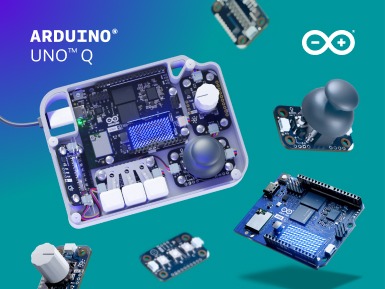
Imagine a world where interacting with your computer does not require a plastic mouse or a keyboard with hundreds of keys, but instead relies on physical knobs, tactile buttons, and glowing lights that respond to your touch. This is the core philosophy behind the Arduino UNO Q SBC Controller Bundle, a kit announced on October 20, 2026, that bridges the gap between traditional desktop computing and the tangible, hands-on nature of electronics. At its heart, this bundle is designed to transform the way users engage with the Linux operating system running on the UNO Q board. By replacing standard input devices with custom physical interfaces, it opens up new possibilities for how we control software, particularly in scenarios where a screen and a mouse are either inconvenient or insufficient. The kit centers around the UNO Q 4GB, a single-board computer equipped with four gigabytes of RAM, which serves as the brain of the operation. However, the true magic lies in how this computer communicates with the user through a set of specialized hardware components known as Modulino nodes.
The bundle includes a curated selection of these Modulino nodes, specifically chosen to demonstrate the versatility of physical input. You will find buttons for simple on-off commands, a joystick for directional control, a rotary knob for adjusting values like volume or brightness, and pixels that provide immediate visual feedback. These are not just random electronic parts; they are part of a modular ecosystem designed to be reconfigured as your project evolves. This modularity is a key pedagogical concept in modern electronics. Unlike a fixed control panel built into a device, the Modulino system allows you to change what each button does or swap out a joystick for a different sensor without rewriting the entire software from scratch. This flexibility encourages experimentation, allowing makers to start with a simple setup and gradually expand their interface as their understanding of the system deepens. The configuration process is streamlined through the Arduino App Lab, a development environment that simplifies the mapping of these physical controls to software actions. For those unfamiliar with coding, App Lab provides a visual or simplified interface to define how a turn of the knob should affect the desktop, making the barrier to entry significantly lower than traditional programming methods.
One of the most compelling aspects of this bundle is its intended use cases. It is not merely a toy for learning electronics; it is a practical tool for specific applications. For instance, in the realm of Home Assistant, a popular open-source home automation platform, a physical interface can make controlling lights, thermostats, or security systems more intuitive. Instead of digging through menus on a smartphone or tablet, a user can simply turn a knob to adjust the temperature or press a button to toggle all lights in a room. Similarly, for retro gaming, a joystick and button setup can emulate classic arcade cabinets, bringing a nostalgic and tactile experience to modern emulators. In the field of edge AI, where artificial intelligence models run locally on devices rather than in the cloud, physical controls can provide a way to interact with complex data streams or model outputs in real-time, offering a level of immediacy that graphical user interfaces sometimes lack. These examples illustrate how physical computing can enhance human-computer interaction by making it more direct, intuitive, and engaging.
To complete the workstation, the bundle acknowledges that the UNO Q board and Modulino nodes need additional infrastructure to function effectively in a desktop environment. While the core kit provides the input devices, users are encouraged to consider optional accessories that round out the experience. The Arduino USB-C Hub, an 8-in-1 device, is recommended for adding essential connectivity options such as HDMI for connecting a monitor, Ethernet for stable wired internet, and extra USB ports for other peripherals. This hub transforms the compact UNO Q into a more traditional desktop computer by providing the necessary interfaces that the board itself may not fully expose or where convenience is prioritized. Additionally, a dedicated 45W USB-C power supply ensures that the board and its peripherals receive stable and sufficient power, which is crucial for maintaining performance, especially when multiple devices are connected. A 24-pin USB-C cable is also suggested to ensure reliable data and power transmission between the hub and the board. These accessories are not mandatory for the basic functionality of the controller bundle, but they are vital for creating a robust and fully functional workstation.
The aesthetic and practical aspects of the project are also considered. Recognizing that loose wires and exposed circuit boards can be intimidating or unsafe, the bundle supports the use of a 3D-printable enclosure. This downloadable file allows users to print their own case, giving the project a professional and finished look. The ability to customize the enclosure also adds another layer of personalization, as users can design their own layouts for the buttons and knobs, ensuring that the physical arrangement suits their specific workflow or ergonomic preferences. This aspect of the project highlights the maker culture’s emphasis on ownership and customization, where the user is not just a consumer of a pre-built product but an active participant in the design process.
In summary, the Arduino UNO Q SBC Controller Bundle represents a shift towards more tangible computing. By leveraging the power of the UNO Q 4GB and the flexibility of the Modulino ecosystem, it allows users to create custom physical interfaces for Linux applications. Whether for home automation, gaming, or AI experimentation, this kit provides the tools to break free from the constraints of traditional input devices. With the support of the Arduino App Lab for configuration, optional accessories for connectivity and power, and a 3D-printable enclosure for a polished finish, it offers a comprehensive solution for those looking to explore the intersection of hardware and software. The emphasis on modularity ensures that the investment is not limited to a single project but can evolve alongside the user’s skills and interests, making it a valuable resource for both beginners and experienced makers.
| Attr | Specs | verified |
|---|---|---|
core_board | UNO Q 4GB | ? unverified |
ram | 4GB | ? unverified |
included_modules | Modulino Buttons, Joystick, Knob, Pixels | ? unverified |
software_environment | Arduino App Lab | ? unverified |
operating_system | Linux | ? unverified |
enclosure | 3D-printable (downloadable) | ? unverified |
optional_accessory_hub | Arduino USB-C Hub (8 in 1) | ? unverified |
optional_accessory_power | Arduino USB-C Power Supply (45W) | ? unverified |
optional_accessory_cable | Arduino USB-C Cable (24 pin) | ? unverified |
hub_ports | HDMI, Ethernet, extra USB | ? unverified |
use_case | Physical interface for Linux desktop | ? unverified |
ecosystem | Modulino | ? unverified |
Announced on October 20, 2026, this bundle enables the creation of custom physical interfaces for the UNO Q board's Linux system. It aims to replace traditional mouse/keyboard inputs with tactile controls for applications such as Home Assistant or edge AI.
+ Strengths
["- Includes the UNO Q 4GB board and specific Modulino nodes (buttons, joystick, knob, pixels).","- Simplified configuration via the Arduino App Lab development environment.","- Downloadable 3D-printable enclosure available for a finished look."]
− Weaknesses
["- Requires optional accessories (USB-C hub, 45W power supply, 24-pin cable) for a complete workstation setup.","- The USB-C hub is required to add HDMI, Ethernet, and extra USB ports.","- Dependence on the Modulino ecosystem for remapping input configurations."]
- Retour d'expérience expert expert — expert-microdb
- Après deux semaines de tests sur le bundle UNO Q, l'expérience est bluffante. Passer de la souris clavier à un contrôle tactile via les Modulino (joystick + boutons) change tout pour piloter Home Assistant. La config via App Lab est intuitive et le mapping se fait en quelques minutes. Le boîtier 3D… — expert-microdb
- Bon retour. J'utilise ce kit pour des jeux rétro sur écran HDMI. La latence avec le joystick est négligeable. Par contre, je confirme l'avis sur l'alimentation : avec le hub et l'UNO Q 4GB, un chargeur standard fait planter la carte. Le câble 24 broches est aussi essentiel pour éviter les faux cont… — membre-forum
Community feedback and projects
Content not available yet.
Content not available yet.
Content not available yet.
["- Not specified"]
- Configure Modulino I/O with App Lab debutant Apprenez à mapper les boutons et pixels Modulino pour interagir avec Linux via Arduino App Lab.
- Control Home Assistant with Modulinos debutant Transformez l'Arduino UNO Q en une interface physique tactile pour piloter votre domotique via Home Assistant.
- Getting started with the UNO Q SBC bundle intermediaire Guide d'installation initiale et de configuration du kit UNO Q pour un contrôle tactile Linux.
- Configuring Modulino I/O on Arduino UNO Q intermediaire Apprenez à mapper les entrées physiques Modulino vers les interfaces Linux de l'UNO Q via App Lab.
- Home automation with UNO Q SBC and Modulino intermediaire Configurez une interface physique tactile pour Home Assistant sur la carte UNO Q SBC.
- Advanced setup of the UNO Q SBC bundle avance Guide technique pour l'assemblage physique et la configuration logicielle initiale via App Lab.
- Advanced GPIO Control on Arduino UNO Q avance Configurez des entrées-sorties personnalisées via les nœuds Modulino pour interagir avec le système Linux.
- Configure a Physical Interface with Modulino on Arduino UNO Q debutant Apprenez à mapper les composants Modulino sur le système Linux de l'UNO Q via App Lab pour remplacer les entrées classiques.
- Dynamic remapping of Modulino inputs avance Apprenez à reprogrammer les fonctions des nœuds Modulino en temps réel pour adapter votre interface sans reconfiguration physique.