LattePanda 3 Delta (id: lattepanda-3)
⚡ The essentials in 60 seconds
- soc_cpu — Intel Celeron N5105 (Jasper Lake, 10 nm), 4 cores / 4 threads, 2.00 GHz base – 2.90 GHz burst, 10 W TDP (docs + CNX; lattepanda.com product page calls it "Intel 11th Gen mobile quad-core quad-thread").
- gpu — Intel UHD Graphics (UHD 605 per CNX), 450 MHz – 800 MHz.
- npu — none.
- ram — 8 GB LPDDR4 @ 2933 MHz (soldered; only configuration).
- storage — - 64 GB eMMC V5.1 (onboard) - M.2 Key M 2280 — PCIe 3.0 x2 (NVMe SSD) - M.2 Key B 2242/2252/2280 — SATA III (optional PCIe 3.0 x1 via BIOS update), USB 2.0, USB 3.0, SIM (4G/5G modem option) - Micro-SD + Micro-SIM combo card connector
- video_out — HDMI 2.0b; DisplayPort 1.4 via USB Type-C (Alt Mode); eDP 30-pin (two lanes) + touch-panel connector. Up to dual 4K / 3-way simultaneous output (product page).
- On this board : 9 tutorials · 10 code
The LattePanda 3 Delta represents a significant evolution in the single-board computer landscape, distinguishing itself not merely as a compact desktop replacement but as a hybrid platform that seamlessly integrates the power of a full x86 personal computer with the tactile control capabilities of an Arduino microcontroller. Developed by DFRobot, a Shanghai-based robotics company, this pocket-sized device was announced in November 2021 and entered global retail availability in August 2022. It is important to clarify a common misconception regarding its hardware lineage: unlike some earlier iterations or misattributed specifications, the LattePanda 3 Delta is powered by the Intel Celeron N5105 processor, part of the Jasper Lake family. This is a quad-core, quad-thread processor manufactured on a 10-nanometer process, featuring a base frequency of 2.00 GHz that can burst up to 2.90 GHz. For those unfamiliar with these terms, the core count refers to the number of independent processing units within the chip, while the thread count indicates how many sequences of instructions it can handle simultaneously; in this case, the 4C/4T configuration is designed for efficiency, operating with a Thermal Design Power of just 10 watts. This low power consumption is crucial for a device of this size, allowing it to run quietly and coolly, though it does rely on an active cooling system with a redesigned fan that offers a 50 percent larger cooling area compared to its predecessors to sustain performance under load.
Memory and storage are fixed at the factory, with the board coming equipped with 8 GB of LPDDR4 RAM running at 2933 MHz. LPDDR4 is a low-power double data rate memory standard, optimized for mobile and embedded applications where energy efficiency is paramount. Storage is provided via 64 GB of onboard eMMC 5.1, which is essentially a solid-state drive soldered directly onto the motherboard, offering faster and more reliable performance than traditional SD cards. However, for users requiring more space or faster speeds, the board includes an M.2 Key M slot that supports PCIe 3.0 x2 NVMe SSDs, allowing for significant expansion. A second M.2 Key B slot is available for SATA III drives or, notably, for 4G or 5G cellular modems, supported by a dedicated SIM card slot. This cellular readiness makes the LattePanda 3 Delta particularly attractive for remote IoT deployments where wired internet is unavailable. Connectivity is further enhanced by an Intel AX201 wireless module, which provides Wi-Fi 6 support and Bluetooth 5.2. Wi-Fi 6, also known as 802.11ax, offers better performance in congested networks and lower latency compared to older Wi-Fi standards, while Bluetooth 5.2 ensures robust connections for peripherals. Wired networking is handled by an Intel Gigabit Ethernet controller that supports Wake-on-LAN, allowing the device to be remotely powered on for maintenance or updates.
One of the most defining features of the LattePanda 3 Delta is its onboard co-processor: a Microchip ATmega32U4-MU. This is not a simple GPIO expander but a full-fledged Arduino Leonardo-compatible microcontroller. This distinction is vital for developers, as it means the board can be programmed using the standard Arduino IDE and libraries, with its own reset button and USB serial enumeration. This allows the main x86 processor to communicate with the microcontroller via a virtual COM port, enabling complex projects where high-level logic runs on Windows or Linux while real-time hardware control, such as reading sensors or driving motors, is handled by the dedicated microcontroller. DFRobot supports this integration with the "pinpong" library, a Python-based tool that simplifies controlling the Arduino pins from the host operating system, bridging the gap between high-level computing and low-level electronics. The board exposes a rich set of General Purpose Input/Output (GPIO) pins, including 24 digital I/O pins and 7 PWM pins. PWM, or Pulse Width Modulation, is a technique used to simulate analog outputs by varying the width of digital pulses, which is commonly used for controlling the brightness of LEDs or the speed of motors. While the official documentation confirms the pinout, the exact logic voltage levels (3.3V vs 5V) for every pin are not explicitly detailed in all public datasheets, so users should consult specific tutorials for precise electrical characteristics.
The LattePanda 3 Delta is designed with industrial reliability in mind, featuring several robustness enhancements. It includes a hardware watchdog timer implemented in the IT8613E Super I/O chip. A watchdog timer is a safety mechanism that automatically resets the system if it freezes or fails to respond, which is critical for unattended kiosks or remote installations. The board also supports a Trusted Platform Module (TPM 2.0) for hardware-based security, useful for encrypting data and securing boot processes. Power management is flexible, with dual inputs: a USB Type-C port that supports Power Delivery (PD) and a 4-pin JST DC connector. The system can automatically failover between these two power sources without interruption, ensuring continuous operation. An optional UPS Hat accessory is available, which uses three 18650 batteries to provide backup power and communicates with the host via the HID-UPS protocol, allowing the operating system to shut down gracefully during power outages. The video output capabilities are equally impressive for a device of this size, supporting up to three simultaneous displays through HDMI 2.0b, DisplayPort 1.4 via USB-C, and an internal eDP connector for touch-capable panels. This multi-display support makes it suitable for digital signage and control room applications.
Software compatibility is broad, as the device is essentially a standard x86-64 PC. It ships with Windows 10 Pro or Windows 10 IoT Enterprise, depending on the SKU, but officially supports Windows 11 and Ubuntu 22.04 LTS. The official documentation provides step-by-step guides for installing Ubuntu, noting that users may need to update the BIOS to resolve boot order issues when dual-booting. It is worth noting that early reviews from late 2021 and 2022 observed some software maturity issues with 4K video playback on Jasper Lake platforms, though these were largely attributed to driver and OS updates rather than hardware defects. Users should also be aware of specific quirks documented in the official FAQ: for instance, the fan does not spin when the device is cold but only activates at a specific temperature threshold, which can be mistaken for a hardware failure. Additionally, a flat CMOS battery (CR927) can cause slow boot times or disable the auto-power-on feature, although community workarounds using the Arduino pins have been developed to mitigate this. While the board is highly capable, it does not have a publicly available full schematic, limiting deep hardware-level debugging for advanced users. Nevertheless, with its combination of x86 processing power, genuine Arduino integration, and industrial-grade features like dual power inputs and watchdog timers, the LattePanda 3 Delta stands out as a versatile tool for makers, engineers, and developers looking to bridge the gap between desktop computing and physical computing in a compact, reliable form factor.
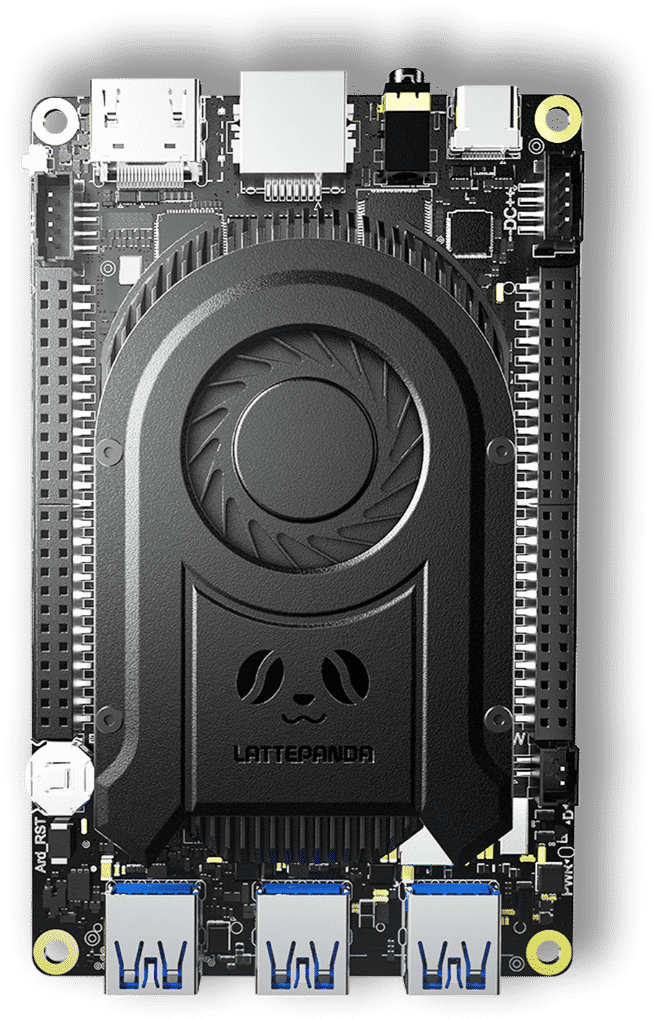
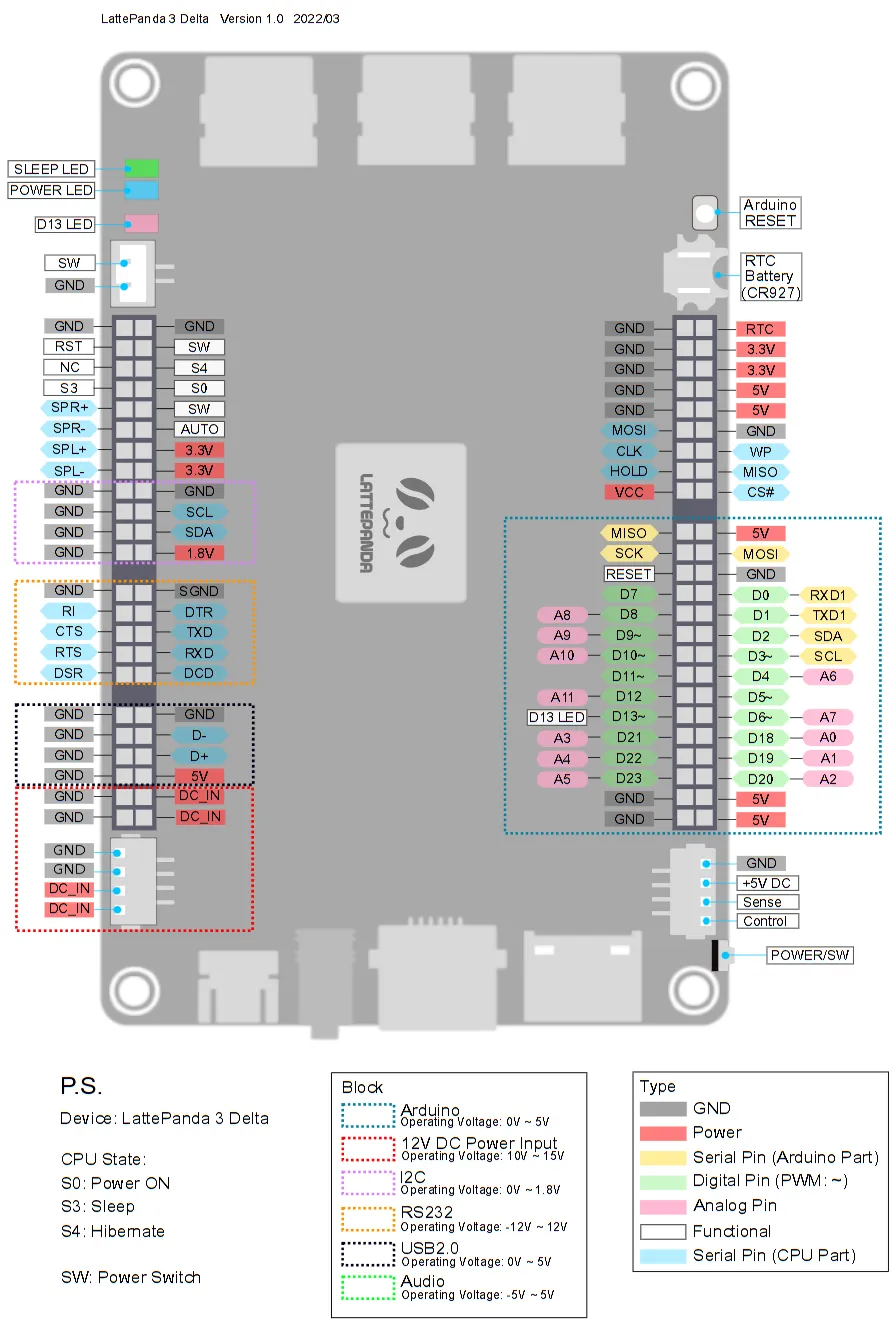
Pinout diagram
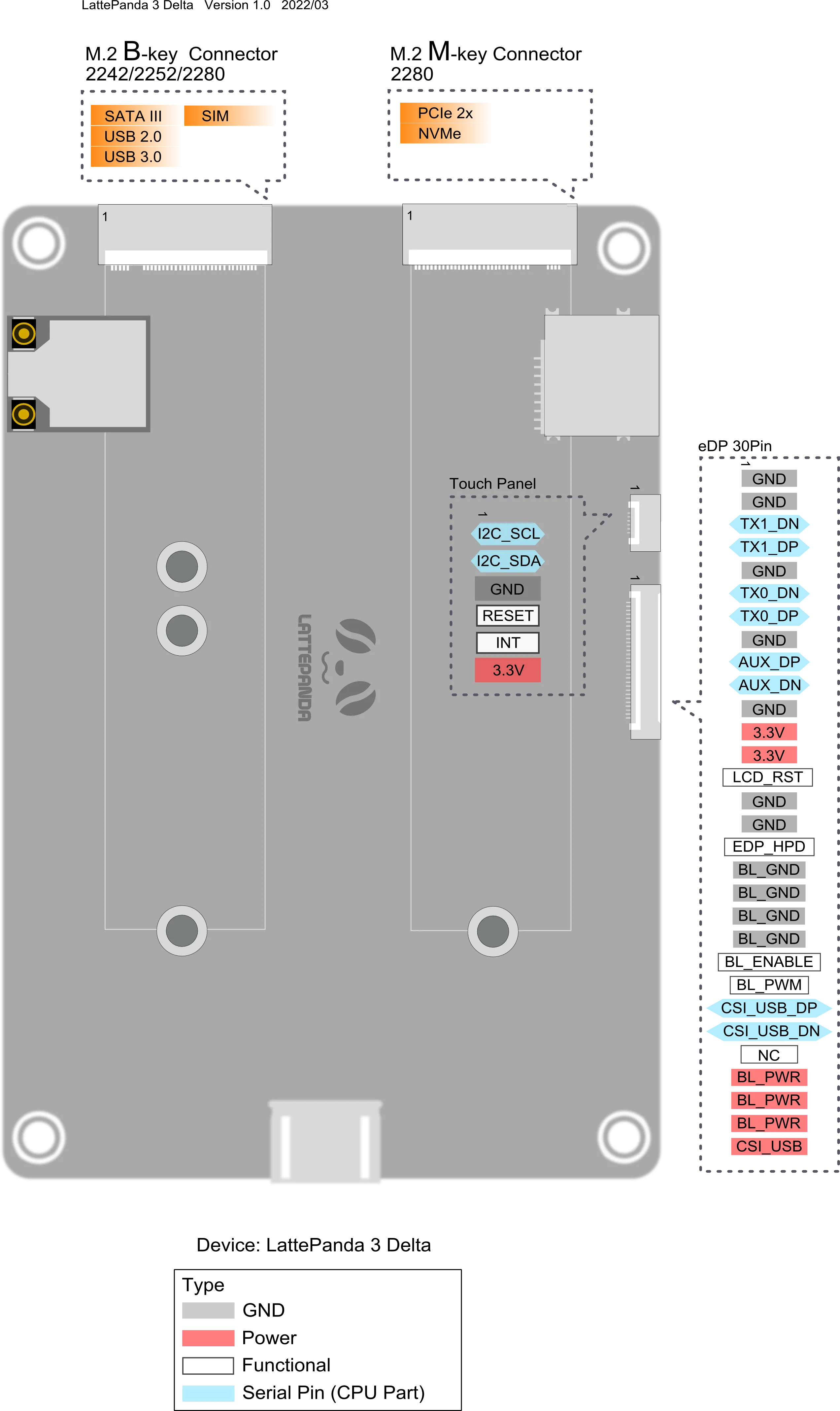
| Attr | Specs | verified |
|---|---|---|
soc_cpu | Intel Celeron N5105 (Jasper Lake, 10 nm), 4 cores / 4 threads, 2.00 GHz base – 2.90 GHz burst, 10 W TDP (docs + CNX; lattepanda.com product page calls it "Intel 11th Gen mobile quad-core quad-thread"). | ? unverified |
gpu | Intel UHD Graphics (UHD 605 per CNX), 450 MHz – 800 MHz. | ? unverified |
npu | none. | ? unverified |
ram | 8 GB LPDDR4 @ 2933 MHz (soldered; only configuration). | ? unverified |
storage | - 64 GB eMMC V5.1 (onboard) - M.2 Key M 2280 — PCIe 3.0 x2 (NVMe SSD) - M.2 Key B 2242/2252/2280 — SATA III (optional PCIe 3.0 x1 via BIOS update), USB 2.0, USB 3.0, SIM (4G/5G modem option) - Micro-SD + Micro-SIM combo card connector | ? unverified |
video_out | HDMI 2.0b; DisplayPort 1.4 via USB Type-C (Alt Mode); eDP 30-pin (two lanes) + touch-panel connector. Up to dual 4K / 3-way simultaneous output (product page). | ? unverified |
audio | 3.5 mm headphone+mic combo jack; 2-channel audio output with 2 W amplifier on pin header (product page). | ? unverified |
wireless | Intel AX201 — Wi-Fi 6 (802.11ax, 2.4 GHz + 5 GHz, 160 MHz), Bluetooth 5.2; two IPEX4 antenna sockets (one per radio chain set). | ? unverified |
ethernet | Intel I211-AT / I225-V PCIe Gigabit LAN, Wake-on-LAN supported. | ? unverified |
usb | 1× USB 3.2 Gen 2 Type-A (10 Gbps), 2× USB 3.2 Gen 1 Type-A (5 Gbps), 1× USB 2.0 Type-C (power PD input + 480 Mbps data + DP Alt Mode), 1× USB 2.0 header. | ? unverified |
gpio_expansion_headers_female_two_50_pin_blocks_per_cnx | - ATmega32U4 Arduino pinout: 24 digital I/O (D0–D23); 7 PWM pins marked ~: D3, D5, D6, D9, D10, D11, D13 (official PWM tutorial); ADC and I2C tutorials exist (docs IO_Playability/ADC, IO_Playability/I2C). - RS232 COM port, USB 2.0 header, audio header, system status control & indication, BIOS-flash pinout, 5 V & 3.3 V outputs, 12 V DC input pins. | ? unverified |
co_processor | Microchip ATmega32U4-MU (8-bit AVR, Arduino Leonardo compatible), with dedicated Arduino reset button. | ? unverified |
security | built-in TPM 2.0. | ? unverified |
misc | RTC with CR927 3 V battery; hardware watchdog (IT8613E Super I/O); auto power-on; active fan cooling (50 % larger cooling area vs. previous Delta). | ? unverified |
power | input range 11–15 V, ≥24 W: - USB Type-C PD input: 15 V/3 A or 12 V/3 A (recommended) - JST PH2.0-4Pin DC input: 12 V ≥2 A (boot peak ≈ 12 V 1.5A); board marking -- DC ++ - Dual-input automatic failover between Type-C and JST without interruption - UPS Hat accessory (DFR0682, 3× 18650, HID-UPS protocol) - Source: | ✔ |
typical_consumption | SoC TDP 10 W; ≥24 W supply required. | ? unverified |
dimensions | 125 × 78 × 16 mm (official docs; CNX lists 125 × 76 × 16 mm). | ? unverified |
environment | operating 0–60 °C, 0–80 % RH. Certifications: CE, FCC, KC, RoHS. | ? unverified |
- Manufacturer: DFRobot (Shanghai, China; LattePanda brand — the LattePanda line is developed by DFRobot / Zhiwei Robotics Corp.) —
- Board: LattePanda 3 Delta, a pocket-sized x86 Windows/Linux SBC with an onboard Arduino-compatible co-processor.
- Announced: November 2021, via Kickstarter campaign ("LattePanda 3 Delta — Faster than Ever, Still Pocket-sized"), rewards from $229 USD + ~$16 shipping, shipping expected March 2022 —
- Global retail availability: announced August 2022 on DFRobot from $279 USD —
- Status: Active product (listed on the current docs overview without a "Discontinued" tag, unlike LattePanda V1 and LattePanda Delta) — (fetched 2026-10-13)
- Variants / SKUs (from overview): - DFR0981 — 8 GB RAM, 64 GB eMMC - DFR0982 — 8 GB RAM, 64 GB eMMC, Windows 10 IoT Enterprise 2021 LTSC license - CNX also refers to a "LattePanda 3 Delta 864" designation in its 2022 availability article.
+ Strengths
- x86 PC + genuine Arduino on one board: the ATmega32U4-MU is a full Arduino Leonardo compatible MCU (flashable from Arduino IDE, own reset button, enumerated as a COM port to the host CPU), not a fake-serial GPIO chip. Python control from the host side is official via DFRobot's pinpong library (Firmata-based, MicroPython-style syntax) —
- Industrial-reliability features: hardware watchdog timer implemented in the IT8613E Super I/O (resets the system via PWRGD if not fed — full register-level docs + WinDog C# demo/source), auto power-on, serial port redirection —
- Dual power inputs with seamless failover (USB-C PD + JST 12 V), plus an official UPS Hat (HID-UPS, appears as a battery device) — powering docs page.
- Wi-Fi 6 + BT 5.2 (Intel AX201) — unusual at this class/price in 2021.
- Cellular-ready: M.2 B-Key socket + SIM slot for 4G/5G modem.
- Triple simultaneous display paths: HDMI 2.0b + DP 1.4 (USB-C) + eDP (internal panel, touch supported).
- RS232 COM header and 2 W audio amp header — industrial/retail kiosk oriented.
- TPM 2.0 built in.
- Active cooling with redesigned fan (50 % larger cooling area) to sustain the 10 W TDP.
− Weaknesses
- Boots into EFI shell instead of Windows/Linux on some units — official fix: update BIOS to latest (LP-BS-7-S70JR120-CN51G-E). (FAQ Q1)
- Auto Power-On silently dies when the RTC battery (CR927) is flat; community workaround uses the onboard Arduino pins to keep auto-power-on working: (FAQ Q2)
- Very slow OS boot when RTC battery voltage is low/absent (FAQ table).
- Older BIOS (≤ LP-BS-7-S70JR120-CN51G-D): Ubuntu dual-boot boot-order bug — after installing Ubuntu alongside Windows, the machine may boot straight to Windows or not list Ubuntu; manual "UEFI Hard Disk Drive BBS Priorities" fix required —
- Fan does not start cold: by design it starts only at a BIOS-configured temperature threshold — often mistaken for a dead fan (FAQ).
- Weak USB-C PD supplies cause abnormal operation: <24 W or non-PD adapters are a documented failure mode (powering page).
- Watchdog vs. Windows Update: feeding app must be stopped before Windows Update or the board can reboot mid-update (watchdog page note).
- Blue LED stays on after power-off while the OS updates or if Auto Power-On is enabled in BIOS (FAQ).
- Platform-era note (2021): CNX observed imperfect 4K YouTube playback on early Jasper Lake systems (Windows 11 / Ubuntu 20.04) — a platform software-maturity issue at launch, not a board defect —
- No full public schematic (only pinout diagrams, 2D drawings, 3D models).
- Retour d'expérience expert expert — expert-pi-like
- Après quelques semaines sur la LattePanda 3 Delta, je confirme l'atout majeur : c'est un vrai x86 avec un Arduino Leonardo integre, pas un simple GPIO. La bibliotheque pinpong pour Python marche bien. Par contre, attention a l'énergie. J'ai perdu du temps car ma carte bootait en EFI shell. La solut… — expert-pi-like
- Merci pour le retour sur l'alim, je pensais que l'USB-C PD standard suffisait. Question sur la partie Arduino : je vois que tu utilises Python via pinpong, mais est-ce que tu as essaye le mode natif avec Arduino IDE ? Je demande car je lis que le chip est un ATmega32U4-MU. Est-ce que tu as rencontr… — maker_flou
- Pour repondre a ta question niveau logique, c'est l'une des zones d'ombre. Les tutos officiels font clignoter une LED via 5V, mais la fiche technique ne certifie pas explicitement le niveau par pin. J'ai prefere jouer la sécurité avec des convertisseurs de niveau. Sinon, si tu fais du kiosk industr… — kiosque_dev
Community feedback and projects
- Unfortunate Experience with Delta 3 - LattePanda Forum lattepanda.com
- Lattepanda delta 3 auto power on doesn't work sometimes - DFRobot Forum dfrobot.com
- LattePanda 3 Delta Review: Does Price/Performance Physical Computing Get Better Than This? electromaker.io
- I Turned The New LattePanda 3 Delta Into A Rugged Cyberdeck the-diy-life.com
Content not available yet.
- Boots into EFI shell instead of Windows/Linux on some units — official fix: update BIOS to latest (LP-BS-7-S70JR120-CN51G-E). (FAQ Q1)
- Auto Power-On silently dies when the RTC battery (CR927) is flat; community workaround uses the onboard Arduino pins to keep auto-power-on working: (FAQ Q2)
- Very slow OS boot when RTC battery voltage is low/absent (FAQ table).
- Older BIOS (≤ LP-BS-7-S70JR120-CN51G-D): Ubuntu dual-boot boot-order bug — after installing Ubuntu alongside Windows, the machine may boot straight to Windows or not list Ubuntu; manual "UEFI Hard Disk Drive BBS Priorities" fix required —
- Fan does not start cold: by design it starts only at a BIOS-configured temperature threshold — often mistaken for a dead fan (FAQ).
- Weak USB-C PD supplies cause abnormal operation: <24 W or non-PD adapters are a documented failure mode (powering page).
- Watchdog vs. Windows Update: feeding app must be stopped before Windows Update or the board can reboot mid-update (watchdog page note).
- Blue LED stays on after power-off while the OS updates or if Auto Power-On is enabled in BIOS (FAQ).
- Platform-era note (2021): CNX observed imperfect 4K YouTube playback on early Jasper Lake systems (Windows 11 / Ubuntu 20.04) — a platform software-maturity issue at launch, not a board defect —
- No full public schematic (only pinout diagrams, 2D drawings, 3D models).
- Faire clignoter une LED via le MCU Arduino embarqué debutant Schéma : IMG-lattepanda-3-debutant-1-led-mcu.svg — Schéma de câblage : LED sur broche D13 via résistance 220 Ω, alimentation 5 V et GND sur l'en-tête Arduino de la LattePanda 3 Delta.
- Lire un bouton poussoir et afficher dans la console debutant Schéma : IMG-lattepanda-3-debutant-2-bouton-console.svg — Bouton poussoir entre la broche D2 et le GND avec résistance de pull-up 10 kΩ vers 3,3 V, lecture de l'état dans la console.
- Premier script Python sur le Linux embarqué debutant Schéma : IMG-lattepanda-3-debutant-3-premier-script-python.svg — La LattePanda 3 Delta sous Ubuntu 22.04 avec un terminal affichant les informations du processeur Celeron N5105 et un éditeur de texte ouvrant un script Python.
- Pont série entre le MCU Arduino et le SoC x86 intermediaire Schéma : IMG-lattepanda-3-intermediaire-1-pont-serie.svg — Diagramme du port série interne : l'ATmega32U4 envoie des trames vers le port COM virtuel lu par un script Python sur le Celeron N5105.
- Scanner le bus I2C depuis le microcontrôleur intermediaire Schéma : IMG-lattepanda-3-intermediaire-2-scanner-i2c.svg — Un capteur I2C connecté aux broches SDA/SCL de l'en-tête Arduino avec résistances de pull-up, l'ATmega32U4 balayant les adresses de 0x08 à 0x77.
- Wi-Fi 6 et Bluetooth 5.2 sous Ubuntu (Intel AX201) intermediaire Schéma : IMG-lattepanda-3-intermediaire-3-wifi-bluetooth.svg — La LattePanda 3 Delta avec ses deux antennes IPEX4, le module AX201 relié au réseau Wi-Fi 6 et à un haut-parleur Bluetooth, commandes nmcli et bluetoothctl à l'écran.
- Conteneuriser avec Docker sur le PC x86 embarqué avance Schéma : IMG-lattepanda-3-avance-1-docker.svg — La LattePanda 3 Delta sous Ubuntu exécutant plusieurs conteneurs Docker (web, base de données, MQTT) au-dessus du moteur Docker et du noyau Linux, image eMMC en dessous.
- Accélération GPU et streaming vidéo (Intel UHD, VAAPI) avance Schéma : IMG-lattepanda-3-avance-2-acceleration-video.svg — Flux vidéo entrant transcodé par le GPU Intel UHD via VAAPI puis diffusé en HLS, avec sortie HDMI 2.0b et sortie réseau vers des clients.
- Installer Ubuntu en dual-boot et maîtriser le BIOS UEFI avance Schéma : IMG-lattepanda-3-avance-3-install-ubuntu-bios.svg — Étape par étape : clé USB gravée avec Rufus, touche F7 au démarrage pour le menu de boot, touche DEL pour le BIOS AMI, puis priorité de démarrage UEFI pour le dual-boot Windows/Ubuntu sur l'eMMC.
Code library — examples written for this board
clignotante.pyPythonbouton.pyPythonservo.pyPythonanalogique.pyPythonrespiration.pyPythonneopixel.pyPythonpont_serie.pyPythonjournal_systeme.pyPythontableau_bord.pyPythonclavier_media.inoArduino
Examples and repos found online
- ambrogio-galbusera/panda_acrobat github.com
- AntoineMeheut/Rokc-Mk3 github.com